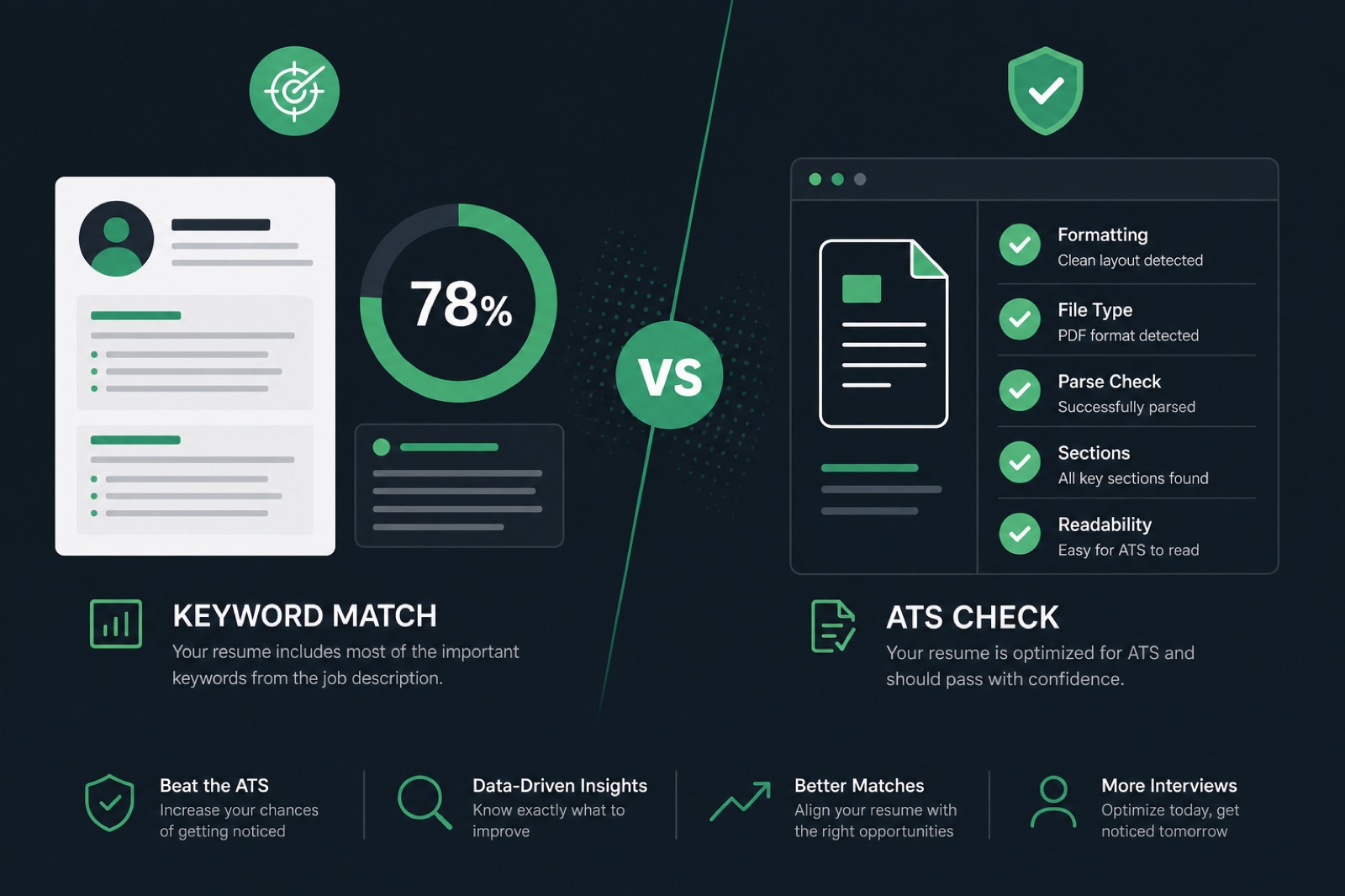
The best Jobscan alternative in 2026 depends on which problem you are actually solving: keyword overlap against a job description, parse and format risk before a Workday or Greenhouse upload, application tracking across dozens of roles, or AI-assisted drafting—not a single winner for every search query.
Jobscan built its reputation on match percentages: paste a job description, upload a resume, get a score and a list of missing terms. That mechanic works when your file already extracts cleanly and you need a fast tailoring checklist. It is a weaker signal when columns, icons, or header/footer contact blocks hide your experience from the ATS that receives the file—regardless of what percentage Jobscan reports on pasted text.
This comparison maps six tools by capability, not marketing slogans, with honest limits on free tiers, before/after examples from real screening failures, and a tool-agnostic workflow you can run before every application on hireflow.net or elsewhere.
| Your symptom | Likely bottleneck | Tool category to prioritize |
|---|---|---|
| Applications go silent—no rejection email | Parse/format failure in ATS | Format and parse checker first |
| Rejections after recruiter review | Content, fit, or weak proof | Rewriting + selective keyword match |
| Lost track of 30+ applications | Organization, not resume quality | Application tracker (Teal) |
| Blank bullets, need first draft fast | Drafting, not scoring | AI builder (Rezi) with human edit pass |
Key Takeaways
- "Jobscan alternative" covers at least four different buying decisions—match the tool to your symptom
- Run a parse check before a keyword check; high overlap on an unreadable file is worthless
- Free tiers gate different things—scan volume vs rewrite depth vs export quality
- No single product wins every column in a feature table; honest comparisons read by column
- Workday, Greenhouse, Lever, and iCIMS index extractable text—not match percentages from third-party tools
What Jobscan actually measures—and what it cannot see
Jobscan's core output is keyword overlap: how much language in your resume appears in a specific job description, weighted into a percentage. Recruiters at large employers rarely see that number. They see whatever Workday, Greenhouse, Lever, or iCIMS extracted from your file—employer names, titles, dates, and skills in structured fields—or they open the PDF directly.
The FTC's guidance on hiring technologies reminds employers that automated screening must be transparent and fair. For job seekers, the practical takeaway is simpler: screening systems evaluate parsed resume data and recruiter search filters—not third-party match scores you generated at home.
Jobscan is genuinely useful when:
- Your resume already parses cleanly in corporate portals
- You tailor one base resume across many similar postings
- You want a fast missing-term checklist before a human edit pass
It is a weaker signal when your layout uses columns, skill star ratings, text boxes, or nonstandard headers ("My Journey" instead of "Experience"). Keyword matchers that work from pasted text cannot detect those failures because they never test the file the ATS receives.
Common Mistake: treating a 92% Jobscan score as proof your resume will pass Workday screening. Overlap and extraction are different tests—run both.
Feature comparison: six tools side by side
"Yes" in this table means the feature is a genuine, built-out part of the product—not a line on a pricing page. Read by column, not by row: no single tool wins every category, which is why comparison beats a generic "top 5" list.
| Tool | Format/parse check | JD keyword match | Resume builder | Application tracking | Free scan, no signup |
|---|---|---|---|---|---|
| HireFlow | Core feature | Yes (job match score) | Included | No | Yes |
| Jobscan | Limited | Core feature | No | No | Limited scans |
| Teal | Limited | Basic | Workspace | Core feature | Limited |
| Rezi | Template-dependent | Yes | Core (AI drafting) | No | Limited |
| Resume Worded | Partial | Yes | No | No | Limited |
| SkillSyncer | Minimal | Yes | No | No | Partial |
Mid-article check: if you are unsure whether parsing or keywords is your gap, upload your actual file to HireFlow's ATS resume checker before buying another monthly subscription. The report separates format risk from missing terms—two problems that look identical when you only chase a percentage.
Quick Check: if "application tracking" is your gap, Teal is the only row built for it. If "format/parse check" is your gap, prioritize tools with that as a core feature—not a keyword matcher alone.
Pricing and value: what free tiers actually include
Every tool on this list has a free tier and a paid tier. What matters is where the paywall sits—scan volume, export quality, or human rewrite depth—because that determines whether the free version is useful or just a demo.
| Tool | Free tier depth | What payment unlocks |
|---|---|---|
| HireFlow | Full ATS scan and job match score, no account | Ongoing rewrite support and professional resume writing |
| Jobscan | Limited scans per month | Unlimited scans, LinkedIn optimization, history |
| Teal | Job tracker and basic resume workspace | Deeper AI analysis, multiple score reports |
| Rezi | Limited AI generations and basic score | Full AI writing, unlimited exports |
| Resume Worded | One resume score with high-level feedback | Line-by-line suggestions, LinkedIn review |
Practical rule: if you use a tool once per resume version (format check), a generous free tier is usually enough. If you use a tool once per application across fifty postings, scan limits bite quickly. The BLS monthly employment situation reminds us hiring volume fluctuates—batch your tailoring, but do not skip parse verification on the file you actually upload to Taleo or SuccessFactors portals.
Pro Tip: keyword tools gate volume; format-first tools more often gate human help. Know which model you are paying for before committing monthly.
Who should switch—and who should stay
"My applications disappear with no response"
This is a parsing symptom more often than a keyword symptom. A high Jobscan match does not confirm Greenhouse extracted your work history. Run a full ATS format check first. See also why ATS rejects resumes for the parse-vs-content split.
"I built my resume in Canva or a design tool"
Columns, icons, and text boxes are the most common cause of silent rejections. Keyword matchers cannot see layout problems. Rebuild with a free ATS-safe resume builder or read does a Canva resume pass ATS before investing more time in match percentages.
"I apply to 40+ roles and lose track"
Your bottleneck is organization. Teal's tracker is built for this. Neither Jobscan nor a format checker fixes a spreadsheet problem.
"I want AI to draft bullets, not just score them"
Rezi leans hardest into generation. Proofread for specificity—AI drafts often need a human pass for metrics and voice. Compare AI resume builder vs human writer when quality plateaus.
"I want one tool instead of three subscriptions"
HireFlow consolidates format check, job match score, and builder in one workflow on hireflow.net—so you are not exporting between three logins for one clean file.
When staying with Jobscan still makes sense
Stay if your resume parses cleanly in Workday- and Greenhouse-style portals, you tailor per application, and you treat the score as a checklist—not a scoreboard. Switching tools would solve a problem you do not have until silence or autofill errors appear.
Common Mistake: picking from a generic "top alternatives" list without diagnosing your symptom first. Match the tool category, not the brand with the loudest ads.
Before/after: when match score and parse reality diverge
These examples show why overlap percentage and ATS extraction are different tests. Names are illustrative; the failure modes are common across corporate portals.
| Before (high match, low trust) | After (lower match, higher trust) |
|---|---|
| Two-column Canva PDF, 91% Jobscan match, Workday autofill shows blank job title | Single-column rebuild, 78% match, Workday/Greenhouse import shows title, dates, and skills in correct fields |
| "Experienced in project management, agile project management, and managing projects across the project management lifecycle." | "Led agile delivery for a 6-person squad; cut release cycle from 6 weeks to 2 and improved sprint predictability from 61% to 88%." |
| Skills in a graphic sidebar; Lever search for "SQL" returns no match | Plain-text Skills line plus SQL proof bullet: "Built Redshift dashboards cutting report time 40% for finance ops." |
Both bullets in row two reference agile delivery. Only the second survives a recruiter skim and holds up in an interview—which is what match percentage proxies, poorly, when keywords repeat without proof.
Key Takeaway: repeating a keyword four times does not beat backing it up once with a specific, defensible result.
Pre-apply workflow (tool-agnostic)
Whichever tool or combination you choose, order of operations matters more than brand:
- Parse check first. Confirm the file is readable before optimizing any percentage. Test the PDF or DOCX you will upload—not pasted plain text.
- Pull 8–15 honest keywords from the job description—skills you can defend in an interview. Skip buzzwords you have never used professionally.
- Place keywords in three zones: summary, skills list, and one or two achievement bullets with metrics attached.
- Run match score as a second pass, not the first optimization step.
- Read aloud. If it sounds like a keyword list instead of a person, rewrite until it does not.
For file-type decisions on Greenhouse and older Taleo portals, see PDF vs DOCX for ATS . For Workday-specific layout traps, see Workday resume format guidance .
Quick Check: copy-paste your resume into Notepad. If section headers and contact info appear in reading order, parsers likely will too.
How Workday, Greenhouse, and iCIMS actually use resume data
Understanding what happens after upload clarifies why a Jobscan percentage is only a proxy. When you apply through a corporate portal, the ATS extracts text into structured fields—employer, title, start date, end date, skills. Recruiters then run boolean searches and filters on that extracted data, not on third-party match scores.
Workday Recruiting typically maps parsed fields into a candidate profile recruiters search before opening attachments. Greenhouse and Lever follow a similar pattern: parsed history feeds ranking and filter rules configured per requisition. iCIMS and Taleo—still common at large enterprises and staffing agencies—often apply stricter format rules where tables and multi-column PDFs scramble field order entirely.
Semantic matching has improved—some systems weight skills in context rather than raw keyword counts—but none of them receive your Jobscan report. That is why a tool that tests extraction on the actual file you will upload answers a different question than one that compares pasted plain text. For a deeper look at semantic screening, see semantic matching in ATS .
| ATS platform | Common parse failure | What keyword-only tools miss |
|---|---|---|
| Workday | Autofill drops title or merges columns into one field | High match score on pasted text while PDF fails autofill |
| Greenhouse | Skills in sidebar not indexed in recruiter search | Keyword list updated but graphic skill bars unchanged |
| Lever | Nonstandard headers skip Experience mapping | Creative section names score well in paste mode only |
| iCIMS / Taleo | Table layouts and header contact blocks scramble order | DOCX vs PDF choice never tested by text-only matchers |
Key Takeaway: recruiters search parsed fields in their ATS—not your Jobscan percentage. Test the file, not just the words.
Common mistakes when comparing Jobscan alternatives
- Chasing the percentage instead of the outcome. Recruiters and modern ATS filters use more context than raw string counts. Keyword stuffing can hurt with humans and machines.
- Copying JD phrases you have never done. If you cannot explain it in an interview, it should not be on the resume—regardless of match score.
- Ignoring file/format risk. Keyword tools assume the ATS already read your file correctly.
- Assuming "free" means equivalent. A free tier that only counts words is not a substitute for parse risk detection.
- Running five tools with five different numbers. Pick one primary tool per function—format, match, tracking—instead of averaging conflicting scores.
Common Mistake: switching from Jobscan to another keyword matcher when the real fix is rebuilding a single-column layout. Same category, same blind spot.
Decision checklist: stay, switch, or stack tools
Use this quick decision tree before you cancel Jobscan or add another subscription. Answer honestly—most people need only one primary tool per function.
- Did Workday or Greenhouse autofill your last application correctly? If no, prioritize parse checking over any keyword matcher.
- Do you tailor the same base resume to 20+ similar roles? If yes, a keyword matcher (Jobscan or equivalent) may be worth keeping once format is clean.
- Are you losing track of where you applied? If yes, add Teal or a tracker— not another scanner.
- Are bullets blank and you need a first draft? If yes, test Rezi or similar— then edit for specificity.
- Are you paying for three tools that each report a different number? If yes, consolidate to one parse checker and one match tool maximum.
The EEOC guidance on selection procedures reminds employers that assessment tools must be job-related. For you, the parallel lesson is simpler: pick tools that measure what actually blocks your applications—format, fit, or organization—not vanity scores that feel productive without changing outcomes.
Pro Tip: run the checklist once per resume version, not once per application. Format problems are version-level; keyword gaps are posting-level.
If you are comparing Jobscan alternatives because a friend recommended a specific brand, pause and run one diagnostic first: upload your current PDF to a parse checker and note whether titles, employers, and dates extracted correctly. That single test usually tells you whether you need a new keyword tool or a new resume file entirely.
Key Takeaway: the best alternative is the one that fixes your actual bottleneck—format, keywords, tracking, or drafting—not the one with the highest affiliate ranking.
The honest answer to "best Jobscan alternative" is a question back: is your bottleneck keywords, parsing, tracking, or drafting? Match the tool category to that answer—not to whichever product ranked first in a listicle.
Start with a free, no-signup check on HireFlow's ATS resume checker , then layer a job match score once the base file parses cleanly. If the report points to structure rather than word choice, the free resume builder handles that fix in the same workflow—no separate export required.
Frequently asked questions
For most job seekers, the best free alternative covers three layers: parse/format risk (columns, headers, contact fields), keyword and skills gaps against a specific job description, and specific rewrite suggestions—not just a percentage. HireFlow's free ATS resume checker on hireflow.net covers all three without signup for the first scan. SkillSyncer and Resume Worded offer limited free keyword matching if you only need overlap counts.
Most keyword matchers gate scan volume on free tiers—Jobscan typically allows a handful of scans per month before paywall. HireFlow's core ATS scan and job match score are free without an account, though ongoing human rewrite support is paid. Pricing and limits change; verify each tool's pricing page before you commit to a monthly plan.
Common reasons: your resume fails to parse in Workday or Greenhouse despite a high match score; you need application tracking (Teal); you want AI drafting (Rezi); or you want one consolidated workflow instead of three subscriptions. Silence after applying—no rejection email—is often a parsing symptom, not a keyword gap.
No. Match percentage measures text overlap with a job description. It does not confirm whether Lever, iCIMS, or Taleo extracted your work history correctly, or whether a recruiter will find the content credible. A resume can score 90% on keywords while Workday autofill shows a blank job title because the PDF used a two-column layout.
Teal is strongest for application tracking and a basic resume workspace—not deep keyword matching or format/parse diagnostics. Choose Teal when your bottleneck is organizing forty applications, not when Workday is scrambling your dates. Many fractional and high-volume applicants pair Teal for tracking with a separate parse checker.
Yes. A practical split: run a HireFlow format and parse check first to confirm the file extracts cleanly, then use Jobscan or a similar matcher for per-application keyword tailoring. That order matters—optimizing keywords on an unreadable file wastes time. Many people consolidate into one tool once the base resume is solid.
At minimum: parse and format risk detection (columns, tables, nonstandard headers, contact info in footers), keyword and skills gap analysis against a specific posting, and actionable fixes—not a number with no explanation. If the tool only compares pasted text and never tests the actual PDF you upload to Greenhouse, it will miss the most common failure mode.
Stay if your resume already parses cleanly in corporate portals, you tailor heavily per application, and you treat the score as a checklist rather than a target. Jobscan's keyword overlap mechanic is genuinely useful when formatting is not the bottleneck. Revisit the decision if applications go quiet— that often signals a parse problem keyword tools cannot see.