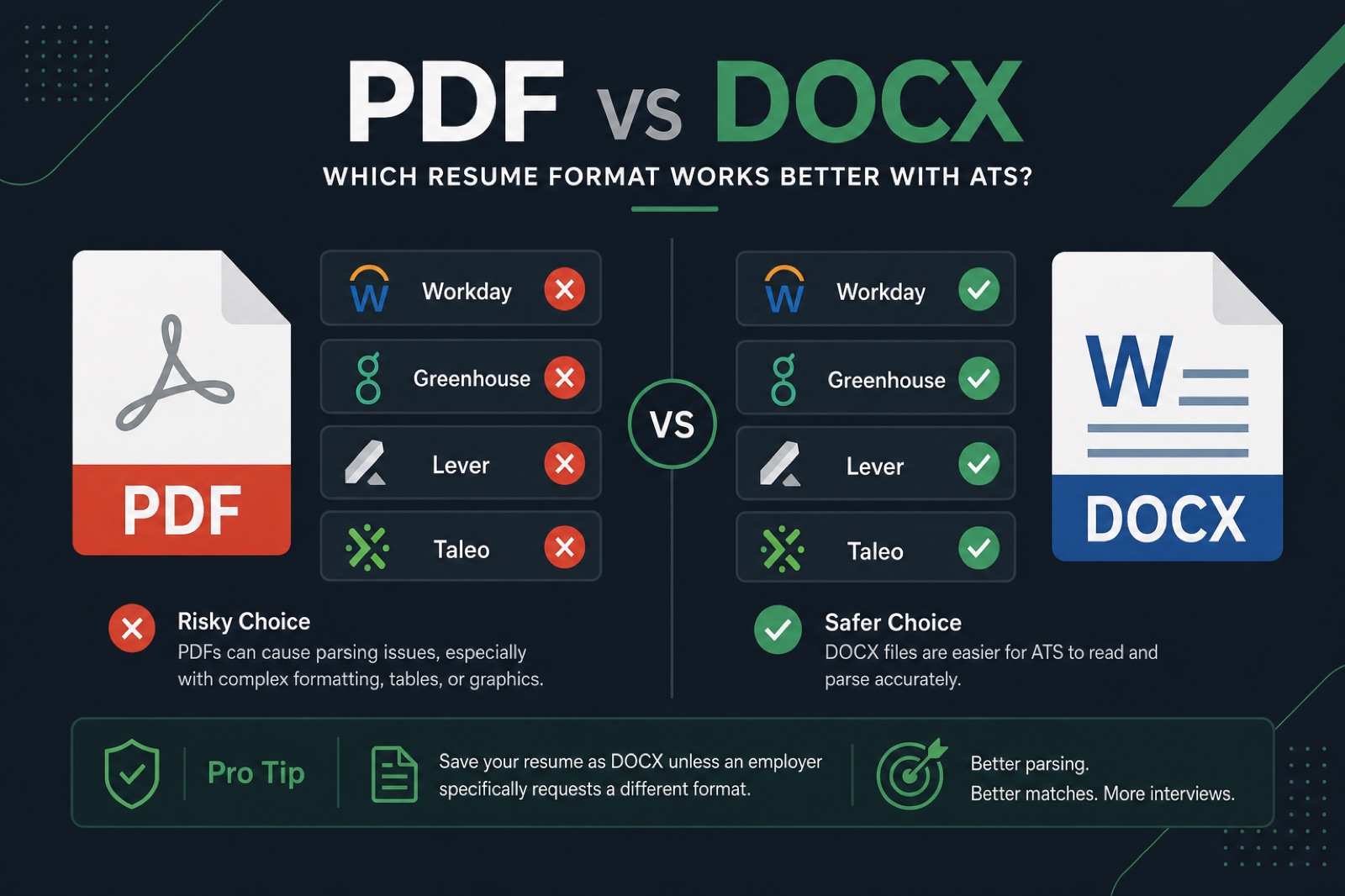
“Should I submit a PDF or a DOCX?” has no single universal answer—it depends on which applicant tracking system the employer uses, which portal is doing the uploading, and how the file itself was actually built. What is true across every ATS: a badly-made PDF (scanned, flattened, or exported from a design tool without real text) is a bigger risk than the file extension ever will be.
This guide is built as a decision guide, not a one-line rule. It walks through when PDF wins, when DOCX wins, why a “PDF” isn't always what it appears to be, and exactly how to check the file you're about to submit before you click apply.
Here's what you'll walk away with:
- A 60-second decision flow you can run on any job application
- A decision table organized by portal type, not just ATS brand name
- The real difference between a text-based PDF and an image-based PDF
- A step-by-step export checklist for Word, Google Docs, and design tools
- The file-type mistakes that quietly filter out strong candidates
Key Takeaways
- File extension matters less than whether the file contains real, extractable text in the right order.
- Large, legacy-leaning enterprises (Workday, Taleo, SuccessFactors) tend to be safer with DOCX.
- Modern hiring stacks (Greenhouse, Lever, Ashby) generally handle clean, text-based PDFs well.
- An explicit format instruction in a job posting always overrides general guidance.
- Test the exact file you're about to submit—not an earlier draft—before every application.
Why file type is a parsing problem, not a taste problem
Key Takeaway
The real risk is a file with little or no extractable text underneath it—true for both PDF and DOCX built carelessly.
An ATS never “reads” your resume the way a hiring manager does. Before any human opens it, software extracts raw text from the file, tries to detect section boundaries, and maps fragments into fields like job title, employer, dates, and skills. Your file type determines how well that extraction step works—nothing more, nothing less.
That means the question isn't really “which format looks more professional.” It's “which format, built the way I'm about to build it, extracts cleanly in the system this employer happens to be running.” Those are two very different questions, and most advice you'll find online answers the wrong one.
- Some ATS platforms parse DOCX more reliably due to how they were originally engineered
- Some parse PDF just as well, provided it's a genuine text-based PDF
- Almost none reliably parse a scanned or flattened image PDF, regardless of brand or version
- Very few job postings tell you which system is running behind the apply button
Expert tip: The file extension matters less than most people think. The real risk is a file that looks perfect on your screen but has little or no extractable text underneath it—and that risk exists in both PDF and DOCX files built carelessly.
What actually happens when you hit “upload”
Key Takeaway
DOCX gives a parser more structural information by default; PDF gives more visual certainty by default. Neither wins outright.
When your file lands on an employer's server, most modern ATS platforms run it through a parsing library that converts the document into plain text and a rough structural outline. That library treats DOCX and PDF very differently under the hood:
- DOCX is fundamentally a structured XML document. Paragraphs, headings, and even table cells are tagged in the file's underlying markup, so a parser has explicit signals to work with—assuming your layout isn't built from stacked text boxes.
- PDF is a page-description format designed for visual fidelity, not structure. A well-exported PDF embeds a text layer the parser can pull character-by-character, but nothing in the format guarantees that text layer exists or is in the right reading order.
This is the entire reason the “PDF vs DOCX” debate never fully resolves: DOCX gives a parser more structural information by default, while PDF gives a parser more visual certainty by default. Neither wins outright—each fails in a different way when the source file is poorly built.
The 60-second decision guide
Key Takeaway
Stop at the first step that applies to you—an explicit posting instruction always overrides everything below it.
Run through these steps in order. Stop as soon as one applies—you don't need to go further down the list.
- Step 1 — Does the posting explicitly name a format? If it says “PDF only” or “Word document required,” that instruction overrides everything below. Compliance with a stated rule is itself part of screening.
- Step 2 — Is this a large, established enterprise in a traditionally conservative industry (banking, insurance, government, manufacturing, healthcare systems)? These employers disproportionately run older or heavily customized ATS deployments. Default to DOCX.
- Step 3 — Is this a tech company, startup, or scale-up using a modern hiring stack (commonly Greenhouse, Lever, or Ashby)? These platforms use current parsing engines built with PDF as a first-class citizen. A clean, genuinely text-based PDF performs well here.
- Step 4 — Are you submitting directly by email, or uploading to a portal with no visible ATS branding? Email attachments and small-business career pages are usually reviewed with less automated parsing, so visual fidelity matters more. A text-based PDF is the safer default.
- Step 5 — Still unsure which employer type applies? Default to a genuinely text-based PDF. It preserves layout across devices and parses acceptably in the majority of modern systems, as long as it passes the text-selectability test in the next section.
Notice what this guide never tells you to do: guess based on vibes, or submit both files “just in case.” Most portals only ingest one file per application anyway, so picking correctly the first time is what actually matters.
Decision table: PDF vs DOCX by portal type
Key Takeaway
Match the file type to what you can observe—the portal's look and flow—since most job seekers don't know the exact ATS brand behind it.
ATS brand names are useful, but most job seekers don't know which ATS a posting runs on—they only know what the application experience looks like. This table maps file-type guidance to what you can actually observe: the portal itself.
| Portal type | What it looks like | Recommended file | Why |
|---|---|---|---|
| Large enterprise career portal | Multi-step application, profile builder, resume parser that auto-fills fields | DOCX | Often built on Workday, Taleo, or SuccessFactors—see the full Workday resume format guide |
| Startup or tech-company careers page | Single-page apply form, resume + short questions, minimal branding friction | Text-based PDF | Typically Greenhouse, Lever, or Ashby—modern parsing engines handle clean PDFs well |
| LinkedIn Easy Apply | In-app upload widget, resume preview shown before submit | Text-based PDF | LinkedIn's own preview and parsing handle text-based PDFs reliably |
| Job-board quick apply (Indeed, ZipRecruiter) | One-click apply using a stored profile resume | DOCX | These auto-fill profile fields from your file; DOCX tends to populate titles and dates more accurately |
| Direct email to a recruiter or hiring manager | You attach a file to a plain email, no ATS involved yet | No parser in the loop at this stage—visual fidelity across devices matters more than extraction | |
| Staffing or recruiting agency portal | Third-party site that resubmits your resume into client ATS systems later | DOCX | Your file often gets re-parsed a second time downstream; simpler formats survive that hand-off better |
| Government job portal (e.g. USAJobs-style systems) | Rigid multi-field forms, strict file-size or format instructions | Follow the posted instruction exactly | These systems frequently reject non-compliant files outright, before any content is even reviewed |
| Unbranded small-business apply form | Simple contact form with a single file upload field, no visible parsing preview | Text-based PDF (safe default) | Likely reviewed by a person early, so consistent formatting matters more than deep parsing |
If a portal explicitly states a required format anywhere in the process, that instruction always overrides this table—it usually reflects a real, tested constraint in their specific system.
If you do know the ATS: platform-specific notes
Key Takeaway
Workday, Taleo, and SuccessFactors lean DOCX-safer; Greenhouse, Lever, and iCIMS handle clean PDFs well.
Sometimes the ATS is visible in the URL or the page footer. If you can identify it, these one-line notes refine the portal-type guidance above: Workday and Taleo — DOCX often safer, legacy configurations can struggle with complex PDFs; Greenhouse and Lever — text-based PDF is usually fine on their modern parsing engines; iCIMS — either format works if genuinely text-based; SuccessFactors — DOCX often safer, sensitive to complex formatting regardless of extension. For a deeper dive on one specific platform, see the full Workday resume format guide .
Text-based PDF vs image-based PDF: the distinction that actually matters
Key Takeaway
Two PDFs can look pixel-identical while one parses perfectly and the other returns nothing to an ATS.
Almost every mistake in this entire topic traces back to one confusion: treating “PDF” as a single, uniform thing. In practice, there are two fundamentally different kinds of PDF, and only one of them is remotely ATS-safe.
Text-based PDF
This is a PDF exported directly from an editable source—Word, Google Docs, or most résumé builders—where every letter on the page is stored as actual character data. A parser can extract that text cleanly, the same way it would from a DOCX file. This is the only kind of PDF you should ever submit to an ATS.
Image-based PDF
This is a PDF that contains a picture of text rather than the text itself. It happens in three common ways: scanning a printed resume, exporting from certain design tools that flatten layouts into shapes, or “printing” a resume to PDF through a virtual printer driver that rasterizes the page. To a parser, this file is functionally blank—there is no character data to extract, no matter how sharp it looks to a human eye.
- Looks identical, behaves completely differently. Both types can render pixel-for-pixel the same on your screen while one parses perfectly and the other returns nothing.
- File size is a rough hint, not proof. Image-based PDFs are often noticeably larger for the same one-page resume, since they store a bitmap instead of text, but this isn't a reliable test on its own.
- The fix is never “compress the PDF.” If your file is image-based, the only real fix is re-exporting from the original editable document, not adjusting the PDF after the fact.
The test in the next section takes about thirty seconds and tells you, with certainty, which category your specific file falls into.
How to test if your PDF is actually text-selectable
Key Takeaway
Run this test on the exact file you plan to submit—re-exporting can silently reintroduce a problem you already fixed.
Run this on the exact file you plan to submit—not an earlier draft, not a similar version. Re-exporting can silently reintroduce the exact problem you already fixed.
- Try to select text. Open the PDF and click-drag to select a sentence. If nothing highlights, it's almost certainly an image, not real text.
- Copy and paste. Select all (Ctrl/Cmd+A), copy, and paste into a plain text editor. If nothing pastes, or the text is garbled and out of order, an ATS will struggle the exact same way.
- Search for a specific word. Use Ctrl/Cmd+F inside the PDF viewer to search for your own name or a job title. If it isn't found, that text isn't extractable at all.
- Check the export source. PDFs exported directly from Word or Google Docs are reliably text-based. PDFs exported from some design tools, or created by scanning a printed page, frequently are not.
- Check reading order, not just presence. If the pasted text jumps between columns or scrambles section order, the parser will see the same scrambled order—even though every word technically extracted.
For a full check that goes beyond file type—covering layout, sections, and keyword coverage—run your resume through HireFlow's free resume builder to generate a file that's verified parseable from the start.
The case for DOCX
Key Takeaway
DOCX's structural tagging and legacy-ATS compatibility make it the safer default for large, older deployments.
- Structural tagging built in. Headings, paragraphs, and list items carry explicit markup, giving parsers more reliable structural signals by default.
- Best default for legacy and enterprise ATS. Older parsing libraries were frequently built with DOCX as the primary target format.
- Better auto-fill accuracy. Portals that populate profile fields from your resume (job title, dates, employer) tend to extract those fields more accurately from DOCX.
- Survives re-parsing. If your file gets passed from a staffing agency into a client's own ATS, DOCX tends to tolerate that extra hand-off better than PDF.
The trade-off: DOCX renders slightly differently across devices and Word versions, and it's easier for a recipient to accidentally edit. Neither issue affects ATS parsing, but both matter if the file is ever opened directly by a person.
The case for PDF
Key Takeaway
PDF is only as ATS-safe as its text layer—visual polish means nothing if the export flattened your words into an image.
- Fixed visual fidelity. Your layout, spacing, and fonts render identically regardless of device, OS, or software version—critical when a human opens the file directly.
- First-class support in modern ATS engines. Platforms built or rebuilt in the last several years (Greenhouse, Lever, Ashby, LinkedIn) parse clean, text-based PDFs reliably.
- Harder to accidentally alter. Recipients can't easily reflow or edit your layout, which matters for later-stage, human-reviewed sharing.
- Sensible default when the employer type is unknown. A genuinely text-based PDF is a safe middle-ground choice absent any other signal.
The trade-off: PDF quality depends entirely on how it was exported. A PDF is only as ATS-safe as its text layer—get that wrong, and no amount of visual polish will save it from returning blank in a parser.
Export checklist: getting a clean file every time
Key Takeaway
Most file-type failures happen at the export step, not the writing step—check the source-tool checklist that matches your workflow.
Most file-type failures happen at the export step, not the writing step. Work through the checklist that matches your source tool before you submit anything.
Exporting from Microsoft Word
- Use File → Save As / Export → PDF, not a print-to-PDF driver
- Confirm the checkbox for “Best for electronic distribution” (or equivalent) is selected, not “minimum size”
- Avoid text boxes for contact details or section headers—use regular paragraph text
- Keep the layout single-column with no embedded tables used for structure
- For DOCX, save directly as .docx, never the older .doc format
Exporting from Google Docs
- Use File → Download → PDF Document, which reliably produces a text-based file
- For DOCX, use File → Download → Microsoft Word (.docx)
- Double-check that any imported template didn't introduce hidden text boxes or columns
Exporting from Canva, Figma, or similar design tools
- Export as “PDF Print” or “PDF Standard,” never “PDF for print with outlined text”—outlining converts letters into shapes
- Immediately run the text-selectability test above before trusting the export
- If the test fails, don't troubleshoot the export settings—rebuild the resume in Word or Google Docs instead
Before every submission, regardless of tool
- Rename the file cleanly: FirstName-LastName-Resume, no version numbers like “final_v3”
- Open the exact file you're about to upload—not a similarly named draft
- Run the copy-paste test one more time on that specific file
- Confirm file size is reasonable (typically under 1–2 MB); an oversized file often signals an embedded image rather than text
Common file-type mistakes
Key Takeaway
A stated format requirement always overrides general guidance, and most portals only accept one file anyway.
- Exporting from a design tool without checking text layers. Some visual resume builders flatten text into shapes, which look fine but contain zero extractable text.
- Scanning a printed resume to create a PDF. This produces an image file with no text layer at all, regardless of the .pdf extension.
- Assuming PDF is always safer because it “locks” formatting. That same formatting lock can include tables and columns that break parsing—file type doesn't fix a bad layout.
- Submitting a .pages or .odt file, or never testing the exact file you plan to submit. Uncommon formats often fail on upload, and testing an earlier draft instead of the final export can reintroduce problems you already fixed.
- Ignoring an explicit format instruction, or sending both formats “to be safe.” A stated requirement overrides every table above, and most systems only ingest one file per application anyway.
Before and after (ATS-safe wording)
Key Takeaway: keep the same fact, add the tool name and a number.
| Before | After |
|---|---|
| Responsible for reports and team support. | Built weekly Workday headcount reports that cut manager follow-ups by 30%. |
| Used office software and helped customers. | Processed 40+ Greenhouse tickets/week in Zendesk with 96% CSAT. |
| Improved processes across the department. | Mapped the Taleo requisition workflow and cut time-to-post from 5 days to 2. |
Frequently asked questions
It depends on the portal. Large enterprise career sites (often Workday, Taleo, or SuccessFactors) tend to be safer with DOCX. Startup and tech-company sites (often Greenhouse, Lever, or Ashby) handle a clean, text-based PDF well. If the posting states a required format, follow that instruction over any general rule.
Neither wins universally. DOCX carries more structural tagging by default, which helps some parsers. PDF preserves visual fidelity and is well supported by modern parsing engines, provided it's a genuine text-based PDF and not a flattened image.
Open the file and try to click-drag to select a sentence. If nothing highlights, it's likely an image. Then copy and paste a section into a plain text editor—if the text pastes cleanly, in order, your file is text-based. You can also search for your own name with Ctrl/Cmd+F inside the PDF viewer.
The most common cause is that the PDF is image-based rather than text-based—created by scanning a printed resume, exporting from a design tool that flattens text into shapes, or using a virtual print driver that rasterizes the page. To a parser, this type of file is functionally blank.
Workday and other legacy-leaning platforms like Taleo and SuccessFactors are often safer with DOCX, since their candidate-profile importers were originally tuned around Word documents. See our full Workday resume format guide for platform-specific detail.
Most portals only ingest one file per application, so submitting both usually isn't an option and isn't necessary. Pick correctly the first time using the decision guide, and always test the exact file before you upload it.
The most common are exporting from a design tool without checking for a real text layer, scanning a printed resume into an image-only PDF, submitting an uncommon format like .pages or .odt, and testing an earlier draft instead of the exact file you plan to upload.