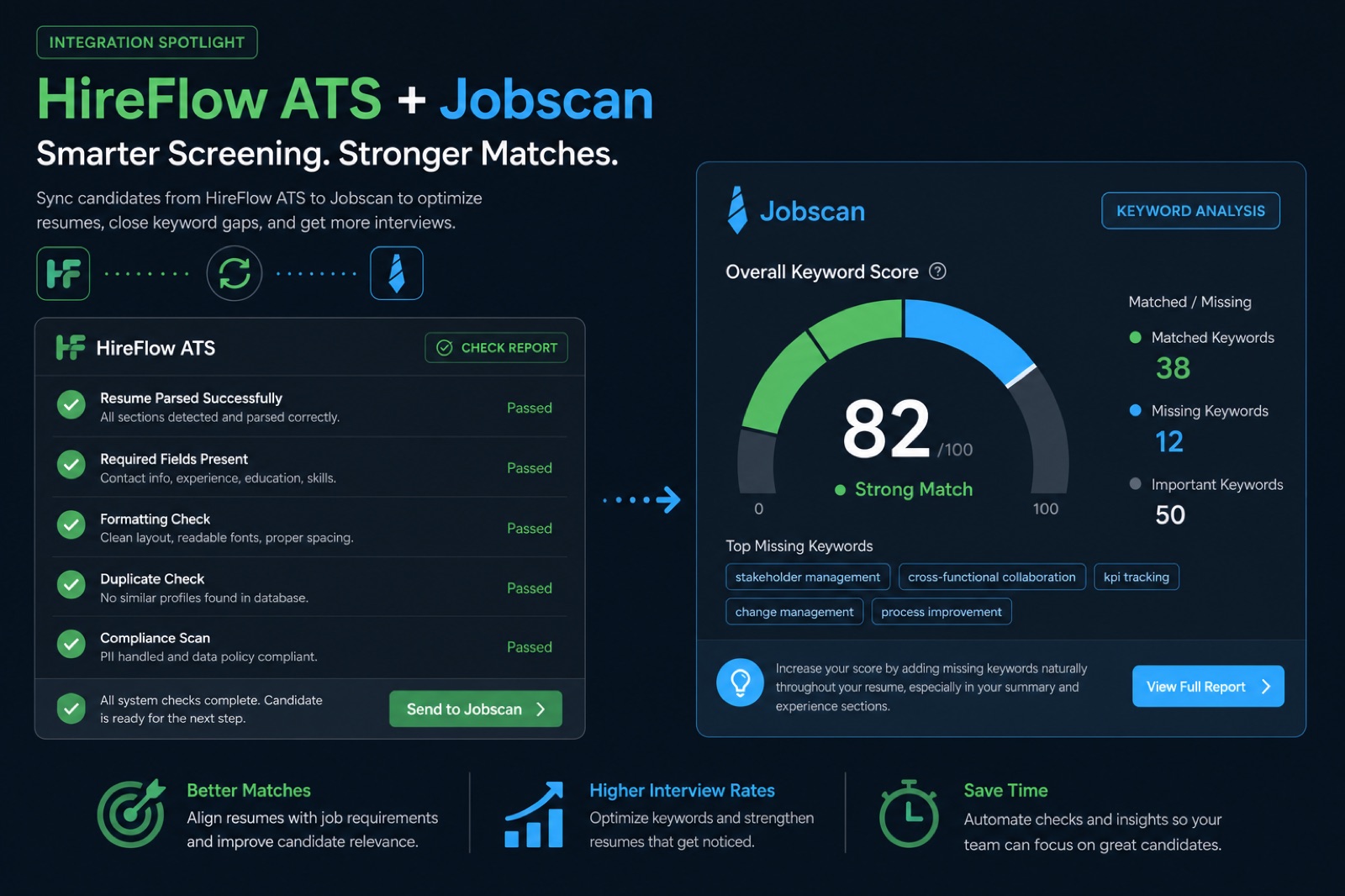
Jobscan measures overlap between your resume and a job description and returns a percentage. HireFlow measures whether an ATS can read your resume at all—columns, tables, headers, image text—then layers a match score on top. One tool assumes your file already parses cleanly; the other checks that assumption before you tailor keywords for Workday, Greenhouse, or Lever uploads.
That distinction sounds small until you watch a resume score 88% on a keyword matcher and still get auto-rejected because Workday imported a blank job-title field. Taleo and iCIMS boolean searches never run on text the parser never extracted. This head-to-head comparison covers features, pricing philosophy, before/after outcomes, workflow order, and a decision matrix—not a listicle where both tools tie for first place because the author fears picking a side.
Key Takeaway
- Jobscan = keyword overlap; HireFlow = parse check first, then match score
- High keyword match does not confirm ATS-readable structure
- Jobscan rewards high-volume subscription use; HireFlow leads with free scan
- Neither tool guarantees interviews—both measure application inputs
- Match the tool to your bottleneck: parsing vs wording
The quick verdict before the details
| Your situation | Pick this |
|---|---|
| Never had your resume format-checked | HireFlow |
| Resume parses cleanly; need keyword tailoring only | Jobscan |
| Applying to 15+ jobs per week | Jobscan (after format confirmed) |
| Built resume in Canva or visual template | HireFlow |
| 50+ applications, near-zero callbacks | HireFlow |
| Want rebuild path, not just diagnosis | HireFlow |
| No monthly subscription right now | HireFlow |
Quick Check: if you cannot answer whether your resume passed a parse test, start with HireFlow regardless of which keyword tool you prefer later.
What each tool actually checks, mechanically
Jobscan's process
Jobscan extracts text from your resume and from the job description you paste in, then compares the two bodies for hard skills, soft skills, and phrasing overlap. It returns a percentage plus missing-term lists. Fast, legible, and efficient for candidates who already know their resume is structurally sound.
What Jobscan does not do by design is independently verify that Workday or Greenhouse will extract your work history, dates, and contact details correctly. That assumption holds for most simple single-column resumes. It breaks for page-layout software, graphics-based headers, and certain builder exports as flattened PDFs.
HireFlow's process
HireFlow starts one layer earlier: structural parse check—name, contact, titles, employers, dates—then flags columns, tables, text boxes, headers/footers, and image-based text. Once structure clears, it layers a job match score against a specific posting and offers the free resume builder when rebuild beats manual Word surgery.
The EEOC technical assistance on hiring systems notes that employers increasingly rely on automated screening—understanding what machines extract from your file is prerequisite to tailoring what they search.
Common Mistake: treating a 92% keyword match as proof your resume is safe. Overlap and extraction are correlated, not identical.
Same resume, two tools: what each report shows
Consider a marketing manager resume built in a two-column Canva template. Job titles sit in a left sidebar; dates live in a right-aligned table column.
| Tool | Typical output | What it misses or catches |
|---|---|---|
| Jobscan (keyword focus) | 84% match — missing "HubSpot," "ABM," "SQL" | May not flag scrambled title/date extraction |
| HireFlow (parse + match) | Parse warning: two-column layout; dates mis-mapped; then 71% match | Flags structural risk before keyword tuning |
| Before (weak bullet) | After (tailored for both tools) |
|---|---|
| Ran marketing campaigns and grew leads. | Demand Gen Manager—ABM programs in HubSpot; grew MQL-to-SQL conversion 22% YoY; $1.4M pipeline influenced on $380K spend. |
| Used CRM and email tools for outreach. | Salesforce + Marketo nurture tracks for 40K-contact database; lifted webinar attendance 31% with segmented SQL follow-up workflows. |
| Two-column Canva layout with icon skill row | Single-column DOCX: Skills line lists HubSpot, ABM, SQL, Salesforce in plain text; dates inline with titles for Workday autofill. |
Jobscan helps you close the keyword gap on a clean file. HireFlow helps you discover the file was never clean. For Canva-specific failures see is Canva resume ATS-friendly .
Pro Tip: run a parse check once per resume version, then keyword tailor per posting—order matters more than tool loyalty.
Head-to-head feature comparison
| Feature | HireFlow | Jobscan |
|---|---|---|
| ATS parse/formatting check | Core—columns, tables, fonts, headers | Not a core feature |
| Keyword match vs posting | Yes—job match score | Yes—flagship feature |
| Missing-skills breakdown | Yes | Yes, detailed |
| Resume builder / rebuild | Free ATS builder included | Not included |
| LinkedIn optimization | Not core | Paid tiers |
| First scan without account | Yes | Limited / varies |
| Explains why parsing fails | Yes | Not covered |
Mid-article check: upload the same file to HireFlow's ATS checker and compare the extracted text preview to what you see after select-all paste. That thirty-second test predicts more than any comparison table.
Key Takeaway: HireFlow is not "Jobscan plus more"—it starts from a different first question about your application.
Pricing approach compared
Jobscan is subscription-first with scan limits on free and lower tiers. Heavy sustained usage—five to ten tailored resumes a week for months—amortizes the monthly cost well. Light or occasional usage pays for unused scan capacity.
HireFlow leads with a free scan without signup, then pay-for-depth extras when needed—job match score, builder exports, optional professional resume writing . No forced recurring commitment to learn whether your file parses.
| Dimension | HireFlow | Jobscan |
|---|---|---|
| Default model | Free scan, pay for extras | Monthly/annual subscription |
| Best if you scan rarely | Strong | Weak |
| Best if you scan daily | Per-check adds up | Strong—flat monthly |
| Try before commit | Full first scan, no card | Capped free tier |
Quick Check: subscribing to a keyword matcher when your actual problem is a parsing bug is the most expensive free mistake in job search.
Decision matrix: match tool to bottleneck
| Symptom | Likely cause | Start here |
|---|---|---|
| Zero callbacks, no rejection emails | Parsing failure | HireFlow |
| Fast rejections, resume looks fine | Format or wording—check both | HireFlow, then Jobscan |
| Some callbacks; want higher rate | Wording/relevance gap | Jobscan |
| Tailor same base to 5 postings today | Speed matters | Jobscan |
| Need check, fix, and rebuild in one place | Workflow gap | HireFlow |
For Jobscan pricing limits and free-tier caps, see is Jobscan completely free and Teal vs Jobscan vs HireFlow .
Key Takeaway: separate "doesn't parse" from "doesn't match"—different failure modes, different fixes.
Three real-world scenarios: which tool to open first
Scenario 1 — Career changer, new template
You rebuilt your resume in a popular Canva template last weekend. You have not applied yet. Open HireFlow first. Jobscan will happily score keywords on text that Greenhouse may never associate with your job titles. Fix structure, export DOCX, then tailor.
Scenario 2 — Active search, clean Word file
You have applied to thirty roles with a plain Word resume and gotten five screens. Parsing is probably fine. Jobscan or HireFlow job match score for per-posting gaps makes sense. Optimize wording, not layout.
Scenario 3 — Silence after 80+ applications
High volume, near-zero human response, resume from an online builder with icons. Assume structural risk until disproven. HireFlow parse check, rebuild if needed, then reconsider keyword tools. Volume without parse health multiplies wasted effort.
| Scenario | First tool | Second tool (if needed) |
|---|---|---|
| New visual template | HireFlow parse | Keyword matcher |
| Callbacks but low rate | Jobscan / job match | Optional re-parse after edits |
| Mass silence | HireFlow parse + rebuild | Keyword only after paste test passes |
Quick Check: if you cannot name the last time you verified paste test, you are guessing—and guessing favors HireFlow first.
A practical workflow: using both tools in the right order
You do not need a permanent subscription to two products. A sensible sequence for many candidates: Week 1—run HireFlow on your current resume; fix parsing issues or rebuild in the free builder; confirm select-all paste is clean. Week 2 onward—if structure is confirmed, use Jobscan (or HireFlow job match score) for per-posting keyword tailoring on priority applications.
- Upload base resume to a parse checker; save extracted text screenshot
- Fix columns, headers, icons until extraction matches visual order
- Paste target JD into keyword matcher; note missing must-have true terms
- Edit top third of resume—summary, two recent bullets, skills line
- Re-run parse check after any layout change; re-run keyword match after text edits
- Submit on employer portal; align form fields to resume language
High-volume searchers batch steps 3–4: mine three representative postings, build one weekly keyword target list, apply light tweaks per employer. Dream roles get full custom passes on both structure and wording. The workflow scales without treating either tool as a daily religion. Track which employers use Workday vs Greenhouse in your spreadsheet—when one platform dominates your target list, read platform-specific format guidance before the next tailor pass.
Pro Tip: save a "parser-safe master" DOCX and branch tailored PDFs from it. Never reintroduce columns on a tailored version.
Cover letters, LinkedIn, and what neither tool fully covers
Jobscan offers LinkedIn optimization on paid tiers; HireFlow focuses on resume file structure and match scoring. Neither replaces a referral, portfolio proof, or interview performance. Cover letters may be parsed or stored in Greenhouse and Lever, but many workflows still weight the resume file more heavily in boolean search—keyword alignment on the resume matters first.
Keep LinkedIn consistent with your resume's true keyword set after you mine a role family. Sourcers search similar atoms: titles, tools, domain nouns. Contradictions between LinkedIn and your ATS attachment become interview questions or silent passes. LinkedIn skills endorsements are noisy—prioritize featured skills that match target JDs and remove relics that pull you into wrong searches.
For cover letter ATS behavior, see Jobscan alternatives in 2026 when evaluating whether a second subscription is worth it for letters alone.
Common Mistake: optimizing LinkedIn and resume for different keyword personas. One honest skill set across channels beats double stuffing.
How to interpret scores from HireFlow and Jobscan without overfitting
Treat any percentage as a tailoring checklist, not a hiring prediction. A 95% Jobscan match with copied JD phrases can trigger stuffing suspicion in human review. A 65% HireFlow match with clean parsing may still advance if level fit and referrals are strong. Scores answer "what text is present" more than "will I get hired."
The SHRM talent acquisition research hub consistently shows human review and structured interviews remain central even in automated screening environments—your goal is to survive filters with an accurate, readable file, then win on proof in later stages.
When scores conflict—high keyword, low parse confidence—trust parse first. When both are high but callbacks are low, shift energy to networking, portfolio quality, and level targeting. Read why ATS score is low for parse vs keyword diagnosis when results confuse you.
Key Takeaway: every matched term should survive the question "tell me about a time you used that." Remove terms that cannot.
When Jobscan is genuinely the better choice
- Format already confirmed safe—recent parse check passed; remaining gap is wording overlap
- High-volume tailoring—15–20 applications per week where flat monthly cost amortizes
- Granular keyword feedback—mature missing-term breakdowns built for repetition
- Existing workflow—already part of your routine and working; no need to switch on principle
Pro Tip: experienced professionals with clean single-column resumes deep into active search are Jobscan's natural fit—not edge cases.
When HireFlow is genuinely the better choice
- Never had a formatting/parse check—close that gap before keyword tuning
- Design-software resume—Canva, InDesign, heavily templated Word
- Broad applications, near-zero response—classic structural problem signature
- Want rebuild path—builder after diagnosis, not a list of issues alone
- Occasional use without subscription—one or two checks, not daily scans
Common Mistake: chasing higher Jobscan percentage on a file Greenhouse extracts as scrambled fragments. Fix structure first via Workday resume format guidance .
Honest limits: what neither HireFlow nor Jobscan can do
Neither tool sees the employer's internal ranking weights, referral flags, or knockout questions on the application form. Neither predicts culture fit, compensation alignment, or whether a req is a ghost posting. Neither replaces networking, portfolio work, or interview prep. Both measure text on a page—not your full candidacy.
Jobscan cannot tell you whether Workday mis-mapped your dates. HireFlow cannot replace unlimited daily keyword tailoring at subscription scale if that is your primary workflow after structure is confirmed. Choose based on your actual bottleneck this week, not brand loyalty or forum consensus from 2023.
The honest goal is a resume that parses cleanly and matches the posting with defensible proof—then human judgment takes over. Tools that promise more than that are overselling.
Common Mistake: delaying applications until a score hits an arbitrary number. Ship when parse is clean and must-have true terms are covered with proof.
Switching from Jobscan to HireFlow (or the reverse) without losing progress
Switching tools mid-search is normal—your bottleneck changes. Moving from Jobscan to HireFlow: export your latest tailored DOCX, run parse check, fix structure if flagged, then re-import missing keywords from your Jobscan notes into bullets—not into a skills dump. Moving from HireFlow to Jobscan: confirm paste test is clean, save the parser-safe master, use Jobscan only on that master branch.
Do not maintain two divergent resume versions with different dates or titles. Recruiters compare LinkedIn, ATS profiles, and attachments. One truthful timeline, multiple tailored emphasis versions, is the sustainable model. Cancel unused subscriptions when the workflow shift is permanent—you can resubscribe if volume tailoring returns later in the search.
Neither switch requires throwing away prior work. Keyword research from Jobscan transfers as a mined-term list. Parse fixes from HireFlow transfer as layout rules for every future export. Tools are interchangeable; your master file and honesty about skills are not.
Pro Tip: screenshot extracted text previews when a file first passes parse—baseline proof if a later edit breaks layout silently.
Mistakes when choosing between them
- Chasing percentage instead of fixing unreadable PDF structure
- Assuming match score predicts interview outcomes or level fit
- Subscribing before confirming basics parse on Workday or Taleo uploads
- Ignoring free first scan on either tool before paying
- Treating tool choice as permanent—needs change as search progresses
Key Takeaway: both tools measure inputs to your application, not hiring decisions. Use them as checklists, not prophecies.
Neither tool is a scam—Jobscan is a well-built keyword matcher for candidates with clean files; HireFlow starts one step earlier on whether the machine can read your resume at all. Ask which question matches where you are: "does this match the posting" or "can an ATS even extract this."
If you are not sure, run a free scan on HireFlow first—it costs nothing to rule out a formatting problem on hireflow.net. If the file comes back clean, move to keyword tailoring with Jobscan or HireFlow job match score with real confidence instead of a guess. Revisit this comparison when your search phase changes; the right tool at week two may not be the right tool at week ten.
Frequently asked questions
Neither tool is universally better—they check different things. HireFlow leads with a structural ATS parse check (can the file be read correctly at all), then adds a job match score. Jobscan leads with keyword-overlap scoring against a job description. If your resume has never been format-checked, start with HireFlow. If you already know your formatting is clean and just want keyword tailoring, Jobscan is a fine choice.
Jobscan's core feature is keyword and phrase overlap between your resume and a job description, not a dedicated formatting/parse audit. It assumes the text you paste in is what an ATS will also read. That assumption holds for simple, single-column resumes and breaks down for resumes built in design software or exported as flattened PDFs.
Yes. A keyword match percentage measures text overlap, not whether the ATS actually extracted your work history, dates, and contact details correctly. A resume can score well on keywords while a broken two-column layout or image-based header keeps a parser from reading it at all—which is exactly the gap a formatting check like HireFlow's is built to catch.
HireFlow's core ATS checker offers a free scan without requiring signup for your first check. From there you can run a job match score against a specific posting or move into the free resume builder if formatting needs a rebuild.
If your resume format is already confirmed clean, Jobscan's speed and flat monthly cost make sense for high-volume tailoring. If you're not sure your formatting is safe, run a HireFlow scan first—tailoring keywords on a resume an ATS can't parse wastes the time you're trying to save.
Not necessarily. Many job seekers only need one: a formatting/parse check to rule out structural problems, and separately, a keyword-tailoring pass once the base resume is confirmed clean. Some people use HireFlow for the first job and a keyword matcher for ongoing tailoring—that combination is reasonable, but it isn't required for everyone.
A structural ATS check looks at things a keyword matcher can't see: multi-column layouts, tables, text boxes, non-standard fonts, image-based text, and whether contact fields and job titles extract cleanly. These issues commonly appear in resumes built with design tools like Canva, and they can silently block an application regardless of how well the wording matches a posting.
Not automatically. A very high keyword match can reflect genuine fit, or it can mean phrases were copied nearly verbatim from the job description, which can read as stuffing to both algorithms and human reviewers. Treat the percentage as a starting reference point, then check that every matched term is backed by a real, defensible bullet.