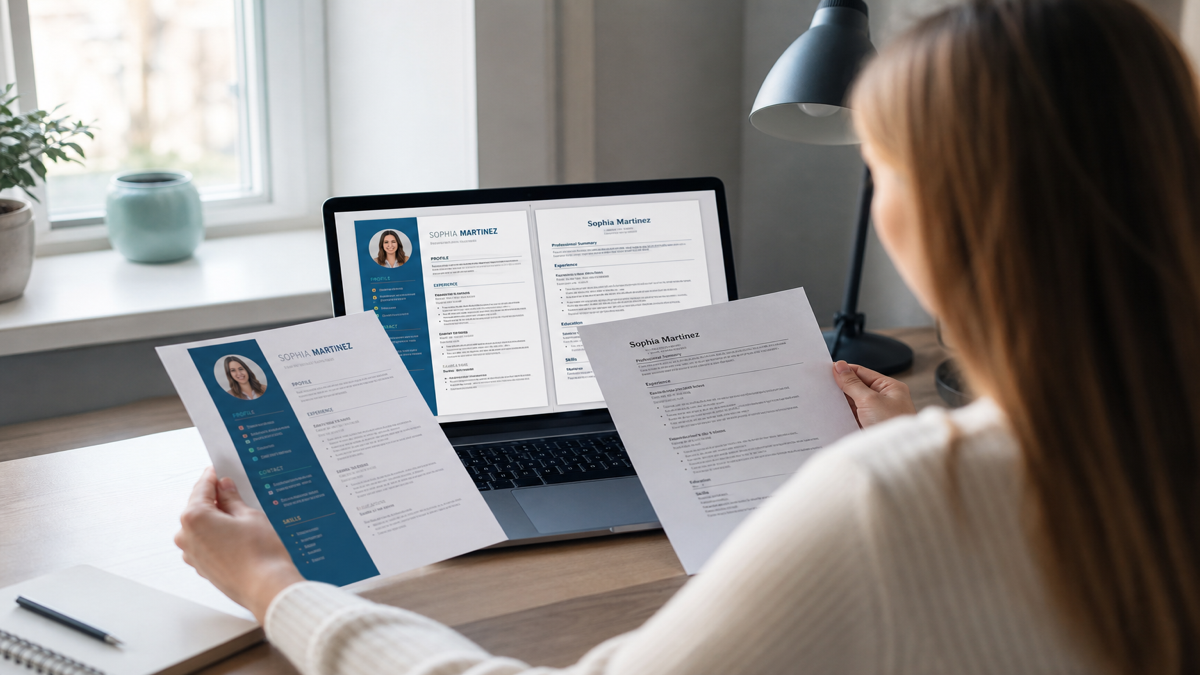
A Canva resume can pass ATS screening only when the export is a simple, single-column, text-based PDF with standard headings—not when it uses the popular two-column templates with icon contact rows and colored sidebars that dominate social media. Most Canva designs fail because applicant tracking systems read linear text order, not visual layout, and Workday, Greenhouse, Lever, and iCIMS routinely drop sidebar skills, scramble dates, or leave contact fields blank after ingest.
Canva is not banned from hiring pipelines. The default path from viral template to careers portal is fragile. This guide explains exactly what breaks, when a constrained Canva file still works, how to test your export in five minutes, and how to rebuild without losing your content. For the broader pipeline picture, read how ATS systems really work .
| Canva layout feature | Typical ATS symptom | Fix |
|---|---|---|
| Left/right sidebar columns | Skills and certs missing from parsed profile | Move skills into a single body section |
| Icon contact row (phone, email glyphs) | Blank phone or email in Workday autofill | Plain-text contact line under your name |
| Text boxes for each job block | Experience in wrong chronological order | One continuous Experience section, top to bottom |
| Skill star ratings or progress bars | Graphics instead of searchable skill words | Comma-separated plain-text skills list |
| Flattened/image PDF export | Little or no extractable text | Export digital PDF; verify text is selectable |
Key Takeaways
- Canva passes ATS only with single-column, text-based exports—not viral sidebar templates
- Parsers read reading order; sidebars and text boxes scramble Workday and Greenhouse fields
- Run select-all paste and an ATS checker before every apply wave
- Rebuild in Word, Docs, or HireFlow builder when the template fights you
- Creative roles may need two files: parse-safe for the portal, designed for humans
Why Canva templates break ATS parsers
Applicant tracking systems do not render your resume like a browser. They extract text, guess section boundaries, and map fragments into structured fields: name, email, phone, employers, titles, dates, education, skills. The EEOC guidance on selection procedures reminds employers that automated tools must still produce fair, reviewable records—yet a scrambled extract gives recruiters an empty profile before anyone judges your experience.
Canva's popular resume kits lean on layout features that interrupt reading order:
- Two-column layouts with skills in a colored sidebar
- Contact details as icons or inside header frames
- Text living inside movable text boxes instead of document flow
- Lines, shapes, and graphics between text layers
- Custom bullet glyphs that become garbled characters after parse
Real scenario: Maya exports a navy-sidebar Canva template for a mid-level operations role. On her screen, skills and certifications sit neatly on the left. After Workday ingest, the left column vanishes from the structured profile. A recruiter boolean search for "inventory planning" returns nothing. Maya's content was accurate—it never entered the field the filter used.
Common Mistake: assuming recruiters always open your PDF attachment. In high-volume roles they search parsed fields first. If the sidebar never indexed, you are invisible to that search.
When a Canva resume can still pass ATS
You can use Canva safely if you treat it like a constrained word processor—not a design playground:
- One column only—no sidebar skills rail
- Contact line in the document body as plain text
- Standard headings: Summary, Experience, Education, Skills
- Normal bullets (• or -), not icon ornaments
- Fonts that embed cleanly (Arial, Calibri, Helvetica-style sans serifs)
- Export as PDF with selectable text—not a flattened image
Smoke test before every apply wave: open the PDF, press Cmd/Ctrl+A, copy, paste into Notepad. If order is wrong, dates float, or whole sections are missing, the ATS will struggle too. The Adobe guidance on searchable PDFs explains why selectable text matters for document extraction tools.
Quick Check: if you cannot highlight a full Experience paragraph with your cursor, the file may be an image PDF—most ATS stacks will not OCR it reliably for contact lines and job titles.
How Workday, Greenhouse, and iCIMS handle Canva PDFs
Large employers on Workday often show an application preview after upload. That preview is your best free signal: if autofill drops your email or attaches dates to the wrong employer, the Canva layout is the culprit—not your qualifications. Greenhouse and Lever index extractable text across the full document but still mis-order multi-column blocks. iCIMS and Taleo used by staffing agencies are similarly sensitive to tables and text boxes.
None of these systems auto-reject the word "Canva." They struggle with unreadable extracts. Compare PDF vs DOCX for ATS when a portal asks for Word, and whether Canva resumes are ATS-friendly for template-specific fixes.
Mid-article check: upload a tailored version to HireFlow's ATS resume checker before applying on Workday or Greenhouse. The checker surfaces missing contact lines and formatting issues that hide skills from parsers.
Pro Tip: government and older enterprise stacks often prefer DOCX. Canva is the wrong authoring tool for those portals unless you rebuild content in Word after drafting.
Before/after: same content, different ATS outcomes
Identical achievements can vanish or surface depending on layout. Rewrite the container, not your career story.
| Before (Canva sidebar template) | After (single-column rebuild) |
|---|---|
| Skills in teal left column; SQL and forecasting only in sidebar. Phone as envelope icon. Greenhouse parse: skills empty, phone missing. | Plain contact line; Skills block mid-page: SQL, Python, forecasting. Same metrics in Experience bullets. Recruiter search returns the candidate. |
| Dates in narrow right rail; overlapping text boxes per role. Workday autofill: 2019–2021 dates attached to wrong employer. | Title | Company | Jan 2019 – Mar 2021 on one line per role. Chronological order preserved in parser output. |
| "Managed projects and teams" with star-rated skill bars instead of tool names. iCIMS extract: no searchable PMP, Jira, or Agile strings. | PMP-certified PM; led 4 cross-functional squads in Jira/Confluence; cut release cycle 22% using Scrum ceremonies and stakeholder dashboards. |
Key Takeaway: the candidate did not become more qualified overnight. The file stopped fighting the parser.
Five-minute Canva ATS test protocol
- Export PDF from Canva. Open it in Preview, Edge, or Acrobat—not only inside Canva.
- Select all text. Paste into Notes or TextEdit. Check order, contact, dates.
- Upload to HireFlow's ATS checker . Note structure and contact flags.
- If the portal shows an application preview (Workday often does), compare fields to your PDF.
- Only then submit. Keep a DOCX master for portals that demand Word.
If step 2 already looks wrong, skip steps 3–5 and rebuild. You cannot keyword-stuff your way out of broken reading order. See why ATS scores run low when scores drop after design exports.
Common Mistake: mass-applying a designed PDF you have never tested. One evening of parse fixes beats eighty silent rejections from empty profiles.
Safer rebuild path without losing your content
- Paste all Canva text into a plain document. Clean duplicate spaces and broken lines.
- Rebuild in Google Docs, Word, or HireFlow's free resume builder with one column.
- Use standard headings. Put strongest metrics in the first two bullets per recent job.
- Export PDF (and DOCX if needed). Re-run the ATS checker.
- Optional: keep the Canva PDF for portfolio emails where a human opens the attachment first.
For enterprise and mid-market portal applies, ship a boring, parse-safe resume. Boring files get interviews. Pretty scrambled files get silence. Creative industries are the partial exception—carry two files: ATS-safe for the portal, designed for human follow-up.
Pro Tip: the template that got the most likes on social media is often the worst ATS citizen. Social proof is not parse proof.
Canva export settings that reduce ATS risk
Inside Canva, people often click Download → PDF Print without checking what that means for text. For job applications you want a digital PDF where characters remain real text. Do not upload a PNG or JPG of your resume to a portal that expects a document. Skip password protection. Keep file names boring: FirstLast_Role_Resume.pdf.
After export, open the file in a different app than Canva. Select a full paragraph from Experience. If selection jumps around the page or skips the sidebar, you still have a reading-order problem even when characters are technically text.
Quick Check: sharing a Canva link instead of uploading a file fails most employer portals. Recruiters will not chase your template through a login wall.
Myths about Canva and ATS
- "ATS rejects Canva automatically." False. Systems reject unreadable extracts, not brand names.
- "If it looks good, it parses." False. Visual layout and reading order are different problems.
- "PDF always fails; Word always works." False. Clean PDFs work widely; messy DOCXs fail too.
- "A 95 checker score means I'm safe." Only if the checker tested structure. Match tools can love a keyword-heavy Canva file that still mangles in Workday.
Common Mistake: optimizing fonts and colors while contact info still lives inside icon graphics. Fix structure before aesthetics.
Decision table: keep Canva, fix Canva, or abandon Canva
| Situation | Verdict | Action |
|---|---|---|
| Workday enterprise cold apply | Avoid fancy templates | Single-column PDF or DOCX; test parse |
| Greenhouse / Lever startup portal | Simple Canva OK if tested | No sidebar; re-check after export |
| Email to hiring manager | Design more acceptable | Still keep text selectable |
| Creative portfolio role | Two-file strategy | ATS-safe for portal; designed for humans |
| Select-all text will not read in order | Abandon template | Rebuild in Docs, Word, or HireFlow builder |
Key Takeaway: choose the file that survives extraction, not the one that wins design likes.
After the file parses: keywords still matter
Fix Canva layout first. Then align titles and skills to the job description without stuffing. A clean empty skills profile still loses searches when sidebar terms never indexed. Mine the posting for hard skills—see what keywords ATS looks for and how many keywords belong on a resume . Put real tools in context inside bullets, not in a column the parser drops.
A parse-safe file with honest overlap beats a designed file with every buzzword painted in a column that never gets indexed. Spend your next hour on the boring work: strip the sidebar, move contact into plain text, re-export, select-all paste, run the checker, and only then customize keywords for priority roles.
Key Takeaway: Canva and keywords are sequential problems—layout first, vocabulary second.
What recruiters see after a Canva upload
In high-volume roles, recruiters start from filters—title keywords, years, location, skills—then open a short stack. They may skim structured fields the ATS filled, not your color palette. If those fields are blank or wrong, you never enter the stack. That is why "my Canva resume looks amazing" coexists with "I applied to 80 jobs and heard nothing."
When a human opens the attachment, a clean single-column layout still wins on speed. Sidebars force zigzag reading. Icons steal attention from metrics. Referrals change the sequence—a recruiter may open your PDF by name—but a broken extract still creates busywork when they copy details into the requisition. Send a parse-safe file when someone refers you.
Pro Tip: keep a designed Canva PDF for networking only; archive it separately from your portal apply file so you never upload the wrong one by mistake.
Frequently asked questions
Sometimes—only when you export a simple single-column layout with selectable text and standard section headings. Most popular Canva templates use columns, text boxes, and icon contact rows that scramble inside Workday, Greenhouse, Lever, and iCIMS. Treat every Canva export as a design risk until you run a parse test.
No. Canva optimizes for visual layout, not applicant tracking parsers. A plain Word or Google Docs resume exported as text-based PDF or DOCX is safer for portal applications. Reserve designed Canva files for networking leave-behinds where a human opens the attachment first.
Yes if the template is salvageable: strip to one column, move contact info into the body as plain text, replace icons with words, use standard headings (Experience, Education, Skills), and re-export as a digital PDF with selectable text. If select-all paste still scrambles, rebuild in a simpler tool—it is faster than fighting the template.
Only after a parse test. Workday autofill is sensitive to multi-column layouts, tables, and text boxes. Prefer a single-column DOCX or clean text PDF for Workday portals. Keep a designed Canva version for LinkedIn messages or in-person handoffs if you want the visual polish.
Screen appearance and reading order are different problems. Parsers extract text in document order, not visual position. Sidebars, overlapping frames, and icon contact rows often vanish or attach to the wrong employer. Select all text in the PDF and paste into Notepad—if order is wrong, the ATS will struggle too.
Google Docs, Microsoft Word, or HireFlow's free resume builder with a single-column template. Export text-based PDF or DOCX as the portal requests, then verify with an ATS checker on hireflow.net before you mass-apply.
Recruiters care about clarity and fit, not the authoring tool. Many never know you used Canva if the file parses cleanly. What they reject are empty parsed profiles, missing phone numbers, scrambled dates, and skill lists that never entered the ATS record because they lived in a sidebar.
Use a two-file strategy. Submit a parse-safe single-column resume to the Greenhouse or Workday portal. Attach or link a designed portfolio PDF where the application allows it. Do not assume the hiring manager will open a broken parse to find your tasteful layout.