7 min read
You've spent an evening on typography, color blocks, and a sidebar that finally feels like you. Then you uploaded that same file to a corporate portal and heard nothing back. The design looked sharp in Preview. The import preview told a different story.
That's the core conflict. Humans skim for hierarchy and white space. Applicant tracking systems extract plain text in file order and map it into fields. When design wins the eye, parsing often loses the data. You don't need to abandon good taste. You need two files with different jobs.
Check your resume for free on the file you'll actually upload, not the portfolio version you show friends. Tonight's decision is simple: which file goes in the portal, and which one stays for direct human contact.
This page compares plain upload files vs designed PDFs on the criteria that matter after you click apply: field order, text extraction, and recruiter skim speed in the ATS viewer. If you've only got one resume on your desktop, you're probably sending the wrong one to half your applications.
If your designed file already failed a copy-paste test, start with why fancy layouts break parsing for the mechanics, then come back here for the two-file rule.
Why design first resumes fail in ATS uploads
Design first means you chose layout, color, and visual hierarchy before you tested whether the file survives an ATS import. Canva templates, two-column Word themes, icon headers, and skill rating bars all signal "design first" to a parser.
Design first means you chose layout before you tested import. The failure is not about taste. Plenty of hiring managers like a clean visual resume in email. The break happens when that same file is the only version you send through Workday, iCIMS, or Taleo.
The ATS does not render your margins. It pulls text and guesses which chunk is your phone number. A sidebar stored before the main body in the file means your skill cloud becomes line one in Greenhouse.
Use four criteria to judge any resume before upload:
- Field order: Does name and contact appear first in plain text?
- Date integrity: Do employment dates stay attached to the right employer?
- Section labels: Are Experience and Education plain words, not icons?
- Channel fit: Is this the portal file or the human-only file?
Before: One designed PDF for every application channel.
After: Plain single-column for portals, designed PDF only when a human requests it.
Plain upload file vs designed PDF for humans
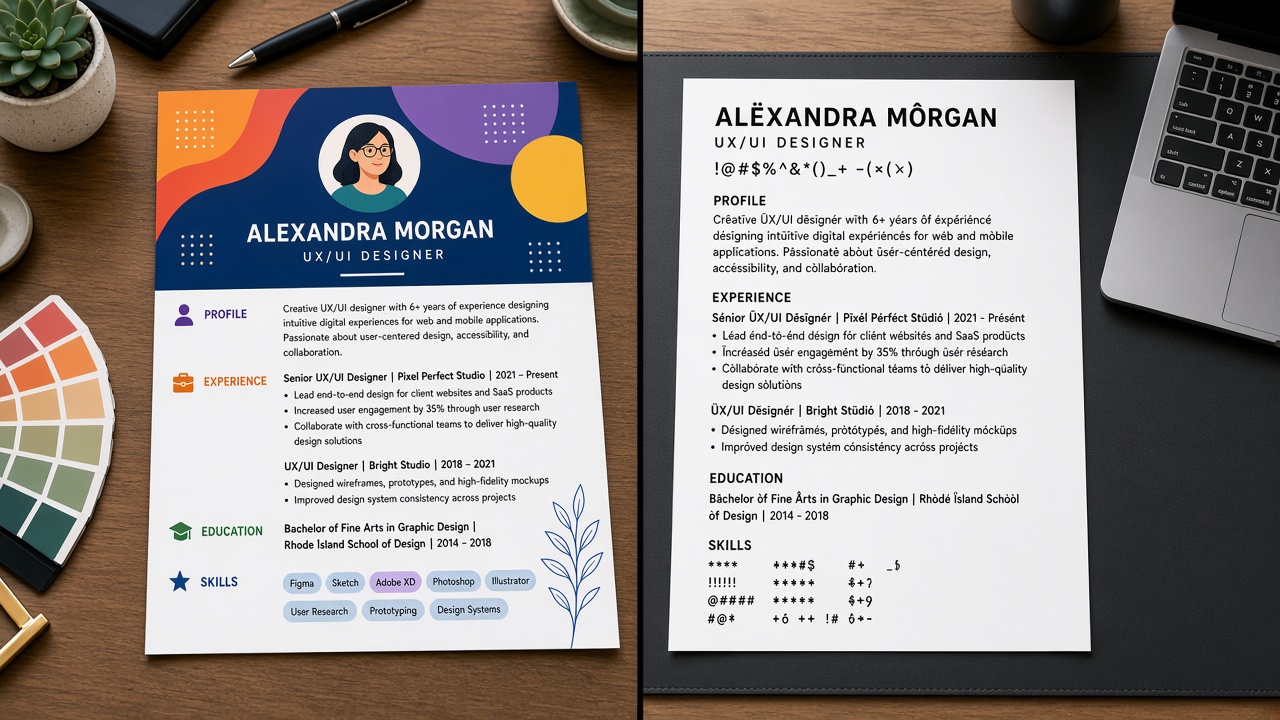
Same candidate, same bullets, two exports. One is a Canva-style two-column PDF with a color sidebar. One is a plain Word single-column layout. The human view looks similar at a glance. The parser view does not.
| Criterion | Designed PDF (human skim) | Plain upload file (ATS portal) |
|---|---|---|
| Best channel | Email attachment, career fair handoff, portfolio link | Workday, Greenhouse, Lever, Taleo upload fields |
| Contact block | Centered header looks polished; may sit in a text box | Name, email, phone on lines one to three in body text |
| Skills placement | Sidebar skill cloud reads fast for humans | Skills follow experience; keywords live in bullets |
| Graphics | Icons, bars, and color show personality | No graphics; every keyword is typed text |
| Parser outcome | Often scrambles field order on import | Matches PDF and ATS preview when tested |
Before (designed): Plain-text paste starts with "Figma Sketch Adobe" then jumps to "Morgan Ellis" twelve lines later.
After (plain): Paste reads "Morgan Ellis, email, phone, Experience, Company A, Designer, Jan 2022 to Present, bullet…" in order.
Copy-paste block: two-file decision test
Run this before every application
CHANNEL CHECK: are you uploading to a portal or emailing a person?

IF PORTAL:
  Use plain single-column DOCX or PDF
  Copy all text into Notepad. Name in first 3 lines?
  Upload and check import preview for blank email field

IF HUMAN EMAIL:
  Designed PDF is fine if copy-paste test still passes
  Include portfolio link in body, not only in the PDF header

RULE: maintain two files with the same bullets, different layout
When the designed PDF still makes sense
Handing a polished PDF to a hiring manager at a meetup is different from uploading to iCIMS. Creative proof belongs on a portfolio site you control. The resume file's job in a portal is to populate fields, not to win a design award.
Some design-heavy PDFs export fine because they're single-column under the hood. Run the test anyway. A template that worked for a colleague might store text differently in your version of Word or Canva.
Networking events and recruiter coffee chats are human-first channels. Bring the designed PDF on a tablet if you want. Just don't upload that same file when you get home and see a Greenhouse link in the follow-up email.
I've opened thousands of uploads in Workday where the Canva export looked sharp but the extracted profile listed Photoshop as the candidate's first name. The fix was never more color. It was a plain upload file and standard headings.
Where designed resumes lose in Workday
Multi-column templates. The default failure mode. Sidebar-first extraction puts skills above your name in the import preview.
Tables as layout grids. Nested tables split employer names from dates. Some parsers read row by row in ways that do not match your visual grid.
Text boxes for contact info. Visually centered and clean. Often skipped or dumped at the end of the file on import.
Skill rating graphics. Five-dot skill meters carry no text. The keywords never reach the ATS index.
Headers and footers. Page numbers and repeated contact lines in the footer may duplicate or vanish depending on the parser.
Canva and design-tool exports. Pretty templates often flatten text into shapes the parser skips. Export to PDF, then run the copy-paste test. If half the resume disappears, rebuild the upload version in Word with a blank single-column doc.
Columns inside one section only. Even a two-column experience block with dates left and bullets right can split dates from job titles. Put dates on the same line as the company name every time.
Before: One Canva PDF for every channel, including the Workday upload on a Fortune 500 posting.
After: Plain DOCX for the portal, designed PDF saved for the recruiter who asked for it by email.
For a deeper walkthrough of formatting failures, see how resume design can cost you interviews .
Pick the right file for each channel
After you build the plain upload version, run the copy-paste test again. Then pass that exact file through HireFlow's checker to catch layout issues the eye misses.
Use the free ATS checker on the portal file only. Rebuilding layout is faster than re-applying after a garbled upload.
If the posting also wants a cover letter, generate a cover letter in the same plain formatting. Matching structure across documents keeps both files readable in the same portal.
Your two-file rule
Default to plain single-column for any application that runs through an ATS. That's most corporate hiring in the US. Design first resumes fail quietly on upload. You often won't get an error message. You'll get silence.
- Run the copy-paste test on every new template.
- Keep dates on the same line as employer and title.
- Save design flair for portfolios and human-only email, not parser food.
Your bullets did the hard work. Don't let a sidebar reorder them before a human ever sees your name.
Read more
Frequently asked questions
No. Keep it for human-only moments: networking email attachments, portfolio links, or when a hiring manager asks for a PDF by name. For Workday, Greenhouse, Lever, and Taleo uploads, submit the plain single-column file. Two exports beat one pretty file that scrambles on import.
Sometimes, if it is still single-column under the hood and exports clean text. Run the copy-paste test every time. If your name is not in the first three lines of plain text, assume the design is fighting the parser regardless of how good it looks on screen.
Plain Word often survives better than a PDF saved from Canva or InDesign. Follow the portal's requested format. A simple DOCX with standard headings beats a graphic PDF when the employer allows either. Test both if you are unsure.
Creative proof lives in portfolios and work samples. The ATS file still needs to populate fields. Upload plain for the portal, then link your portfolio in the application URL field or follow-up email. Design the work, not the parser food.