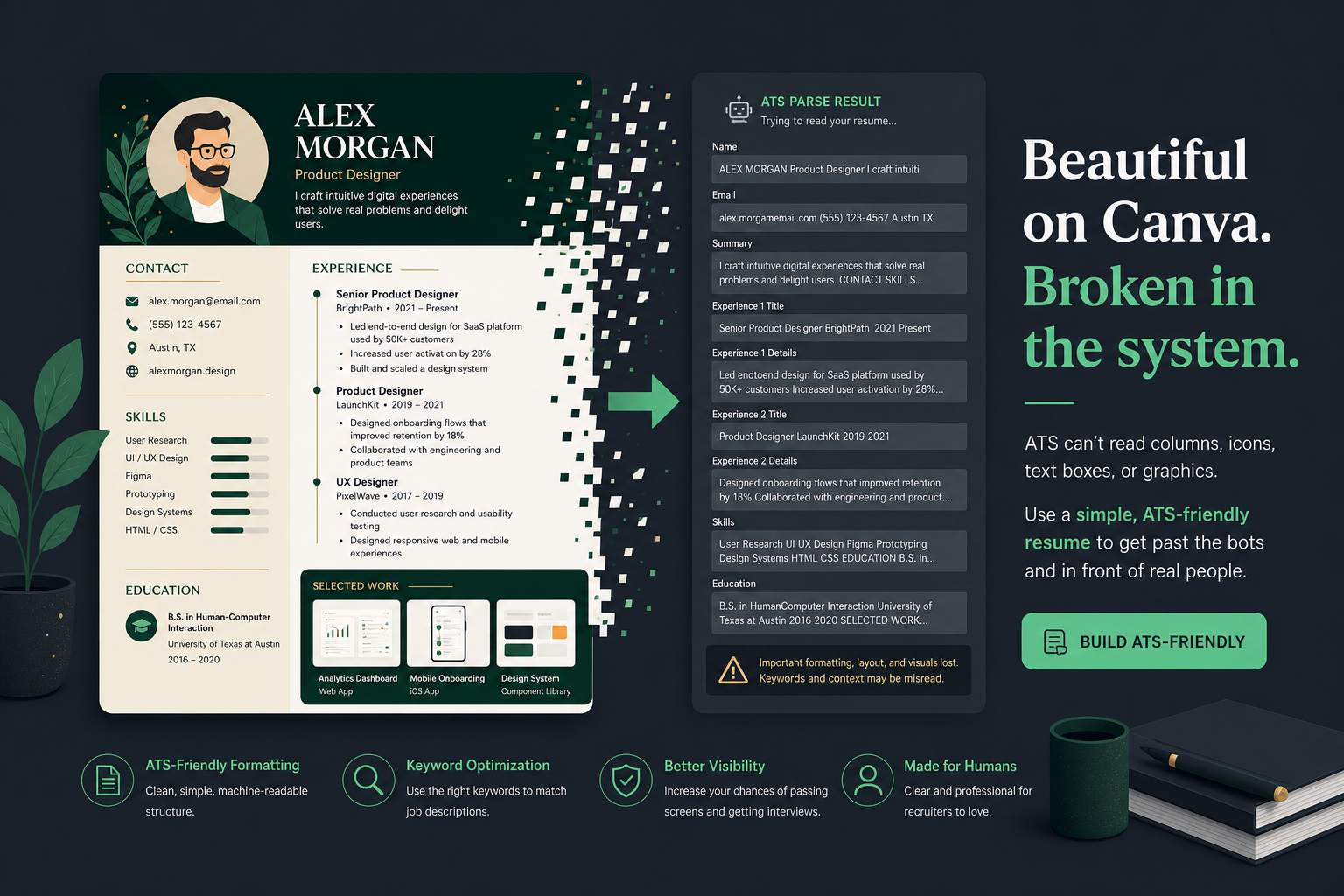
Most Canva resume templates are not ATS-friendly by default. Canva is a design tool first, and its most popular resume layouts use multi-column grids, floating text boxes, icon rows, and decorative graphics—features that cause Workday, Greenhouse, Taleo, and iCIMS parsers to misread, scramble, or silently drop your contact info, job titles, and skills. A plain single-column Canva export can pass if you pick carefully and test before every application—but the default template library is optimized for visual impact, not parser extraction.
This is not a blanket "never use Canva" rule. It is a decision guide. You will learn which design elements break parsing, how major ATS platforms handle Canva PDFs differently, a template risk matrix, before/after layout fixes, a five-minute export test, and a two-resume strategy that lets you keep a design-forward file for humans without gambling portal applications on it.
| Canva design element | Parser risk | What recruiters see in ATS |
|---|---|---|
| Two-column layout with skills sidebar | Very high | Skills glued to job bullets; dates misaligned |
| Icon contact row (phone/email icons) | High | Missing email or phone in searchable fields |
| Graphic section headers | High | Experience block not grouped; skills orphaned |
| Single-column plain text sections | Low | Clean top-to-bottom extraction when exported correctly |
Key Takeaways
- Canva's default templates prioritize design over parser-safe structure
- Workday autofill is especially sensitive to columns and floating text boxes
- A 30-second copy-paste test predicts ATS behavior better than visual review
- Keep a Canva version for humans and an ATS-safe version for portals
- Template marketing labels are not parsing guarantees—test the layout itself
What actually breaks in Canva resumes
ATS software does not render your resume the way a browser displays Canva's editor. Parsers extract raw text and try to reconstruct structure—name, contact info, work history, skills—based on position, whitespace, and recognizable section headers. The EEOC guidance on employment selection procedures reminds employers that automated screening must be job-related; when your file fails to parse, you are filtered out before a human evaluates fit—not because of qualifications, but because the system never received your data correctly.
- Multi-column layouts. Parsers read left-to-right across the full page width. A skills bullet from the left column can merge with a job description sentence from the right column. Workday's importer often maps the left sidebar as the first text block, pushing your most recent job title below unrelated skill keywords.
- Floating text boxes. Name, email, and phone placed in layered boxes outside the main flow are skipped by some parsers entirely—visible on screen, absent from the ATS record.
- Icons instead of text labels. A phone icon next to a number gives parsers no searchable "phone" or "email" label. Recruiters running boolean searches in Greenhouse for contact fields find nothing.
- Headshots and profile circles. Beyond parsing risk, many US employers discard resumes with photos to reduce bias risk. A headshot template is a double liability for corporate portals.
- Tables used for date alignment. Invisible grids aligning dates to job titles parse inconsistently—fine in Lever, scrambled in Taleo, depending on cell order.
- Skill bars and star ratings. Graphics replace searchable words. A five-star "Python" bar does not match a posting that requires the word Python in plain text.
Common Mistake: assuming a visually clean PDF equals a parser-safe PDF. Open the file, select all text, and paste—if the order is wrong, the ATS version is wrong too.
How Workday, Greenhouse, and Taleo handle Canva PDFs differently
Not every ATS fails the same way. Understanding platform behavior helps you decide whether a lightly designed Canva file is worth the risk for a specific application.
| ATS platform | Typical Canva failure mode | Safer file approach |
|---|---|---|
| Workday | Autofill maps sidebar skills into wrong fields; contact info dropped from text boxes | Single-column DOCX or plain PDF; see Workday resume format |
| Greenhouse | Top-to-bottom order preserved but icon labels and graphic headers lost | Plain PDF with typed section headers and no icons |
| Taleo (Oracle) | Table-based date layouts scramble; multi-column rows merge unpredictably | Dates on same line as job title in plain text |
| iCIMS | Decorative fonts and text boxes often skipped; skills section thin | Standard fonts (Arial, Calibri, Helvetica) only |
The practical rule: if you do not know which ATS powers the portal, assume Workday-level sensitivity. Fortune 500 employers and many mid-market companies route applications through systems that punish column layouts hardest.
Quick Check: if the job posting links to a Workday or Taleo URL, treat any two-column Canva template as a hard no unless you have a tested plain backup.
Template decision matrix: which Canva layouts are actually safe
Template category matters more than color palette or font choice. Use this matrix before you invest hours editing a layout that will not survive upload.
| Template type | ATS risk | When it is OK to use |
|---|---|---|
| Two-sidebar creative templates | Very high | Portfolio PDFs, design roles reviewed by humans first—never portals |
| Headshot or profile circle templates | Very high | Networking handoffs only; avoid US corporate ATS uploads |
| Timeline / infographic templates | Very high | Treat as design pieces, not application documents |
| Icon-heavy contact rows | High | Only after replacing every icon with typed labels |
| Single-column with plain header | Low to moderate | Good candidate if you verify export with copy-paste test |
| Minimalist plain-text sections only | Low | Safest Canva option; still re-test after every edit |
Popularity and parsing safety are unrelated. Canva's most downloaded resume templates tend to be the most column-heavy. For a deeper comparison of design-first formats, see why infographic resumes fail ATS —the same parsing logic applies to Canva's graphic-heavy layouts.
Pro Tip: search Canva for "minimal resume" or "simple resume" and filter mentally for single column—ignore "ATS-friendly" in the template title until you inspect the layout.
Step-by-step: export a Canva resume and test it before you apply
If you choose a low-risk template, the export and test sequence below is non-negotiable. Skipping it is how qualified candidates get filtered out silently.
- Confirm single-column structure before customizing colors or fonts.
- Rebuild contact as plain text: Jane Doe | [email protected] | (555) 123-4567 | Austin, TX — in the main body flow, not a header graphic.
- Replace graphic headings with typed Experience, Education, Skills headers in a standard font.
- Move content out of text boxes into the primary text layer.
- Export PDF (standard) — not print-quality flattening that turns text into images. Adobe's PDF text-layer documentation explains why selectable text matters for extraction tools.
- Text-select test: highlight a paragraph, paste into Notepad. Check order, bullets, and contact info.
- Search test: Ctrl/Cmd+F for your name and a job title inside the PDF.
- ATS checker: upload against the specific posting on HireFlow's ATS resume checker .
Also confirm file type preference—see PDF vs DOCX for ATS when a portal accepts both. Some older Taleo instances parse DOCX more reliably than design-exported PDFs.
Key Takeaway: the copy-paste test takes 30 seconds and predicts parser behavior more reliably than asking whether Canva is "allowed."
Before/after: fixing Canva layout traps for ATS parsing
These examples show what parsers extract from common Canva patterns—and what to change so Workday and Greenhouse index the same facts you see on screen.
| Before (Canva layout) | After (parser-safe) |
|---|---|
| Left sidebar: icon row for email/phone; skills in colored column; experience in right column | Single column: Jane Doe, [email protected], (555) 123-4567; Skills line as comma list; Experience bullets below in reading order |
| Graphic "EXPERIENCE" banner image; job titles in floating boxes | Plain text heading Experience; Senior Analyst | Acme Corp | Jan 2022–Present on one line; bullets directly underneath |
| Five-star skill bars for Python, SQL, Tableau (no typed skill names in body) | Skills: Python, SQL, Tableau, Excel, stakeholder reporting — plus bullets proving Python in a project ("Built Python ETL reducing report time 40%") |
Common Mistake: fixing icons but keeping two columns. Columns are the root cause—icons are a symptom. Collapse to one column first.
The two-resume strategy: Canva for people, ATS-safe for portals
You do not have to abandon Canva entirely. Split the use cases instead of forcing one file to do both jobs.
- Canva version (human-first): networking emails, LinkedIn attachments, portfolio sites, referrals where a person opens the file directly. Visual polish helps here because no parser runs first.
- ATS-safe version (portal-first): Workday, Greenhouse, Lever, iCIMS, and job board uploads. Single column, plain headers, same titles/dates/metrics as the Canva file.
Keep both versions synchronized when you update experience. The two-resume strategy for ATS vs human readers walks through naming conventions and when to send which file.
Pro Tip: filename your portal version FirstName-LastName-Resume.docx and reserve Canva exports for FirstName-LastName-Portfolio.pdf so you never upload the wrong one by habit.
Common Canva resume mistakes that fail screening
- Picking templates for aesthetics, not structure. The prettiest layouts are usually the least parseable.
- Trusting "ATS-friendly" template labels. Marketing copy, not a technical certification.
- Skipping re-test after small edits. Moving one text box can break reading order.
- Using the same Canva PDF everywhere. Portfolios and portals need different files.
- Exporting flattened print PDFs. Text becomes an image; search and parsers fail.
- Ignoring autofill preview on Workday. If fields populate wrong, the parser already failed—do not submit and hope.
Common Mistake: assuming creative roles never use ATS. Agencies and in-house teams still upload designer resumes into Greenhouse—format risk does not disappear because the job is visual.
A safer default when reliability beats design risk
If your goal is passing screening and getting interviews, starting from a parser-built template is faster than auditing a Canva file after every edit. HireFlow's free resume builder uses single-column, standard-header layouts by default—no manual export detective work.
For related questions on whether Canva passes specific checks, see does a Canva resume pass ATS . Whichever path you choose, run a free scan on hireflow.net before submitting to a live application.
Key Takeaway: design tools optimize for eyes; ATS tools optimize for text extraction—pick the tool that matches who reads the file first.
Pre-submit checklist for Canva resume uploads
- Single-column layout confirmed in editor.
- Contact info typed as plain text in body flow.
- All section headers are editable text, not graphics.
- No icon rows, skill bars, or layout tables holding content.
- Standard PDF export with selectable text.
- Copy-paste test shows correct reading order.
- Cmd/Ctrl+F finds your name and latest job title in PDF.
- ATS checker run against the target job description.
- Portal autofill preview reviewed if Workday or Taleo.
Quick Check: if any checklist item fails, switch to your ATS-safe backup file for that application—do not submit the Canva version and hope.
Edge cases: when Canva still fails after you "fixed" the layout
Most Canva ATS failures are layout-related, but three edge cases keep showing up after people switch to a single-column template and still get blank Workday or Greenhouse fields.
- Exported PDF is image-only. Canva's "Flatten" or print-to-PDF workflows can rasterize text. If you cannot select words in Preview/Acrobat, Greenhouse and Taleo will not extract skills or dates. Re-export as a text PDF, or rebuild in Google Docs / Word and upload DOCX when the portal allows it.
- Icons replace words. Phone, email, and LinkedIn icons look clean, but many parsers never convert the icon into the word "phone." Keep the label in real text next to every contact line.
- Text boxes stacked out of reading order. Visually top-to-bottom can still parse left column first, then right, then footer. Copy-paste the PDF into Notepad: if job titles appear after skills, rebuild as one flowing column.
After any Canva change, run the same three checks before you apply: selectable text, Notepad paste order matches the visual resume, and a free ATS check on hireflow.net catches missing contact or date fields. That sequence catches more failures than swapping templates alone.
Pro Tip: if a company's Workday portal keeps mangling a Canva PDF, submit DOCX from a plain Word rebuild for that application only—you can keep Canva for human-facing networking PDFs where you email a hiring manager directly.
Frequently asked questions
Most Canva resume templates are not ATS-friendly by default because they rely on multi-column layouts, floating text boxes, icons, and decorative graphics that parsers misread or drop. A small subset of plain, single-column Canva templates can work if you pick carefully, export as a standard PDF with selectable text, and pass the copy-paste test before applying through Workday, Greenhouse, or similar portals.
Minimalist, single-column templates with a plain header block and no tables, icons, or sidebars carry the lowest risk. Two-sidebar creative templates, timeline or infographic designs, and anything with a headshot photo carry the highest risk and should be avoided for portal applications where a parser reads your file first.
Export the PDF, then run the text-select test: open the file, click-drag to highlight a paragraph, and paste it into a plain text editor. If text pastes in the wrong order, is missing, or your contact info does not appear, an ATS will have the same problem. Follow with a dedicated ATS checker against the job description before submitting.
Yes, if you start from a single-column template. Rebuild the contact line as plain text, replace icon-based labels with typed words, ensure every section heading is real text rather than a graphic, remove layout tables, and export as a standard PDF rather than a flattened print export. Re-test after every layout edit.
Many job seekers do exactly this: a visually distinct Canva version for networking, portfolios, and direct human hand-offs, and a plain single-column ATS-safe version for any portal or online application where a parser might process the file first. Both versions should share the same facts—titles, dates, metrics, skills.
Not automatically. Template names on Canva are marketing copy, not a parsing guarantee. Judge the actual layout—columns, text boxes, icons, tables—rather than trusting the title of the template. A template labeled ATS-friendly with a colored skills sidebar will still scramble in many systems.
Workday's autofill importer is especially sensitive to multi-column layouts and mis-maps contact fields when text boxes sit outside the main flow. Greenhouse usually preserves top-to-bottom text order better but still drops icon-only labels and graphic section headers. Neither system reliably reconstructs a two-column Canva design into structured work history.
A resume builder designed around single-column, standard-header layouts by default removes the manual export and re-testing steps Canva requires. HireFlow's free resume builder is one option if you want reliability without auditing every template change yourself. Word or Google Docs with a plain template is another low-risk path.