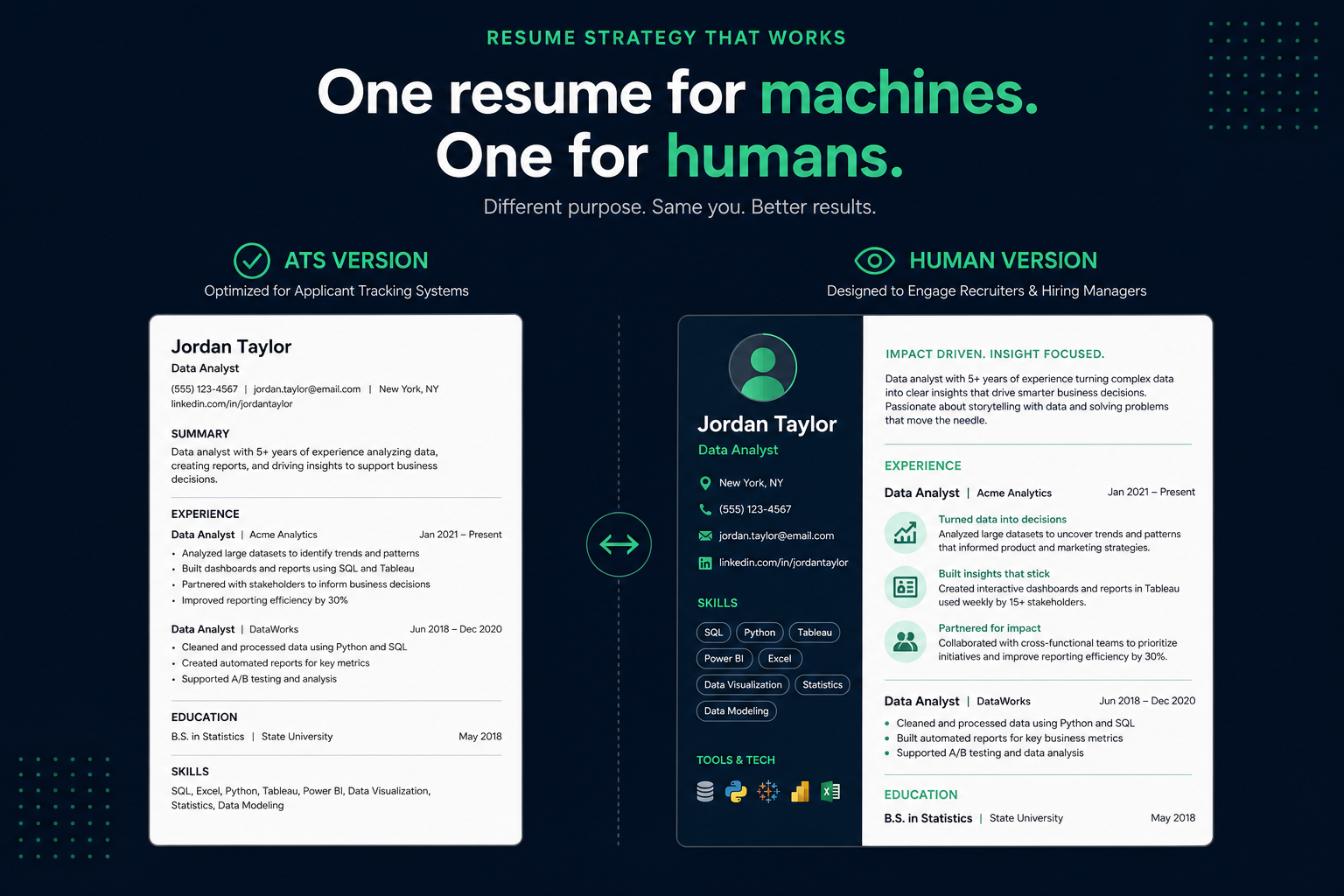
A single resume file is being asked to do two very different jobs in 2026: survive a parser that wants plain, linear, single-column text, and impress a human who is often more visually persuaded by a clean, well- designed layout when they finally see one. Those two goals are not always in conflict, but for certain roles—design, marketing, product, anything with a portfolio component—they genuinely pull in opposite directions.
The two-resume strategy is simple: keep an ATS-safe, plain-formatted version for anything going through a job board or company application portal, and a second, more visually designed version for direct human contexts—an email attachment to a referral, a LinkedIn profile PDF, or a portfolio site. This guide covers exactly when you need both, how to build them without double the effort, and the mistakes that undo the strategy.
Key Takeaways
- Why one file cannot optimally serve both audiences
- Who actually needs two versions, and who does not
- How to build both from one source without duplicating work
- Where each version goes, application by application
- Mistakes that undo the strategy
Why one file cannot optimally serve both audiences
ATS parsers and AI screening agents generally read best when the content is linear: single column, standard section headers, no text boxes, minimal graphics, consistent fonts. Our guide to how ATS software actually matches resumes to job descriptions covers this parsing behavior in more depth. A human skimming a PDF for seven seconds, on the other hand, is genuinely influenced by clean visual hierarchy, whitespace, and—for certain roles—design sensibility as a proxy signal for the work itself.
ATS version wants
- Single column, no tables or text boxes
- Standard headings (Experience, Education, Skills)
- Plain bullet points, no icons or graphics
- PDF or DOCX depending on the specific platform
Human version can use
- A sidebar, accent color, or subtle two-column layout
- A small amount of visual hierarchy beyond plain text
- Slightly more personality in the summary section
- A portfolio link or visual work sample reference
Neither version is "more honest" than the other—the content should be identical in substance. The difference is purely about which reader (machine or human) is most likely to encounter the file first in that specific application channel.
Key Takeaway: An ATS parser and a human reader respond to different signals — plain linear structure for one, visual hierarchy for the other. The content should stay identical.
Who actually needs two versions, and who does not
This is not a universal requirement—for a large share of roles, a single clean, ATS-safe resume works everywhere and a second version adds maintenance overhead with little benefit.
- Probably worth two versions: design, marketing, product, and creative roles where visual presentation is itself a mild signal of skill; senior roles where a polished leave-behind after a networking conversation matters; anyone actively building a portfolio site where a matching visual resume makes sense.
- Usually fine with one: most technical, operations, finance, healthcare, and administrative roles, where a clean single- column resume is standard practice and a "designed" version adds risk without clear upside.
If you are unsure which category you fall into, default to a single ATS-safe version—the downside of an unnecessary second version (extra upkeep, risk of sending the wrong one) is generally larger than the upside for roles where visual design is not itself part of the evaluation.
Key Takeaway: Design, marketing, and senior leave-behind resumes benefit most from a human version. Most other roles do fine with one ATS-safe resume everywhere.
How to build both from one source
The efficient way to run this strategy is to treat your content—bullets, titles, dates, skills—as the single source of truth, and generate two layouts from it rather than writing and maintaining two separate documents:
- Write and edit your actual content (summary, bullets, skills) once, to the highest standard, independent of layout.
- Apply an ATS-safe, single-column template for the version that goes through job boards and application portals.
- Apply a designed, visually distinct template using the same content for the version you send directly to a human or attach to a portfolio.
- When you update your experience or add a new accomplishment, update the content once and regenerate both layouts, rather than editing two documents separately and risking drift between them.
A builder that supports multiple templates from one data set—rather than two independent Word documents—removes almost all of the maintenance overhead this strategy would otherwise add. HireFlow's free resume builder works this way: the same content can be rendered into an ATS-safe template or a more visually designed one without retyping anything.
Key Takeaway: Treat your content as the single source of truth and generate two layouts from it — do not maintain two separate documents from scratch.
Not sure your ATS version actually parses cleanly? Run it through HireFlow's free ATS checker on hireflow.net before you send it anywhere.
Where each version goes
| Channel | Use |
|---|---|
| Company application portal / job board | ATS version, always |
| Email directly to a referral or hiring manager | Human version—this reader will never touch an ATS |
| LinkedIn "Featured" section or profile PDF | Human version |
| Recruiter cold outreach reply | Human version, unless they explicitly ask you to apply through the portal—then also send the ATS version there |
| Portfolio site or personal website | Human version, matching the site's visual identity |
Key Takeaway: Anything touching a job portal gets the ATS version. Anything going straight to a person — email, LinkedIn, a portfolio site — gets the human version.
Mistakes that undo the strategy
- Sending the human version through a job portal. This is the single most common failure—a designed, multi-column resume uploaded to a Workday or Greenhouse portal can parse worse than a plain one, even if it looks better to a human.
- Letting content drift between the two versions. If you update your latest role in one version and forget the other, an interviewer who saw the human version and a recruiter who saw the ATS version can end up with different pictures of your background.
- Over-designing the human version. "More visual" does not mean cluttered—dense graphics or excessive color can undercut the same clean-communication signal a good resume is supposed to send, regardless of which version it is. If you are tempted to use a heavily templated design tool for either version, our breakdown of whether a Canva resume passes ATS covers exactly where those templates tend to break parsing.
Key Takeaway: The most common failure is sending the wrong file to the wrong channel — double-check before every submission.
Side-by-side: the same bullet, written for each version
The most practical way to understand the difference between an ATS version and a human version is to see the same accomplishment written both ways. Neither version lies or exaggerates—they contain identical facts and identical metrics. What changes is structure, vocabulary, and emphasis: the ATS version front-loads keywords and uses the exact tool names a job description would contain, while the human version leads with the business outcome and allows slightly more narrative framing. Below are two worked examples—one from an operations background, one from sales—so you can see how the rewrite logic applies across different functional areas.
Example 1 — Operations Manager
ATS Version
Managed cross-functional supply chain operations for 12-SKU product line using SAP S/4HANA and Tableau; reduced order fulfillment cycle time by 31% YoY through process re-engineering and vendor SLA renegotiation.
Front-loads role scope and tool names (SAP S/4HANA, Tableau) that ATS keyword filters match against. Metric is included but subordinate to the functional label.
Human Version
Cut customer wait times nearly in half—31% faster order fulfillment—by rebuilding the vendor negotiation process from scratch across a 12-product supply chain, replacing a slow manual approval loop with a live SAP dashboard the whole operations team could act on daily.
Leads with the customer-facing outcome and the human story of how the change happened. Tools appear, but as supporting context rather than the opening phrase.
Example 2 — Account Executive (SaaS Sales)
ATS Version
B2B SaaS account executive; managed full sales cycle from prospecting to close using Salesforce CRM and Outreach.io; exceeded annual quota 118%, generating $2.4M new ARR; focused on mid-market and enterprise segments in financial services vertical.
Uses the job-title label (B2B SaaS account executive) and platform names (Salesforce, Outreach.io) as early keywords, followed by the metric.
Human Version
Closed $2.4M in new annual recurring revenue last year—18 points above quota—by landing seven-figure deals with financial services firms that had never bought SaaS before. Built every pipeline relationship from cold outreach to signed contract without SDR support.
Opens with the dollar outcome and the degree of overperformance. The "never bought SaaS before" detail adds narrative texture that a human reader can remember and retell; an ATS parser has no use for it.
Notice what is the same across both pairs: every number, every tool name, every job title. The two versions are legally and factually identical. The rewrite is not embellishment—it is audience targeting, the same skill a good marketer uses when writing the same product benefit for a search ad versus a print brochure.
Key Takeaway: Rewrite structure and emphasis between versions, never the underlying facts, numbers, or tool names.
A decision rule for which version to send
The most common source of confusion is not how to build the two versions— it is knowing which one to reach for in ambiguous situations. The flowchart below walks through the most common scenarios in order of clarity, starting from the obvious cases and working toward the genuinely tricky ones.
- Applying cold through a company portal or job board (Workday, Greenhouse, Lever, LinkedIn Easy Apply, Indeed, etc.). Send the ATS version, always. Your file will be parsed by software before any human sees it. A designed, multi-column layout risks garbled text in the parsed record even when the rendered PDF looks clean. The human reader will see a plain document—that is exactly what you want at this stage.
- Forwarded directly to a hiring manager by a referral, sent as an email attachment, or handed over at a networking event. Send the human version. This reader will open a PDF in their email client or print it—no ATS parser will ever touch this file. A plain, keyword- dense document in this context looks visually flat when there is no scanner to benefit from it.
- Applying through a portal AND you personally know the hiring manager or a senior person on the team. Send both. Upload the ATS version through the portal so your application parses correctly in the system. Then send a brief, direct email to your contact attaching the human version: "I also wanted to send you this directly—it gives a bit more context than the portal submission." This is not gaming the system; it is using the right file for the right reader in each channel, exactly as intended.
- A recruiter emailed you cold and asked you to send your resume. Send the human version. A recruiter reading your email is a human reader. If they ask you to formally apply through a portal afterward, upload the ATS version there as a separate step.
- A company says they do not use an ATS and handles hiring manually. Send the human version. Small companies that review applications manually— often stated on the job listing or discoverable by asking—have no parsing step. A visually polished document is a competitive advantage here, not a risk.
- You are not sure which process the company uses. Default to the ATS version. The cost of an ATS version landing in a human's inbox is low—it reads clearly even if it is not visually exciting. The cost of a human-version landing in a parser is potentially a garbled record that misrepresents your background. When in doubt, minimize downside.
The one-line rule
If software touches the file before a human does, send the ATS version. If a human is the first and only reader, send the human version. If both will see it, send each version through the channel it is designed for.
Key Takeaway: When you are not sure which process a company uses, default to the ATS version — it is the lower-risk choice in ambiguous situations.
Keeping both versions in sync without doubling your maintenance work
The most common complaint about the two-resume strategy is maintenance: two files, two update cycles, twice the time. That complaint is valid when you treat each version as a fully independent document. It dissolves almost entirely when you structure your workflow correctly from the start.
The core principle is to separate content from presentation. Your content—the actual bullets, metrics, job titles, dates, and skills list—is a single source of truth. Presentation is just a template applied on top of that content. When content and template are tangled inside one document, every update requires touching two files. When they are separate, you update the content once and re-export both templates.
Practical workflow that keeps drift from happening:
- Maintain one master content document. This can be a Google Doc, a Notion page, or even a plainly formatted Word file— anything where you write and edit your actual accomplishment bullets, titles, and skills without worrying about formatting. This is your single source of truth.
- Export or paste into each template, do not write in the template. When you need to update a version, pull from the master document rather than editing the PDF or formatted file directly. Editing inside a formatted template is the fastest path to the two versions diverging.
- Date-stamp every exported file. Name your files with a date in the filename (for example, resume-ats-2026-07.pdf and resume-human-2026-07.pdf). This makes it immediately obvious if one version is months older than the other when you are about to send one.
- Update on a trigger, not a schedule. The right time to update both versions is when something real changes: a new role, a completed project with a measurable outcome, a new skill you want to feature. Waiting for a quarterly review means you often lose the detail while the experience is still fresh.
- Do a two-minute sync check before every send. Before attaching either version to an application or email, open the other version and confirm the last-updated dates and your most recent role match. Thirty seconds of checking prevents the most common version- control mistake in this strategy.
The version-drift warning sign
If you accepted a new position, completed a high-impact project, or earned a significant credential and only updated one version of your resume, you have already created drift. A recruiter who saw your LinkedIn, an interviewer who reviewed the portal submission, and a colleague who forwarded the PDF you emailed six months ago now each have a different picture of your background. The safest habit: treat "update resume" as a task that is only complete when both versions reflect the same reality.
If you use a resume builder that natively supports multiple template exports from one content layer—rather than two independent Word documents—this problem is largely architectural rather than habitual. HireFlow's resume builder stores your content once and lets you switch between ATS-safe and more visually designed templates without re-entering anything, which removes the manual sync step entirely.
Key Takeaway: Separate content from presentation, date-stamp your files, and do a two-minute sync check before every send — that eliminates most version drift.
Where to take this next
If you are not sure which template category your target role falls into, our template gallery labels each layout as ATS Friendly, ATS Compatible, or Creative, with a one-click switch between an ATS-safe layout and its more visually designed counterpart—so building both versions from the same content takes minutes, not a second resume written from scratch.
Frequently asked questions
No—provided the substance is identical in both. Having two versions of your resume is the same as tailoring a pitch for two different audiences: a conference talk and a one-on-one conversation cover the same ideas, but the framing and depth differ. The ethical line is content accuracy; the two-resume strategy changes presentation only, not facts, titles, dates, or metrics. If the two versions contain different accomplishments or different numbers, that is a problem—but the strategy itself is not.
They can, but the difference should be modest. The ATS version may run slightly shorter because lean, scannable bullets parse more cleanly than narrative prose. The human version can carry a slightly richer summary section or slightly more context in key bullets without becoming a biography. In practice, most people end up within half a page of each other—two versions that are dramatically different in length usually signal that the content itself is diverging, which is a drift problem rather than a formatting choice.
Only if you have strong evidence they do not use one—meaning the job was posted without a portal, the company is very small, or the application process is explicitly email-based. Most companies with more than roughly 25 employees and any meaningful application volume use some form of applicant tracking software, even if the job description does not mention it. If you cannot confirm the absence of an ATS, the ATS version is the lower-risk choice.
The two-version strategy pays off most clearly when you are also doing active networking alongside portal applications—roles where the same position might reach you through two completely different channels. If your entire search is purely online portal applications with no referral or direct networking component, maintaining a human version adds overhead with little practical payoff. Build the second version when you have a clear, immediate use for it rather than as a precaution you might need someday.
LinkedIn sits closer to the human version in terms of reading context—a recruiter browsing your profile is a human reader scanning for fit, not a parser extracting tokens from structured fields. Your LinkedIn summary and experience bullets should read clearly and compellingly as prose, which aligns with the human version's style. That said, keyword coverage still matters on LinkedIn because its internal search algorithm does index your profile text. The practical answer: write LinkedIn in the human version's voice, but make sure every important keyword from your ATS version also appears somewhere in your profile.
The rule of thumb is: any interviewer who reads both versions side by side should immediately recognize them as the same person's background, worded differently. If the same role reads so differently in each version that it sounds like a different job, you have gone too far. The safe test is to read both versions aloud and check whether every metric, every scope description, and every achievement is clearly the same underlying fact. Presentation, ordering, and level of narrative detail can vary freely. The underlying facts cannot.