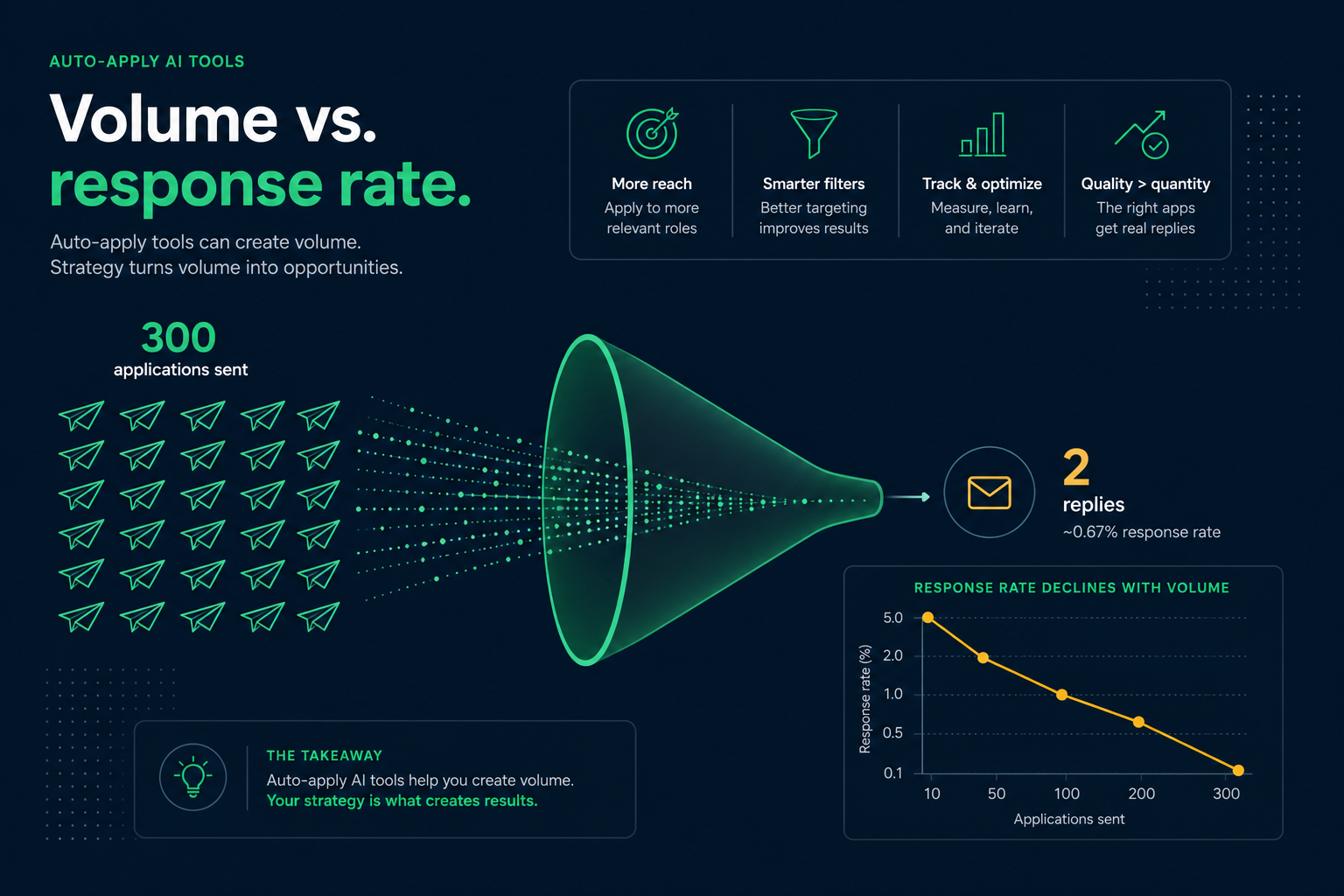
Auto-apply AI tools can submit hundreds of job applications per week, but they rarely produce interviews at a rate that justifies the volume. Most automate form filling and resume upload on simple career pages—they do not solve fit, referrals, or screening questions on Workday and Greenhouse. Job seekers who manually tailor 10–15 strong applications per week usually see better callback rates than users blasting 200+ generic applies.
The tools are not scams; they are mismatched to how US employers actually hire in 2026. Recruiters sort by relevance and referral first. AI-generated tailoring often sounds hollow and triggers duplicate or low-quality flags. This article explains what auto-apply automates well, where it fails, and a hybrid workflow that saves time without torching your reputation in ATS queues.
| Approach | Typical weekly volume | Interview rate trend |
|---|---|---|
| Mass auto-apply (200+) | Very high | Often <1–2% of submissions |
| Loose auto-apply (50–100) | High | Low; quality varies with bot review |
| Hybrid (15 tailored + alerts) | Moderate | Highest per-application yield |
| Referral-led + selective apply | Low–moderate | Best conversion when network active |
Key Takeaways
- Volume ≠ interviews; relevance and referrals dominate ATS ranking
- Workday multi-step flows break most auto-apply bots
- AI-tailored resumes need human review and parse checks
- Track conversion rate, not application count
- Use automation for discovery and autofill—not blind submit
What auto-apply tools actually automate
Products in this category—browser extensions, AI job agents, and subscription "copilots"—typically scrape job boards, match keywords loosely, pre-fill name and contact fields, upload a resume PDF, and click submit on supported sites. Some rewrite a bullet or two per posting using an LLM.
- Job discovery: aggregating LinkedIn, Indeed, and company career pages
- Form autofill: repetitive contact and work history fields
- Resume swap: uploading a base or lightly modified file
- Keyword injection: adding posting terms to skills or summary
- Volume reporting: dashboards showing applications sent per day
They generally do not automate recruiter relationships, internal referrals, portfolio review, take-home assessments, or negotiation. The US Department of Labor employer hiring resources emphasize structured selection—employers still design reqs to filter volume, which works against blast tactics.
Common Mistake: treating "applications sent" as success. Track interviews per 50 applications instead—auto-apply metrics hide poor conversion.
Where auto-apply breaks down in real ATS
Workday and enterprise portals
Workday applications often include knockout questions—years of SaaS experience, clearance, work authorization, salary expectations, and custom multiple-choice screens. Bots that guess or default to "Yes" create obvious mismatches recruiters filter in seconds. Duplicate profiles from repeated bot submissions can flag one candidate record across reqs.
Greenhouse and Lever screening
Greenhouse-hosted career pages frequently require short answers: "Why this company?" or "Describe a project using X." LLM-generated text that mirrors the posting reads as AI to recruiters trained on how to spot AI resumes . Identical phrasing across 80 applications is easy to detect.
Parse and format risk
Auto-tailored PDFs may break layout—extra pages, mangled bullets, or fonts that drop text in iCIMS and Taleo. A bot-optimized keyword version can score 90% on a checker while failing extraction. Always verify parse before any campaign; see why chasing 90%+ scores is a red flag .
Mid-article check: before scaling any automated flow, run your base resume through HireFlow's ATS checker on hireflow.net—confirm Workday-readable text and reasonable match on a sample JD.
Pro Tip: if a posting has more than three custom questions, submit manually—bots rarely answer well enough to pass human review.
What recruiters see when auto-apply floods a req
Corporate recruiters using iCIMS, SuccessFactors, or Greenhouse typically open reqs with 200–1,000+ applicants for popular roles. Sort defaults often prioritize referral, internal, agency, and "strong match" tags—not chronological bot submissions.
Signals that suggest auto-apply or low-effort blast:
- Resume title does not match role seniority (Director title on Associate req)
- Cover letter or answers reuse posting language without specifics
- Same candidate applied to 12 incompatible departments in one week
- Skills list includes every tool in the JD without supporting bullets
- Application timestamp clusters at odd hours with identical IP patterns
Some reqs are also ghost postings —auto-apply sends even more volume into black holes. Filtering fake or stale jobs matters more than sending faster.
Key Takeaway: recruiters optimize for fewer, better matches—not more applications to scroll.
Before/after: application text auto-apply produces vs human-tailored
| Before (auto-apply output) | After (human-tailored) |
|---|---|
| Summary: Results-driven professional eager to unlock synergies in a fast-paced environment. Skills: everything from the job description. | Summary: B2B SaaS Account Executive — $1.2M ARR quota attainment 118% FY25; Greenhouse and Salesforce daily; mid-market fintech focus. |
| Workday question "Why us?": I am passionate about your innovative solutions and would be a great fit for your team culture. | Why us?: Used your API sandbox at prior role; spoke with AE Jane Doe at SaaStr; targeting your payments vertical where I closed 4 deals last year. |
| Bullet: Responsible for managing client relationships and delivering outcomes. | Bullet: Managed 28 mid-market accounts ($8K–$40K ACV) in Salesforce; reduced churn 11% via quarterly QBRs and expansion plays tied to product usage data. |
Common Mistake: letting auto-apply inject banned corporate buzzwords. Recruiters pattern-match generic AI tone in the first sentence.
Track conversion, not vanity metrics
Job search efficiency in 2026 is a funnel problem. Measure:
| Metric | How to calculate | Healthy range (varies by role) |
|---|---|---|
| Screen rate | Recruiter replies ÷ applications | 5–15% for well-targeted campaigns |
| Interview rate | Interviews ÷ applications | 2–8% when fit is strong |
| Offer rate | Offers ÷ interviews | 20–40% with solid prep |
Read how to track job search conversion rate for spreadsheet templates. If auto-apply pushes applications 10× but interview rate drops 5×, you are moving backward.
Quick Check: divide last month's interviews by applications. If below 1%, fix targeting and resume quality before buying more automation credits.
Hybrid workflow that beats pure auto-apply
- Alerts, not auto-submit: Use job alerts and RSS; you choose which reqs enter your queue.
- Parse-safe base: One ATS-friendly resume in HireFlow's free builder ; verify in checker.
- Tier your list: A-tier (tailor fully), B-tier (light keyword swap), C-tier (skip)—never auto-send C-tier.
- 15 quality applies/week: Adjust title, three bullets, skills; match check each A-tier JD.
- Autofill only: Browser autofill for contact fields saves time without misrepresenting screening answers.
- Referrals weekly: Two informational chats beat 50 cold bot applies on Lever.
For tool pairing (tracker + checker), see Teal vs Jobscan vs HireFlow . Automation belongs at the edges of this workflow—not at submit.
Pro Tip: batch similar reqs (same title family) and tailor once per batch—efficiency without blind mass apply.
Auto-apply success rates by employer ATS platform
Not all career sites behave the same. Bots that work on a one-click Indeed Easy Apply often fail on a six-step Workday req with visa attestation. Use this matrix to set expectations before you automate anything.
| Platform | Auto-apply reliability | Human must handle |
|---|---|---|
| Workday | Low on multi-step reqs | Screening Qs, work history autofill review, assessments |
| Greenhouse | Low–medium | Short answers, portfolio links, culture fit prompts |
| Lever | Medium on simple flows | Custom questions, EEO optional disclosures |
| Taleo / Oracle | Low; legacy UI variance | Profile creation, questionnaire loops, document uploads |
| iCIMS | Low–medium | Parse verification after upload, knockout questions |
| ADP Recruiting | Medium for staffing agency simple posts | Compliance attestations, shift availability |
Enterprise employers on SuccessFactors and Workday increasingly add assessment vendors after resume upload. A bot that stops at PDF submit never sees those steps—your application looks complete to you but incomplete to the ATS status field recruiters filter on.
Key Takeaway: the more steps after resume upload, the less auto-apply helps—and the more damage a bad auto-answer can do.
Red flags in auto-apply vendor marketing
Legitimate productivity tools exist; exaggerated claims are common. Walk away when you see:
- Guaranteed interviews or specific salary outcomes from mass apply
- "Beat the ATS" language implying employers reward bot volume
- No mention of screening questions, assessments, or referral strategy
- Resume rewriting without human review or parse verification step
- Dashboards that only count applications sent—not replies or interviews
Compare vendor promises to whether high ATS scores get interviews . Keyword match and application volume are inputs; hiring decisions are not linear functions of either.
Common Mistake: trusting a tool's "success story" screenshot without sample size. One interview from 400 applies is not a scalable strategy.
When limited automation still helps
Auto-apply is not useless—it is misapplied when treated as an interview engine. Reasonable uses:
- Saving drafts on repetitive simple apply forms (name, phone, LinkedIn URL)
- Aggregating new postings that match boolean search criteria
- Reminding you to follow up on stalled Greenhouse applications
- Generating first drafts of bullets you then edit with real metrics
The EEOC guidance on employment tests and selection reminds employers to validate selection procedures. Candidates mirror that logic: automate administrative steps, not truthfulness about qualifications.
Common Mistake: paying $50–100/month for auto-apply before fixing a resume that does not parse—speeding up broken submissions multiplies rejections.
Cost-benefit math auto-apply vendors rarely show
Run the numbers before subscribing. Example: $79/month auto-apply plan promising 200 applications weekly.
- 200 applies × 4 weeks = 800 submissions/month
- 1% interview rate (optimistic for blast) = 8 phone screens
- Cost per interview ≈ $79 ÷ 8 = ~$10 before your time
- Hybrid 50 applies/month at 6% screen rate = 3 interviews with $0 tool cost if you use free HireFlow + spreadsheet
Auto-apply can look cheap per application ($0.10 each) while remaining expensive per interview—and costly to your reputation if recruiters flag low-quality repeat submissions in Lever. Time spent fixing one parse-safe resume often returns more screens than another month of bot volume.
For resume quality before any spend, use how to pass an ATS checker as your pre-flight—not a bot dashboard.
Key Takeaway: divide subscription cost by interviews gained, not applications sent. If the vendor will not help you track that, build your own spreadsheet.
Pre-subscribe checklist: should you buy auto-apply?
Answer honestly before entering a credit card. If more than two answers are "no," fix fundamentals first.
- Does your resume parse cleanly in a free ATS checker (single-column, plain text)?
- Are you already applying to roles you meet 70%+ of must-have requirements?
- Do you track applications and follow up without a tool failing you?
- Is your current interview rate below 1% after 50+ manual tailored applies?
- Will you review every AI-edited bullet before submit—not just trust the bot?
- Can you avoid auto-answering Workday knockout and visa questions incorrectly?
- Do you have weekly time to network, not only to increase apply volume?
Auto-apply is a multiplier. Multiplying zero fit or a broken resume still yields zero interviews. Candidates who pass this checklist usually benefit more from a free parse check on hireflow.net and 15 selective applies than from another 300 blind submissions.
If you already use a job tracker, pair it with manual applies for A-tier reqs only. The combination preserves organization without training recruiters to ignore your name in a sea of identical AI cover letters on Taleo and SuccessFactors requisitions. Response rates recover when each submission sounds like you—not like a template shared across hundreds of employers in the same week. That single habit does more for Lever and iCIMS visibility than any auto-apply subscription tier.
Quick Check: screenshot your last 20 applications. If fewer than half were roles you would take on day one, auto-apply is widening the wrong funnel.
Before and after (ATS-safe wording)
Key Takeaway: keep the same fact, add the tool name and a number.
| Before | After |
|---|---|
| Responsible for reports and team support. | Built weekly Workday headcount reports that cut manager follow-ups by 30%. |
| Used office software and helped customers. | Processed 40+ Greenhouse tickets/week in Zendesk with 96% CSAT. |
| Improved processes across the department. | Mapped the Taleo requisition workflow and cut time-to-post from 5 days to 2. |
Auto-apply AI tools are efficient at clicking submit—not at earning interviews. In 2026, US hiring still rewards fit, proof, and referrals inside Workday, Greenhouse, and Lever queues. Use automation to find openings and save typing; keep tailoring, honesty, and follow-up human. Measure success in conversations booked, not buttons clicked.
Before your next campaign, verify parse quality and match on priority reqs with HireFlow's free ATS resume checker on hireflow.net—then apply selectively where you are genuinely qualified. One strong application with a verified parse beats a hundred auto-submits that recruiters never open.
Frequently asked questions
Sometimes, but rarely at scale proportional to application volume. Most users see very low interview rates—often under 2% of automated submissions—because bots send generic resumes to poor-fit roles, fail on Workday assessment questions, and trigger duplicate-application flags. Targeted manual applications with tailored resumes consistently outperform mass blast in callback data job seekers report.
Using automation is not illegal for candidates in most US jurisdictions, but it may violate individual employer terms of service on career sites. Some companies deploy bot detection on Greenhouse and Workday portals. Misrepresentation—claiming skills an AI inserted that you do not have—creates integrity issues if discovered in background checks.
Recruiters on Lever and iCIMS already receive hundreds of applicants per req. Auto-apply floods add unqualified volume, identical cover letters, and wrong seniority matches. Many ATS views sort by referral, internal, and recency—cold auto-applies sink to the bottom before a human opens them.
Some tools rewrite bullets or swap keywords per posting using LLMs. Quality varies: outputs often sound generic, repeat posting phrases, or add tools you have never used. Without a human review pass and parse check, tailored-by-AI resumes can score high on keyword checkers while failing human screen or onboarding verification.
A hybrid workflow: build one parse-safe base resume, manually tailor top 10–15 postings per week with ATS check against each JD, track in a CRM like Teal, and network for referrals. Use automation only for job alerts and application form autofill—not full unattended submission on assessment-heavy Workday flows.
Partially. Simple apply flows with resume upload only are easier to automate. Multi-step Workday questionnaires, EEO attestations, custom screening questions, and video intro prompts break most bots. Greenhouse forms with required short answers often need human input—bots that guess produce obvious mismatches.
Quality-focused seekers typically submit 10–20 well-tailored applications per week plus networking touchpoints. That sustains keyword tailoring, company research, and follow-up. Beyond 30–40 manual applies per week, fatigue usually collapses quality—exactly when auto-apply tempts, and exactly when response rates fall.
Entry-level postings attract the highest applicant volume, so auto-apply competes with thousands of similar blast resumes. Even at junior level, selective targeting—campus ties, internships, project keywords—beats volume. Reserve automation for discovering openings, not submitting unreviewed materials.