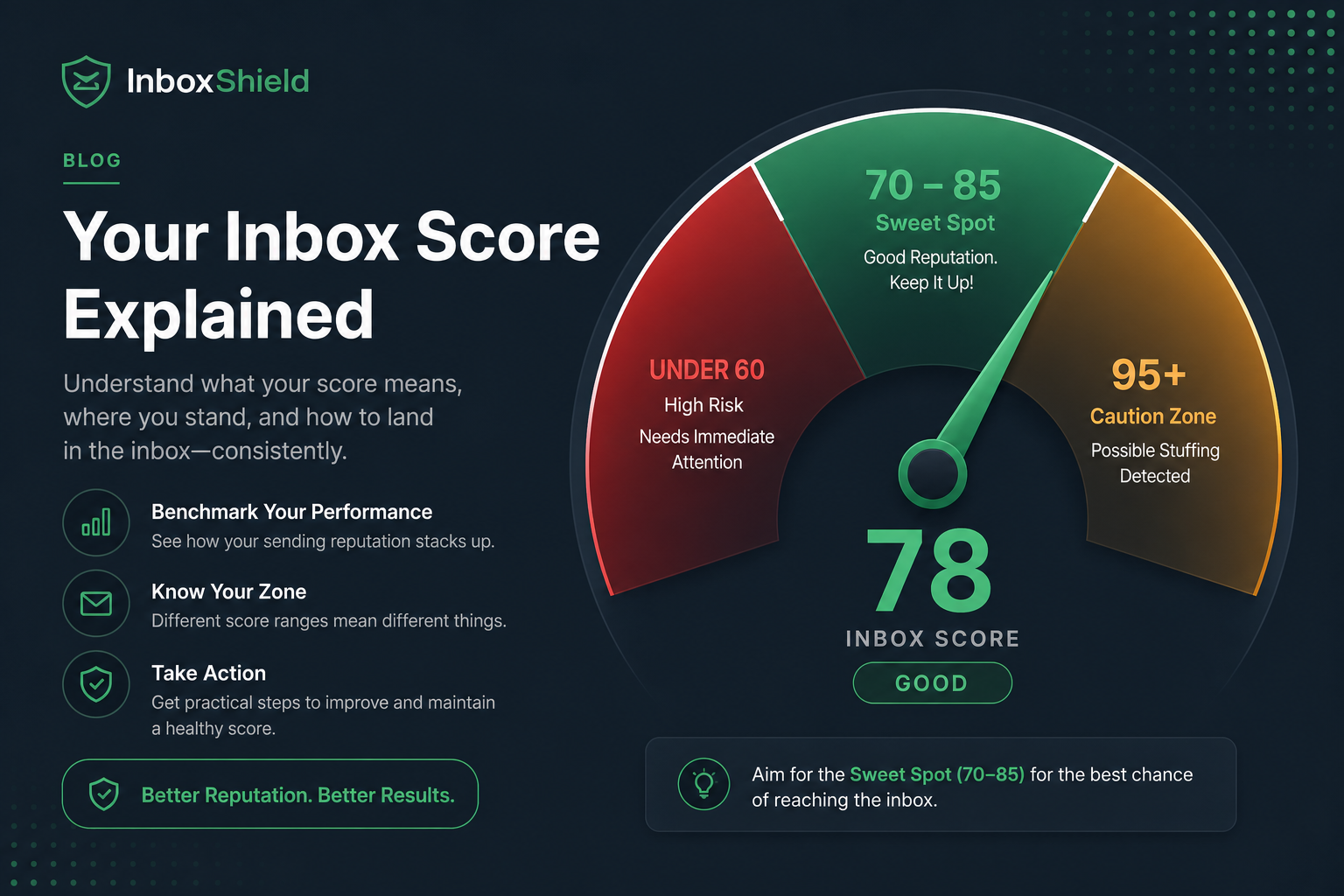
A good ATS score on a resume checker is usually 70–85% when you compare your resume to one specific job description—not 95% or 100%. That range typically means your title, must-have skills, and experience bullets overlap what the posting asks for, your file parses as plain text, and you have not stuffed the job description into your skills block.
Scores above 90% are often a red flag: they can mean keyword stuffing, copied posting language, or a checker run against the wrong role level. Employer ATS platforms like Workday, Greenhouse, iCIMS, and Taleo do not show candidates a single percentage—they rank applicants with proprietary models. Third-party scores are a tailoring compass, not an interview ticket.
| Checker score (vs one JD) | What it usually means | What to do next |
|---|---|---|
| Below 55% | Major gap: wrong title, missing must-haves, or parse failure | Parse test first, then align headline and top bullets |
| 55–69% | Qualified but under-tailored; nice-to-haves missing | Add 3–5 honest keywords with proof bullets |
| 70–85% | Healthy match for roles you actually fit | Apply; polish metrics and human readability |
| 86–92% | Strong overlap—watch for over-mirroring posting text | Read aloud; remove duplicate JD phrases |
| 93%+ | Often stuffing, wrong JD, or inflated skills list | Strip unverifiable keywords; verify each claim |
Key Takeaways
- Score against one job description at a time—global scores are meaningless
- 70–85% is the practical target when you are genuinely qualified
- 90%+ often signals stuffing, not a better candidate
- Employer ATS ranking ≠ checker percentage on hireflow.net or elsewhere
- Fix parsing and title alignment before chasing more keywords
What an ATS score actually measures
Resume checkers estimate text overlap between your resume and a pasted job description. Most tools count hard skills, certifications, job titles, and sometimes soft-skill phrases. They may also flag format risks—tables, columns, headers—that hide text from parsers used by Workday and Lever.
They do not measure your interview charisma, referral strength, internal candidate status, or whether a recruiter already knows your work. The EEOC guidance on selection procedures reminds employers that automated screens must be job-related; checkers approximate keyword fit, not legal compliance or hiring decisions.
- Keyword presence: Does extracted text include terms from the posting?
- Title alignment: Does your headline match role level (Senior vs Lead)?
- Skills distribution: Are terms in skills and experience bullets?
- Parse quality: Can the tool read your file at all?
- Density warnings: Repeated phrases that look like stuffing
For how recruiters use these systems after upload, see how ATS really works in recruiter workflow . The score you see is a pre-application sanity check—not what appears on a hiring manager's screen.
Common Mistake: comparing your HireFlow or Jobscan score to a friend's score for a different job family. Marketing manager and product manager postings use different keyword sets—a 72% for one is not comparable to 72% for another.
Why 90%+ scores often hurt more than help
Job seekers chase 95% because the number feels objective. In practice, ultra-high scores usually come from one of three patterns—and recruiters spot all three quickly in human review or semantic ranking layers inside iCIMS and SuccessFactors.
- Posting paste: Skills block mirrors the job description sentence structure. ATS duplicate-text flags and hiring managers notice verbatim copy.
- Skill inflation: Every tool in the posting appears on your resume though you have not used half of them in three years.
- Wrong posting: Checker run against a senior req while your resume reflects mid-level scope—keywords match on paper only.
Modern systems increasingly use semantic matching—not just keyword counts. Semantic matching in ATS rewards context in bullets ("reduced churn 14% using SQL cohort analysis") over a naked list of "SQL, Python, Tableau, Looker, Snowflake." A 94% keyword score with hollow bullets can still rank below a 78% resume with strong proof.
Pro Tip: if your score jumped 15+ points in one edit, re-read the diff. Large jumps usually mean you added words, not better evidence.
A good ATS score does not guarantee interviews
Passing a keyword threshold gets you into the searchable pool in Greenhouse or Taleo. Interviews still depend on volume of applicants, referral priority, portfolio quality, and recruiter bandwidth. A Bureau of Labor Statistics employment situation report context: labor market tightness shifts weekly—your score is one variable among hundreds of applications per req in popular roles.
Read whether a high ATS score gets you an interview for realistic expectations. Aim for "clearly qualified on paper" (that 70–85% band) then invest energy in networking and role targeting—not endless rescans chasing 98%.
Mid-article check: paste your tailored resume and the target JD into HireFlow's ATS resume checker on hireflow.net. Confirm parse quality and keyword gaps before you apply on the employer's Workday portal.
Quick Check: can you defend every skill above 80% match in a two-minute interview story? If not, remove or downgrade it.
Before/after edits: score impact without stuffing
These rewrites target a operations analyst posting searching Workday, SQL, variance analysis, and stakeholder reporting. Notice how proof raises match quality without copying the job description wholesale.
| Before (weak — ~58% match) | After (strong — ~76% match) |
|---|---|
| Business Analyst — helped teams with data and reports. | Operations Analyst — built weekly variance decks in SQL + Excel for $40M P&L; automated Workday headcount exports cutting close time 6 hours. |
| Skills: SQL, Excel, communication, problem solving, Agile, Scrum, Jira, Tableau, Power BI, Python, R, stakeholder management, leadership. | Skills: SQL (joins, window functions), Excel (pivot, XLOOKUP), Workday reporting, variance analysis, executive stakeholder updates. |
| Worked on cross-functional projects and delivered insights to leadership. | Partnered with FP&A and HRIS on headcount forecasting; presented monthly KPI trends to VP Ops—12% improvement in forecast accuracy YoY. |
Common Mistake: shrinking the skills list from twenty generic terms to eight specific ones can raise recruiter trust while keeping checker score in the healthy band—bigger is not better.
How to raise a low score the right way
If you are under 65% on a role you have actually done, work through this order. Format problems masquerade as keyword gaps—especially on resumes exported from design tools.
- Parse test: Copy resume into Notepad. If text order is scrambled, fix layout before keywords. See PDF vs DOCX for ATS .
- Title line: Match posting title when accurate (Senior Product Manager, not just Manager).
- Must-haves: Highlight required skills in the JD; add only those you can defend with a bullet.
- Acronyms: Spell once then abbreviate—"Customer Relationship Management (CRM)" if the posting uses both forms.
- Rescan once: Stop after one improvement pass. Diminishing returns set in after 75–85%.
Deeper troubleshooting: why your ATS score is low and how to pass an ATS checker step-by-step .
Key Takeaway: one tailored resume per application beats one overstuffed resume chasing 95% on every posting.
Why two checkers give you different scores
Tools weight categories differently—hard skills vs soft skills vs education vs job title. One checker may treat "project management" as a match for "program management" while another does not. Scores are directionally useful, not standardized like a credit score.
| Factor | Effect on score |
|---|---|
| Synonym handling | ±5–10 points between tools |
| Skills block vs bullets | Some tools only scan skills section |
| Format detection | Unreadable PDF may score 0% on all keywords |
| JD length | Long postings dilute match % unless you mirror volume |
Quick Check: pick one checker, use it consistently per campaign, and track relative improvement—not absolute numbers across different products.
Before and after (ATS-safe wording)
Key Takeaway: keep the same fact, add the tool name and a number.
| Before | After |
|---|---|
| Responsible for reports and team support. | Built weekly Workday headcount reports that cut manager follow-ups by 30%. |
| Used office software and helped customers. | Processed 40+ Greenhouse tickets/week in Zendesk with 96% CSAT. |
| Improved processes across the department. | Mapped the Taleo requisition workflow and cut time-to-post from 5 days to 2. |
Treat ATS scores like a thermometer: useful when read in context, misleading when you chase a perfect number. Target 70–85% against each posting you are qualified for, keep claims defensible, and stop when improvements start to sound like the job ad—not your career.
Run your next tailored version through HireFlow's free ATS resume checker on hireflow.net—parse check and match score in one pass, no signup required.
Frequently asked questions
Against a specific job description you are targeting, 70–85% usually means strong overlap on required skills, title alignment, and parseable formatting—without obvious keyword stuffing. Below 60% often signals missing must-have terms, a title mismatch, or a file that does not extract cleanly in Workday or Greenhouse. Scores are not universal; a 78% on one posting may be 62% on another because the keyword set changes.
Not always. Scores above 90% frequently mean you pasted large chunks of the job description into your skills section, listed tools you have not used in years, or ran the checker against a posting that is a poor fit for your background. Recruiters notice unnatural keyword density in human review—and semantic matchers in modern ATS platforms can down-rank resumes that mirror posting text too closely.
No. Third-party checkers estimate overlap between your resume text and a pasted job description. Employer systems like Workday, iCIMS, Lever, and Taleo use proprietary ranking models that weigh recency, seniority signals, location, and referral status—not a single percentage shown to candidates. Treat checker scores as a tailoring diagnostic, not a guarantee of interview placement.
Checkers penalize duplicate phrases, skills blocks that exceed reasonable length, and keywords with no supporting bullets. Adding "stakeholder management" twelve times or listing every tool in the posting without context can lower readability scores and trigger stuffing warnings. One honest keyword in a results bullet usually beats five copies in a skills cloud.
No. A 100% match often requires misrepresenting experience or copying posting language verbatim—both risk rejection at the human screen. Aim for high coverage on must-have requirements you genuinely meet, clean parsing, and a title line that matches the role level. Missing one nice-to-have tool is fine if core requirements are visible in plain text.
There is no universal cutoff. Below 55–60% against a posting you are qualified for usually means fixable gaps: wrong job title, missing certification acronym, or a two-column template hiding skills. If you are below 50% on roles you have done for years, run a parse test and compare your headline and top three bullets to the posting's must-have list before skipping the application.
Yes. A keyword-rich resume inside a Canva graphic or multi-column PDF may score low because the checker cannot extract text—even though the design looks professional. DOCX or a simple one-column PDF typically parses better in Greenhouse and Workday. Fix format first; chasing keywords on an unreadable file wastes time.
Run a fresh check every time you tailor for a new posting, after any format change, and once more before batch applying to similar roles. Keep a saved base resume at 65–75% against your target role family, then push to 75–85% per application by swapping title, skills, and two to three bullets—not by rewriting the entire file from scratch each time.