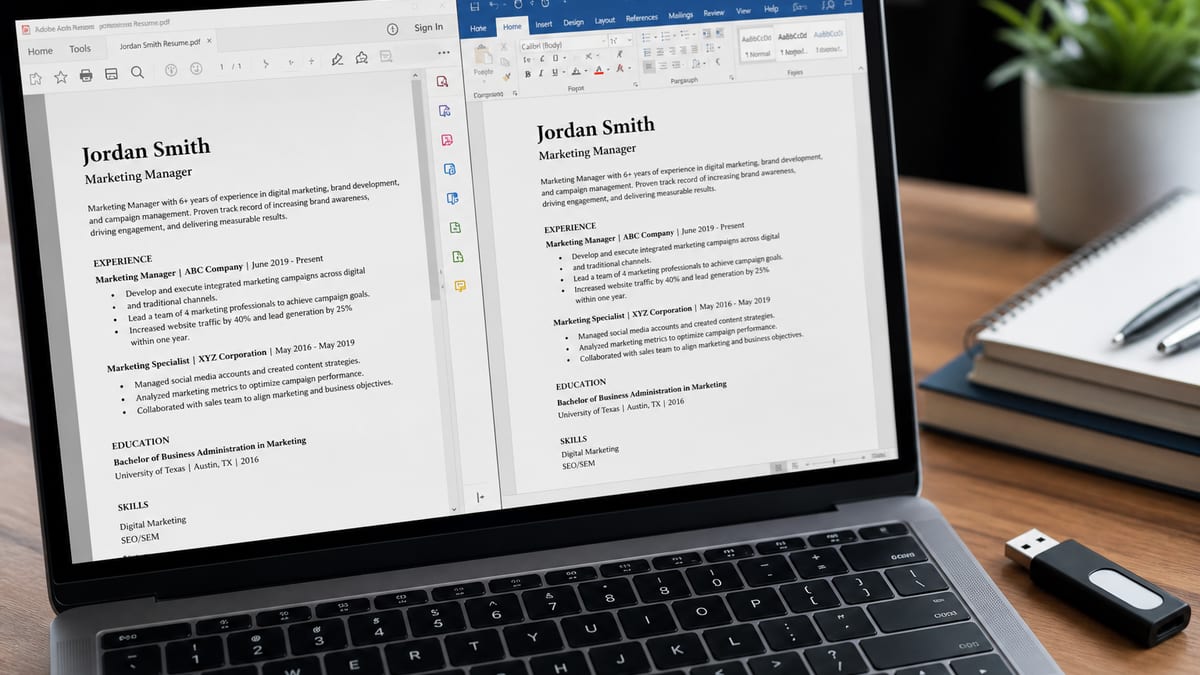
Yes—if your PDF contains real, selectable text. The question can ATS read PDF is almost always the wrong fight. An applicant tracking system (ATS) is software that stores, parses, and ranks resumes before a human ever opens them. Modern ATS stacks parse PDF and DOCX every day. What they struggle with are scanned images sold as PDFs, multi-column designs that scramble reading order, and contact details trapped in headers or shapes.
Key Takeaways
- PDF and DOCX both parse fine when the file has real, selectable text.
- Scanned or photographed resumes are the real risk, not the file extension.
- Multi-column layouts and text boxes scramble reading order in many ATS parsers.
- The select-and-copy test in ten seconds tells you if a PDF is text-based.
- Follow the portal's requested format; keep both PDF and DOCX exports ready.
Below: PDF vs DOCX in plain language, how to tell text PDFs from scans, layout rules that keep Workday/Greenhouse/Lever happy, before/after export habits, and a check workflow on hireflow.net. For the wider screening path, see how ATS really works . For score context after you export, read what a good ATS score means . For tool shopping, use the free ATS checker comparison .
Short answer: PDF is fine; image PDFs are not
Key Takeaway
A text-based, single-column PDF is a normal ATS upload in 2026. A photographed or flat-exported “PDF” without selectable text is a picture, not a resume the parser can trust.
Recruiters and career coaches still repeat advice from a decade ago: “Never use PDF, only Word.” That advice aged. Enterprise portals accept PDF because candidates send PDF. The systems improved. The failure mode shifted from “PDF forbidden” to “this PDF has no usable text” or “this PDF’s text order is nonsense.”
Quick test: open your resume PDF and try to highlight a bullet. Selectable text means a text layer exists. If the cursor treats the page like a photo, rebuild the file before you apply to fifty roles.
Real scenario: Priya designs a beautiful resume in Canva, exports PDF, and applies to 30 analyst roles. On her laptop it looks crisp. In Workday, the parser reads the left skills column first, then fragments her experience into one block with broken dates. Recruiters searching “Financial Analyst” + “SQL” never see a clean profile. Priya switches to a plain Google Docs export—same content, boring layout—and starts getting profile views. The brand of ATS did not change. The text order did.
PDF vs DOCX: pick what the portal wants, keep both clean
Key Takeaway
File extension is secondary. Layout and text extractability are primary. Follow the portal’s preference; keep a simple master that exports well to either format.
| Format | Strengths | Risks | Best when |
|---|---|---|---|
| Text PDF | Looks stable across devices; widely accepted | Bad exports from design tools; columns | Portal lists PDF or either |
| DOCX | Easy for many parsers; easy to edit | Weird styles, text boxes, tracked changes | Portal insists on Word |
| Image PDF / scan | None for ATS portals | Little or no extractable text | Almost never—rebuild instead |
| Pages / proprietary | Fine on your Mac | Portals may reject the extension | Export to PDF/DOCX first |
Keep one master in Google Docs, Word, or a simple resume builder. Export PDF or DOCX on demand. Do not maintain three divergent “versions” that drift on dates and titles.
Text PDF vs scanned image: the difference that matters
Key Takeaway
Text PDFs contain characters the ATS can extract. Scans are pictures. OCR at the employer is unreliable. If you cannot select text, do not mass-apply that file.
People create image PDFs by accident: phone photos of a printed resume, “print to PDF” from a flattened design, or export settings that rasterize everything. Humans can still read those files. Parsers often cannot build a useful candidate object.
Signs you have a problem:
- You cannot select or copy text in Preview/Acrobat
- Zooming makes letters look soft like a photo
- File size is huge for one or two pages of “text”
- An ATS checker reports empty sections or missing contact fields
Fix: rebuild in a word processor or HireFlow’s free builder, paste real text, export a fresh PDF, and confirm selection works. Then re-check parse flags.
Layout problems that break PDF parsing more than file type
Key Takeaway
Columns, tables-as-design, text boxes, icons for contact, and creative headings cause more “ATS can’t read my PDF” complaints than the letters P-D-F.
Even with a perfect text layer, reading order can fail. Parsers often walk the page top to bottom, left to right, in ways that do not match your visual design.
- Two columns: Skills sidebar may be read before or after the wrong jobs.
- Tables: Dates and titles can swap cells or merge rows.
- Text boxes / shapes: Contact lines disappear from the profile.
- Headers/footers: Some systems skip them; put email and phone in the body.
- Icons: A glyph is not the word “Email.” Type the label.
- Graphics and charts: Pretty, but they add noise and file weight.
Before (looks designed, parses poorly): two-column Canva PDF, phone in header shape, skills as icon badges.
After (looks plain, parses cleanly): single column, “Email: [email protected],” Experience / Education / Skills headings, month/year dates, bullets with tools named in words.
Want to know if your PDF is parse-safe before another portal upload?
Use HireFlow’s free ATS resume checker — PDF or DOCX, no account, ranked formatting flags you can fix tonight.
What Workday, Greenhouse, and Lever tend to do with PDFs
Key Takeaway
Brands differ in UI, not in the need for extractable text. Workday may feel field-heavy; Greenhouse and Lever feel search-driven. All punish messy PDFs.
Candidates treat ATS brands like enemies with secret PDF rules. Hiring teams treat them like databases. Practical differences:
- Greenhouse / Lever: Attachment is close, but recruiters still search parsed titles and skills first.
- Workday: More structured fields; a bad parse plus sloppy form answers compounds fast.
- All: Image PDFs and wild columns create empty or scrambled cards.
Optimize for a tired recruiter’s search grid, not for printouts from 2012. More on that path here: will recruiters see my resume .
Export checklist: ship a PDF the ATS can actually read
Key Takeaway
Build simple, export text PDF or DOCX, confirm selectable text, run a checker, then apply. Redesign after you are findable—not before.
- Write in Word, Google Docs, or a simple builder—not a poster tool.
- Single column; standard headings; contact in the body.
- Export PDF (or DOCX if required). Avoid “flatten” / image-only settings.
- Select-and-copy test on page one.
- Upload to an ATS checker; fix formatting flags; re-export; re-scan.
- Keep file size reasonable; strip huge background images.
- Name the file clearly: FirstLast_Role_Resume.pdf.
| Symptom | Likely cause | Fix |
|---|---|---|
| Cannot select text | Image/scan PDF | Rebuild + text export |
| Phone missing in ATS | Header/text box contact | Move contact into body |
| Jobs in wrong order | Columns / tables | Single-column stack |
| Portal rejects file | Wrong type or huge size | DOCX/PDF per rules; compress |
Verify on HireFlow, then interpret the score sanely
Key Takeaway
A checker will not clone every employer parser, but it will catch text-layer and layout disasters before you burn a week. Treat scores as diagnostics—see what a good ATS score means for bands.
Workflow: upload to HireFlow’s free ATS resume checker , fix structure first, re-scan, then worry about keywords. Compare free tools with the comparison guide . Read score bands in what’s a good ATS score .
Bottom line: can ATS read PDF resumes? Yes—when the PDF is real text in a sane layout. Stop debating extensions. Fix scans, columns, and contact fields, then apply with a file a parser can store and a recruiter can find.
How parsers actually “read” a PDF
Key Takeaway
Parsers extract characters and infer fields. They do not admire your visual hierarchy the way a human does. Reading order and text objects decide whether can ATS read PDF content into a usable profile.
Under the hood, a text PDF stores glyphs and positions. Extraction libraries walk those objects and rebuild strings. Then the ATS tries to map strings into name, email, employers, titles, dates, education, and skills. Your two-column design may look balanced to eyes and still feed the extractor the left rail first—skills, then a fragment of experience, then the rest in a muddled order.
That is why “the PDF looks perfect on my Mac” is not evidence the ATS can read it. Visual perfection and extractable structure are different problems. Designers optimize the first. Portal uploads need the second.
DOCX files often expose a clearer linear document model (paragraphs, runs, styles). That can make older parsers happier. It does not make DOCX magic. A DOCX full of text boxes and nested tables fails the same way a designed PDF fails. Clean structure wins in both formats.
If you want a mental model: imagine pasting your resume into Notepad. If the Notepad version is gibberish—skills before jobs, dates split mid-line, email missing—you simulated a bad parse. Fix that linear story, then export.
Design tools, “Print to PDF,” and other accidental image exports
Key Takeaway
Many “ATS can’t read my PDF” cases are export accidents. Prefer Word/Google Docs or a simple builder; verify selectable text every time you export.
Creative tools are excellent for portfolios and one-pagers you email after a recruiter asks. They are risky as your only portal file. Export settings may flatten text into outlines or images. Columns are the default aesthetic. Icons replace labels. The result looks premium and parses like a poster.
Common accident patterns:
- Phone photo of a printed resume saved as PDF
- “Print to PDF” from a slide deck resume
- Design export with “flatten” or “outline text” enabled
- Password-protected or permission-restricted PDFs some portals reject
- Multiple embedded fonts and huge background images that hit upload limits
Safer path: keep a master in Google Docs, Microsoft Word, or HireFlow’s free resume builder. Export PDF for portals that ask for PDF. Export DOCX when the portal demands Word. Run the select-text test. Then run an ATS checker so you are not guessing.
If a hiring manager later asks for a “designed” version for a leadership packet, you can produce it then. Do not let a decorative file block the database record that gets you into the packet.
Portals that make you retype everything: why the PDF still matters
Key Takeaway
Form fields become searchable data. The attachment still gets opened for finalists. Keep both consistent—and never assume retyping means the PDF is ignored forever.
Workday-style flows often parse your upload, then force you to confirm fields. People conclude the PDF is irrelevant. Wrong. Recruiters still download attachments. Parsing still seeds the first draft of your profile. A bad PDF creates bad defaults you may forget to fix in the form—compounding the error.
Checklist when a portal dual-writes:
- Upload the clean text PDF/DOCX first.
- Read every pre-filled field. Fix titles, dates, and employer names.
- Match years of experience answers to the resume timeline.
- Do not leave parsed garbage in “current title.”
- Save and reopen the application review screen if the portal allows.
Inconsistency between form and file is a quiet killer. A recruiter sees “Senior Analyst” on the card and “Coordinator” on the PDF. You look careless even when both titles were true at different times. Align the story.
Industry norms: when PDF is expected vs when Word wins
Key Takeaway
Follow the posting. Keep both clean masters. US corporate portals usually accept PDF; some older government or vendor systems still prefer DOCX.
Tech and startup careers pages usually accept PDF happily. Some federal, healthcare staffing, or older enterprise vendor portals still say “Word only.” International employers may say “CV as PDF.” None of that rewrites the text-layer rule.
| Situation | Prefer | Watch-outs |
|---|---|---|
| US corporate portal, either allowed | Text PDF | Avoid design-tool flatten exports |
| Portal says Word/DOCX only | DOCX | Accept tracked changes; use final |
| Email to founder / small team | Still keep text selectable | |
| Staffing agency asks for editable | DOCX | They may reformat—keep a master |
Build once with simple formatting. Export to the format requested. Re-verify after every major edit. That habit answers can ATS read PDF better than any Twitter thread arguing about extensions.
A 10-minute QA routine before every batch of applies
Key Takeaway
Select-text, skim linear order, checker scan, filename, portal type. Ten minutes prevents a week of silent applications.
- Open the export; select a full paragraph on page one and page two.
- Copy into a plain text note; confirm job order and dates look sane.
- Confirm email and phone appear as typed words in the body.
- Upload to an ATS checker; clear critical formatting flags.
- Confirm the portal wants PDF or DOCX; upload the matching export.
- After form fill, spot-check pre-filled title and dates.
Do this when you change templates, not only when you change verbs. Template swaps are when text layers and columns sneak back in. If you are job-searching hard for a month, schedule the QA routine every Sunday night before the next apply batch.
Before/after export stories that show up in real ATS profiles
Key Takeaway
Same career, different export, different searchable profile. Treat export settings as part of your application—not an afterthought.
Case 1 — Marketing manager: Designed PDF with a left skills rail. Greenhouse shows skills first, then a jumble of dates. Recruiter search for “Product Marketing” misses the title buried mid-page. After a single-column Google Docs PDF with selectable text, the title sits at the top of the experience block and appears in search.
Case 2 — Nurse applicant: Phone photo of a printed CV uploaded as PDF. Workday extracts almost nothing. Candidate retypes into Word, exports text PDF, and license plus unit names finally populate fields. Knockouts still matter, but at least humans can find the file.
Case 3 — Engineer: DOCX with text boxes for contact. iCIMS drops the email. Moving contact into the body header line fixes outreach. PDF vs DOCX was never the debate—text boxes were.
Steal the pattern: reproduce the failure with select-text and a checker, change one variable (layout, export, contact placement), re-test, then apply. That loop answers can ATS read PDF for your file specifically.
Fonts, graphics, headers, and footers: small choices, big parse gaps
Key Takeaway
Stick to standard fonts, skip decorative lines as content carriers, and never rely on headers alone for email or phone.
Exotic fonts sometimes subset weirdly. Huge background shapes become image noise. Horizontal rules are fine; text hidden in footers is not. Page numbers in footers are fine; your only phone number in a footer is not.
Graphics that represent skills (Python logo, Tableau icon) do not count as the words “Python” or “Tableau” for many parsers. Type the tool names. Save icons for personal websites.
Hyperlinks can be helpful if the visible text is still readable when stripped. A logo that links to LinkedIn without the word LinkedIn nearby is a common miss. Write “LinkedIn: linkedin.com/in/you” in plain text.
If you must keep light branding for human readers, confine it to a simple name line— not a multi-column hero. The ATS question is literacy, not aesthetics.
Decision tree: which file should you upload tonight?
Key Takeaway
Portal rules first, text layer second, layout third. If any step fails, rebuild before you apply.
- If the portal requires DOCX, upload a clean DOCX—not a renamed PDF.
- If PDF is allowed and your text PDF selects cleanly, upload that PDF.
- If you cannot select text, stop. Rebuild and re-export.
- If select works but columns remain, convert to single column and re-export.
- Run a checker. Clear critical flags. Then submit.
That tree is the practical answer to can ATS read PDF resumes: yes for text PDFs with sane layout; no reliable yes for scans; DOCX when required; always verify. Keep a master, export on demand, and refuse to scale applications on an untested file.
If you only remember one habit from this guide, make it the select-text test after every export. It catches more silent failures than arguing about file extensions on social media ever will.
When recruiters download the PDF anyway
Key Takeaway
Parse gets you found. The attachment still needs to skim cleanly for humans who open it on a laptop or phone between meetings.
Even when can ATS read PDF is answered yes for your text layer, finalists get a human read. Recruiters forward PDFs to hiring managers. Managers print or pinch-zoom on mobile. A parse-safe but visually chaotic file can still lose the second gate.
Keep margins sane, type sizes readable, and bullets short enough to scan. You do not need heavy design. You need hierarchy: name, title, recent roles, proof. That dual standard—machine readable and human skimmable—is the real PDF goal in 2026.
Frequently asked questions
Yes—modern Workday, Greenhouse, Lever, and iCIMS stacks routinely parse text-based PDFs. The risk is not the .pdf extension. The risk is image-only scans, multi-column layouts, text boxes, and contact details trapped in headers. A clean single-column text PDF usually works. If you cannot select and copy text in Preview or Acrobat, rebuild before you apply at scale.
DOCX is often slightly easier for older parsers, but both are widely accepted in 2026. Pick the format the portal asks for. If either is allowed, use a simple single-column file with a real text layer. Fancy designed PDFs fail more often than plain DOCX—or plain PDFs. Keep one master and export to whichever format the posting requires.
What you see is visual layout. What the ATS reads is text order and extractable fields. Two columns can reorder experience. Tables can scramble dates. Headers may be skipped. Export a text PDF from Word or Google Docs, not a flat image from a design tool, then verify with a checker. The Notepad paste test is a fast way to simulate a bad parse before you upload.
Usually poorly. A scan is a picture of text. Many ATS parsers need a text layer. OCR inside the employer stack is inconsistent across vendors and tenants. Retype or rebuild in a word processor and export a text PDF or DOCX before applying at scale. Huge photo PDFs also hit upload limits on some portals.
Sometimes, if you export with selectable text and avoid heavy columns and graphics. Often they create fragile text order or text-in-shapes problems. For portal uploads, prefer a simple builder or Word/Google Docs export. Keep designed versions for email intros after you are shortlisted, not as your only careers-page file.
Only if the portal offers both and you have matching clean versions. Do not upload a pretty PDF plus a mismatched DOCX with different dates. One accurate, parse-safe file beats dual confusion. Name files clearly so you do not upload yesterday’s broken export by mistake.
Open the PDF, try to select and copy a paragraph on page one and page two. If you cannot select text, it is likely image-only. Also upload to a free ATS checker that flags parse issues. If copy works but the checker still flags columns, fix layout next. That ten-minute QA routine prevents a week of silent applications.
Huge files with embedded images can slow uploads or hit portal limits. Keep resumes lean. PDF version is rarely the main issue compared with text layer and layout. Compress images or remove decorative backgrounds if portals reject the upload. Standard fonts and body contact lines matter more than PDF version trivia.
Done for you
Turn this advice into an interview-ready resume
Professional writers rebuild your resume for ATS + recruiters — unlimited revisions, interview guarantee.