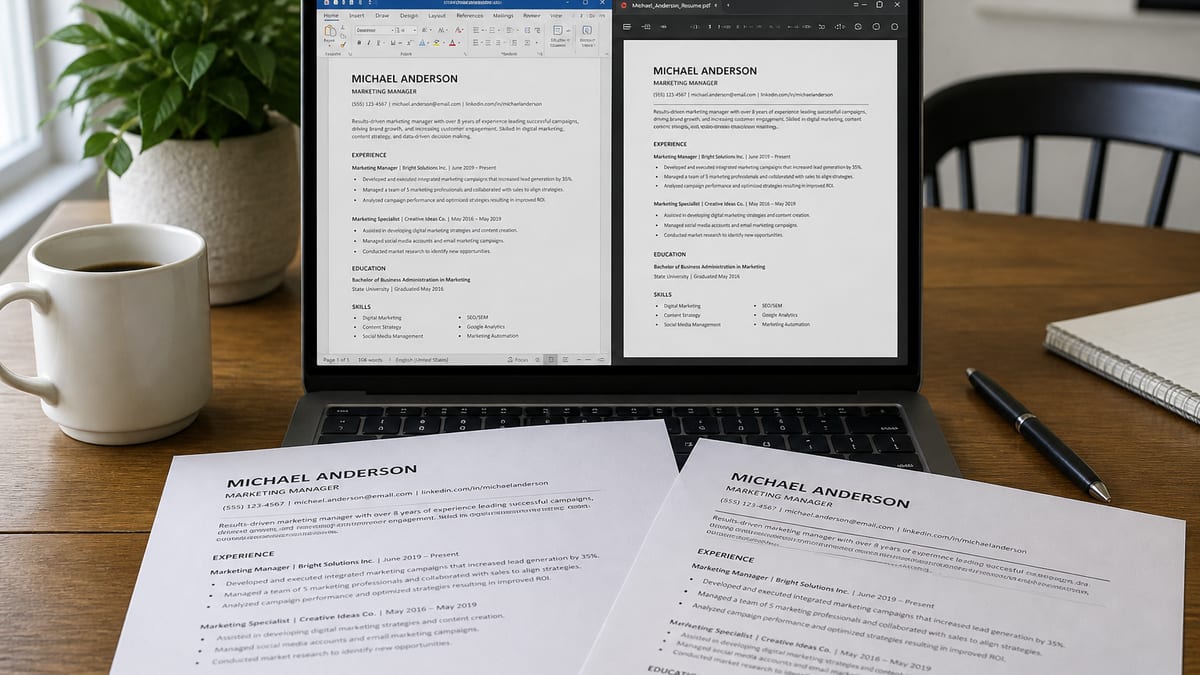
Follow the portal first; build a clean single-column file either way. DOCX vs PDF for ATS is not a religious war. Modern Workday, Greenhouse, Lever, Ashby, and iCIMS stacks read both when the file is text-based and simply structured. The failures that actually end applications are scanned image PDFs, multi-column design exports, and ignoring a form that literally says “Word only.”
This guide gives you a 60-second decision flow, a portal-oriented table, tests for text-selectable PDFs, and export checklists for Word and Google Docs. Pair it with can ATS read PDF resumes and does a Canva resume pass ATS if your file started in a design tool.
- Key takeaways:
- Follow the portal's stated format first—it overrides any general DOCX vs PDF preference.
- A text-based, single-column file matters more than the extension you pick.
- Image-only or design-tool PDFs are the real failure mode, not PDF as a format.
- Workday, Greenhouse, Lever, and iCIMS all accept clean PDF or DOCX when both are allowed.
- Keep both a PDF and DOCX master so you can match any portal's requirement quickly.
60-second decision flow: DOCX vs PDF
Key Takeaway
Portal instructions beat internet lore. If both formats are allowed, pick the cleanest text-based file you can verify—not the prettier extension.
- Read the upload widget. If it says PDF only, Word only, or lists extensions, obey it.
- If both are allowed, ask: was this file authored in Word/Google Docs as one column? If yes, either export works.
- If the file came from Canva, Illustrator, or a photo of a paper resume, do not upload yet—rebuild or re-export with real text.
- Run select-all → paste into a plain text editor. Confirm order, email, phone, dates.
- Upload to HireFlow’s free ATS checker before you spray applications.
Most people invert this order. They argue on forums, pick PDF because it “looks professional,” and never test reading order. Professional is a file that stores correctly and still reads clean when a recruiter opens the attachment.
Portal and ATS decision table
Key Takeaway
Brand names matter less than form rules and file cleanliness. Use this table as a bias, not a substitute for the upload label in front of you.
| Context | Bias | Notes |
|---|---|---|
| Greenhouse / Lever / Ashby | PDF or DOCX | Clean single-column either way; test parse |
| Workday enterprise | Both; watch preview | Confirm fields after upload; DOCX if form insists |
| iCIMS / Taleo-style stacks | Follow label | Older configs may favor Word; avoid design PDFs |
| U.S. federal / some state portals | Often DOCX or portal builder | Obey instructions; USAJOBS-style flows differ |
| Email to hiring manager | PDF usually | Locks fonts; still keep text selectable |
| Unknown ATS, both allowed | Clean PDF or DOCX | Pick the master you verified this week |
For how recruiters use these systems after ingest, read how ATS really works and do recruiters use ATS.
Text PDF vs image PDF: the real PDF problem
Key Takeaway
ATS can read text PDFs. Image-only PDFs behave like photos. Your cursor’s select tool is the cheapest test you have.
Saying “PDF” is incomplete. There are at least three animals wearing the same extension:
- Text-based PDF: characters live in the file; you can select and copy them.
- Image-based PDF: each page is basically a picture; selection fails or OCR gibberish appears.
- Hybrid/design PDF: some text is real, but reading order jumps across columns and text boxes.
Consumer advice that says “never use PDF for ATS” is usually reacting to image or design PDFs. A Word → Export → PDF from a single-column resume is a different object. Treat them differently.
Phone camera scans of printed resumes are the worst case. Students still upload them. Recruiters still get empty profiles. If that is your only copy, retype into Docs/Word or use careful OCR into an editable file, then rebuild structure manually—do not trust raw OCR layout.
Want a second opinion on your file type before you apply?
Upload your PDF or DOCX to the free ATS resume checker on hireflow.net and fix structure flags first.
When DOCX is the smarter submit
Key Takeaway
Choose DOCX when the portal asks for Word, when an older ATS historically mangles your PDF, or when you need easy last-mile edits without re-exporting design tools.
DOCX strengths:
- Explicit portal requirements for .doc/.docx
- Some legacy enterprise parsers tuned on Word XML
- Easy surgical edits the morning of an apply without touching Canva
- Simpler collaboration with a resume coach who tracks changes
DOCX risks: messy styles, text boxes, tables used as layout grids, headers/footers holding contact info, and Mac/Windows font substitutions that shift wrapping. Keep styles boring. Put contact info in the body. Avoid nested tables for design.
If your DOCX looks perfect locally but the ATS preview shows broken characters, save a copy with embedded fonts where possible, or paste into a fresh blank document to shed corrupted style inheritance—a common Word ghost.
When PDF is the smarter submit
Key Takeaway
Choose PDF when both are allowed and you want consistent human rendering after parse—or when emailing a hiring manager who will open the attachment on a phone.
PDF strengths:
- Consistent typography across devices for human readers
- Harder for accidental edits when files bounce around a hiring team
- Widely accepted on modern startup and mid-market portals
- Familiar default for email outreach
PDF risks: design-tool exports, print drivers that rasterize, password locks, and multi-column reading order. None of those are “PDF’s fault” as a format—they are authoring faults. Author in Docs/Word, export carefully, test selection.
Opinion: for most 2026 private-sector roles where the form allows both, I ship a tested single-column PDF and keep DOCX in the same folder. If one portal rejects PDF, I upload the DOCX twin without rewriting content.
Export checklists: Word, Google Docs, design tools
Key Takeaway
Author simply, export simply, verify outside the authoring app. Design-tool PDFs need extra skepticism.
Microsoft Word
- Single column; Normal style for body; Heading styles only if they stay standard names
- File → Save As → PDF, or Export → Create PDF with standard settings
- Do not print to PDF through a random printer driver if it flattens text
- Keep a .docx master alongside the PDF
Google Docs
- File → Download → PDF Document or Microsoft Word
- Avoid three-column tables for layout
- Check the downloaded file on desktop—not only mobile preview
Canva and other design tools
- Prefer rebuilding in Docs/Word for portal applies
- If you must use Canva, strip to one column and test selection aggressively
- See Canva vs ATS before mass applying
File-type mistakes that quietly filter candidates
Key Takeaway
Extension superstition wastes time. Unreadable text, wrong portal choice, and mismatched form fields are what hurt.
- Uploading a screenshot PDF of a LinkedIn profile
- Submitting .pages or .odt when the portal listed PDF/DOCX only
- Password-protecting the resume “for security”
- Using a different content cut in PDF vs the Workday form answers
- Chasing a 100 match score on a broken hybrid PDF—see good ATS score bands and high score vs interviews
Also avoid editing the PDF in random mobile apps that recompress pages into images. Go back to the DOCX/Docs master, edit there, re-export.
A practical two-file system for active search
Key Takeaway
Keep one content master and two exports. Update the master, regenerate both, re-test weekly during heavy apply seasons.
Recommended folder:
Resume_Master.docx(or Google Doc)—source of truthFirstLast_Role_Resume.pdf—default portal/email fileFirstLast_Role_Resume.docx—for Word-only portals
When you tailor for a priority role, tailor the master, then refresh both exports. Do not maintain three divergent stories. Drift between PDF and form answers is a trust problem recruiters notice.
During a busy week, re-run the ATS checker after major edits. Structure regressions creep in when people paste new bullets into the wrong text box of an old design file.
After the ATS: what humans prefer to open
Key Takeaway
Once you are shortlisted, humans want fast clarity. PDF consistency helps; content still decides the interview.
Parsed fields get you into the room. The attachment still matters when a hiring manager opens it on a train. A tidy PDF with clear hierarchy reduces friction. That does not mean decorative columns. It means readable type, margins that survive mobile, and bullets that front-load outcomes.
If you are deciding between spending Saturday on file-type debates versus rewriting three weak bullets with metrics, rewrite the bullets. File type is hygiene. Proof is persuasion. Hygiene first, then persuasion—never the reverse.
For keyword volume after format is settled, continue with how many keywords on a resume and what keywords ATS looks for.
Worked scenarios
Key Takeaway
Same candidate, different portals, different correct choices—without changing the career story.
Scenario A: Priya applies to a Series C startup on Greenhouse. Form accepts PDF and DOCX. She uploads a tested single-column PDF from Google Docs. Preview looks fine. She applies.
Scenario B: Same week, Priya hits a federal contractor portal that lists .docx only. She uploads the DOCX twin. No redesign.
Scenario C: A friend sends a “aesthetic” Canva PDF. Select-all paste shows skills before her name and no email. She rebuilds in Docs in 45 minutes, exports both types, and only then applies to the dream role.
Scenario D: Marcus emails a hiring manager after a conference. He attaches PDF for consistent phone viewing, and still keeps DOCX ready if the formal portal later demands Word.
None of these stories require a universal winner between DOCX and PDF. They require reading the room—literally the upload room.
How parsers treat Word XML vs PDF text streams
Key Takeaway
DOCX is a structured package of XML; PDF is a positioned text stream. Both can yield clean plain text—or chaos—depending on how you authored the layout.
You do not need to become an engineer to make good file choices, but a little mechanism helps. A DOCX file is a zipped set of XML parts describing paragraphs, runs, and styles. Many ATS parsers unzip that structure and walk paragraphs in document order. That is why a simple Word resume with normal paragraphs often extracts cleanly: the reading order is basically the paragraph order.
A PDF stores glyphs at coordinates on a page. A good text-based PDF still includes a mapping that lets software reconstruct reading order. A bad PDF stores pretty positions without a sane order—or stores an image with no text at all. Design tools that place each phrase in its own frame increase the chance the reconstructed order jumps from sidebar to header to footer before it ever reaches your latest job.
Practical translation: if you think in paragraphs and headings, Word/Google Docs is the path of least resistance. If you think in artboards, you must fight the tool to produce paragraph-like order—or abandon it for applications. That is the deeper answer behind DOCX vs PDF for ATS debates that never mention XML or text streams.
Some vendors add résumé-specific parsing models on top of raw extraction. Those models try to guess which string is an employer versus a title. They still need a coherent string sequence first. Garbage order in, creative guesses out. Your job is coherent order; their job is field mapping.
Quality checklist the night before a big apply
Key Takeaway
Ten minutes of file QA prevents days of wondering why priority roles went silent.
- Open the exact file you will upload—not an older similarly named copy.
- Confirm the extension matches the portal allow-list.
- Select-all paste test for order and contact integrity.
- Skim for tracked-changes leftovers, comments, or “TODO metrics” notes.
- Check that the target job title language appears in the top third honestly.
- Run HireFlow’s ATS checker and clear severity flags.
- Prepare the alternate export (PDF↔DOCX) in the same folder.
- Align Workday-style form fields with the resume dates and titles.
Candidates skip step eight constantly. The PDF says Senior Analyst 2019–2024; the form dropdown says three years of experience because they rushed. ATS score tools will not catch that. Humans will. File type excellence cannot fix contradictory applications.
If you are applying internationally, also confirm date formats and spelling variants (organise/organize, labour/labor) match the posting’s locale. Parsers are less romantic about bilingual flair than you are. Keep one language per file unless the employer asked for two.
Finally, store a short changelog in your notes: “2026-07-21 added Terraform bullets; exported PDF+DOCX; checker 84.” Future you will thank present you when a recruiter asks for an updated file in twenty minutes.
Myths that keep smart people stuck on file type
Key Takeaway
File type is hygiene. Content, targeting, and referrals move interviews. Do not let extension anxiety eat the week.
Myth: “PDF always fails ATS.” Reality: bad PDFs fail. Text PDFs from simple documents pass constantly in 2026.
Myth: “Word is outdated.” Reality: Word is still the required format on many formal portals. Outdated is ignoring the upload label.
Myth: “If I pick the right extension I can keep my two-column design.” Reality: extension does not sanitize reading order. See Canva ATS failures.
Myth: “Recruiters only open PDFs.” Reality: recruiters open what the ATS surfaces. Many skim structured fields before the attachment. Read how ATS really works.
Myth: “A perfect extension choice replaces keywords.” Reality: after the file parses, searches still need honest language overlap. Continue with what keywords ATS looks for.
Spend your scarce attention on the decision flow at the top of this article, then move on. The candidates who win are not the ones with the longest forum threads about PDF philosophy. They are the ones with clean files, true skills on the page, and a follow-up plan that includes humans.
What happens inside recruiting ops after you click submit
Key Takeaway
Your file becomes database fields, search indexes, and maybe an attachment preview. Pick the format that survives that pipeline for the employer in front of you.
After submit, the ATS stores your candidate record, attaches the binary file, and runs parsing jobs that may be immediate or queued. Recruiters later filter lists, save searches, and bulk-email. Some teams open the original PDF for everyone they phone screen. Others live inside the structured profile and only open the attachment when something looks odd. You cannot control their workflow. You can control whether the structured profile is empty.
That is why DOCX vs PDF arguments that ignore parsing are incomplete. The extension is an input to a pipeline. The output is fields + attachment. Optimize for both outputs. A gorgeous PDF that yields empty fields fails half the pipeline. A DOCX that parses but uses comic fonts may annoy the human half. Aim for boring excellence on both sides.
Compliance and audit trails also matter in larger companies. HR may need a stored copy of what you submitted. Password-protected PDFs and odd proprietary formats create help desk tickets—or silent drops. Give them a normal file. Be the easy candidate administratively so your substance can compete.
If a portal offers a “paste resume text” box in addition to upload, paste a clean plain text version from your master. Do not paste OCR garbage from a photo PDF. Dual paths sometimes feed different parts of the system; inconsistency confuses ranking tools that compare pasted text to attachments.
When something goes wrong, recruiters rarely email “your PDF reading order was wrong.” You experience silence. That asymmetry is why preflight with a free ATS resume checker is rational, not neurotic. Compare tools in the checker comparison guide if you want a second opinion.
Edge cases: portfolios, academic CVs, and dual-language files
Key Takeaway
Special document types still need a parse-safe application resume. Do not force your portfolio or 12-page academic CV through a startup upload widget unchanged.
Designers and researchers often keep long PDFs. For ATS portals, ship a two-page (or one-page) parse-safe resume and link the portfolio or publications list separately. Stuffing a 20-page PDF into Greenhouse because “everything is there” creates skim fatigue even when parsing succeeds.
Academic CVs with dense headings can parse if they remain single column and use clear labels. They still may be the wrong artifact for industry roles. Maintain an industry resume twin. Same career, different emphasis, correct file for the channel.
Dual-language resumes should usually be two files, not one interleaved document. Interleaving languages confuses keyword search and human skim alike. Submit the language of the job posting unless instructed otherwise.
Legal name changes, preferred names, and romanization variants belong in the name line and LinkedIn—not hidden in a footer the parser skips. Footers are a frequent DOCX/PDF footgun for contact details and URLs. Keep critical identity strings in the body.
If you are transitioning countries, rebuild the master in the target market’s norms, then export DOCX and PDF twins again. Do not merely rename an old file. Section order, photo rules, and personal data expectations differ. Format choice comes after content localization.
Frequently asked questions
Follow the portal first. If it specifies a type, use that. If both are allowed, a clean single-column PDF or DOCX both work on modern stacks. The bigger risk is a designed or scanned file—not the extension.
Neither wins universally. Text-based PDFs and simple DOCXs both parse. Prefer DOCX when an older or government portal asks for Word. Prefer PDF when you need layout lock for human readers after parse.
Yes—when the PDF contains a real text layer. Image-only scans and flattened design exports often fail. Try selecting text with your cursor. If you cannot, convert from the original Word/Google Doc.
Workday commonly accepts both. Many candidates succeed with clean PDFs. If the posting or form labels Word as required, submit DOCX. After upload, check the application preview fields.
Often the PDF came from a design tool or print driver that scrambled reading order or rasterized text. Re-export from Word/Google Docs using a standard PDF export.
Only if the form allows multiple uploads. Otherwise pick one. Keep both masters on your computer so you can match portal rules quickly.
Yes. Export DOCX or PDF from Google Docs with a simple single-column layout. Avoid publishing to the web as your application method unless the employer asked for a link.