12 min read · You'll need your latest export and one target posting
You polished the design. You hit submit. Then silence. You're not crazy. The system probably never stored your best bullet under the employer you think it did. Most files fail quietly during conversion, long before a recruiter sorts results.
Before you rewrite keywords tonight, check your resume for free on the export you'll upload. You're checking field order, not font taste. Ten minutes on a paste test beats guessing why Workday, Greenhouse, Lever, Taleo, or iCIMS shows blank rows.
Job searching is draining when the portal feels like a black box. The box is simpler than marketing slides suggest. It's a profile built from text fragments. When you know which fragment failed, you can fix the file with your hands instead of rewriting the same summary five times.
Below you'll see what the importer builds, a six-step procedure to verify each field, edge cases that break conversion, mistakes that empty whole jobs, and two tools to confirm the map matches the posting before you apply again.
Need a short bridge letter after the file is clean? Generate a cover letter that names one employer row and one skill from the posting. The letter won't repair a scrambled import, but it shouldn't repeat skills the parser never stored.
Quick Wins
- Paste your export into Notepad and read top to bottom once.
- Use Experience, Education, and Skills headers parsers recognize.
- Pair each title line with one employer and Month Year dates.
- Screenshot the portal preview before final submit.
What the importer is building from your file
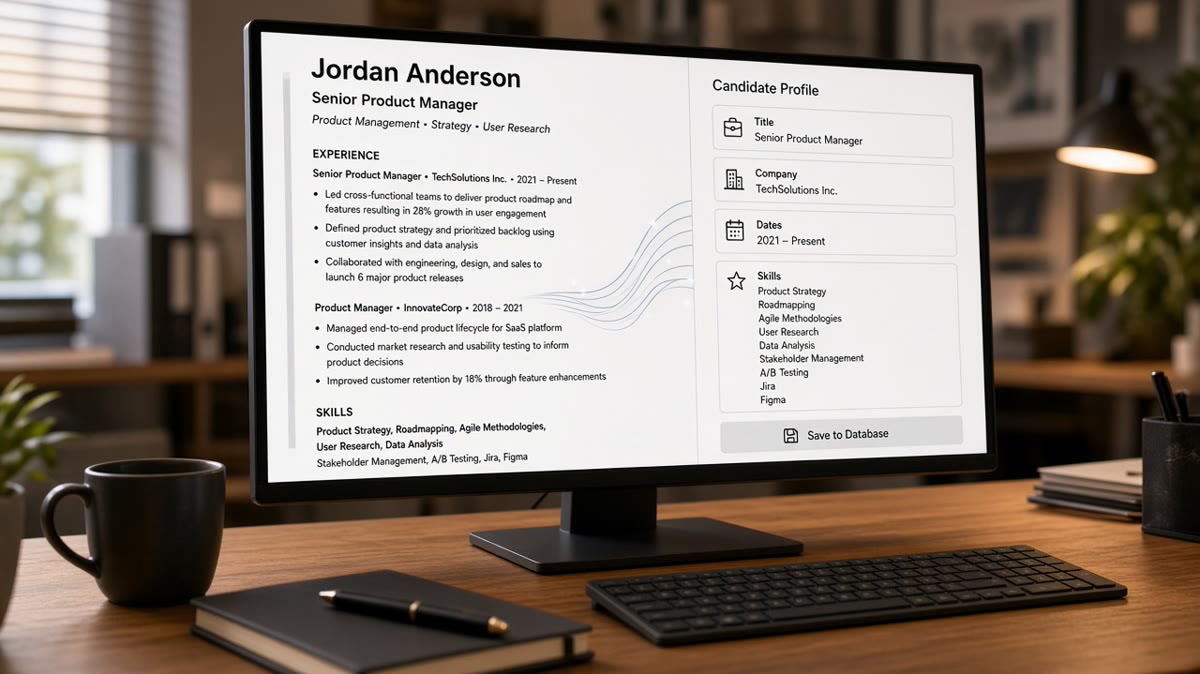
Think database rows, not a PDF thumbnail. When you upload a DOCX or text-based PDF, the portal extracts characters, strips most styling, and guesses which lines belong in which field. Recruiters later filter on those fields. Humans open the rows that survived search.
The pipeline you can observe on almost every corporate stack follows the same beats. Upload and store the binary file. Extract plain text. Segment on headers like Experience or Work History. Pull employer, title, start date, end date, and bullet bodies into separate cells. Attach education and skills lists when headers match. Show a preview or recruiter profile built from those cells.
Keyword matching runs against stored fragments, not against your margin choices. Posting language compared to imported text is how req templates highlight gaps. That step assumes fragments landed in the right employer row. When conversion fails, matching still runs, but it reads the wrong rows or empty strings.
How ATS converts resumes into data in practice is less about magic scores and more about read order. A two-column layout can push employer names into a zone the parser treats as footer text. Icons and charts disappear entirely. Scanned PDFs become noise. The recruiter dashboard still opens, but your Experience block looks like you never worked anywhere.
I've screened imports in Workday and Greenhouse where the candidate's strongest metric sat in a text box the parser skipped, and the searchable row showed an empty title field. The fix was never more adjectives. It was a boring single column with the title on the same line as the employer.
Parsers do not understand design intent. They understand line breaks and familiar words. Section labels act like signposts. Creative headers such as Where I've Made Impact often map to nowhere. Standard US labels keep segmentation predictable.
Raw text backup still matters. Some teams open the stored extract when preview looks wrong. If your paste test already shows scrambled order, expect the stored extract to match that scramble. Fix the source file, not the portal summary you wish existed.
For how posting language ties to stored fields after import, read how ATS matches resumes to job descriptions . Conversion comes first. Matching only helps when rows contain the right text.
This won't fix applying to roles you're not qualified for. It stops a qualified file from dying because the importer stored an empty Experience grid while your PDF still looked sharp on a phone screen.
Six-step field verification workflow
Use these steps on the file you plan to upload, not a master resume you haven't exported in months. Each step produces a visible check you can screenshot before you spend an hour on bullet rewrites.
Step 1: Run the plain-text paste test
Open your PDF or DOCX, select all, copy, paste into Notepad or TextEdit plain mode. Read top to bottom once. Contact info should lead. Section headers should stand alone on their own lines. Each job should read employer, title, dates, then bullets without columns interleaving.
If dates appear above company names or skills dump at the file bottom, parsers will attach data to the wrong fields. Note the first line that breaks order. That line is your edit target, not the summary paragraph.
Step 2: Rename sections to standard headers
Replace creative headers with Experience, Education, and Skills. Keep Summary or Professional Summary if you use one, but don't hide jobs inside a paragraph block with no header. Parsers segment on those words.
Before: Sidebar Skills column with icons; jobs listed in a table with shaded cells.
After: Single column; Skills section below Experience; each role uses plain lines instead of table rows.
Step 3: Rebuild one Experience block at a time
For each role, type employer on one line, title on the next or the same line separated by a pipe, dates in Month Year to Month Year or Present format, then bullets. Repeat the pattern for every job. Mixed patterns confuse segmentation.
Before: Senior Analyst 2019-2023 on one line; employer name in a footer logo area.
After: Northwind Bank | Senior Financial Analyst | March 2019 to Present, followed by bullets with NetSuite and variance metrics in plain text.
Step 4: Move tools from sidebars into dated bullets
Skills lists help when parsers duplicate them into searchable lists. They do not replace proof under an employer. Put posting must-haves inside bullet one for the job where you used them. Name the tool in the first eight words when the posting repeats it twice.
Before: Salesforce appears only in a Skills chip row imported empty.
After: Bullet says Closed 42 enterprise opportunities in Salesforce with forecast notes updated weekly for six-rep pod.
Step 5: Read the portal preview like a recruiter
Upload to a test application or use the employer preview when available. Compare each Experience row to your source. Title, employer, dates, and first bullet should match line for line. If education lands inside experience, split the sections in the source and re-upload once.
Edge case: scanned PDF from a print shop. Text extraction returns garbage or blank. Rebuild in Word from scratch. No amount of keyword stuffing fixes a scan.
Edge case: heavy contractor file with twelve clients in one year. Group by employer of record, not by client logo rows. Dates must reflect paid engagement blocks recruiters can read fast.
Step 6: Re-export, match-check, save one apply copy
Save PDF from Word or Google Docs without text boxes around bullets. Name the file with your name and req slug. Run parser check plus posting match on that export only. Store it as the version tied to one application.
Copy-paste Experience block (parser-friendly)
Experience
Harbor Health System | Registered Nurse, Med-Surg | June 2021 to Present
- Documented care in Epic for 28-bed unit; precepted four orientees on fall-prevention workflows
- Reduced med-pass delays 11% in Q3 by standardizing shift handoff checklist with charge nurse

Rule: employer and title before dates; tools inside bullets, not icon rows.
When bullets parse but search still feels off, read how ATS interprets titles vs duties for US matching so title fields and duty text stay aligned after conversion.
Parser trips that empty whole role blocks
Tables for job history. Cells reorder on import. Use plain lines with consistent punctuation instead.
Text boxes for summaries. Summary content may never attach to Experience. Keep summary as normal paragraphs under a header.
Headers in graphic banners. Parsers read characters, not banner styling. A gray bar does not tell the software that Experience started.
Uploading the wrong PDF type. Design exports from Canva or Illustrator often fail silently. Recruiters see blank fields while you still share a pretty link.
Before: Two-column template with contact info in a left rail; jobs on the right import as one jumbled paragraph.
After: Contact lines full width at top; jobs stacked below in one column with repeating employer, title, date pattern.
Before: Skills listed as comma soup with no section header.
After: Skills header on its own line, tools separated by commas, each tool also named once in a dated bullet.
Fixing keywords on a scrambled import is the most common time waste I see. Candidates rewrite summaries while the portal still stores their title field empty. Run the paste test first every time.
And if you're tempted to hide employment gaps by deleting dates entirely, parsers still read timeline holes as missing data. Compress old roles to one line with honest Month Year ranges instead of removing employers.
Confirm the data map before you apply
Upload your rebuilt export to HireFlow's free ATS resume checker with the job description pasted beside it. Confirm Experience rows imported with employer and title populated, not just Skills headers floating alone.
Then score your job match on the same posting. Match score highlights missing posting terms after structure works. Running match before conversion fixes is backwards and sends you chasing words that still land in the wrong field.
Do this now: Paste test, rebuild one role block, export PDF, run checker plus match score, screenshot preview, submit once with the saved file name.
Rows first, keywords second
When you understand how ATS converts resumes into data, you stop fighting a ghost score and start fixing field maps. Upload, extract, segment, populate rows, then match posting language. Your job is to make each row readable before you tune words inside bullets.
- Paste test every export before apply.
- Standard headers and one-column layout.
- Employer, title, dates, then bullets on repeat.
- Preview pane matches source line for line.
- Checker plus match score on the saved apply copy.
Open tonight's export, run step one, fix the first scrambled line you see, and run a free ATS check on the rebuilt PDF before you submit again.
Read more
Frequently asked questions
The portal stores your file, runs a text extraction pass, and tries to drop lines into labeled fields such as name, employer, title, dates, education, and skills. What you see in the recruiter preview is that field map, not a photocopy of your PDF layout. If extraction fails, fields stay empty even when the PDF looks fine on your screen.
Blank rows usually mean the importer could not find standard section headers or read order got scrambled by columns, tables, or text boxes. Run a paste test in Notepad. If job titles appear below dates or employer names sit at the bottom of the file, rebuild as a single-column DOCX before you tweak keywords.
Most corporate builds store both raw text and parsed fragments tied to field names recruiters filter on. Search runs against those fragments. A bullet about Salesforce in a sidebar the parser skipped may never attach to the employer row you expect, so keyword edits in the wrong zone do not fix silence.
Upload the format the posting allows. A DOCX exported from Word or Google Docs with a single column often parses cleanly. PDFs work when they are text-based exports, not scans or design-tool saves. If the preview garbles either format, fix structure first and retest on a fresh application when the portal allows one upload.
Many employer portals show a parsed preview or let you edit imported fields before submit. Read that pane like a recruiter: every Experience row should show employer, title, dates, and bullet text in order. Screenshot mismatches, fix the source file, and re-upload once. A checker that simulates parsing helps when the portal hides the preview.