10 min read · Upload-to-preview timeline
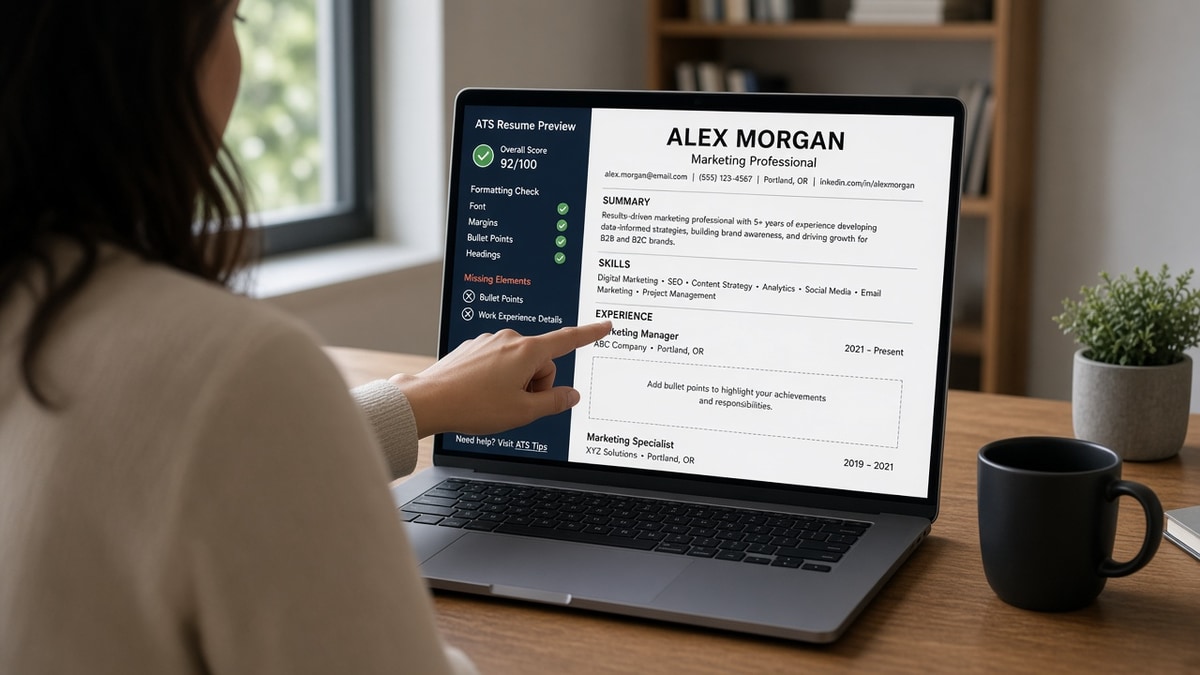
Your resume looked clean five minutes ago. You uploaded the PDF, opened the Workday preview, and half your bullets are gone. Bullet one under your current role might survive. Bullets two through four are missing, or they merged into a wall of text under Summary, and you can't fix it until you know where they dropped.
That shock is common, and it's not proof the ATS hates you. It's a symptom along a fixed path: upload, parse, field mapping, then the screen where bullets actually drop. When you know the order, you'll stop guessing whether to add keywords or swap fonts.
Before you rebuild the whole file, check your resume for free against the posting you saved. You need to see which lines import, not just whether the PDF looks pretty on your laptop.
Below is the full sequence from the moment you hit submit through the mapping step that eats bullets, plus the fix order that puts outcomes back where recruiters search.
Quick Wins
- Export single-column DOCX before you re-upload to any portal.
- Use plain Experience, Education, Skills headings spelled exactly.
- Copy parsed preview text into Notepad and count lines under your current job.
- Put your strongest metric in bullet one if only one line survives import.
Stage one: what happens when you upload
You choose a file or paste text into Greenhouse, Workday, Lever, Taleo, or iCIMS. The portal stores the attachment and kicks off extraction. Nothing is scored yet. The system is copying bytes and guessing file type.
PDF vs DOCX at upload. Many portals accept both. PDFs built from design tools often carry hidden layers. DOCX from Word or Google Docs usually yields cleaner text when you kept a single column. If the portal offers paste-only, skip the attachment and paste plain paragraphs.
Size and fonts. Oversized files slow preview but rarely delete bullets. Tiny fonts and margin tricks can cause lines to clip in preview even when the PDF looks fine. Stick to 10.5 to 11 point Calibri or Arial with normal margins.
What you should do right after upload. Open the preview or application profile the portal builds. Do not assume the attachment thumbnail matches imported text. Scroll the Experience block before you move on.
Stage two: how the parser reads your bullets
The parser walks the file in reading order: top to bottom, usually left column before right. It looks for headings like Experience, Education, and Skills, then grabs text under each heading until the next heading appears.
Bullet symbols. Standard list bullets in Word convert to lines starting with a bullet character or hyphen. Custom Wingdings, checkmarks, and emoji often import as blank space. The line is still there, but it looks like a continuation of the line above.
Tables and text boxes. A two-column resume puts skills in a right rail. The parser may read the left column first, skip the rail, or merge cells so bullets three and four never attach to the job title you expect.
Graphics and icons. Skill bars, logos, and chart icons are not text. Parsers ignore them. If your best metric sat inside a shaded text box, it may not exist in the extracted profile.
For a deeper look at format traps, see Workday why your resume looks different after upload US . The symptom is wider than Workday, but the preview habit is the same.
Stage three: field mapping and the summary trap
After extraction, the ATS maps text chunks into fields: name, email, current title, employer, dates, description, skills. Mapping rules are rigid. If your heading says Profile instead of Summary, content may still route to a summary box with a character limit.
Experience vs summary. When the parser cannot find a standard Experience heading, it dumps everything into Summary or Additional Information. Long summary boxes truncate. Bullets at the bottom of a crowded summary are the first to disappear from the recruiter view.
Multiple jobs in one block. If date lines parse as plain text without line breaks, two roles can merge. Bullet points from your older job may attach to the wrong employer or vanish when the mapper gives up.
Skills list vs bullet proof. A Skills section import does not replace bullets. Recruiters search bullets for scope. Mapping can succeed for Skills while Experience bullets still collapse. Both views matter.
Why your bullet points disappear after uploading to an ATS: where lines vanish
I've opened thousands of Workday profiles where the PDF attachment looked strong and the parsed Experience block showed one line: Responsible for various duties. The bullets did not get deleted. They never mapped to Experience.
Sidebar and column loss. Bullets in the right column often import after Skills or get skipped. You keep bullet one from the main column and lose the rest.
Nested table cells. Resume templates that put each job inside a table row frequently drop rows three and four. The parser reads the first cell and stops.
Header/footer bleed. Contact lines in a header sometimes push body text down in preview. A bullet that wrapped near the footer can clip.
Summary truncation. When bullets land in Summary, the first two lines show. The rest are gone from the recruiter screen even if the raw extract still holds them in a hidden field.
Paste-field stripping. Some paste boxes strip list formatting. You paste four bullets; the portal stores one paragraph. Always paste into Notepad first, then into the portal, if you need hard returns.
Pair this with why weak bullet points get ignored once your lines import cleanly. Parsing and proof are different problems.
Fix order when bullets vanish after upload
Run these in order. Stop when the preview shows four separate lines under the correct job title.
Before: Bullets three and four sit in a right-column skills rail. Preview shows bullet one only under the current title.
After: All bullets stacked under each job title in one column. Preview shows four distinct lines with hard returns in Notepad paste test.
Before: Experience heading says Career Story. Bullets land in Summary and truncate after two lines.
After: Plain Experience heading. Bullets map to Work Experience field and survive recruiter search.
- Single column. Move Skills and contact info into the main flow. Delete text boxes and tables used for layout only.
- Standard headings. Use Experience, Education, Skills spelled plainly. Avoid creative labels like Career Story.
- Rebuild lists in Word. Select bullets, apply the normal round bullet style, one job block at a time. Re-export DOCX.
- Re-upload and preview. Scroll the Experience field. Copy parsed text into Notepad to see hard returns.
- Rewrite bullet one if needed. Put your strongest metric in the first eight words of bullet one. If only one line survives, make it count.
Do not do these yet: keyword stuffing, white text, or swapping to a graphics-heavy template. Those steps do not restore lost lines. They add noise after mapping already failed.
Copy-paste: five-minute preview check
1. Upload DOCX (single column).
2. Open portal preview → Experience.
3. Copy parsed text → paste into Notepad.
4. Count lines under current job title.
5. If count < your bullet count, fix layout, not keywords.
Parse-check before you reapply
After you fix layout, run the same file against the posting you saved. You are confirming import order, not chasing a mystery rank score.
Run an ATS format check on the DOCX you plan to upload. Flagged sections usually match where the portal preview already looked thin.
When bullet one carries the posting's must-have tool, score your job match on the saved job description. Match work belongs after lines import correctly.
When the portal also asks for a letter, generate a cover letter only after Experience lines import cleanly. A letter won't replace bullets the parser never mapped.
Do this now: Export single-column DOCX, upload, open preview, count Experience lines. Fix layout until the count matches your draft.
The preview panel is the real resume
Why your bullet points disappear after uploading to an ATS is almost always a timeline problem: upload, parse, map, then lose lines in the wrong field. The PDF on your desktop is not what the recruiter searches.
Fix single-column layout first. Use plain headings. Re-upload and count lines in preview. Then tailor bullet one to the posting.
This will not fix applying to roles where you lack scope. It stops a qualified file from looking empty because the parser never mapped your wins into Experience.
Read more
Frequently asked questions
No. The parser reads your file in document order and maps text into fields like Work Experience and Skills. Bullets disappear when the layout breaks reading order, when symbols do not convert to plain text, or when content lands in a summary box that truncates. The system is not punishing you. It is misreading structure.
Word renders design. The ATS preview shows extracted text. Two-column layouts, text boxes, tables, and icon bullets often import as one paragraph or skip nested cells. Open the portal preview or paste into Notepad. If lines merge, the recruiter sees the same mess.
Use standard round bullets from Word or Google Docs list styles, not custom Wingdings or emoji. If preview still drops lines, switch to hyphen prefixes with a hard return after each line. Plain text beats pretty symbols that the parser cannot map.
Export single-column DOCX, re-upload, and read the preview top to bottom. If bullets return, layout was the issue. If only bullet one survives, check whether later lines sat in a sidebar or table. If everything collapses into Summary, move experience back under a standard Experience heading.