11 min read
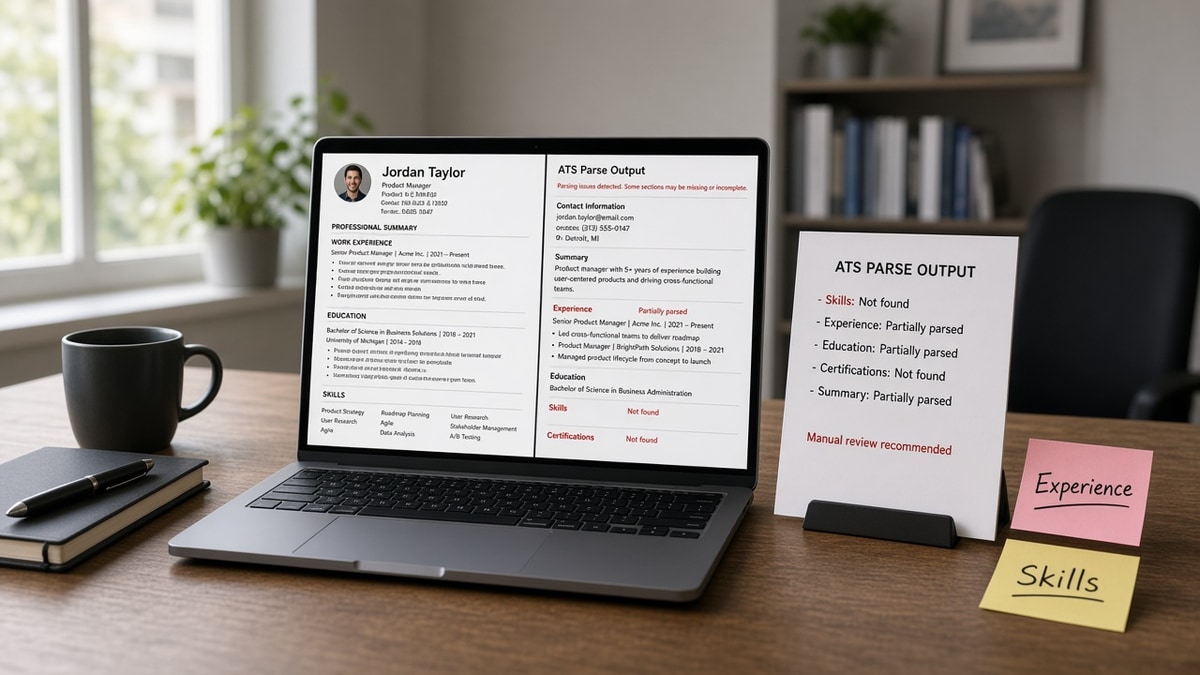
You're not failing keyword games. You're uploading a pretty file where half the proof lives in places parsers skip. Recruiters don't see a mystery rejection. They see an empty Skills column in the portal preview while your real wins sit in a sidebar the import dropped.
And that's fixable tonight. Check your resume for free with a posting pasted in. You're checking extracted text, not whether the PDF looks sharp on your screen.
Below you'll get the bar I use when I compare a designer export to a plain Word file, five before-and-after pairs across roles, what broken uploads share, and a copy-paste skeleton for a parser-safe layout.
When the preview finally matches your intent, generate a cover letter that repeats two must-haves from the posting so the upload package tells one story.
Quick Wins
- One column, standard headings, no text boxes.
- Must-haves inside Experience bullets, not only Skills.
- Contact info once in the body, not duplicated in headers.
- Run extracted-text preview against a target posting.
The bar a parser-safe file must clear
Recruiters trust the portal preview more than your PDF attachment. If the preview shows scrambled dates or missing employers, the file is treated as incomplete even when you know the content is there.
Parsers read linear text. They expect Work Experience, Education, and Skills in familiar order. Fancy section names still work if the heading is plain English. What fails is structure that hides the timeline.
Keyword lists without bullet proof look hollow in every ATS. The matcher may record the term, but human screeners still ask where you used it. One bullet with a tool name and outcome beats twelve skills with no context.
Month Year dates on the same line as the employer row matter. When tables split title and dates across cells, imports often merge them wrong. That is one reason what ATS ignores on your resume looks like a gap you never had.
For deeper layout rules, read US resume skills section format that ATS understands . Skills belong in the file, but proof lives in Experience first.
File name matters for humans, not magic scores. Use Firstname_Lastname_Resume.pdf so a downloaded copy is recognizable. The parser cares about text inside, not the string on the icon.
Scanned paper resumes are the worst case. OCR drops punctuation and splits words. Retype into a plain template instead of uploading a photo PDF from a phone camera.
Watermarks and background images compete with text layers. Export a version with no watermark for applications even if the draft looked nicer with branding.
Track changes and comment bubbles sometimes export as garbled characters. Accept all edits and save a clean copy before upload so reviewers' notes do not become random symbols in the preview.
What ATS ignores on your resume: five teardown pairs
Pair 1: Marketing coordinator, two-column Canva export
Before: Left column holds contact icons and a skill bar chart. Right column holds jobs. Export PDF looks polished.
After: Single column. Skills as a comma list under a heading. Top bullet: "Managed HubSpot workflows for 14 email nurtures, lifting MQL-to-SQL handoffs 19% in two quarters." HubSpot appears in the bullet, not only as an icon label.
Pair 2: Data analyst, table-based timeline
Before: Experience built inside a Word table with three columns for title, company, and dates.
After: Plain bullets under each employer row. Title and company on line one, Month Year range on line two. Bullet leads with "SQL, dbt, Looker" inside the sentence that describes the dashboard shipped.
Pair 3: Registered nurse, skills as star ratings
Before: Skills section shows "Epic" as five stars and "IV therapy" as four stars in a graphic row.
After: Skills list: "Epic Cadence, Pyxis, ACLS, stroke protocol bundles." Bullet under the hospital role: "Precepted six new hires on Epic documentation standards on a 28-bed unit."
Pair 4: Warehouse lead, header-only certifications
Before: OSHA card number sits in the page footer on every page. Body never mentions forklift certification.
After: Certifications block under Skills with "OSHA 10, Forklift Operator, Month Year." Bullet ties certification to work: "Led daily safety huddles for 22 pickers; zero recordable incidents over 11 months."
Pair 5: Customer support lead, text box summary
Before: Summary lives inside a shaded text box with a circular photo anchored beside it.
After: Summary as normal paragraphs under a Professional Summary heading. First line names Zendesk, CSAT, and escalation volume in plain text.
I've screened stacks of these in Workday where the portal preview showed a blank Skills area while the PDF looked perfect, and the hire still had the skills. The file simply never imported the sidebar.
Copy-paste block: parser-safe skeleton
Name | City, ST | phone | email | linkedin.com/in/you

Professional Summary
Two sentences with one must-have from the posting in line one.

Skills
6–10 plain terms, comma or bullet list, no icons

Work Experience
Employer Name | Job Title
Month Year – Month Year
• Bullet with tool + action + outcome (posting keyword in first 8 words)
• Second bullet with scope (team size, volume, region)

Education
Degree, School | Month Year

Certifications (if any)
Name, issuer | Month Year
Edge case: the portal only accepts PDF and your design tool is the source file. Rebuild once in Google Docs or Word, export a text PDF, and compare previews. Keep the pretty version for networking, not for upload.
Edge case: you need a portfolio link. Put one URL in the contact line. Do not bury project URLs inside image buttons the parser cannot read.
When imports still scramble, see Workday why your resume looks different after upload US . Sometimes the fix is section order, not keywords.
What ignored uploads share
They treat Skills as the main keyword bank. Must-haves stuffed into a list while Experience stays generic is the fastest way to look qualified on paper and empty in preview.
They hide dates inside graphics. Timeline bars and infographic resumes rarely export dates next to the correct employer. Recruiters read that as missing tenure.
They duplicate contact blocks. Headers and footers repeat email and phone, then the parser drops both copies. One clean contact block at the top survives more often.
They rely on abbreviations alone. If the posting spells out "customer relationship management" and you only write "CRM" inside an icon row, the preview may not tie the term to a role. Spell it out once in a bullet, then abbreviate later in the same file.
Before: Two-column design, 24-skill icon grid, jobs in the narrow column, certifications in the footer.
After: One column, six-skill list, three bullets per recent role with tools named, certifications in-body with Month Year.
This will not fix applying to senior roles when your bullets still read junior. It stops qualified files from disappearing because the parser never saw the proof.
White text on colored boxes is a silent killer. You can see it. The extractor often cannot. Stick to black text on white for upload versions.
Hyperlinks hidden behind the words "click here" waste space. Show the plain URL for GitHub or LinkedIn once. Parsers and recruiters both copy from text view.
Section titles like "Where I've Made Impact" sound fresh. They confuse less than icons do, but "Work Experience" still parses cleanest. Creative labels belong in bullets, not navigation.
Job hopping flags are human decisions. What ATS ignores on your resume won't be fixed by shrinking font to cram more roles. Shorten old roles to one line instead of shrinking type below ten point.
Volunteer rows count when dated and specific. One line with Month Year beats a graphic badge with no employer name attached.
If you must keep a design resume for creative directors, maintain a plain sibling file for corporate portals. Same facts, different skin. Run the checker on the plain one before you batch apply.
Before: Must-have "Salesforce" only in a tag cloud image.
After: "Salesforce Service Cloud" in bullet one under the role where cases were closed daily.
Parsers do not reward color. They reward readable order. Save the brand palette for the interview deck, not the Workday upload.
Multi-page files are fine when each page continues Experience in order. Breaks fail when page two starts with Skills while page one ends mid-job. Finish each employer block before you jump sections.
Graphics for language fluency flags often vanish. Write "Professional working proficiency in Spanish" as text. Do not rely on flag icons in a margin column.
Contract labels belong on the employer row. "Contract" or "Contract via Agency Name" on the same line as the client keeps parsers from merging two jobs into one blob.
Remote location lines help humans more than parsers. Still list city and state on the contact line so timezone and work authorization questions do not stall a phone screen.
When you change templates, rerun the preview even if the words stayed the same. A new margin width can shove a column off the import path without touching your bullets.
Before: QR code for portfolio as the only proof of GitHub work.
After: github.com/handle on the contact line plus one bullet naming the repo outcome in plain text.
Preview before the next batch
Upload your plain file and a target posting to HireFlow's free ATS resume checker . Read the extracted text first. If a section is missing, fix layout before you tweak synonyms.
When you're rebuilding from a design export, build your resume in a single-column template so the next PDF export does not drop sidebars again.
Do this now: Export your upload file, run extracted text against one posting, move two must-haves into Experience bullets, then apply to three roles with the plain version only.
What to do now
What ATS ignores on your resume is almost always structure. One column, plain headings, dated employers, and must-haves inside bullets beat any icon grid.
- Rebuild a plain upload copy tonight.
- Move two posting must-haves into Experience bullets.
- Strip headers, footers, and text boxes from that copy.
- Run extracted text against one target req.
- Apply with the plain file until previews stay stable.
Open a posting you care about. Run a free ATS check , fix missing sections in the preview, then submit one clean upload.
Read more
Frequently asked questions
Some parsers read a Skills heading, but many treat a long keyword list as low weight compared with the same terms inside Experience bullets. Icons, star ratings, and multi-column skill grids often parse as blank lines. Put must-have tools and methods in bullets under the job where you used them, then keep a short Skills list as backup.
Not always. A text-based PDF exported from Word or Google Docs usually parses fine. A PDF built from Canva layers, scanned images, or heavy design elements often drops whole sections. If the portal accepts DOCX, test both formats with a plain preview before you mass apply.
Contact blocks repeated in headers and footers, page numbers, and decorative lines frequently duplicate or vanish on import. Put name, phone, email, city, and LinkedIn URL once in the body top. Avoid putting must-have keywords only in a footer tagline.
Often yes. Two-column layouts and table cells reorder text so job titles attach to the wrong dates. Text boxes may not export to the parser at all. Use one column, standard headings, and simple bullet lists instead.
Upload the file and a target posting to an ATS checker, then read the extracted text side by side with your PDF. If a certification or role title is missing from the preview, the matcher never saw it. Fix export settings or layout, then scan again.