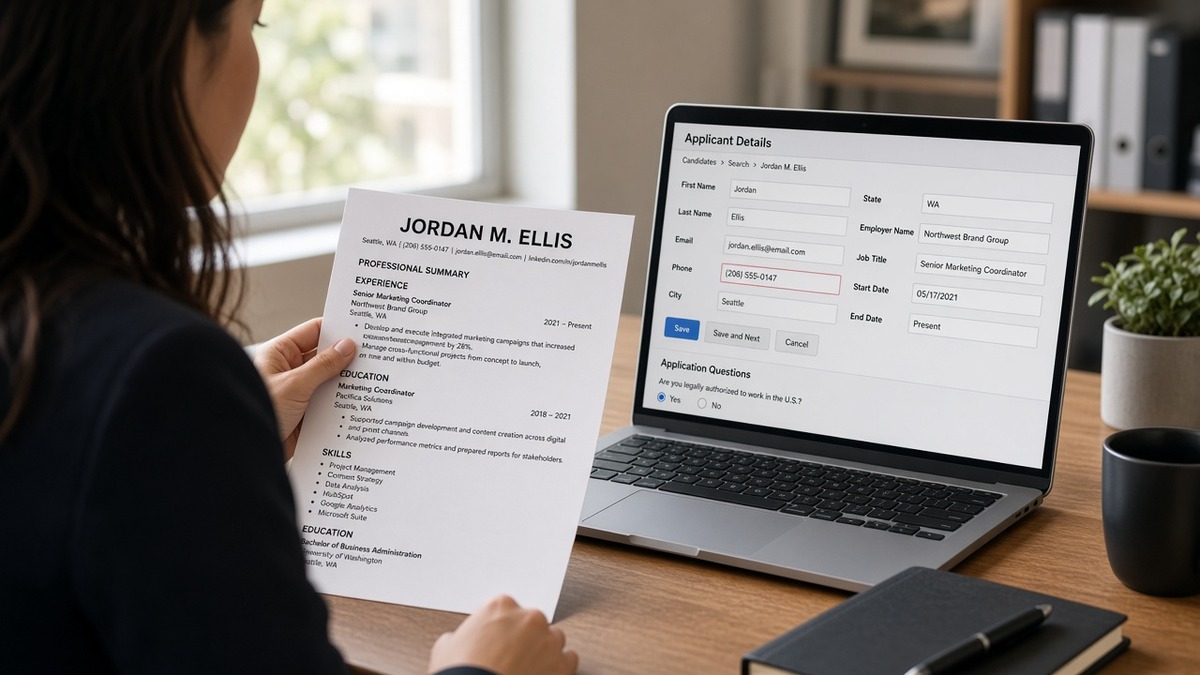
9 min read · Fix the import preview, not the keyword list
You didn't misread the screen. Workday really showed a job title you never held, or Greenhouse left your current employer blank. That's a mapping miss, not proof your resume is dishonest. The parser read your layout out of order and stuffed lines into the wrong fields. It won't fix itself on the next upload if the layout stays the same.
Before you rewrite bullets, check your resume for free and confirm Experience imported in the right sequence. A scrambled import makes every other fix pointless.
You've probably spent an hour on wording while the portal still can't find your phone number. Don't do that twice tonight. Below you'll see which fields break first in US corporate stacks, how to read an import preview, and a copy-paste audit you can run in ten minutes. If you're tired of guessing, start with the preview, not another synonym in Skills.
And if the posting asks for a letter, draft one with the cover letter generator after mapping is clean. A perfect summary won't save an application where the employer field is empty.
Quick Wins
- Open the import preview before you hit submit.
- Search the preview for your phone number and each employer name.
- Put dates inline with job titles, not in a side column.
- Rebuild tables as plain stacked lines if any row is blank.
Common ATS field mapping errors for US candidates show up in the import preview
Field mapping is the step where the ATS assigns each piece of your resume to a database column. Name goes to name. Employer goes to employer. Start and end dates attach to the right job row. Skills may tag separately or stay inside Experience depending on the platform.
The PDF can look perfect while the mapped record is wrong. Recruiters search and filter on the mapped record, not your original file.
In Workday-heavy employers (banking, insurance, large healthcare), the candidate profile importer often reads left to right. A two-column layout can dump your dates into the company field or skip a table cell entirely. In Greenhouse, the parse step may run before you see the form, which means header contact lines never enter the profile if they lived only in a Word header region.
Lever and iCIMS show the same symptom with different labels: duplicate job rows, merged employers, or education dates parked under work history. The pattern is consistent. Layout broke reading order, so the wrong text filled the wrong box.
Job searching is already heavy when silence runs past a week. You're not failing because you picked the wrong font. You're often failing because the system thinks you have no current employer.
Think in three layers. Layer one: can the file be read? Layer two: did each line land in the correct field? Layer three: do filters on title, recency, and location still work on what imported?
Mapping errors hit layer two hardest. You pass upload. You fail search because employer is blank or dates sit on the wrong role.
For platform-specific layout rules, pair this page with Workday resume format for 2026 and PDF vs Word for ATS uploads . Mapping fails differently by file type and column count.
A mid-level operations analyst whose contact block sits inside a shaded header box can look polished on paper. Workday imports name and city, drops phone and email, and the recruiter queue shows an applicant who can't be reached. That's a mapping error, not a skills gap.
Run a field mapping audit before you hit submit
Upload once to a saved draft if the portal allows it. Stop at the screen that shows imported work history. Do not click submit until every row matches your file.
- Compare employer names line by line. Blank rows mean the parser lost a table or column.
- Check start and end dates on your current role first. Missing end dates often default to "still employed" on the wrong job.
- Search the preview for your phone number and email. If search fails, contact mapping broke.
- Copy the imported text into a plain editor. Jumbled order confirms layout, not wording, is the problem.
- Rebuild broken sections as single-column stacked lines, re-export, and re-import.
Before: Two-column resume with dates in a narrow right column. Workday import shows employer "Acme Corp" with no dates and a second row titled "2019 to 2024" with no company.
After: Single column: "Operations Analyst, Acme Corp, March 2019 to Present" on one line, then bullets below.
Before: Phone and email in a Word header. Greenhouse preview shows city and state only.
After: Contact block in the body under your name: phone, email, city and state as plain text lines.
Before: Skills listed in a text box beside Experience. iCIMS maps skills into summary and leaves tools off the skills tag list.
After: Tools named inside bullets under the job where you used them, plus a short Skills section with standard heading.
Copy-paste block: field mapping audit
Copy-paste (run after every new portal upload)
IMPORT PREVIEW CHECK
Employer 1: [expected] → [what portal shows]
Title 1:    [expected] → [what portal shows]
Dates 1:    [expected] → [what portal shows]

Contact search in preview:
Phone found?  Y / N
Email found?  Y / N

Paste test: copy imported block to Notepad
Order matches resume top to bottom? Y / N

If any N: rebuild section as single-column plain text, re-export, re-import.
When matchers still look off after mapping is clean, read how ATS matches resumes to job descriptions . Field mapping is the gate before keyword scoring matters.
Mapping traps that blank employer and date fields
I've opened Workday profiles where the employer line was blank and the phone number sat in the city box, and there's no interview to schedule from that record.
Side-column dates: parsers read across the row. Dates become the company name or vanish.
Header and footer contact: many configs never scan those regions. Recruiters see a name without a way to call.
Ambiguous US date strings: "07/08/2021" can map as July or August depending on parser rules. Use "July 2021" or "07/2021" in Experience lines.
Creative section labels: "Where I've Worked" instead of "Experience" can leave jobs in an uncategorized blob that filters ignore.
Invisible tables in Canva or Word templates: toggle gridlines in Word. If you see cells around dates, rebuild that block as plain lines.
Stacked abbreviations: "Sr. Ops Mgr" in the title field with the company on the next line inside a table cell often maps title only. Spell out title once and keep employer on the same line.
Print page one. Highlight any field the preview left blank. Fix layout on those lines before you touch bullet verbs.
Parse checks that catch mapping drift
A parse check won't invent employers the layout hid. It shows whether Experience survived in order so you know if you're fighting mapping or wording.
Upload to the ATS checker , then compare its readout to the portal import preview. Empty employer slots in both places mean rebuild the file, not tweak keywords.
If you're starting from a broken template, build your resume in a single-column base instead of patching margins on a two-column design. Mapping errors love fancy layouts.
Do this now: Paste the portal import into a plain text file. If employers and dates are missing or out of order, fix structure before your next application goes out.
Re-upload once mapping matches your file
Open your latest import preview side by side with the resume. Circle every blank employer, every date on the wrong row, every missing phone line. Rebuild only those blocks as plain single-column text.
Export DOCX or a text-selectable PDF. Upload again. Run the copy-paste audit. Submit only when search finds your contact info and each job shows title, company, and dates on one row.
Common ATS field mapping errors for US candidates look scary on screen. They're usually layout problems you can fix in one rebuild, and you'll save more time fixing import order than rewriting bullets the recruiter never sees.
Read more
Frequently asked questions
Field mapping is how an applicant tracking system assigns each line on your resume to a database box: employer, job title, start date, end date, degree, phone, and so on. When mapping fails, the portal can show blank employer rows, scrambled dates, or contact info in the wrong column even though your PDF looks fine on screen.
Each employer configures its own instance. Workday often imports into a candidate profile with strict left-to-right reading order, so tables and side columns break first. Greenhouse leans on a resume parse step before the application form, which can drop header contact lines or merge two jobs into one row. Same file, different field layout per company.
After upload, open the import preview or application autofill screen before you submit. Check that every employer name, title, and date range matches your file. Search the preview for your phone number and email. If either is missing or sitting in a city field, mapping failed regardless of how polished the PDF looks.
Fix the source file when the same error repeats across portals. Manually typing over a bad import works once, but the next re-upload will break again. Rebuild layout as single-column plain text, standard section headers, and inline dates next to job titles, then re-import.
Not always. A blank employer field can remove you from title or recency filters before keyword scoring runs. You might have the right terms on the page while the system thinks you have no current job. Fix mapping first, then tune bullets.