7 min read
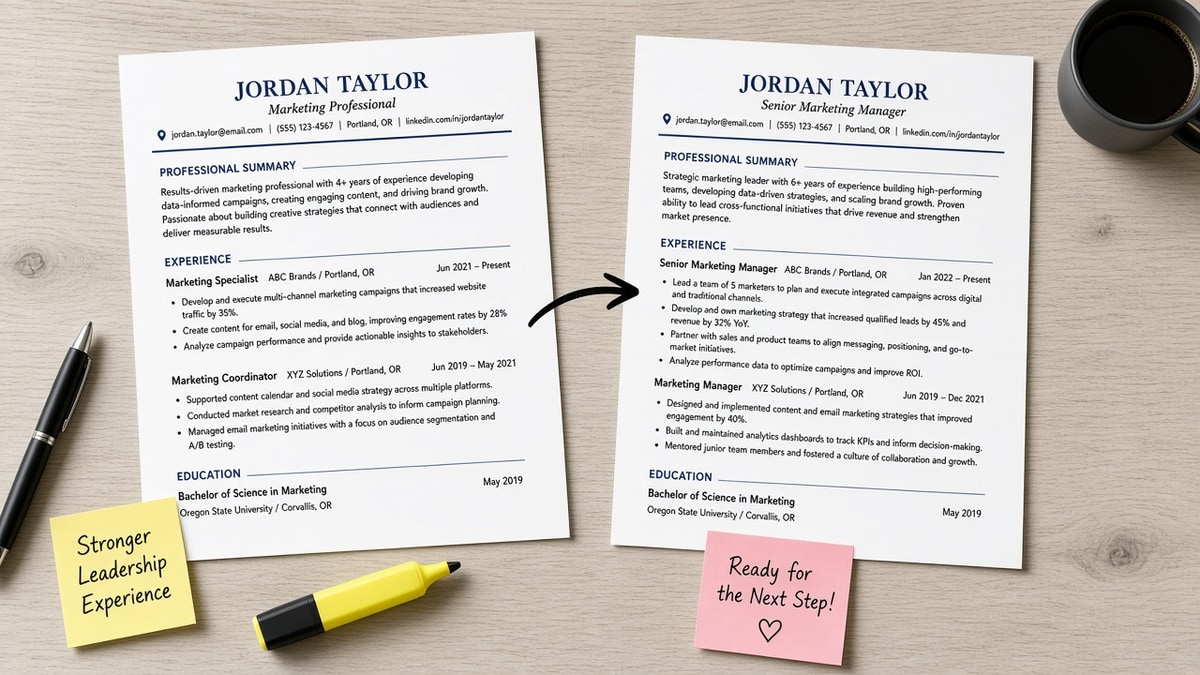
Same skills, same years, different file order. One version gets a second look because bullet one names the posting title and a metric. The other lists tools at the bottom while page one still talks about college clubs, and that's a direction problem, not a talent problem.
If you're not sure what a recruiter sees in the first screen, check your resume for free against the role. You'll catch whether your match signal sits above the fold in plain text. It shouldn't live under sections parsers skim last.
Job searching is draining enough without guessing why silence follows a solid background. This won't fix applying ten levels above the req, and it doesn't replace honest dates. It stops a qualified file from losing because the proof showed up on page two of the export.
What screeners read first
Direction is not decoration. It's the sequence a parser walks and a recruiter mirrors on a quick pass: contact, headline or summary, current role, then whatever sits next on the page.
| Criterion | Template-default file | Posting-directed file |
|---|---|---|
| First proof block | Education or old internship before current role bullets | Current role bullet one names posting skill plus scope |
| Summary job | Generic objective about growth | Two lines pointing to the metric below |
| Skills placement | Long footer list unrelated to bullet one | Short list echoed in experience above |
| Screen outcome | Reader stops before finding the match | Reader sees fit without hunting |
Why resume direction improves screening is that contrast: the parser still captures your jobs, but humans quit when the first screen looks off-role. Direction aligns what they see in pass one with what the posting asked for in pass one.
Pair this mental model with how hiring software filters candidates so you know which blocks machines weigh before a person opens the file.
Order traps on template-default files
This is the file most people export from a design app or school career center: education up top for recent grads, every job in strict reverse date order, skills as a long list at the end, summary optional and vague.
Before: Header, objective about seeking opportunities, Bachelor's degree, first internship, current analyst role with bullet one still reading *Responsible for weekly reports*.
After (still template-default): Same sections, same order. Nothing in the first half of page one tells a Greenhouse reviewer you own SQL reporting for finance stakeholders.
Template-default works when your timeline is linear and your current title already matches the posting. It fails when your pivot, promotion, or contract work lives in an older block while your latest job is adjacent but not identical.
Another trap is stacking certifications and volunteer lines above paid work. Those lines are fine lower on the page. They should not push the role that matches the req below the scroll line on a laptop screen.
- Education before experience mid-career: signals the reader should look elsewhere first.
- Objective lines about growth: waste the slot where a title match could sit.
- Skills longer than experience: looks like keyword paste without owners.
Posting-directed flow
Here you keep one column and honest dates, but you aim every block at the req open on your other monitor. Summary names the target function once. Bullet one under the owning job repeats a posting phrase with an object, team, or ticket volume.
Before: Skills footer lists Salesforce, Zendesk, CSAT, escalation, Salesforce cases as five separate lines while experience bullets never say Salesforce.
After: Skills line reads Salesforce, Zendesk. Bullet under current role: Ran Salesforce case queues for enterprise accounts, holding first-response SLA at 94% for six months.
Before: Summary repeats project management four times with no budget or stakeholder count in experience.
After: Summary points to one program bullet: Delivered a $2.1M vendor rollout on time across three regions under the 2024 title you still hold.
I've screened stacks of imports in Lever where the skills tab matched the posting and the experience tab read like a different person. The file that moved forward put the match on line one, not line nineteen.
Posting-directed flow still respects parsers: standard headers, Month Year dates, single column PDF or DOCX. You are not hiding older jobs. You are choosing which bullet leads and which section follows contact.
Choose your order tonight
Use template-default when your current title, industry, and scope already mirror the posting and bullet one could stay untouched. Use posting-directed when you pivot, return after a gap, or your best proof sits outside the latest employer block.
- Open the posting. Highlight three must-haves you can defend in a phone screen.
- Paste your resume into Notepad. Note which must-have appears first on the page.
- Rewrite bullet one under the job that owns each must-have. Put the phrase in the first eight words.
- Trim the skills block to tools you repeated upstairs. Delete orphan lines.
- Move education and extras below experience unless you graduated this year.
Copy-paste summary skeleton:
[Target title] with [years] in [function]. See [metric or scope] in [current company] below.
Example: Revenue operations analyst with six years in B2B SaaS. See pipeline hygiene win in bullet one at current employer.
If keywords float without employers, read why resume keywords alone don't work before you reorder again. Direction without proof is still an empty first screen.
Test the reorder
Export plain text after you move bullet one. If the posting phrase still appears below internships, keep editing.
Score your job match on the posting-directed version. Then run the free ATS check to confirm section headers survived the upload path you plan to use. If the role asks for a letter, generate a cover letter that points to bullet one instead of repeating the skills footer.
A shorter file after editing usually means you cut duplicate skill lines, not that you lost experience. What matters is whether the first screen reads like the role on the posting.
Direction is a screening signal
Why resume direction improves screening comes down to placement, not prettier fonts. Put the posting's must-haves in bullet one under the job that owns them, pull education down when you are mid-career, and upload the shorter file.
You already did the work. Direction makes sure the screener sees it before they click to the next row in the queue.
Read more
Frequently asked questions
Keywords still need a home recruiters reach before they stop scrolling. Terms buried under education, old roles, or a long skills footer often never get scored in context. Direction puts the proof block where the parser and the human both start reading.
Use reverse-chronological for steady career lines in the same function. When your best match is an older role or a pivot, lead with a short summary and reorder bullets inside each job so posting language sits in bullet one. Keep dates honest; change emphasis, not facts.
After contact and a two-line summary, or directly under your current role if the posting is tool-heavy. A skills block above experience works when every line repeats in bullets below. If skills run longer than your last two jobs combined, trim and move terms into experience instead.
Reordering within a role is normal tailoring. You are highlighting work you already did, not inventing titles. Do not move a project to a job where you did not perform it. If you cannot place a posting requirement under a real employer line, treat it as a gap, not a keyword paste.