7 min read
Don't treat the ATS vs recruiter debate like a personality test. It's really a queue order problem. Software imports your file before a human has a reason to open it.
Should you optimize for ATS or recruiters first? For corporate portals, parser-first. You're not choosing cold software over people. You're making sure people ever see an accurate profile when they finally search your name.
Run your tailored file through check your resume for free with the posting attached before you spend an hour on summary wording. It'll show import issues summary edits can't fix.
Quick wins
- Flatten columns before you tailor keywords.
- Put three posting terms in bullet one under your current job.
- Repeat contact info in the body, not only the header.
- Save, export to plain text, read aloud once.
What happens from upload to recruiter skim
Minute zero: you submit. The portal stores a file and triggers import into Workday, Greenhouse, Lever, or similar. Fields populate from whatever order the parser saw.
Minutes later to days later: a recruiter searches or sorts. They may never download your PDF if the profile already shows a mismatch or missing phone number.
Recruiter time is the second gate, not the first. Polish on a scrambled import does not reach the skim you pictured.
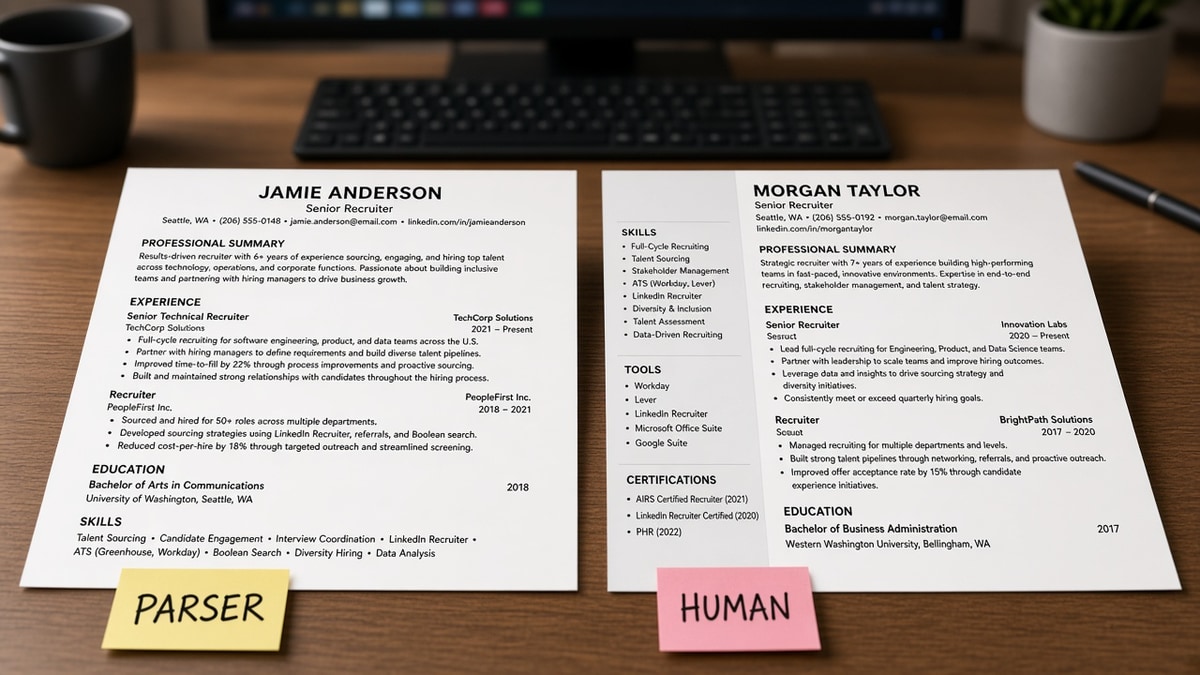
Before: You rewrite the summary for tone, then upload a two-column template.
After: You flatten layout, confirm import, then tighten the summary on the importable file.
For overlap between gates, read resume checker vs ATS checker so you run the right check at each phase.
Timeline: optimize in this order tonight
Phase 1: Structure (parser gate)
Remove tables and columns. Move contact lines into the body. Use standard headers: Experience, Education, Skills. Save DOCX unless the posting demands PDF.
Phase 2: Posting fit (matcher gate)
Highlight three required skills or tools in the posting. Place each once in a dated bullet where you actually used it. Reorder the skills list to mirror the req.
Phase 3: Human skim (recruiter gate)
Shorten bullet one to lead with outcome. Bold nothing for keyword sake. Read the top third in six seconds: title, company, recent role, one number.
Phase 4: Upload and stop
Submit once per req unless you found a parse error. Extra uploads can refresh profile fields in ways you did not intend.
Copy-paste six-second skim checklist:
[ ] Target title visible in headline or first role
[ ] Most recent job dates complete (Month Year)
[ ] First bullet has a number or scope (team size, $, %)
[ ] Three posting terms appear in experience, not only Skills
[ ] Contact email and phone in body text
[ ] Plain-text export reads in sensible order
I've screened stacks where the summary sparkled and the imported title field was blank because it lived in a text box. Parser-first would have caught it in five minutes.
Before: Recruiter-first meant design tweaks before import.
After: Parser-first meant import proof, then design only if it still parses.
Layout details that break import are covered in how ATS handles tables and columns . Fix those before you debate summary adjectives.
When recruiter-first backfires
- Choosing a graphic template because it "stands out" in a PDF preview.
- Writing a cinematic summary before employment dates import correctly.
- Hiding older roles in a sidebar to "guide the eye" while the parser drops them.
- Adding color and icons that do not survive plain-text export.
Before: "I'll make it beautiful so they'll remember me."
After: "I'll make it readable in one column so they'll find my last role."
Check parse, then match, then polish
Tools follow the same timeline as the gates. Parse before match. Match before metaphor hunting in the summary.
Run the ATS checker after phase one structure edits. Confirm employment blocks and contact survived.
Score your job match after phase two keyword placement. You are looking for terms stuck only in skills.
Generate a cover letter in phase three if the posting asks for one. Keep the letter aligned with the headline you already proved in import.
Where parser rules and recruiter habits overlap
Recruiters scan title, company, dates, then the first bullet. Parsers build searchable fields from the same spine. When that spine is clean, you're not maintaining two resumes. You're maintaining one file both audiences read differently.
Numbers in bullets help humans remember you and give matchers concrete tokens tied to jobs. Action verbs at the start of lines help skim speed and keep imported text from looking like a paragraph essay.
Before: You maintain a "pretty PDF" for humans and a "plain TXT" for ATS.
After: You maintain one DOCX that exports cleanly and reads well on screen without a sidebar.
Networking uploads and employee referral forms still hit the same import path. Parser-first isn't only for cold applications. It's for any portal that stores a profile from your attachment.
Executive and senior roles sometimes skip heavy keyword games, but they rarely skip import. A missing executive title in the profile still hurts when an assistant searches before the hiring manager ever opens email.
Creative portfolios belong in links, not in place of a parseable employment block. You can send design work after the profile proves where and when you worked. The timeline still starts with a boring spine recruiters trust.
What to do while you wait on a human read
After upload, resist reopening the file hourly to change fonts. Each save tempts you to reintroduce spacing tricks that break import. Log the upload time and the headline you used instead.
If a week passes with no movement, improve fit on the next req rather than uploading a third cosmetic variant to the same profile. Parser-first also means upload discipline.
Before: You upload v4 because you're anxious.
After: You note v2 is live, fix layout only if a portal shows a parse error, and spend energy on a posting that matches your title band.
Parser first, recruiter second, same file
Should you optimize for ATS or recruiters first? On employer portals, structure and import proof come first. Recruiter appeal is phase three on the file that already survived import.
The overlap is large: clear headers, strong first bullets, and numbers help both machines and tired humans. The sequence is what saves you from polishing prose on a profile missing your phone number.
Run the timeline once on your next application. You will spend less time debating sides and more time submitting a file both gates can use.
Read more
Frequently asked questions
Clean single-column layout reads faster for humans, not slower. Boring is overloaded sidebars, tiny fonts, and graphics that hide titles. Strong bullets with numbers still pop on a plain page.
Customize headline and top bullets when titles differ. You do not need a full rewrite for a comma change. Do run a parse check after any layout edit, even a small one.
In dated experience bullets first, then skills. A cloud of terms without job proof is easy to import and hard to trust. Mirror three required phrases in bullet one under your current role when true.
Use DOCX when the posting is silent and your file has no tables. Use PDF when you exported from Word with selectable text and the posting asks for PDF. Always run a plain-text export test after saving.