7 min read
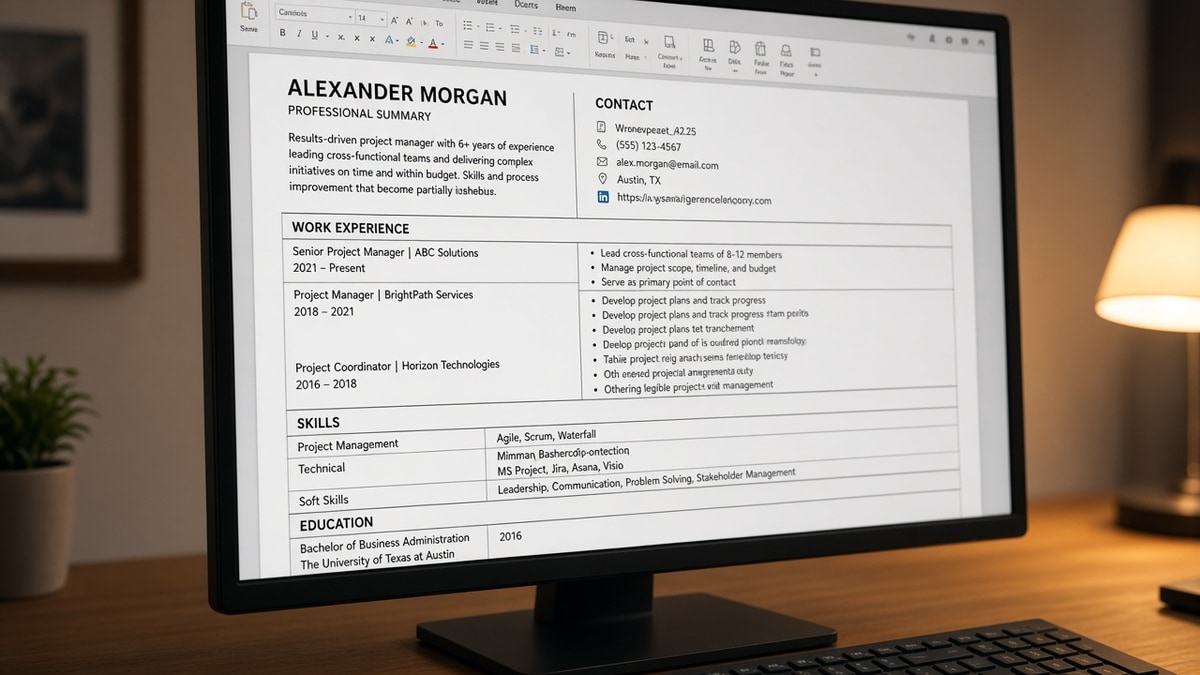
Your resume looks organized on screen. The imported profile shows your Salesforce skills sitting under an internship from 2019. That mismatch usually isn't a keyword problem. It's layout, and you can't keyword your way out of a scrambled import.
How ATS handles tables and columns comes down to one rule: the parser walks characters in file order. Sidebars, skill grids, and invisible tables break that walk. You don't need to memorize vendor names to fix it tonight.
Before you upload again, check your resume for free with the posting pasted in. You are confirming import order, not chasing a perfect score on the first pass.
Quick wins
- Turn on table gridlines in Word and delete anything that highlights.
- Paste a DOCX export into Notepad and read top to bottom once.
- Move sidebar skills into a body section with a clear Skills header.
- Save one single-column version before you tailor keywords.
Symptoms that mean tables or columns broke the parse
Candidates blame the ATS score first. The tell is simpler: fields in the employer portal do not match what you typed in Word.
Skills show up under the wrong employer. That pattern almost always means the parser read a sidebar column in one chunk and experience in another, then merged lines in the wrong sequence.
Dates float away from titles. Table cells often store dates in a separate cell from the company name. Importers may output "March 2022 Acme Corp" on one line and "Senior Analyst" three lines later with no clear link.
Contact info vanishes. Headers, footers, and one-row contact tables sit outside the main story stream. Some systems skip those regions entirely even when they look centered at the top of page one.
Before: You assume the portal skipped your email because the score was low.
After: You open Notepad, see the email missing entirely, and move contact lines into the body.
For a wider map of parse failures, read resume formatting errors that break ATS parsing . Tables are one branch on that tree, not a separate mystery.
How to tell which layout cause you have
Cause A: visible two-column template
Open the PDF and cover the right third with a sheet of paper. If critical skills live only under that cover, the parser may read them out of order relative to jobs.
Fix: move skills below experience in one column. Keep the same words; change only placement.
Before: Skills column lists Python, SQL, Tableau beside jobs on the left.
After: One column with Experience block, then Skills: Python, SQL, Tableau on its own lines.
Cause B: borderless alignment tables
Click near a date line. If a small move handle appears, you are inside a table used for spacing. These are common in Canva-to-Word conversions and designer templates.
Fix: select the table, convert to text with paragraph marks, then rebuild spacing with blank lines only.
Cause C: nested tables for a skills matrix
Matrices with proficiency columns read as grids, not sentences. Importers often drop half the grid or flatten proficiency into noise words.
Fix: replace the matrix with comma lists or one bullet line per category.
Copy-paste plain contact block (no table):
Alex Morgan
(555) 555-0142 | [email protected]
Denver, CO
LinkedIn: linkedin.com/in/alexmorgan
Run the Notepad test on your saved DOCX: Save As plain text, open in Notepad, read aloud. If you hear skills before your name, the file order is wrong for parsers.
I've opened Workday imports where a borderless two-column template put every tool from the sidebar into the first job's description. The candidate spent a week adding keywords while the layout kept attaching them to the wrong role.
Before: "I'll add Tableau to the skills grid."
After: "I'll put Tableau in the bullet that proves I used it, then run the plain-text export."
When you compare file types, see PDF vs Word resume for ATS . Format choice matters less than whether tables survive export.
Layout traps that still look professional
- Using a template because it "passed" a friend's company. Their stack is not yours.
- Keeping a table for dates in the left cell and bullets in the right cell on every role.
- Putting languages or certifications in a narrow column to save vertical space.
- Switching to PDF to hide table structure. The grid still exists inside the file.
Before: You shrink margins and add columns to fit ten years on one page.
After: You allow two pages with a single column so each job block imports as one unit.
Human readers still win with boring layout. Recruiters scan in an F pattern down one column. You are not giving up design. You are choosing readability that matches how both parsers and people move through the page.
Parse check after you flatten the file
Once tables are gone, confirm employment blocks still import with titles and dates paired. Layout edits can accidentally delete a section break you relied on.
Run the ATS checker with the job description pasted. You want to see skills sitting near the jobs that prove them, not floating at the top of the profile.
Build your resume in a single-column flow if rebuilding faster than fixing nested tables. Paste your old bullets in order; do not reintroduce grids for spacing.
Generate a cover letter only after the resume import looks sane. The letter can't fix a profile that attached your email to the skills field.
What the parser reads from a table row
Designers love a clean row: company in cell one, dates in cell two, city in cell three. On screen it aligns. In a plain-text export it often collapses into one line with spaces where relationships used to be.
Before: Table row reads visually as Acme Corp | March 2021 to Present | Remote.
After: Plain lines read Acme Corp, Senior Analyst, March 2021 to Present, Remote on separate lines under one Experience header.
Nested tables multiply the problem. A role table inside a page table forces the importer to finish the inner grid before it knows where the job ended. That is when bullets from job two appear under job one's title in the portal preview.
If you're unsure whether you're looking at a table or tight tabs, select the whole experience block and toggle borders. When cells highlight, treat it as a table and flatten it even if it looked like spacing.
Flatten first, then tailor keywords
How ATS handles tables and columns is predictable once you stop judging the PDF with your eyes alone. Grids and sidebars change read order. Single-column text puts each employer block back in sequence.
Run gridlines, Notepad, and one parse check tonight. If the imported story matches your intent, keyword work finally has something solid to attach to.
You do not need a prettier template. You need a file where the parser and a tired recruiter read the same career story top to bottom.
Read more
Frequently asked questions
You can, but it is still a table. Some imports read the row fine; others merge cells with the first experience line. Plain text with pipes or line breaks is safer: name on line one, phone and email on line two, city and state on line three. Run the Notepad test after you save.
No. Borders are visual. The file still stores cell boundaries, and the parser still has to guess read order inside the grid. Borderless tables often look clean to you and messy in the imported profile.
Only when the second column is decorative and empty of searchable text. If skills, dates, or titles live in a sidebar, assume the parser may read that column before or after the main stack unpredictably. For corporate applications, single column is the default.
If gridlines show more than one table, rebuild in a plain template faster than you can debug nested cells. Copy text only, not layout. Save DOCX, run the plain-text export test, then PDF if the posting allows it.