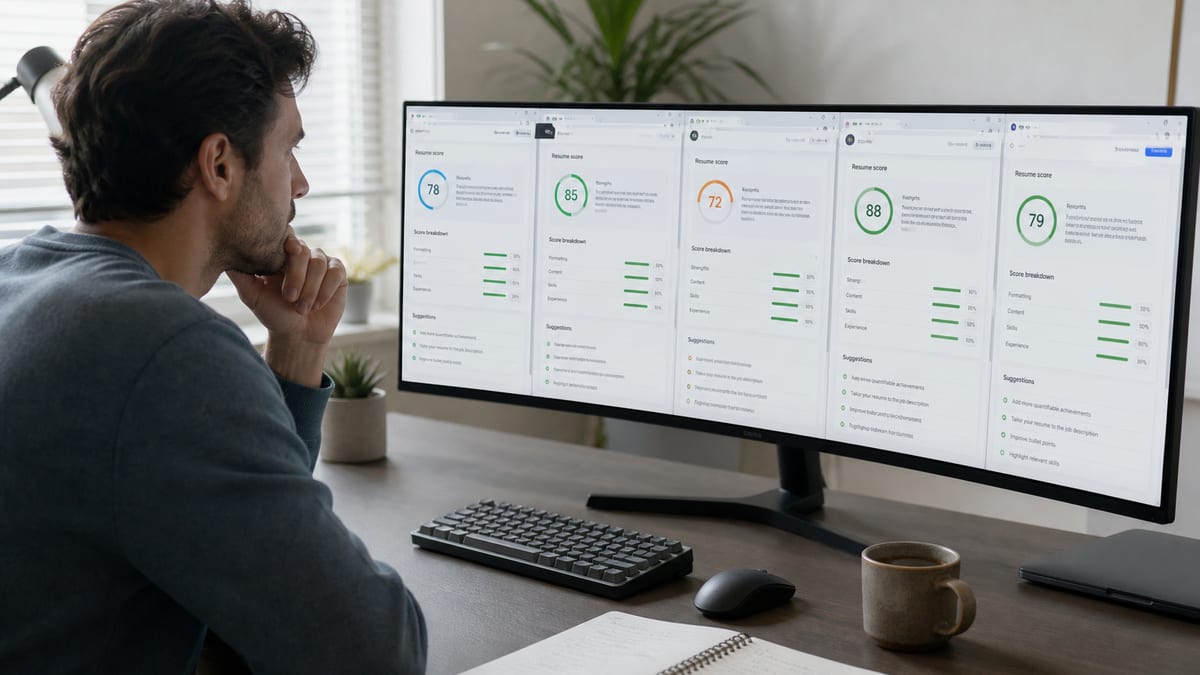
The best free ATS resume checker is one with no signup wall, real PDF/DOCX parsing checks, and clear fixes—not a vanity score. An ATS resume checker is a tool that scans your resume file the way an applicant tracking system would, then reports formatting problems and keyword gaps before you apply. Paid tools can go deeper on job-match reports. For most applicants, a reliable free scan that you can re-run after each edit matters more than a locked “pro” dashboard.
This guide compares free ATS resume checkers by criteria you can verify in ten minutes: signup friction, scan limits, file types, fix quality, and upsell pressure. You will leave with a workflow that starts on HireFlow’s free ATS resume checker , then branches only when a specific posting deserves a deeper match report. For what the number means, read what's a good ATS score . For the pipeline behind the score, see how ATS really works .
Key Takeaways
- No free checker beats a signup wall, a one-scan limit, and a blurred report combined.
- Judge tools on iteration speed—can you fix an issue and re-scan for free?
- PDF and DOCX support both matter since portals differ in what they request.
- A single percentage without explanation is not a diagnosis worth trusting.
- Structure fixes come before keyword tailoring, in that order, every time.
What to evaluate in a free ATS checker
Key Takeaway
Score free checkers on iteration speed and fix clarity. A tool that gives one locked percentage after signup is worse for job seekers than a free scan with ranked, plain-English issues you can act on tonight.
Marketing pages all claim “ATS optimized.” Ignore the slogan. Open the product and pressure-test these six criteria with a real PDF or DOCX you already use for applications.
- Signup required? Account walls kill iteration when you are editing under a deadline. If you must create an email just to see the first report, the free tier is already taxing your time.
- Scan limits: One free scan is not enough. You need re-checks after each fix cycle. Unlimited or generous free re-scans beat a “pro” tease that expires after one upload.
- File types: PDF and DOCX support for real portal uploads. A checker that only accepts paste-in text misses layout failures that break Workday and Greenhouse.
- Fix quality: Ranked, plain-English issues beat a single percentage. “Contact info appears only in the header” is actionable. “Score: 62” alone is not.
- Keyword / job match: Optional but useful when you have a specific posting. Prefer a separate match view so you do not confuse structure health with JD overlap.
- Upsell pressure: Fine if the free tier is usable. Avoid tools that hide the report, blur the fixes, or watermark the download until you pay.
Run a ten-minute bake-off: upload the same file to two tools, note which flags overlap, and see whether you can fix and re-scan without hitting a wall. The winner is the tool that shortens the loop—not the one with the flashiest dashboard screenshot.
Free ATS checker comparison (criteria-based)
Key Takeaway
HireFlow fits applicants who need unlimited free structure checks today. Jobscan-style free tiers fit deep JD keyword reports when you accept caps. Builder freemium checkers often push design upsells. Upload-only toys give curiosity scores without a repair plan.
Features change over time. Treat this as a decision framework, not a permanent scorecard. No invented competitor ratings—only what you should verify on each site before you invest an evening.
| Criterion | HireFlow | Jobscan-style free tier | Builder freemium checkers | Upload-only free tools |
|---|---|---|---|---|
| Signup to scan | No | Often yes | Often yes | Varies |
| Free re-scans | Unlimited core checks | Usually capped | Often capped | Often limited |
| PDF & DOCX | Yes | Usually yes | Usually yes | Varies |
| Parse / format flags | 27 checks, ranked fixes | Strong on JD match | Mixed; push to builder | Shallow score only |
| Job description match | Via job match score | Core product focus | Sometimes | Rare |
| Best for | Fast free iteration | Deep JD keyword reports | Design + rewrite upsells | One-off curiosity scans |
Notice the pattern: tools that monetize match reports often gate re-scans. Tools that monetize templates often gate the “real” export. HireFlow’s free checker is built so the diagnostic itself stays usable—because a checker you cannot re-run after edits is a brochure, not a workflow.
Want a free re-check loop without signup?
Upload your PDF or DOCX to the free ATS resume checker , fix the top flags, and scan again until the file is apply-ready.
Who should use which tool
Key Takeaway
Match the tool to the job. Need free iteration tonight? HireFlow. Need a deep keyword report for one dream posting? A Jobscan-style product can complement. Layout beyond repair? Rebuild, then check—never the reverse.
- Need a free re-check loop today: start with HireFlow’s ATS resume checker —no login pitch for the core scan.
- Have one critical posting and budget for reports: a Jobscan-style paid match report can complement a free parse check. Do not skip structure cleanup first.
- Resume layout is broken beyond repair: rebuild in a free resume builder , then re-scan. Polishing bullets inside a multi-column Canva export is how people waste weekends.
- Only want a single vanity percentage: skip it—percentages without fixes waste time and create false confidence.
- Career change or executive narrative: a checker still helps with parse safety, but story positioning may need a human writer. See AI resume builder vs human writer and professional resume writer cost .
Real scenario: Maya has a two-column design PDF that looks great in Preview. She runs three free checkers. Two give her a middling score and vague “formatting” warnings. HireFlow lists concrete flags: columns, icon contact row, skills in a text box. She rebuilds in a single-column template, re-scans into the mid-80s, and only then spends a paid match credit on her top three postings. The free structure pass paid for itself in saved applications that would have parsed as garbage.
Recommended workflow (HireFlow first)
Key Takeaway
Structure first, keywords second, applications third. Re-scan until you are roughly in the 75–89 band without stuffing. Then tailor lightly for roles that deserve it.
- Run the free ATS resume checker and write down the top five flags by severity.
- Fix formatting and sections first: single column, standard headings, contact in the body, consistent dates. Do not touch keywords yet if the parse is broken.
- Paste the job description into job match score for keyword gaps on roles you actually want.
- Add missing tools and titles only where true. Put them in Experience bullets or a Skills section—once, in context—not as a synonym cloud.
- Re-scan until you are in a strong band (roughly 75–89+) without stuffing.
- Apply with PDF or DOCX as the portal requests. Keep both exports ready.
- Track interviews over two weeks. If the file is clean and callbacks stay near zero, your issue is targeting or networking—not another checker.
This order matters. People reverse it constantly: they paste the entire job description into a skills block, watch a match percentage climb, and still fail parse in the employer portal. A free checker that surfaces structure issues early stops that habit.
Signup walls, scan caps, and other free-tier traps
Key Takeaway
Free does not always mean usable. Watch for blurred reports, one-scan trials, forced accounts mid-edit, and checkers glued to a builder paywall. Test the download and re-scan path before you rewrite your whole resume inside a tool.
Job seekers lose hours to “free” funnels. Here is how the traps show up and how to walk away early.
| Trap | What it looks like | What to do |
|---|---|---|
| Blurred report | Score visible; fixes locked behind paywall | Leave. A score without fixes is not a product. |
| One free scan | Second upload demands card or trial | Use a tool with free re-checks for iteration |
| Forced account mid-flow | Upload works; results need email verify | Acceptable only if results arrive fast and free |
| Builder glue | Checker only works inside paid template editor | Check the file you will actually upload, not a demo template |
| Vanity 100 chase | Tool rewards pasting the entire JD | Stop at a sane band; protect human readability |
If you already lost an hour to a funnel, do not double down. Export whatever you can, move to a free checker with honest limits, and rebuild only the sections that failed. For builder choice itself, see the best free resume builder for job seekers .
What free checkers get right—and what they cannot know
Key Takeaway
Free checkers estimate parse risk and relevance. They cannot see referral strength, knockout form answers, or interview performance. Use them as a preflight check, then compete on targeting and proof.
A good free ATS resume checker is excellent at catching self-inflicted wounds: columns, headers that hide contact info, missing Experience headings, inconsistent dates, and keyword gaps against a posting you paste in. Those issues are common and fixable.
A free checker cannot tell you whether the hiring manager already has an internal candidate, whether your years-of-experience answer on the portal contradicts your bullets, or whether your metrics are believable. It also cannot clone every employer’s custom knockout rules. That is why “accurate” should mean “diagnostically useful,” not “predicts offers.”
When your score is healthy and interviews still do not arrive, shift effort: tighten role targeting, ask for referrals, and improve bullets with proof. Re-reading will recruiters see my resume helps separate parse problems from human pipeline problems.
How to read a free ATS checker report without panicking
Key Takeaway
Sort flags by severity: parse blockers first, then missing sections, then keyword gaps. Ignore soft suggestions that would force you to invent experience. Re-scan after each batch of fixes so you learn which changes moved the needle.
A report that lists twenty issues feels like a personal attack. It is not. Treat it like a vehicle inspection: brakes before cupholders. Here is a practical triage order that works across HireFlow and most serious free checkers.
- Parse blockers: multi-column layouts, text in images, contact only in headers/footers, tables that scramble reading order. Fix these before any keyword work.
- Section integrity: missing Experience, Education, or Skills labels; creative headings like “My Journey” that parsers miss; dates that do not line up.
- Identity and logistics: phone/email missing from body text, broken LinkedIn URLs, city/state absent when your target market is local.
- Hard-skill gaps vs a pasted JD: tools and title language you truly used but forgot to name. Add them in context.
- Soft polish: length, density, summary tone. Do these last; they rarely block a human from finding you once the file parses.
When a flag says you are missing “Agile coaching” and you have never coached Agile, leave it out. Free checkers cannot know your ethics boundaries. You can. A lower match score with honest content beats a high score that collapses in the first screen.
After each triage batch, re-upload the same export path you will use on the portal. If you edit in Word and check a stale PDF, you are debugging a ghost. Name files with dates (`Surname_Role_2026-07-21.pdf`) so you always know which version scored.
PDF vs DOCX: what free checkers should catch
Key Takeaway
Scan the exact format you will upload. Text-based PDFs and clean DOCX files both work when layout is simple. Image-only PDFs and design exports fail often—and a good free checker should warn you before the portal does.
Portals disagree on preferred format. Your job is not to win a format argument; it is to keep a clean pair of exports and follow the posting. Free ATS resume checkers earn their keep when they reveal that your “pretty” PDF is actually a flattened design with little selectable text.
- Text-based PDF: you can highlight words in Preview or Acrobat. Parsers usually extract them. Prefer this for most applications when the posting is silent.
- DOCX: useful when the employer asks for Word or when you need easy last-mile edits. Keep styles simple; avoid text boxes.
- Design PDF from Canva-like tools: high visual risk. Run a free checker every time before you apply. If the tool cannot extract bullets cleanly, rebuild.
Practical test: open your PDF, select a full Experience bullet, copy, paste into a plain text editor. If order scrambles or characters vanish, the ATS will struggle too. Your free checker should surface that class of problem even when the on-screen design looks fine to you.
Case study: one evening with a free ATS checker
Key Takeaway
A typical repair night moves someone from the low 60s to the low 80s by fixing layout and naming real tools—not by inventing skills. Track interview rate for two weeks after the cleanup to confirm the work mattered.
Starting point: Alex, mid-level operations candidate, two-column resume, icons for phone and email, skills in a sidebar. Cold applies for three weeks with almost no responses. First HireFlow scan: low 60s, top flags for columns, contact placement, and missing standard headings.
Hour one: rebuild into a single-column template in a free resume builder , move contact into body text, rename “Where I’ve Been” to “Experience.” Re-scan: mid-70s.
Hour two: add Salesforce, NetSuite, and SQL into bullets where Alex truly used them. Quantify two projects with cycle-time and error-rate metrics. Run job match score against a target ops posting; fill only truthful gaps. Re-scan: low 80s.
Next two weeks: same application volume, clearer targeting, two screens and one onsite. The free checker did not “get Alex hired.” It removed a parse and findability tax that was hiding a decent candidacy. That is the realistic win condition for any free ATS resume checker comparison—you are buying clarity, not magic.
Mistakes that waste free ATS checker time
Key Takeaway
Tool-hopping, stuffing for 100, skipping re-scans, and applying with a known broken layout are the usual failures. Pick one primary free checker, fix flags in order, and measure interview rate—not score theater.
- Collecting five scores, making zero edits. Anxiety is not a strategy. One tool, five fixes, one re-scan beats five dashboards.
- Stuffing the JD into Skills to force 100. Recruiters notice. So do interviewers when you cannot defend the buzzwords.
- Checking a different file than you upload. Always scan the exact PDF or DOCX that leaves your computer.
- Ignoring portal forms. A clean attachment with contradictory form answers still sinks trust.
- Paying for match reports before fixing columns. Keyword overlap on a broken layout is theater.
Healthy habit: keep a simple log—date, checker used, top three flags, score after fix, applications sent that week, interviews booked. Patterns show up fast. If scores rise and interviews do not, stop buying more checker features and start fixing targeting.
One more trap: treating every free ATS resume checker as interchangeable. Structure-first tools and match-first tools answer different questions. If you bounce between them every hour, you will “fix” formatting for Tool A and then break it to chase keywords for Tool B. Pick a primary free checker for health, use match views sparingly for dream roles, and keep the human-readable story intact. That discipline is how comparison guides turn into interviews instead of spreadsheet anxiety.
When a second free checker opinion is worth it
Key Takeaway
Use a second opinion only after you fixed the first tool’s blockers—and only for high-stakes roles. Agreement on flags matters more than agreement on scores.
Second opinions help when you are about to apply to a dream company, when your primary free checker and a peer disagree on a layout risk, or when you rebuilt the file and want confirmation the parse looks clean elsewhere. They do not help when you are still living in a two-column template and shopping for a friendlier number.
Method: fix HireFlow’s top flags first. Export the final PDF/DOCX. Run one alternate free scan. If both tools still flag the same issue, fix it. If only one tool complains about a soft stylistic preference, ship the version that reads clearly to a human. Then spend your remaining energy on referrals and interview prep—not on a third dashboard.