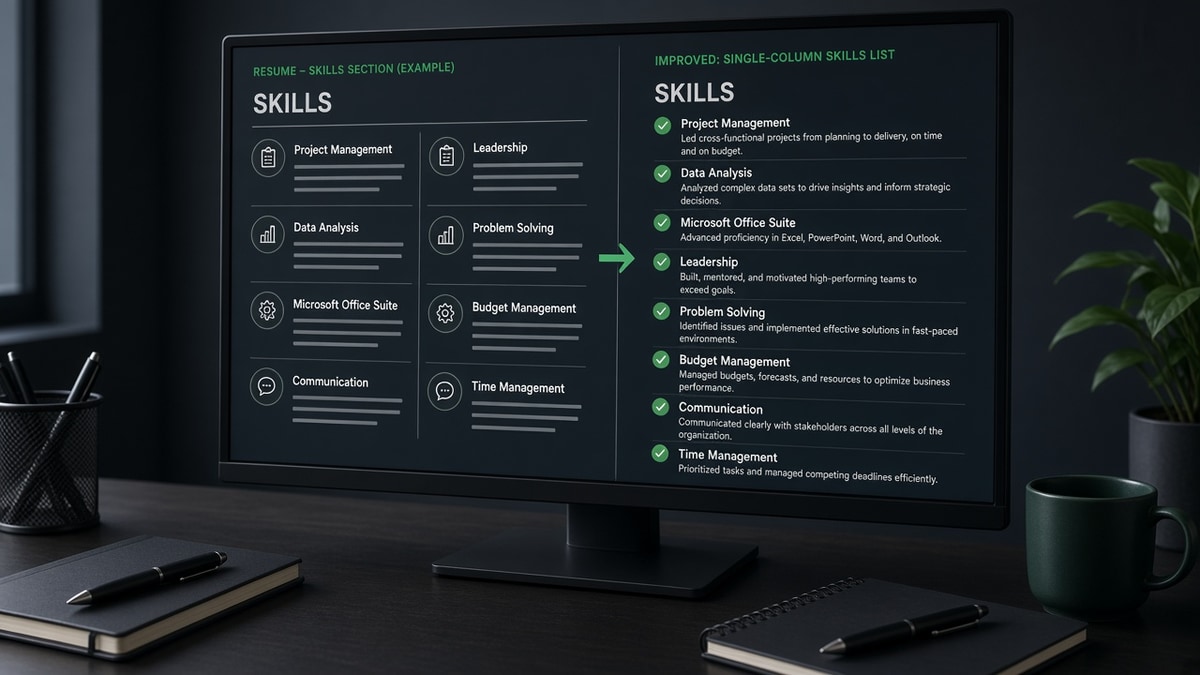
9 min read · Compare skills layout vs proof
Most advice treats the skills block like a magic keyword bank. You'll paste thirty tools, upload, and hope the score jumps. The file often parses fine while the screen still dies because nothing ties Python to an employer and year, and that's when you'll wonder why the match score didn't move.
Check your resume for free after you paste the PDF into Notepad. If skills show up but your last role dates vanished, fix layout before you add more nouns to the list.
Tonight you're comparing two jobs the skills section does: help parsers label a field, and help humans skim tools fast. We'll walk through format choices, what breaks in Workday-style previews, and when to shrink the list instead of growing it. You shouldn't need a second column just to fit SQL on the page.
Quick Wins
- Rename creative headers to Skills on a plain line.
- Paste the PDF into Notepad and confirm one skill per row.
- Mirror each posting must-have in a dated bullet under your current role.
Skills list alone vs skills plus proof bullets
Candidates assume the resume skills section ATS reads correctly is the whole keyword game. Extraction is only half. After the file flattens to text, filters look for overlap between the posting and your experience fields. A naked list scores tokens without context.
Skills-only risk. Twenty tools in a block with no dated use reads like a dump from the job description. Parsers may still tag Tableau, but recruiters cannot tell if you built dashboards last quarter or sat through a webinar.
Bullet proof wins. One line under your current role beats three repeats in the list: "Built weekly revenue dashboards in Tableau for six product owners, cutting manual reporting time by half." The skill name sits beside scope and time.
Best pairing. Keep a short skills section for skim speed. Mirror each posting must-have once in the last two roles. Drop synonyms unless the posting uses them.
Before: Skills block lists Salesforce, Tableau, and SQL with no dated use lines.
After: Same three terms appear in bullets under 2023–Present roles with scope, for example Salesforce pipeline hygiene for 40 reps.
I've screened Greenhouse profiles where the skills rail looked perfect and the experience block never proved the tools. If the posting asks for Salesforce and the list says Salesforce but the last role bullets never mention it, I assume shallow exposure.
Which skills layout parses cleanest
Use this table to pick a format, then run the Notepad test on your export. If order shuffles, no comma trick will save you.
| Layout | Parser behavior | Recruiter skim | When to use |
|---|---|---|---|
| One skill per line under Skills header | Usually maps to a distinct token per row | Fast scan for technical stacks | Default for engineering, data, IT roles |
| Comma-separated single paragraph | Fine in one column; can glue if columns break | Dense; easy to miss one tool | Short lists under twelve terms |
| Categorized Technical / Soft headers | Works if headers sit on their own lines | Helps mixed IC and leadership reqs | Manager roles with clear tool plus people split |
| Sidebar skills column | Often injects skills mid-experience text | Looks modern in PDF, messy in ATS view | Avoid for portal uploads; see single-column guides |
| Icons, bars, or stars for proficiency | Graphics drop; text may survive without level | Self-rated bars rarely trusted | Skip unless posting asks for proficiency text in parentheses |
For sidebar damage patterns, read why ATS rejects resumes with columns before you rebuild the skills rail.
Skills at the top vs skills after experience
Placement is a tradeoff between human skim order and parser field order, not a secret ranking boost.
Top-loaded skills. Works when the req is tool-heavy and your last title already matches. Recruiters see Python, AWS, and Terraform before they read bullets. Risk: you highlight tools you have not used recently if the list is stale.
Bottom-loaded skills. Keeps attention on employers first, which helps when you are pivoting and the list is wider than your last role. Parsers still find a bottom section if the header is standard and the column is single.
Hybrid compromise. Three-line summary with two posting keywords, then experience, then a tight skills block. You get skim signal without a full cloud above your current company.
Neither placement fixes a missing proof bullet. Move terms in the list only after you add one honest use line under a dated role.
Layouts that break skills extraction
Tables with invisible borders. Designers hide grid lines; parsers still read cell by cell. Skills cells often paste between job bullets.
Text boxes labeled Core Competencies. Creative headers skip the Skills anchor some parsers expect. Rename to Skills or Technical Skills on a normal paragraph line.
Narrative skill sentences. "Experienced with Excel, SQL, and stakeholder communication" is harder to split than three plain lines. Save story for experience bullets.
Duplicate labels. Listing Java twice because one line says Java and another says Java 17 can fragment how tools display in recruiter view. Pick the label the posting uses.
Pair layout fixes with resume formatting errors that break ATS parsing when headers and icons also fight the parser.
Mirror posting language without stuffing the list
Open the posting and highlight must-have nouns: systems, methods, certifications. Copy exact spelling, including hyphens in Full-Stack if the req uses them.
Before: Skills section copies every synonym from the req, including tools you have not touched in three years.
After: Twelve to fifteen terms you can defend, each echoed once in a recent bullet with a date range.
Copy-paste skills pass (5 minutes)
1) Paste req must-haves into a scratch column.
2) Mark yes only where you have a dated bullet ready.
3) Add missing proof to the current or prior role, not the list only.
4) Trim skills you cannot defend in an interview.
5) Export PDF and Notepad-test the Skills block order.
Confirm skills and bullets together
Use the job match score tool on one posting after the list and bullets align. A jump driven only by the skills block, with flat experience overlap, is a warning to add proof lines.
Run the free ATS resume checker on the same export. You're checking whether Skills still parses as its own block after you flatten columns or remove tables.
Sample block (line-break format)
Skills
Python
SQL
Tableau
AWS
Agile
Stakeholder communication
Matching proof bullet
Data Analyst · Northwind Health · 2022–Present
Built patient intake dashboards in Tableau on AWS, pulling SQL models used by clinic ops weekly.
Before you upload again
A resume skills section ATS reads correctly is plain, ordered, and honest. Pair the list with dated bullets, keep one column, and match posting labels without cloning tools you cannot explain.
- Run the Notepad paste test on your Skills header and lines.
- Move every must-have from the posting into a recent role bullet once.
- Drop sidebar tables that inject skills into experience text.
When structure is stable, run a free resume check on the export you plan to upload. If you need a fresh layout, the free resume builder keeps skills in a single column by default. If the role wants a letter, pull one proof skill into the cover letter generator so the story matches what parsers can read.
Read more
Frequently asked questions
Most corporate systems scan the whole file after extraction. A dedicated skills block helps when it parses as its own section, but filters and recruiters still look for the same terms inside dated experience. A list without proof bullets often looks like keyword stuffing even when parsing succeeds.
Line breaks usually parse as separate tokens. Long comma strings can glue together when columns or tables scramble order. Either format works in a single column if a Notepad paste shows one skill per chunk. Commas inside multi-word skills, like Project Management, are fine.
Top placement helps human skims for technical roles. Bottom placement is safer when you use a sidebar in Word that might parse late. In both cases, repeat posting must-haves inside the last two roles so parsers tie keywords to recent dates.
Yes, with simple text headers on their own lines, not nested tables. Write Technical Skills, then one skill per line. Avoid colons glued to the first skill on the same line without a break. Category labels that paste as plain words parse more reliably than icon grids.
Enough to mirror the posting without cloning every synonym. A tight set of twelve to eighteen terms you can defend in an interview beats thirty loosely related nouns. Trim duplicates like Python and Python Programming down to one label that matches the job description.