8 min read · Fix parser read order
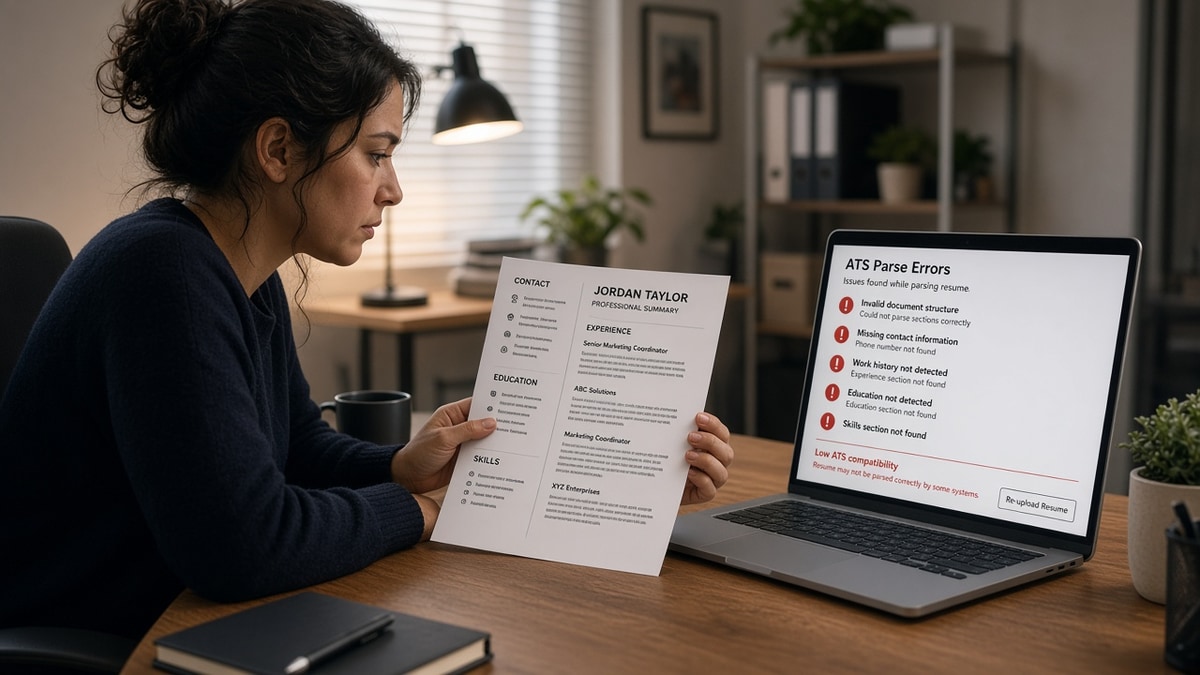
Your template looked sharp in Word, then the portal preview turned job history into alphabet soup. That is not proof you're unqualified. It's usually a layout problem where the parser couldn't tell which column came first.
Check your resume for free after you run a plain-text paste test. If the checker can't see your last role dates, neither can the recruiter queue in Workday or Greenhouse.
Tonight you're diagnosing read order, not chasing a mystery rejection code. We'll walk through what breaks, what still uploads, and which layout swaps actually stick. You shouldn't have to guess why a polished PDF reads like gibberish inside the ATS.
Quick Wins
- Paste the PDF into Notepad and read experience top to bottom once.
- Move sidebar skills under a single Skills heading in the main column.
- Re-upload and open the portal preview before you tailor keywords.
Why ATS rejects resumes with columns in practice
Candidates picture a red error banner when they hear ATS rejects resumes with columns. On most corporate portals the upload succeeds. The damage happens in extraction: the system walks the file like a typewriter, not like your eyes moving left rail then body text.
Linear read assumption. Parsers expect one vertical stack. When two columns sit on the same row, the engine may read across, down one column, or zig-zag through table cells. None of those paths match how you designed the page.
Field mapping breaks. Applicant profiles store employer, title, start date, and end date as separate fields when parsing works. Scrambled text leaves dates orphaned, so automated filters treat ten years of experience like six months.
Keyword context disappears. A skill in the right column might extract inside a bullet from the left. The token Python still exists, but it no longer sits in a skills block, so both humans and filters miss the match you intended.
I've opened Greenhouse profiles where the candidate's current title showed under education because a two-column header swapped order. The resume PDF was gorgeous; the parsed record was unusable for screening.
For the wider parser failure list, read resume formatting errors that break ATS parsing when tables and icons also appear in your template.
Trace column parsing failure step by step
Work through these symptoms in order. Keyword edits won't stick if dates and titles never land in the right fields.
Symptom 1: dates float away from employers
Before: Left column lists Company A with dates; right column holds bullets for that role.
After: Notepad shows "Company A • Built dashboards • Jan 2021 • Reduced backlog…" with no clear pairing.
Fix: Stack title, company, location, and dates on one line above bullets. Keep every bullet for that job directly under that header block in one column.
Symptom 2: skills inject into experience sentences
Before: Narrow skills rail reads "SQL, Tableau, Stakeholder mgmt" beside long bullets.
After: Plain text shows "SQLTableauStakeholder" glued to verbs mid-paragraph.
Fix: Move skills below experience or use a comma-separated line under a Skills header. Mirror must-have tools again inside dated bullets so humans see proof, not just nouns.
Symptom 3: contact block shuffles or duplicates
Two-column headers with name on the left and email on the right often paste as repeated fragments or empty lines. Some portals drop phone numbers entirely when extraction fails early.
Fix: Center or left-align contact lines in a single stack: name, title line, city, phone, email, LinkedIn URL. No text boxes.
Copy-paste column audit worksheet
Copy-paste audit (5 minutes)
1) Export PDF exactly as you submit.
2) Select all → paste into Notepad.
3) Circle the first line where order feels wrong.
4) Note which column that text came from in Word.
5) Rebuild that section in one column and retest.
When previews still look wrong after layout fixes, compare notes with resume rejected by ATS: common reasons and fixes so you don't chase keywords while structure stays broken.
Layout traps that look safe in Word
Invisible tables for spacing. Templates hide grid lines but still force side-by-side cells. Parsers love tables for the wrong reasons.
Canva or design-tool exports. Pretty layers often flatten into unpredictable text order. Treat design exports like guilty until the Notepad test passes.
Multi-column section headers only. Even a short two-column summary plus single-column experience can confuse where section breaks belong.
Icon skill bars. Graphics beside text columns drop entirely or paste as blank squares, which removes keywords you thought were visible.
Assuming the human PDF is what recruiters see. Many recruiters live in the parsed profile first. If that view is scrambled, they never open your attachment.
Adding a second column to save space. You gain half an inch and lose field mapping. Trim bullets instead of splitting the page.
Confirm parsed fields after you flatten columns
Use the free ATS resume checker on the single-column export. You're checking whether experience blocks and skills still appear where the tool expects them, not whether the template looked trendy in Word.
Pair that with Score your job match on one posting after parsing looks stable. If match scores jump only when you paste keywords into a sidebar, the layout was hiding terms from the extracted body text.
Before you reapply
Why ATS rejects resumes with columns is really a parsing story: uploads succeed, order fails. Flatten the layout, retest in Notepad, then tailor keywords once dates and titles stay paired.
- Move sidebar content into the main column under clear headers.
- Keep one header line per job before bullets.
- Confirm portal preview matches your Notepad paste.
When structure is clean, run a free resume check on the finished file. If the role asks for a letter, pull one proof bullet into the cover letter generator so messaging matches what parsers can finally read.
Read more
Frequently asked questions
Most employer systems do not show you a column rejection message. They accept the upload, then extract text in the wrong order. The result looks like a weak or incomplete profile in recruiter view, so you get filtered out even though the PDF looked fine on your screen.
Sidebars still break reading order. Parsers often pull the narrow column in chunks between lines from the main column, so skills land inside job descriptions. A skills cloud at the bottom in one column parses more reliably than a right rail.
DOCX can parse slightly better when the layout uses simple tables, but nested tables and text boxes still scramble output. Run the same Notepad paste test on both exports. If order changes between formats, assume the portal will see the worse version.
Copy all text from your exported PDF into Notepad or TextEdit. If job titles no longer sit next to their dates, or skills appear mid-sentence in experience, the layout failed. Fix structure before you tweak keywords.
Recruiters skim one column faster anyway. Clean headings, white space, and tight bullets beat decorative columns once the file is readable in the ATS preview. You can still use bold section labels and consistent date alignment without side-by-side blocks.