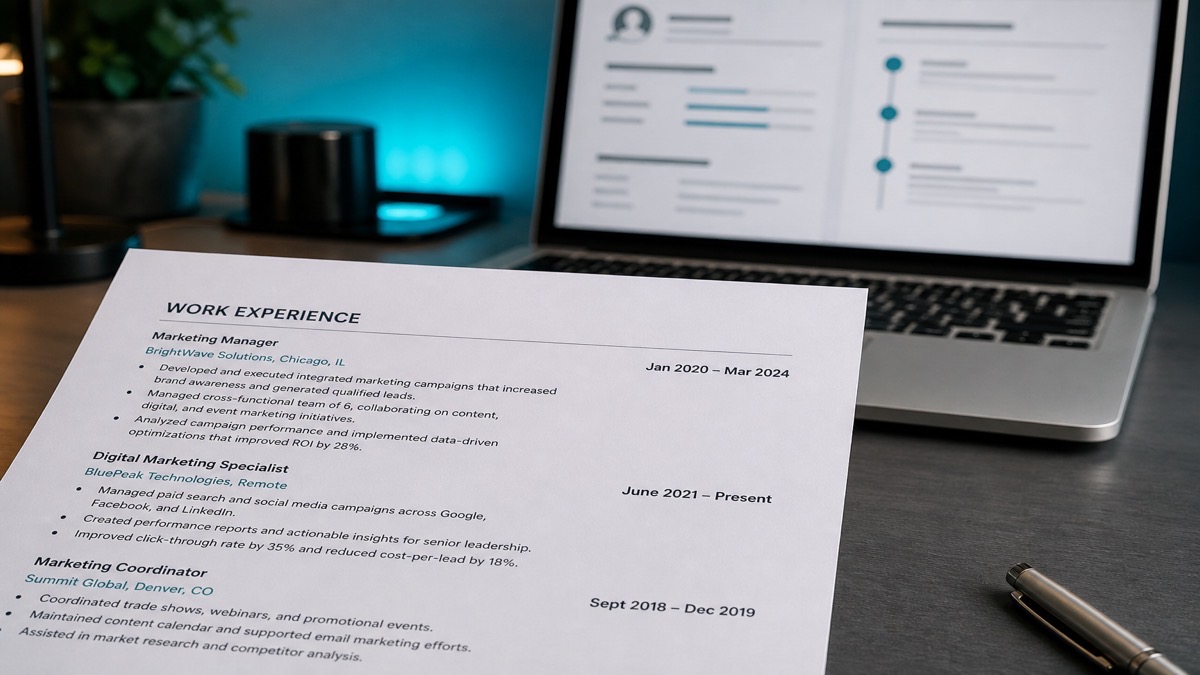
Use a consistent month-year format on every date in your resume — such as "Jan 2020 – Mar 2024" or "January 2020 – Present" — and avoid all-numeric styles like 04/05/06 or 03/21 that are ambiguous for both recruiters and applicant tracking systems. Dates look like the boring part of a resume until they are wrong. Then they become the only thing a recruiter notices: overlapping jobs with no explanation, "Present" on a role you already quit, or a numeric date that reads backward depending on who opens the file.
You do not need a complex chronology system — you need one consistent style and the discipline to apply it everywhere on the page. Many ATS platforms try to build a searchable timeline from what you typed. If your dates live in a header field, a text box, or a merged table cell, the parser can misread gaps that were never actually there or drop end dates entirely.
After you standardize your dates, upload the real exported file to HireFlow's free ATS resume checker on hireflow.net to confirm the ranges still read correctly after upload. If you are also cleaning up titles and section order, pair this pass with our resume consistency checklist and Workday resume format guide .
Key Takeaways
- Pick one style — abbreviated or spelled-out month — and use it for every date.
- Never use all-numeric dates; they are ambiguous and hard to verify.
- Only use "Present" if you are genuinely still employed in that role.
- Keep dates in the body text, not headers, footers, or table cells.
- Match date formatting between your experience and education sections.
- The US month-year format we recommend and when year-only is acceptable
- Numeric, season, and two-digit date traps that break parsing
- Before/after examples you can copy directly into your resume
- How Workday, iCIMS, Greenhouse, and Taleo read employment dates
- A five-step playbook plus do/don't table before you apply
The format we recommend for US resumes
Key Takeaway
Pick abbreviated or spelled-out months once, then apply it identically across every entry — experience, education, and certifications included.
"Jan 2020 – Mar 2024" or "January 2020 – Present" is easy to read and hard to misread. US recruiters expect month plus year for professional roles; day precision is reserved for application forms, not the resume itself. Align dates in a column if your template allows it, but keep them in the main text flow — not inside a table that can break on PDF export.
Abbreviated months save space on dense resumes. Spelled-out months look slightly more formal. Either works; mixing "Jan 2020" in experience with "January 2022" in education does not. Use the same dash style everywhere too — an en dash ("–") between start and end is the most common convention in US hiring.
Copy-ready example
Senior Analyst, Northline Health · Chicago, IL
Jan 2021 – Present
Year-only ranges — "2019 – 2021" — are acceptable when you truly do not remember the month, but expect a follow-up in screening. Do not invent months to fill gaps; honest year-only is safer than fake precision.
Numeric-only dates and other ambiguity traps
Key Takeaway
All-numeric and season-only dates both create ambiguity that a plain month name solves instantly — for humans and for parsers.
04/05/06 is genuinely ambiguous: is that April 5, 2006, May 4, 2006, or something else entirely? International readers and US parsers apply different defaults. Two-digit slash formats like 03/21 – present are just as risky — parsers may read 03 as March or as a malformed year fragment.
Season-only ranges ("Fall 2024 – Spring 2025") look informal and frustrate background-check teams trying to map your history to payroll months. Quarter labels ("Q3 2023") belong in business reports, not entry-level resume timelines. If you only remember the year, use year-only consistently.
Another quiet failure mode: placing dates in a separate column built with an invisible Word table. The visual alignment looks professional, but Taleo and some Workday imports read table cells out of order, attaching end dates to the wrong job title. Inline dates next to the role name are slower to design but far more reliable.
Before/after: fixing date ambiguity
Key Takeaway
The fix is almost always the same: name the month, drop the slashes, and stay consistent across the whole document.
| Before (problematic) | After (ATS-safe) | Why it matters |
|---|---|---|
| 03/21 – present | March 2021 – Present | Removes slash ambiguity; clarifies current role |
| 04/05/06 – 08/12/09 | Apr 2006 – Aug 2009 | US and international readers agree on the timeline |
| Fall 2022 – Spring 2024 | Sept 2022 – Apr 2024 | Maps to real months for background checks |
| 2019 – 2026 (role already ended) | Jun 2019 – Nov 2023 | Fixes stale end date and adds missing months |
| 01/20 – 12/22 (education) | Jan 2020 – Dec 2022 | Matches experience section formatting |
Weak block
Operations Coordinator
06/19 – present
Managed scheduling and vendor invoices.
Strong block
Operations Coordinator · Jun 2019 – Present
Managed scheduling and vendor invoices for 14 clinic locations.
Not sure if your dates will survive an upload intact?
Run a free ATS check on HireFlowPresent, contracts, and overlapping roles
Key Takeaway
A stale "Present" is one of the fastest ways to lose trust during a background check — fix it before you apply, not after an offer.
"Present" means still employed. If you resigned, end the resume with the month you actually left. Ghost "Present" lines show up in employment verification and cost you trust right when you need it most. The same rule applies to internships that ended — "Present" is not a placeholder for "recent."
Contract and freelance roles should use real start and end months even when the client name changes often. Overlapping W-2 and contract work is fine if you label both roles clearly; hiding the overlap by nudging dates reads like fraud even when the overlap was completely innocent. Part-time work during school can overlap full-time employment — just make the schedule obvious in the job title or a short parenthetical.
If you were laid off mid-month, use the month of separation unless your employer confirms a specific day for payroll. Recruiters rarely need day-level precision on the resume; they need a timeline that matches what HR will verify.
Education vs experience: match styles
Key Takeaway
Mixed date styles across sections read as sloppy, not intentional — and some ATS tools merge education and work history into one chronology view.
If experience uses "Jan 2020," do not make education "2020 only" unless you genuinely never knew the start month. Consistency across sections is a small detail recruiters notice quickly because it is so easy to get right. Certifications with expiration dates should follow the same month-year pattern — "Expires Mar 2027" not "03/27."
Expected graduation dates for current students can use "Expected May 2026" — that is clearer than a fake end month. For degrees in progress, "Aug 2023 – Expected May 2026" beats a single future year floating alone under the school name.
How ATS platforms actually read your dates
Key Takeaway
Structured fields make dates searchable for recruiters — but only when your layout lets the parser find them in the main body text.
Workday commonly extracts each role's title and date range into structured fields so recruiters can sort candidates by tenure and recency. If your dates sit inside a table cell or a text box rather than inline with the job title, that extraction step can fail silently, leaving your work history looking incomplete on the recruiter's side even though your PDF looks fine. The Society for Human Resource Management (SHRM) notes that most large employers filter applications through ATS before human review—so misread dates are a machine-gate problem, not just a formatting preference. See our Workday resume format guide for layout rules specific to that platform.
iCIMS, widely used in retail, healthcare, and logistics, often flags resumes with inconsistent or missing end dates during automated review. That can push your application into a slower manual-review queue instead of an initial shortlist. Consistent month-year formatting reduces that friction.
Greenhouse and Taleo both rely on text extraction before a human ever opens your file. Greenhouse tends to preserve reading order on clean single-column resumes; Taleo is more sensitive to tables and multi-column layouts that split dates from titles. In both systems, a recruiter searching for "5+ years in role X" is searching parsed date fields — not re-reading your PDF line by line.
The practical test: copy all text from your exported PDF and paste it into a plain text editor. If date ranges appear on the same line as job titles in logical order, most parsers will too. If dates are missing or appear pages away from the role they belong to, fix the layout before you upload. Running the same file through an ATS resume checker adds a second opinion when you are not sure the copy-paste test caught everything.
US applicants vs international formats: what changes
Key Takeaway
When applying to US employers, default to US month-year conventions even if your home country normally uses day-first numeric dates.
Candidates from the UK, EU, India, and Australia often grow up writing day/month/year order. On a US-facing resume, that habit produces exactly the ambiguous slash dates US parsers struggle with. If you are targeting US roles, write "15 Mar 2019" or "Mar 2019" — not 15/03/2019 — even though the latter is standard in your local market.
Canadian resumes follow US conventions for month-year in most corporate hiring, though bilingual applications sometimes duplicate date styles in French and English sections. Keep both languages on the same month-year pattern if you maintain two versions of one role description.
If you are applying internationally from one master resume, maintain separate exports per region rather than one hybrid file. A single resume that mixes EU day-first dates with US month abbreviations confuses both human readers and parsers, because no single locale's rules apply cleanly.
Another edge case: military and federal resumes sometimes use year-only for older assignments when month records are unavailable. That is acceptable in those contexts if you stay consistent — but add month-year for your last ten years of civilian work so corporate ATS platforms have enough granularity to score recency correctly.
Short roles, gaps, and how dates expose them
Key Takeaway
Honest month-year dates make short stints visible — that is preferable to invented continuity that fails verification later.
A three-month contract is not a problem on its own; faking eighteen months of continuous employment to hide it is. Recruiters see short roles constantly in contracting, layoffs, and startup environments. Clear month-year ranges let you tell the truth without looking evasive.
Employment gaps between jobs should not be papered over by extending the end date of the prior role. If you took six months for caregiving, coursework, or a structured job search, a single neutral line with accurate months is stronger than a timeline that does not survive a reference call. Dates are how that timeline gets checked.
Promotions within the same company deserve separate entries with distinct date ranges when titles changed materially — "Analyst, Jan 2020 – Jun 2022" and "Senior Analyst, Jul 2022 – Present" beats one blurred block with a single start date stretching back years. Parsers and recruiters both use title changes as signals of progression; merged dates hide that signal.
Resume date format: do and don't
Key Takeaway
Run this table against your current draft — most date failures are visible in under two minutes.
Do
- Use "Jan 2020 – Mar 2024" or spelled-out months consistently
- Place dates inline with job titles in the body text
- Use "Present" only for current employment
- Match education and certification date styles to experience
- Use year-only when the month is genuinely unknown
- Verify parsing after PDF or DOCX export
Don't
- Use slash dates like 04/05/06 or 03/21 – present
- Mix abbreviated and full month names on one resume
- Hide employment gaps with invented months
- Put timelines only in headers, footers, or table cells
- Use seasons or quarters as your only date labels
- Leave "Present" on jobs you already left
Date-format playbook before you apply
Key Takeaway
Run this five-step pass once, then reuse the same style on every future resume edit.
- Pick abbreviated or spelled-out months and never mix both on one resume.
- Replace every all-numeric date with a month name (Jan 2020, not 01/20).
- Audit every "Present" line against your actual employment status.
- Move dates out of headers, footers, and table cells into the body text.
- Upload the file to HireFlow's ATS checker and confirm titles and ranges still parse after export.
If you are rebuilding from scratch, the free resume builder on hireflow.net uses inline month-year fields by default, which sidesteps most table and column failures before you export.
Catch export issues before employers do
HireFlow on hireflow.net helps verify your resume still makes sense after upload — not just in your local preview.
Frequently asked questions
Usually no. Month and year is the standard for US resumes — "March 2022" or "Mar 2022" — unless a specific application form asks for a full date. Adding the day just adds clutter without adding useful information, and it can create awkward line breaks when dates sit in a narrow right-hand column.
Fix the gap with honest entries rather than fake continuous dates. A short line for a contract role, caregiving period, or coursework is more defensible than dates stretched to hide a few months, which tends to surface anyway during reference or background checks. Gaps of a few months are common; invented continuity is what recruiters flag.
No. All-numeric dates are ambiguous across countries and even across US readers, since it is unclear whether the format is month/day/year or day/month/year. Spell out or abbreviate the month instead so there is no room for misreading. The same rule applies to two-digit years like 01/20, which parsers often treat as incomplete.
Yes. If your experience section uses "Jan 2020," your education section should not switch to year-only unless you genuinely never knew the start month. Mixed styles read as inconsistent rather than intentional, and some ATS platforms build one timeline from both sections — mismatched formats can make graduation look like it overlaps with full-time work incorrectly.
Use "Present" only if you are still actually employed there, such as "January 2023 – Present." If you have since left, replace "Present" with the actual end month — background checks and reference calls will catch a stale "Present" line. Capitalize "Present" consistently and use an en dash or hyphen between start and end the same way on every role.
It is better to avoid season-only ranges. They look informal and can frustrate background-check teams trying to map your timeline to specific months. If you only remember the year, use year-only consistently rather than inventing a season. Academic roles sometimes use semesters — if you must, pair them with the month you actually started or finished.
Not if you label the overlap honestly, such as a W-2 role running alongside a contract position. Hiding the overlap by adjusting dates reads like fraud even when the overlap was completely innocent, such as a part-time freelance gig during a full-time job. A one-line note — "Concurrent with role below" — is enough context for most recruiters.
Many do. Workday, iCIMS, Greenhouse, and Taleo commonly extract job title and date-range pairs into structured fields to build an applicant's work history view for recruiters. If your dates live inside a text box, a table cell, or a header, that extraction can fail or misorder your timeline even when the PDF looks perfect on screen.