11 min read
You didn't bomb the interview you never got. Workday imported your resume, the preview looked half empty, and the req closed while you were still tweaking fonts. Maybe your email vanished because it lived in a header. Maybe your last job shows as 2019 to Present when you left in 2024 because dates sat in a right-hand table column. You're qualified. The upload wasn't, and that's fixable tonight.
US corporate reqs run on Workday more than any other ATS. The parser's picky about layout, not about how hard you've worked. Before you rebuild bullet wording for the fifth time, confirm the machine can read your phone number and employment order. Check your resume for free on the exact PDF you'll attach. You're hunting missing digits and scrambled titles, not chasing a vanity keyword score.
Job searching's draining. You don't need another generic ATS lecture. You need a short pass that fixes the import errors recruiters see when they open your profile beside two hundred other uploads, and you'll know it's working when the preview matches your paste test.
Below: what broken imports look like in Workday, a six-step workday ats resume checklist you can run tonight, mistakes that survive multiple edits, and two tools that belong in your upload routine. When the preview matches your source file, generate a cover letter that repeats one proof line from bullet one so the package tells one story.
Quick Wins
- Copy phone and email from the header into line two of the body as plain text.
- Replace date tables with one employer line: Title | Company | Jan 2022 to Mar 2025.
- Paste your upload PDF into Notepad; if order scrambles, fix export before you apply.
When Workday previews look fine but the data isn't
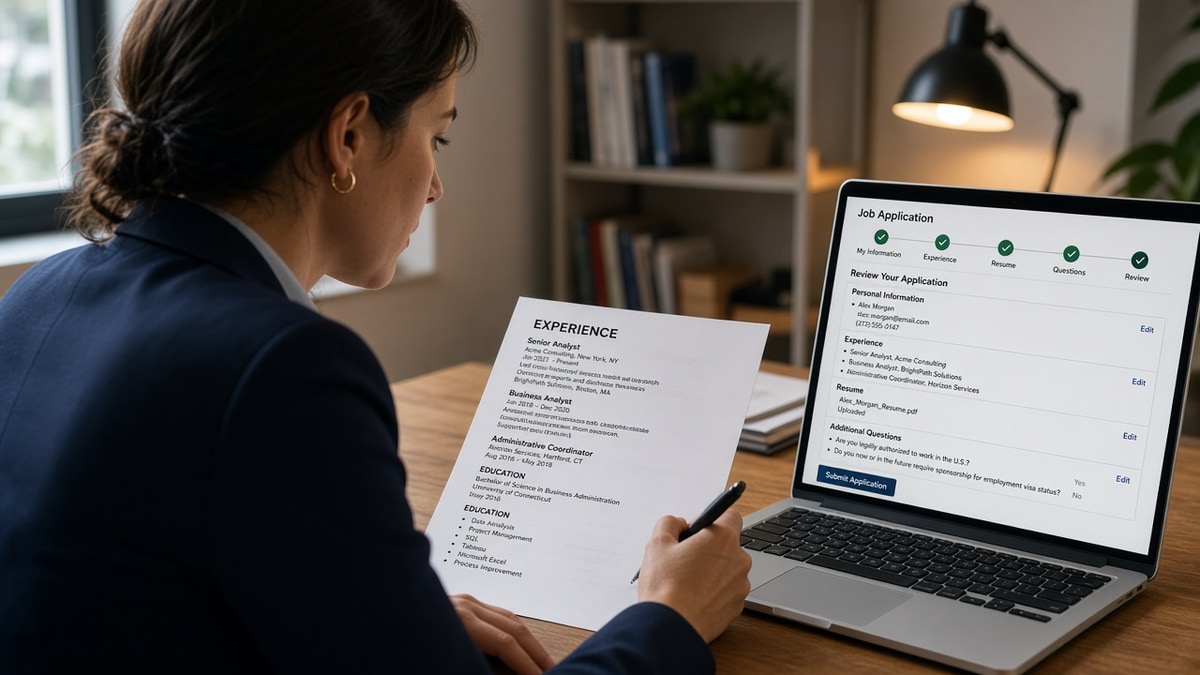
The symptom: you upload, see a thumbnail, and assume you're in the pool. Later, a recruiter opens your profile and contact fields are blank, your current title attached to the wrong company, or your skills block repeats tools already missing from Experience. The file you designed isn't the record Workday stored.
Workday converts uploads into structured fields: name, email, phone, work history, education, skills. Graphics, multi-column layouts, and header-only contact rows drop out of that conversion. US applicants often score a polished DOCX in Word, then submit a PDF export that strips the table holding dates. The checklist isn't about keyword density first. It's about whether the parser can place each fact in the right box.
You might also be comparing apples to oranges. A free scan on an editable file can show green checks while the portal preview built from your PDF shows a gap. Recruiters trust the preview inside Workday, not the Word doc on your desktop. If those two disagree, the preview wins every time.
This won't turn a stretch role into a fit. It stops strong US candidates from losing visibility because the system never attached their email to the application or merged two jobs into one row.
Another tell: you apply to three reqs at the same employer and each preview shows a different job order. That usually means the source layout still uses floating text boxes or section breaks the exporter reorders randomly. Flatten the file once, then reuse the same export for every req at that company until you change jobs.
Knockout questions and referrals still matter, but they sit downstream of parse quality. A referral with a garbled work history row still forces a recruiter to fix data by hand. Most won't. They move to the next profile where dates already line up.
Workday ATS resume checklist: six steps before you hit submit
Run this sequence on one target posting. When the preview and plain-text paste match, reuse the same export for similar reqs until you change roles or layout.
Step 1: Pull contact info into the body
Before: Name in a header band, phone as a phone icon, email in a footer on page two.
After: Line 1: Full Name. Line 2: City, ST | phone digits | email | linkedin.com/in/handle. All plain text, no icons, no text boxes.
Workday often skips headers and footers entirely. If recruiters cannot call you, you do not exist in the req. See why ATS can't read your phone number sometimes US fix when digits still drop after you move them.
Step 2: Flatten employment rows and dates
Before: Two-column table with company on the left and 03/2021 to 06/2024 in a right cell.
After: Senior Analyst | Northwind LLC | Chicago, IL | March 2021 to June 2024, then bullets on the next lines.
Month Year beats numeric-only dates for US readers and parsers. Spell months once per role so end dates do not attach to the wrong employer. For how parsers score gaps and overlaps, read how resume timelines are scored before you shorten history to one page.
Step 3: Kill layout landmines
Remove text boxes, skill bars, charts, and logos. Use one column, 10 to 12 point Arial or Calibri, standard headings: Summary, Experience, Education, Skills. Bullets can be simple hyphens or dots. Fancy symbols sometimes import as garbage characters that break the next line.
Step 4: Export the file Workday will receive
Save DOCX from Word or Google Docs, then export PDF if the portal prefers PDF. Do not upload a Canva or design-tool export for corporate Workday reqs unless you enjoy random section order. The file you test must be the file you attach.
Step 5: Plain-text paste audit
Open the upload PDF, select all, copy into Notepad or TextEdit. Read top to bottom. If titles and dates separate onto different blocks than you intended, fix the source and re-export. If phone digits split across lines, add spacing or remove parentheses until the string reads continuous.
Step 6: Align bullet one with the posting
Once layout is stable, highlight three must-have nouns from the req. Place the top one in the first eight words of bullet one under your current employer. Trim duplicate tools from Skills after they appear in dated bullets. Parsing fixes come first; keyword proof without dates still fails human skim.
Copy-paste block: fifteen-minute Workday pass
1. Move name, phone, email to body lines 1–3 (no header/footer).
2. Rewrite each role as: Title | Company | City | Mon YYYY to Mon YYYY.
3. Delete tables, text boxes, icons, and second columns.
4. Export single-column PDF (same file you will upload).
5. Paste PDF text into Notepad; fix anything out of order.
6. Open Workday preview; confirm employers and dates match.
7. Rewrite bullet one with one posting must-have in the first eight words.
8. Apply once; save this export as your master until the next job change.
Edge case: the portal lets you type contact info manually after upload. Still fix the resume file. Recruiters open the attachment; blank parses make you look sloppy even when forms are full.
Edge case: you're returning after contract work listed as a vendor name recruiters won't recognize. Keep the client-facing title truthful, add one line clarifying the engagement, and put Month Year dates on the same line as the vendor row so parsers do not think you have overlapping full-time jobs.
I've screened stacks of these imports in Workday, and the profiles that move fastest share one boring trait: plain contact lines, flat job rows, and a PDF that pastes cleanly on the first try.
Mistakes that survive multiple rewrites
Scoring the DOCX, uploading the PDF. Word can hide tables that PDF exporters flatten badly. Your checklist pass must run on the attachment, not the editable draft. If scores differ between formats, trust the upload format.
Stuffing Skills to fix a thin preview. A long Skills rail does not replace missing employer rows. Move tools into dated bullets, then shorten Skills to tools not yet shown above.
Ignoring the in-portal preview. Some applicants never scroll past the upload confirmation. Open the preview, click through work history, and compare to your source. One minute there saves a week of silence.
Before: Header contact block, table dates, Canva PDF, no plain-text paste, Skills-only keywords.
After: Body contact lines, flat employer rows, Word PDF export, Notepad audit, bullet-one must-have with Month Year proof.
Re-uploading the same broken file to new reqs. Workday will not magically parse v4 better than v3 if the layout is unchanged. Fix once, clone the clean export, tailor bullets per posting without touching columns.
When parse quality is solid but callbacks still lag, the issue may be proof depth, not format. Read why weak bullet points get ignored for the recruiter skim layer this checklist does not cover.
Filename hygiene matters more than you think. Use Company_Role_YourName.pdf instead of resume_final.pdf so you do not attach the wrong export when you're applying in batches at night.
Do not shrink font to cram a third column back in. Tiny type survives export but fails human skim. Cut older bullets instead of squeezing layout tricks parsers already punished on the last upload.
Gaps, overlaps, and contract rows Workday misreads
Career gaps: Do not hide months with a skills-only page break. List the gap as its own line if you were caregiving, in school, or between contracts: Career break, caregiving, Jan 2023 to Aug 2023. Workday may still show a hole, but recruiters prefer an honest line over a title jump with no dates.
Overlapping part-time roles: Side gigs stacked in one column often merge into a single employer in preview. Give each role its own row with Month Year ranges and part-time in the title when true: Marketing Coordinator (part-time) | Retail Co | Jun 2022 to Dec 2023.
Contract vs client name: If the paycheck came from a staffing firm but you sat on-site at a bank, put the client in the company field and note via Agency Name in the title line or first bullet. Parsers map company to employer; a mystery acronym in the company slot drops you from industry filters recruiters use inside Workday.
After you flatten overlaps, paste the PDF into Notepad again. If two job titles appear on one line, split them before you upload to the next req. The workday ats resume checklist only holds if each job owns its own row in plain text.
Parse and match before submit
Paste your upload PDF and the job description into HireFlow's free ATS resume checker . You're confirming section order, contact strings, and employer rows survived export, not collecting a badge.
After layout is stable, run Score your job match on the same file. Treat gaps as a punch list for bullet one and summary swaps, not as an excuse to pile synonyms into Skills without dates.
Do this now: Pick one Workday req. Flatten contact and dates. Export PDF. Paste into plain text. Fix preview blanks. Scan once. Submit one application with a file you'd be willing to read aloud to a recruiter.
What to fix tonight
A workday ats resume checklist is mostly plumbing. Contact in the body, dates on the employer line, single-column PDF, plain-text paste, preview check, then bullet-one proof for the posting. Fix import errors before you chase synonym swaps in Skills.
Pick one req where you're already close on scope. A clean parse won't invent years you don't have. It will stop Workday from storing a blank email beside a strong career story.
- Move phone and email out of headers into plain body lines.
- Flatten each job row with Month Year dates on one line.
- Export and paste the upload PDF into Notepad before submit.
- Rewrite bullet one with one must-have from the posting.
Open the Workday req on your list. Run a free ATS check on the PDF you'll attach, fix whatever the preview still hides, and send one application with a file that parses the same way twice.
Read more
Frequently asked questions
Upload whichever format the portal lists first, then test both if allowed. Many US employers accept PDF only after a text-based export from Word or Google Docs. A scored DOCX can look perfect in Word while the PDF you actually submit drops table cells and shuffles dates. Always paste the exact upload file into plain text before you hit submit.
Phone and email often sit in a header, footer, or icon row the parser skips. Move name, city, phone, email, and LinkedIn URL into the body as plain text on line one through three. No text boxes, no columns split for design. If the preview still blanks, re-export single column and upload again.
Treat tables as risky. Job titles in the left cell and dates in the right cell frequently merge or vanish on import. Use one line per role: Title | Company | City | Month Year to Month Year, then bullets below. If you must keep a table for legacy reasons, rebuild the same content as plain lines before your next application.
Parsers and recruiters both weight recent Experience higher on most corporate builds. Skills rows full of tools you never dated in a bullet inflate keyword panels without fixing thin previews. Put must-have tools in bullet one under your current employer, then trim duplicate entries from Skills.
Open the application preview when Workday offers one. Compare employer names, titles, and end dates to your source file. Copy parsed text into Notepad and scan for scrambled order or missing digits in phone numbers. If preview and plain text disagree with your PDF, fix layout before you apply to the next req at the same company.