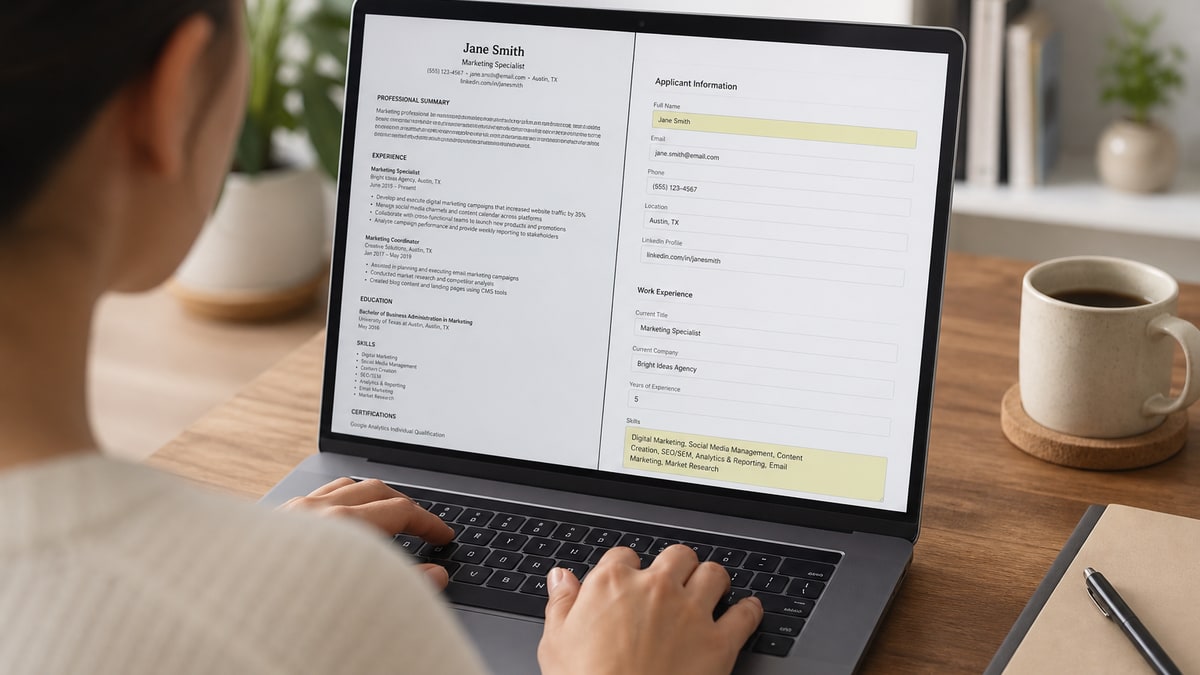
To pass ATS screening systems, use a single-column layout with standard section headers, mirror the exact skills and job title language from the posting, quantify your bullets with real numbers, and export a clean DOCX or PDF with no tables, text boxes, or embedded graphics. Test the actual file before you submit it.
Most advice about applicant tracking systems treats them like a black box that randomly rejects good candidates. They are not. An ATS is a structured database: it parses your resume into fields, stores the text, and lets a recruiter search and rank that data. When a strong candidate gets filtered out, it is almost always because the file broke during parsing or the content never matched what a recruiter searched for —not because a robot decided to reject them.
This guide is the step-by-step playbook: how parsing actually works, exactly which formatting choices break it, how to mirror keywords without stuffing, how to rewrite weak bullets into quantified evidence, and what changes by platform across Workday, Greenhouse, Taleo, Lever, iCIMS, SuccessFactors, and ADP. If you want the psychology behind why screening feels arbitrary, read why ATS screening feels random . If you want to know what a recruiter sees after the system ranks you, see what recruiters actually see after ATS screening . This post focuses on the fixes you can make today.
Key Takeaways
- ATS software parses fields and indexes text—it rarely auto-rejects on its own
- Single-column layouts with plain headers parse far more reliably than designed templates
- Mirror job-description keywords naturally in context; stuffing hurts more than it helps
- Quantified, tool-specific bullets outrank vague duty statements in keyword search
- Workday, Taleo, and iCIMS each have specific quirks worth testing before you apply
How ATS screening actually works (it is not a robot rejecting you)
An applicant tracking system is fundamentally a database with a resume parser bolted on. When you upload a file, the parser reads the text, then tries to sort it into predefined fields: contact info, employer names, job titles, employment dates, education, certifications, and a skills list. That structured data gets stored next to the raw document so a recruiter can later run a search—"5 years, SQL, project management"—and pull a ranked list of matching candidates.
Nothing in that process involves an algorithm judging your career choices or penalizing you for a career gap by default. The systems that reject automatically are usually configured with explicit knockout questions the employer set up—work authorization, required license, minimum years of experience—not a hidden scoring model reading between the lines of your bullets.
Where candidates actually lose ground is parsing accuracy and keyword match. If your job title lands in the wrong field because it was inside a text box, the system may show a recruiter a blank title field next to your name. If your skills section never uses the same words the job posting uses, a keyword search will not surface you even though you are qualified. Both problems are fixable, and neither one is about tricking software—they are about giving the parser text it can read correctly.
Key Takeaway: treat the ATS as a search index, not a judge. Your job is to make sure the right words land in the right fields, in language a recruiter would actually search for.
Single-column layout rules that keep parsing clean
Layout is the single biggest lever you control. Parsers read left to right, top to bottom, in the order text appears in the underlying file structure—not the order it visually appears on the page. A two-column resume with dates in a left sidebar and duties in the main column can get read out of sequence, merging one job's dates with a different job's title.
- One column, always. No sidebars, no side-by-side skill and experience blocks.
- No tables. Table cells frequently parse out of order or get dropped entirely.
- No text boxes. Content inside a text box is sometimes invisible to the parser, even though it displays fine on screen.
- No header/footer contact info. Some parsers skip headers and footers entirely, which means your phone number and email never make it into the candidate record.
- No icon-based skill graphics. A row of star icons for "Excel proficiency" carries zero parsable text.
- Standard fonts only. Stick to Arial, Calibri, or a similar system font; decorative or script fonts can render as broken characters after parsing.
None of this means your resume has to look plain to a human reader. Bold section headers, consistent spacing, and a clean one-column hierarchy read as professional to recruiters and parse cleanly to machines at the same time—you are not trading one audience for the other.
Common Mistake: downloading a visually striking template from a design site without checking whether it uses tables or text boxes under the hood. Open the file in a plain text editor or a parser preview before you trust it.
Use section headers the parser can actually map
Parsers rely heavily on section header text to know where one part of your resume ends and another begins. Creative header names might read well to a human, but they can confuse a system trained to look for conventional labels.
| Avoid this header | Use this instead |
|---|---|
| My Journey | Work Experience |
| What I Bring to the Table | Skills |
| Where I Learned | Education |
| Credentials & Badges | Certifications |
| A Little About Me | Summary |
Standard headers cost you nothing in personality or design—recruiters skim resumes in seconds and expect these labels anyway. Save distinctive language for your bullets and summary, where it can actually influence a keyword match instead of confusing field mapping.
Quick Check: if you would not find your header wording in a template from HireFlow's free ATS checker , a career center handout, or a corporate resume guide, it is probably too creative for a parser.
Mirror keywords from the job description without stuffing
Keyword match is how recruiters actually search a candidate database, and it is also how many systems rank applicants before a human opens a file. The fix is not adding every possible synonym—it is mirroring the exact terms the specific job posting uses, because that is the language the recruiter will search.
Start by pulling the required skills and the job title directly from the posting. If the listing says "Salesforce administration," use that phrase—not "CRM management"—somewhere in your skills list and again inside a relevant bullet. If the posting calls the role "Senior Data Analyst," and that matches your actual scope of work, use that exact title in your most recent role heading or summary rather than a close synonym like "Data Insights Lead."
Stuffing—repeating a term five or ten times, or hiding it in white text or a font size of one point—does not improve ranking on modern systems and creates real risk. Some platforms flag hidden or repeated text as manipulation, and any recruiter who opens the file and finds a keyword dump loses trust in the rest of the document. Two honest, contextual mentions of a required skill outperform five mechanical repetitions.
- Copy the exact required skills and tools listed in the posting into your skills section.
- Use the posting's job title language in your summary if it matches your real experience.
- Work each required skill into at least one bullet with context, not just a list.
- Skip acronym-only listings—write both the acronym and the full term once, such as "SEO (search engine optimization)."
- Never use hidden text, white-on-white keywords, or font-size tricks to pad matches.
The Society for Human Resource Management's talent acquisition coverage regularly notes that recruiters spend very little time per resume before deciding whether to move forward, which is exactly why matching the posting's own language matters—both for the software doing the initial sort and for the person doing the first skim afterward.
Common Mistake: listing skills only once in a dense keyword block at the top and never mentioning them again in your actual experience bullets, which reads as a checklist rather than evidence.
Write quantified bullets that parse as evidence, not duties
Once your keywords are in place, the words around them matter almost as much. A bullet that lists a duty ("Responsible for customer support") gives a parser and a recruiter nothing to rank you against. A bullet with a number, a tool, and a scope gives both something concrete to match and remember.
The formula is simple: what you did, using which tool or method, at what scale, with what measurable result. You do not need exact internal metrics if you do not have them—reasonable estimates based on team size, ticket volume, or budget range are standard practice, as long as they are honest.
| Before (duty statement) | After (quantified, keyword-mirrored) |
|---|---|
| Responsible for handling customer support tickets and helping the team. | Resolved 45+ Zendesk support tickets weekly, maintaining a 94% CSAT score across a 3-person support queue. |
| Worked on marketing campaigns and social media content. | Managed email marketing campaigns in HubSpot for a 12,000-subscriber list, lifting open rates from 18% to 27% over two quarters. |
| Skills: Microsoft Office, teamwork, communication, problem solving. | Skills: Excel (pivot tables, VLOOKUP), Power BI dashboards, Salesforce reporting, stakeholder presentations to directors. |
| Helped manage inventory and vendor relationships for the warehouse. | Managed inventory for a 15,000-SKU warehouse using SAP; cut stockouts 22% through weekly vendor forecast reviews. |
Notice that each rewrite also names a specific tool—Zendesk, HubSpot, Excel, SAP. Tool names are keywords too, and they are often listed explicitly in job postings as required or preferred experience. A bullet with a number and a named tool does double duty: it satisfies a keyword search and gives a recruiter a concrete reason to shortlist you.
Pro Tip: rewrite your three most recent roles first. Older positions matter less for ranking, so spend your editing time on the bullets a recruiter is most likely to search against and read closely.
Choose a file format that parses reliably
File format questions come up constantly, and the honest answer is that structure matters more than the extension. A clean, single-column DOCX and a clean, single-column PDF both parse well on modern ATS platforms. A messy DOCX full of tables and a messy PDF exported from a design tool both parse badly, regardless of which format you picked.
That said, a few practical defaults help. If a posting explicitly requests one format, use it—some Workday and iCIMS configurations are set up to only accept PDF or DOCX, and ignoring the instruction can block your submission outright. If the posting is silent, DOCX remains the slightly safer default because it avoids the rare case where an older parser reads a PDF's text as a flattened image rather than selectable characters. Our PDF vs DOCX for ATS breakdown covers platform-specific exceptions in more depth.
Whatever format you choose, never submit a scanned image of a printed resume, never export from a graphic design tool that flattens text into paths, and never rename a file with special characters or emoji—stick to a plain filename like "firstname-lastname-resume.pdf".
Common Mistake: exporting a resume from a design tool such as Canva without checking whether the text remained selectable—some export presets flatten everything into an image, which most parsers cannot read at all.
Platform-by-platform quirks: Workday, Greenhouse, Taleo, Lever, iCIMS, SuccessFactors, and ADP
Every applicant tracking system parses text differently, and employers configure the same platform in different ways. Knowing the general tendencies of each major system helps you anticipate where your resume is most likely to snag. Our deep dive on Workday resume formatting covers that platform in more detail if it is your target.
| Platform | Common quirk | What to do about it |
|---|---|---|
| Workday | Auto-populates structured entry forms from parsed dates and titles; errors surface immediately as blank or wrong fields. | Use plain date formats (Month Year) and double-check auto-filled fields before submitting the application form. |
| Greenhouse | Stores raw text with fewer forced fields, so layout errors are less visible on submission but still hurt keyword ranking. | Do not assume a smooth upload means clean parsing—test the file separately before relying on the form to catch issues. |
| Taleo | Older instances are especially sensitive to tables, columns, and non-standard bullet characters, which can scramble entire sections. | Keep formatting as plain as possible: standard bullets, no tables, no multi-column blocks anywhere in the file. |
| Lever | Generally parses cleanly but weighs resume text heavily in recruiter search, making exact keyword phrasing more important than usual. | Mirror the posting's exact skill and title language closely rather than using loose synonyms. |
| iCIMS | Behavior varies significantly by employer configuration; identical files can parse differently across companies using the same platform. | Never assume a past successful submission guarantees the same result at a different employer—test each new file. |
| SuccessFactors | Frequently used with mandatory structured fields (skills, certifications) that duplicate resume content—leaving these blank can hurt ranking even with a strong resume. | Fill every optional form field the portal offers in addition to uploading your file; do not rely on parsing alone. |
| ADP | Common in mid-size employer recruiting; upload errors and stalled parsing are frequently reported with dense or graphic-heavy resumes. | Stick to a simple DOCX with no embedded objects if you hit upload or preview errors on an ADP-hosted portal. |
Key Takeaway: the platform name tells you what to expect, but the employer's specific configuration decides the details—when in doubt, format for the strictest case: single column, plain headers, no embedded objects.
Mistakes that quietly tank your ranking even when the file uploads fine
Some errors do not stop your file from uploading, which is exactly why they go unnoticed. The resume looks fine to you, the confirmation email arrives, and you never find out that a field parsed wrong or a keyword never landed.
| Do | Don't |
|---|---|
| Use standard bullet characters (• or -) | Use custom Wingdings-style bullet symbols |
| Spell out and abbreviate key terms once each | Use only acronyms the parser may not expand |
| List employer name, title, and dates in plain text | Bury job titles inside a paragraph or subtitle graphic |
| Put contact info in the body, not header/footer | Rely on a header for phone number and email |
| Proofread for typos in company and tool names | Assume spellcheck caught product-name misspellings |
The U.S. Equal Employment Opportunity Commission's guidance for employers is a useful reminder that screening tools, including ATS platforms, are subject to the same fairness expectations as any other hiring step. That does not change your formatting checklist, but it is worth knowing the systems ranking your resume operate inside real regulatory scrutiny, not an unaccountable black box.
If you want a broader look at what a recruiter does once your file clears initial parsing and ranking, our companion post on what recruiters actually see after ATS screening walks through the review side of the process in detail.
Common Mistake: assuming a successful upload confirmation means the file parsed correctly—confirmation only means the file transferred, not that every field extracted as intended.
Pre-submit checklist before you upload
Run through this list on the exact file you are about to submit—not an earlier draft —every time you apply to a new posting.
- Single-column layout with no tables, columns, or text boxes anywhere in the file.
- Standard section headers: Summary, Experience, Education, Skills, Certifications.
- Required skills from the posting mirrored in your skills list and in at least one bullet.
- Job title language matched to the posting where it honestly reflects your role.
- Every bullet in your most recent two roles includes a number, tool, or scope.
- Contact info placed in the document body, not a header or footer.
- DOCX used by default, or PDF only when the posting requires it.
- Plain filename with no emoji or special characters.
- Standard font (Arial, Calibri, or similar) throughout, no decorative fonts.
- File tested in a parse checker to confirm titles, dates, and skills extract correctly.
Quick Check: if you cannot confirm item 10, run your file through HireFlow's free ATS checker before you apply—it takes less time than one application form.
Frequently asked questions
An applicant tracking system parses your file into structured fields—name, employer, job title, dates, education, and skills—then stores that data alongside the raw text. Recruiters later search or filter that stored data by keyword, years of experience, and location. The system is not scoring your writing quality; it is extracting fields and indexing text so a human can search it faster.
Rarely on its own. Most platforms flag or rank candidates rather than auto-rejecting, though some employers configure hard knockout questions—work authorization, licensure, minimum experience—that filter automatically before a recruiter ever opens the file. What feels like an ATS rejection is often a parsing failure: your dates, title, or skills landed in the wrong field, so you look unqualified even though a person never reviewed the actual document.
No. Multi-column layouts, text boxes, tables, and icon-based skill graphics are the most common cause of scrambled parsing across Workday, Taleo, and iCIMS. Use a single-column layout with standard section headers in plain text. Save visual flair for a portfolio site or LinkedIn banner, not the file you upload to a corporate career portal.
There is no magic repeat count, and stuffing a keyword ten times in white text or a hidden footer can get a submission flagged in some systems and reads as spam to recruiters who do see it. Mirror each required skill from the job description once in your skills section and once more inside a relevant bullet, using the same phrasing the posting uses. Two natural mentions in context beat five repetitions with no context.
Both formats parse reliably on modern systems when the file has no embedded tables, columns, or text boxes—the underlying structure matters more than the extension. DOCX has a slight edge on older Taleo and iCIMS instances that occasionally mis-render PDF text as an image. When a posting does not specify, DOCX is the safer default; when it explicitly asks for PDF, provide PDF.
You need the same clean, single-column, keyword-mirrored core resume for every platform, but you should expect different friction points. Workday's structured- entry forms often auto-populate from your parsed dates and titles, so formatting errors surface immediately during application. Greenhouse tends to store the raw text with fewer forced fields, so a messy résumé is less likely to visibly break the form but still hurts your keyword ranking.
Use a brief professional summary, not an objective statement. A three- to four-line summary near the top gives you extra space to mirror the job title and top two or three required skills in plain sentence form, which strengthens keyword match. Objectives that describe what you want from the employer waste that space and rarely include parsable, job-relevant terms.
You cannot know for certain from the outside—systems do not send a parse report to candidates—but you can test the same file you plan to submit before you apply. Upload it to a parse checker and confirm your job titles, dates, employer names, and skills extract into the correct fields with no garbled characters or missing sections. If those fields come out clean, you have removed the most common reason strong candidates get filtered before a human ever reads their experience.