8 min read
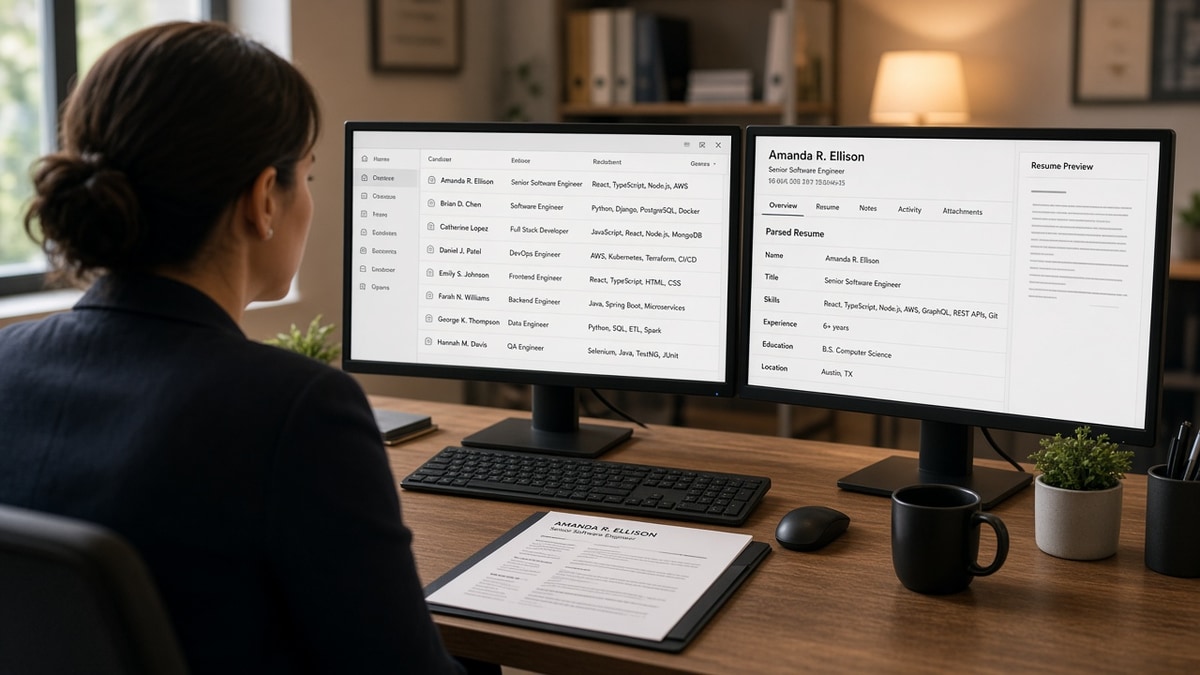
You spent an hour on margins. The recruiter never saw them. She saw a Greenhouse row with your name, a match chip, and six lines of imported text. That's normal, not a personal snub, and it doesn't mean you're unqualified.
Job searching's draining when silence feels like a verdict. Most of the time it's a display problem: the system stored your story in the wrong fields. Once you know what recruiters see after ATS screening, you'll fix the row instead of guessing.
Check your resume for free on the export you'll attach tonight. You'll catch blank title cells before another week's worth of no replies.
Quick wins
- Paste the PDF into Notepad. If employers read out of order, flatten columns before keywords.
- Open the portal preview when available. Empty title or employer fields mean fix layout, not summary prose.
- Rewrite bullet one on your current role with a scope line recruiters can skim in five seconds.
What recruiters see after ATS screening in the queue
Think database row, not attachment. Workday, Greenhouse, Lever, Taleo, and iCIMS all start the same way. Your file becomes fields recruiters sort and filter.
On pass one they usually see:
- Name, email, phone, and location pulled from the header block
- Current or most recent job title and employer on separate lines
- Start and end dates per role, when the parser read them
- Skills or tags extracted from a Skills section or scattered bullets
- Match or rank chips tied to posting terms inside those fields
- Knockout answers you submitted on the form, including work authorization
- Status labels such as new, reviewed, or auto-disqualified
They do not see your color palette, icons, or column balance on that first screen. Some teams never open the PDF unless the row passes a skim test.
| What you designed | What the row shows |
|---|---|
| Sidebar skills column | Skills block may sit above education or repeat twice |
| Logo or headshot | Often stripped; text-only preview |
| Creative section labels | Experience may land in an uncategorized bucket |
| Polished summary paragraph | Summary field recruiters skim only after title and dates look right |
Before: two-column Canva export with skills riding a colored rail beside jobs.
After: single-column DOCX with Skills as one line under summary and tools repeated once in the analyst bullet dated March 2023 to Present.
Before: scanned PDF where employers look perfect on screen but copy-paste returns gibberish.
After: text-based PDF saved from Word with employer, title, and Month Year on separate lines.
For why the preview diverges from your file, read why your resume looks different after upload in Workday . Pair it with formatting errors that break ATS parsing when imports keep scrambling employers.
High-volume reqs sort the row list by match signals and recency. Boutique teams may open more attachments by hand, but they still store the same parsed shape. Your fix is the same: make the row truthful before you polish fonts.
Tell which layer failed you
Silence hits three different layers. Diagnose before you rewrite your whole career story.
Layer 1: Parser never built a row
Symptom: portal preview shows blank employers, missing dates, or skills without any job tied to them. Cause: columns, tables, icons, or image-only PDFs. Fix: flatten to one column, standard headers, text-based export.
Layer 2: Row exists but rank is weak
Symptom: fields populate, but match chips stay low while peers look similar. Cause: posting must-haves live only in a skills list, not under dated bullets. Fix: move each must-have into bullet one under the correct employer.
Layer 3: Row looks fine, human skim fails
Symptom: you get views but no screens, or recruiters open the PDF then stop. Cause: title mismatch, vague bullet one, or tenure that does not match the req level. Fix: headline in market language and one metric in the first bullet.
I've screened stacks of imports in Greenhouse where the skills tab matched the posting and bullet one still said supported various initiatives. That's a human pass fail even when the rank chip looked green.
Copy-paste row audit (run in ten minutes):
Notepad read (parser)
- Employers appear once, in order, top to bottom
- Each role: Company / Title / Mon YYYY – Mon YYYY or Present
- Skills are not floating above your degree block

Portal or checker preview (row)
- Current title cell is not empty
- Last employer matches your PDF header
- Knockout answers match what you would say on a phone screen

Skim test (human)
- Headline uses posting title words you can defend
- Bullet one: verb + object + team size or metric
- Gap longer than six months has one honest line, not silence
Work the list top to bottom. Don't jump to layer three fixes while layer one still shows blank titles.
When you're unsure whether silence is parser or rank, compare your file to why your resume never reaches a human . That page names knockout and filter stacks this row view sits inside.
Symptoms that feel like personal rejection
- Chasing a higher match chip before the title cell fills: recruiters skip empty titles even when skills shout expertise.
- Design-first edits: new font, same scrambled import.
- Summary-only tailoring: posting language up top, generic bullets below the fold in the row preview.
- Assuming recruiters read every attachment: sorted lists mean bottom rows wait until top rows clear.
- Reuploading the same broken file: some systems log repeat attachments without fixing parse errors.
And if you're comparing yourself to a friend who heard back fast, remember reqs differ. Their row may have populated cleanly while yours landed skills above education. Fix the display problem you can see in Notepad before you judge fit.
This won't fix applying far above level. It stops qualified files from dying because the recruiter never got a readable row.
Verify the import on the file you'll send
Tools only help when they read the same bytes you attach to the portal.
Run the free ATS checker after the Notepad read passes. You want missing headings and empty employer lines flagged before another apply.
Score your job match once must-haves sit in dated bullets, not orphan skill lines.
Do this now: Screenshot the portal preview when a title field is blank. Flatten the layout, reupload once, and compare the row before you rewrite bullet three.
Optional cover letter after the row looks honest? Generate a cover letter that points to bullet one proof. Letters rarely rescue empty employer cells.
Before you reapply, fix the row
What recruiters see after ATS screening is imported text in sort order, not your designed PDF. Match chips and flags sit on top of that row. When employers and titles parse cleanly, you earn the attachment click and the ten-second skim.
- Notepad order matches your intended career timeline.
- Portal preview shows employer, title, and dates on the current role.
- Bullet one on that role carries scope or a metric you can defend on a call.
- Checker and match score run on the attachment you'll submit.
Check your resume for free when the row audit is done. Boring imports beat clever layouts that never populate a title cell.
Read more
Frequently asked questions
Usually no on the first pass. They see parsed fields in a candidate row: name, current title, employers, dates, skills text, and match flags. The attachment opens after that row looks relevant. A two-column PDF can look fine to you while the row shows scrambled employers.
Current title against the req, last employer name, and tenure on the latest role. Match percentage or color chips matter only after those three populate correctly. Empty title cells get skipped even when the skills tab is full.
Yes when the preview contradicts the score, knockout answers fail, or the req already has enough screened candidates. Scores rank inside the pool that passed filters. They do not replace a blank employer line or a title that does not map to the posting.
Paste the file into Notepad, then compare order to the portal preview if the employer exposes one. If employers or dates land in the wrong block, fix layout before you tweak keywords. Run a checker on the same bytes you will attach.