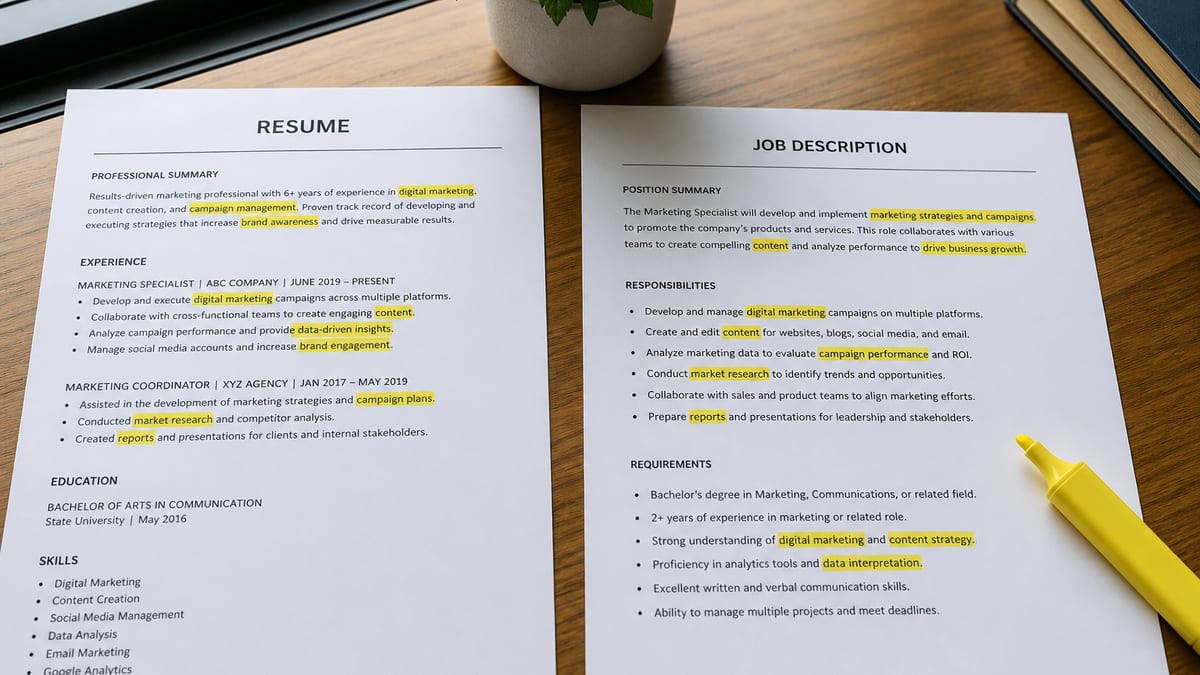
You beat an ATS by becoming findable and credible—not by pasting the job description into Skills. Workday, Greenhouse, Lever, and Taleo store applications, parse attachments, and help recruiters search. Broken layouts, mystery titles, or synonym clouds make you disappear before a fair human look.
This guide is a practical stack: parse hygiene, market titles, natural keywords, honest knockouts, a six-second skim test, and referrals. Baseline on hireflow.net before you rewrite bullets. For score bands see what a good ATS score means ; for the checker workflow see how to pass an ATS checker .
Key Takeaways
- Beating an ATS means becoming findable and credible, not tricking a score
- Parse hygiene (single column, body contact, standard headings) matters more than synonym swaps
- Market titles help recruiter search find you; natural keyword placement beats a stuffed Skills section
- Knockout questions and a six-second human skim decide outcomes a checker score cannot fix
- Referrals and targeted applies compound the effect of a findable, honest resume
What “beating an ATS” actually means
Key Takeaway
Beating an ATS is findability plus credibility—not hacking a score. You want parse-safe text, searchable titles, honest match language, and a file a recruiter still trusts at a glance.
Blog posts and forum threads often treat applicant tracking systems like video-game bosses. That framing pushes people toward shortcuts: white text keywords, invisible fonts, Skills sections copied from the posting, or fifteen synonyms for “project management.” Real hiring workflows are messier. Recruiters search inside the tenant. Knockout questions filter on eligibility. Hiring managers skim PDFs on phones between meetings. A stuffed resume might tick a freemium checker and still lose everywhere else.
A better frame: you are competing to enter the searchable, credible set. Parse hygiene gets your experience into the right fields. Market titles align you with how people type queries. Natural keywords prove overlap without noise. Honest knockouts stop you from applying to roles that would reject you on question one. The human skim and referrals decide who gets called—not a vanity percentage employers never see. Learn where automation ends in does ATS reject resumes automatically .
Real scenario: Devon heard that stuffing Salesforce variants into Skills would “beat Greenhouse,” Workday, or Lever. His checker score hit 94. A recruiter opened the PDF, saw a block of repeated product names with no proof, and passed. His colleague Priya kept the same structure, used “Account Executive” as her market title, mentioned Salesforce in two bullets with quota context, and scored 81 on HireFlow. Priya got the screen. Devon’s high score was a false signal—proof and readability beat stuffing, regardless of whether the employer runs Greenhouse, Workday, Lever, or another tenant.
Parse hygiene: the foundation nobody should skip
Key Takeaway
If parsers cannot read your file, keywords never land. Single column, standard headings, body contact, consistent dates, selectable text—fix these before vocabulary.
Parse hygiene is the unglamorous work that separates findable candidates from invisible ones. When Workday, Greenhouse, Lever, or a similar ATS ingests your PDF, it tries to map text into fields: name, contact, employers, titles, dates, education, skills. Columns, text boxes, graphics, and creative section names scramble that map. Recruiters then search for “Registered Nurse” or “Python” and your mangled export never surfaces—even if those words appear on screen.
Start every optimization pass with a parse audit. Export PDF and confirm you can select and copy paragraphs. Open the copy in a plain text editor: do dates stay with employers? Does Experience read as one continuous block or random fragments? Put your name, email, phone, and city or region in the document body—not only in a header or footer many parsers skip. Use headings recruiters expect: Summary (optional), Experience, Education, Skills, Certifications when relevant.
Raw resume input vs ATS parser output
| Raw Resume Input | ATS Parser Output |
|---|---|
| Two-column Canva; phone in sidebar text box; “Where I Thrived” heading | Workday/Greenhouse drop contact; Experience missed; tools never searchable |
| One column; “Experience”; phone under name; Jan 2022 – Present dates | Same content, now mapped into title/date fields |
| Skills as icon bars and percentage graphics | Skills field empty in Lever/Taleo extract |
| Plain list: SQL, Tableau, Looker, Salesforce (posting spellings) | Hard skills land in searchable fields |
| Parse risk | What breaks | Fix |
|---|---|---|
| Multi-column layout | Experience order scrambled; dates detached | Rebuild single column for apply file |
| Header/footer contact | Email and phone missing in parsed record | Duplicate contact in body under name |
| Tables for jobs | Titles and employers merge or split wrong | Plain headings with line breaks per role |
| Image-based PDF | No selectable text; zero search value | Export from Word/Docs with real text layers |
| Creative section names | Skills land in wrong bucket or get skipped | Standard labels parsers and humans recognize |
Consumer checkers approximate this risk. They are not perfect—read are ATS checkers accurate for limits—but shared structure flags usually predict real portal pain. Fix parse before you touch synonyms. For a step-by-step scan workflow, see how to pass an ATS checker ; for the full parse-safe checklist, use how to make a 100% ATS-friendly resume .
Market titles: speak the language recruiters search
Key Takeaway
Recruiters type titles into ATS search before they read bullets. Align internal titles with market labels when truthful—parentheses beat mystery labels.
Title search is one of the most effective findability moves that is not stuffing. When a recruiter has 300 applications for one requisition, they often filter or search by title first: “Customer Success Manager,” “Staff Software Engineer,” “RN,” “Financial Analyst.” If your resume says “Client Happiness Guru” or “Engineering Partner III” with no translation, you may never appear in that first cut—even with strong bullets.
Translate internal titles to market language when accurate. Format options that work: market title alone if it matches your duties; market title with internal title in parentheses; or internal title with market equivalent in parentheses on the first line of the role. Do not invent seniority. A coordinator is not a director because the posting says director. Do show when your company used non-standard names for standard work.
Title translation examples
| Raw Resume Input | ATS Parser Output |
|---|---|
| Member of Technical Staff — no market hint | Search for “Senior Software Engineer” in Greenhouse misses the row |
| Senior Software Engineer (Member of Technical Staff) | Title field matches recruiter queries |
| Patient Care Advocate (unlicensed title only) | RN keyword filters in Workday/Taleo skip you even if licensed |
| Registered Nurse — Patient Care Advocate (license + scope match) | License/title searches return the record |
Mirror the role family you are applying to, not every synonym in the posting. One clear market title per role beats five stuffed variants in Skills.
Natural keyword placement without stuffing
Key Takeaway
Put hard skills where you used them: Skills list plus bullets with context. Cover top requirements you truly meet; skip pasted posting paragraphs and synonym floods.
Keyword stuffing is the fastest way to look like you optimized for software instead of work. Signs include: a Skills section longer than your Experience, the job description pasted verbatim, every tool repeated six times, or soft-skill adjectives stacked without proof. Some checkers reward that noise. Humans and many ranking views do not.
Natural placement follows a simple rule: if you used it, name it where you used it. Pull five to eight hard requirements from the posting—tools, methods, certifications, domain terms. Add each once in Skills if it belongs on your profile, and at least once in a bullet with scope or outcome when possible. “Built ETL pipelines in Python and Airflow processing 2M rows daily” beats “Python Python Python Airflow dbt Spark” in Skills.
| Approach | Checker score | Human read |
|---|---|---|
| Pasted job description in Skills | Often 90+ | Looks dishonest; instant distrust |
| Synonym flooding (12 Agile variants) | Moderate bump | Noise; hides real proof |
| Skills + contextual bullets | 75–88 typical | Credible; easy six-second skim |
| No overlap with posting | Low match | Fine if wrong role; fix targeting instead |
Raw resume input vs keyword outcome
| Raw Resume Input | ATS Parser Output / human skim |
|---|---|
| Skills lists 40 tools; Experience never mentions half | Fields may fill; recruiter assumes inflation on open |
| Twelve tools in Skills; top eight appear in recent bullets with outcomes | Match looks earned in Greenhouse and to humans |
| Every bullet starts with the same posting phrase | Jobscan score may rise; skim says “optimizer” |
| Two bullets per role reference domain terms; others focus on metrics | Searchable + credible at six seconds |
Stop when honest coverage is done—not when the checker hits 100. If the only remaining gaps are tools you do not know, change role family or build skills instead of faking vocabulary.
Not sure if your file is findable or just stuffed? Test resume formatting.
Run HireFlow's free ATS resume checker on hireflow.net — upload PDF or DOCX, paste a posting, and get structure and match flags without an account.
Knockout questions: honesty beats clever omissions
Key Takeaway
Portal knockouts filter before resume read. Answer truthfully; skip roles with hard gaps. No stuffed resume overrides “requires 7+ years.”
Many applicants treat knockouts as an annoyance to bypass. That mindset wastes evenings. Work authorization, clearance, license numbers, salary expectations, commute radius, and years-of-experience thresholds often auto-filter applications regardless of PDF quality. A perfectly parse-safe, keyword-aligned resume never reaches a human if question four disqualifies you.
Read the full application before you optimize attachments. Note hard requirements in the posting and in the form. If you need sponsorship and the form says “not available,” decide consciously whether to apply. If the role requires an active RN license and you are still in school, no Skills trick fixes that. Honesty keeps you credible for roles you do qualify for later—recruiters remember mismatches.
Before: Checked “Yes” to five years of SaaS sales with eighteen months
total; resume stuffed with “enterprise,” “quota,” “Salesforce.” Auto-rejected or
screened out on experience mismatch.
After: Applied to SMB SDR roles that match tenure; resume uses honest
title “Sales Development Representative”; knockouts answered accurately. Fewer applies,
more conversations.
Pair knockout honesty with realistic targeting. Ten strong applies beat forty where the form outs you on day one. For how automation and filters interact, read does ATS reject resumes automatically .
The six-second human skim test
Key Takeaway
ATS findability gets you into the pile; humans pick interviews. Optimize for a fast skim: clear title, recent proof, scannable bullets, no synonym walls.
Recruiters and hiring managers do not read every word on first pass. They glance at title, company names, dates, and one or two bullets. Stuffing destroys that glance. When the top third of page one is a dense Skills cloud or repeated posting language, the skim says “optimizer,” not “operator.”
Run the skim test yourself. Set a timer for six seconds on your PDF. What did you see? Ideal signals: target title or clear market label, recognizable employers, recent dates, at least one number or outcome, clean layout. Failure signals: walls of keywords, tiny fonts to fit stuffing, inconsistent dates, or no clue what you actually did.
Skim-friendly bullet pattern
- Line one: scope (team size, territory, volume, budget).
- Line two: action with one or two hard skills named naturally.
- Line three: outcome with a metric, range, or before/after when truthful.
Example: “Owned renewals for 120 mid-market accounts ($4.2M ARR). Ran QBRs in Gainsight and Salesforce; flagged churn risk 60 days early. Improved gross retention from 88% to 94% over four quarters.” One glance tells role, tools, and proof—without stuffing “customer success” fifteen times.
Keep summary lines short if you use them. Two sentences that state target role, domain, and one proof point beat a paragraph of adjectives. The human skim is where stuffed resumes die after “beating” a checker.
Referrals and warm paths: beat the cold pile
Key Takeaway
A findable resume competes in search; a referral competes for attention. Pair clean files with targeted outreach—one quality intro beats forty cold applies.
No resume strategy ignores volume and luck. Even perfect parse hygiene leaves you in a queue with hundreds of similar profiles. Referrals, alumni paths, former colleagues, and thoughtful LinkedIn notes change the math: a human may read you before rank order matters. That is not cheating—it is how hiring actually works.
Build a weekly habit: identify five roles you genuinely fit, apply with your parse-safe file, and send two warm messages where you have a real connection or specific insight. Attach or link the same credible PDF—not a stuffed variant for algorithms. Mention one proof point relevant to their team. Ask for guidance or a referral only when the fit is honest.
Before: Ninety cold applies with a keyword-stuffed resume; zero
callbacks; burnout.
After: Twenty-five targeted applies, eight referral asks, parse-safe
resume with market titles; three screens in two weeks. Findability plus network beat
stuffing alone.
Referrals do not override hard knockouts every time, but they reduce the odds that your application dies silently in search. Treat outreach as part of beating the system—not an optional extra after you paste keywords.
90-minute evening workflow: findable without stuffing
Key Takeaway
Baseline scan → parse fixes → title alignment → natural keywords → skim test → two applies. Time-box; do not synonym-spin all night.
- 0–10 min: Pick one target posting. Baseline scan on hireflow.net. Sort flags: structure first, vocabulary second.
- 10–35 min: Parse hygiene—single column, standard headings, body contact, date cleanup, selectable PDF.
- 35–55 min: Market titles on recent roles; headline matches role family when truthful.
- 55–75 min: Natural keywords—top hard requirements in Skills plus bullets with proof. No pasted posting.
- 75–85 min: Six-second skim test; trim synonym walls; add one metric to your weakest recent bullet if honest.
- 85–90 min: Re-scan once. Apply to two qualified roles; answer knockouts honestly.
If you land in the mid-70s to high-80s with honest content and zero critical parse flags, ship applications. Chasing higher through stuffing trades human trust for points nobody at the employer sees. For band nuance, see what is a good ATS score and does it matter .
Stuffing mistakes that fail findability
Key Takeaway
White text, invisible fonts, JD paste, and synonym floods are high-risk/low-trust. They can raise checker scores while killing human reads.
| Tactic | Why people try it | Outcome |
|---|---|---|
| Hidden white text keywords | Trick parsers and checkers | Selectable text exposes trick; credibility gone |
| Full JD in Skills | Max match percentage | Recruiter distrust; awkward screens |
| Listing tools never used | Fill keyword gaps | Fails interviews; damages reputation |
| Chasing 100 on checkers | Feels like winning | Robotic phrasing; worse human skim |
| Optimizing before parse fix | Keywords feel faster than layout | High match, still invisible in search |
Replace each tactic with the stack in this guide. Parse so the system can store your history. Titles so search queries match. Keywords where you did the work. Knockouts answered straight. Skim test for humans. Referrals for attention. That combination is how practitioners actually move interview rates—not through folklore hacks.
Frequently asked questions
Fix parse hygiene first: single column, standard headings, contact in the body, selectable text. Then use market titles recruiters search, place hard skills naturally in bullets and a Skills section, answer portal knockouts honestly, and pass a six-second human skim. Referrals and targeted applies matter as much as file quality. Beating an ATS means becoming findable and credible—not pasting the job description into your resume.
It can inflate consumer checker scores and still fail in real workflows. Recruiters notice dense synonym lists and pasted posting language. Stuffing also breaks the human skim: the person who opens your PDF sees noise, not proof. Natural placement—tools and titles where you actually used them—beats a stuffed Skills block every time.
Rebuild or export a parse-safe file in one evening: one column, Experience and Education with consistent dates, email and phone in the document body. Align your headline title with the role family. Add five to eight hard requirements from the posting only where truthful. Re-scan once on a free checker, then apply. Structure moves findability faster than synonym swaps.
No. Consumer scores from HireFlow and similar tools are private diagnostics. Employers see your application answers, attachment, and how recruiters search inside their tenant. A high vanity score from stuffing does not appear on their screen. Focus on parse safety and honest match language instead of chasing 100.
Referrals do not bypass every knockout, but they often get a human look sooner. A warm introduction can sit above a cold pile of 400 similar PDFs. Pair a clean, findable resume with one referral ask per week for roles you truly fit. File quality gets you into search; relationships get you read.
No. Knockout questions on work authorization, years of experience, clearance, or required licenses filter before a human reads your resume. Dishonest yes answers waste your time and the recruiter's. Skip roles with hard gaps you cannot meet. Honesty preserves credibility when a human does open your file.
On serious structure-aware checkers, roughly 75–89 with critical parse flags cleared is a practical band. Under 60 usually means layout problems. Chasing 95+ through stuffing hurts humans. Read what a good ATS score means for band-by-band actions. The score is a rehearsal—not an employer verdict.
Passing a checker means your file likely survives parse and shows relevant vocabulary against a posting. Beating an ATS in the real world also means surviving knockouts, ranking in recruiter search, and winning the human skim. Use checkers to remove self-inflicted risk, then compete on proof, targeting, and outreach.