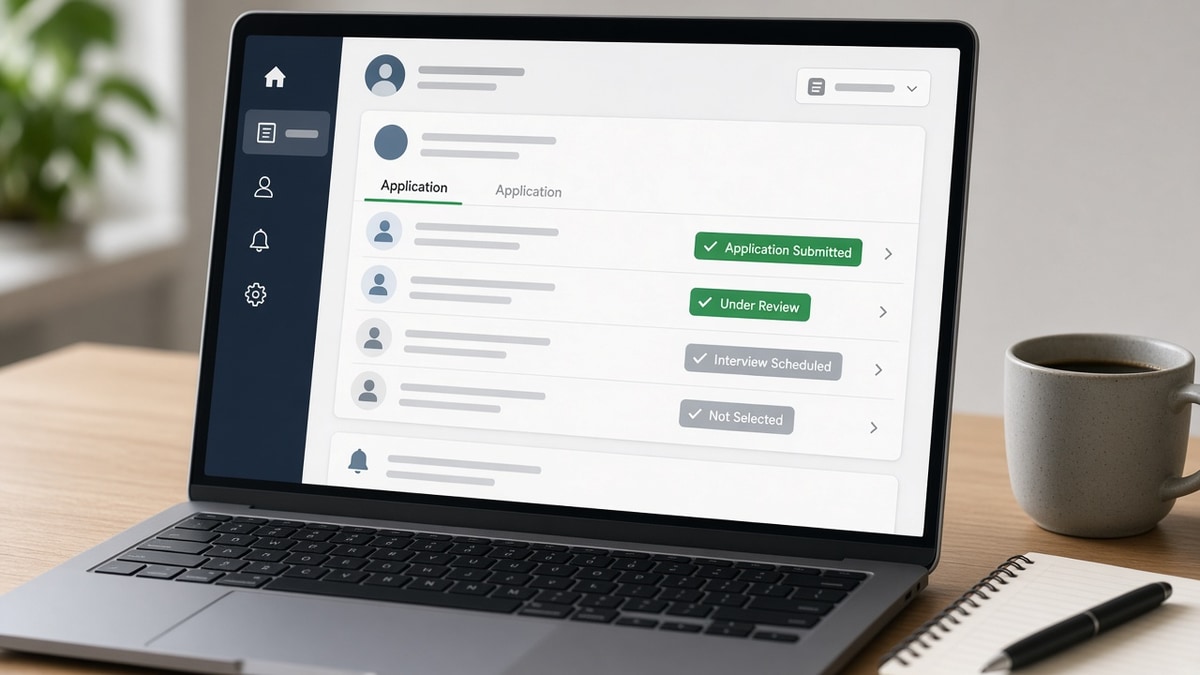
When you submit a job application online, you're entering an Applicant Tracking System (ATS)—software that manages every stage of the hiring process. How ATS status updates work is crucial to understanding where your application stands and what happens behind the scenes. Many job seekers receive status notifications but don't understand what they actually mean or what triggered the change.
ATS platforms automatically update your application status as it moves through the recruitment pipeline. These updates reflect both automated system actions and manual recruiter decisions. Understanding this process helps you know when to follow up, when to move on, and what to expect at each stage.
In this guide, you'll learn:
- What ATS status updates actually represent
- How different ATS systems track application progress
- Why some statuses change automatically and others don't
- How to interpret common status messages
- What happens between status updates
- Best practices for monitoring your applications
Understanding ATS Status Updates
An ATS status update is a notification that your application has moved to a new stage in the hiring workflow. These updates are triggered by either automated system rules or manual actions by recruiters and hiring managers. The status tells you where your application currently sits in the pipeline—from initial submission through interview scheduling or final rejection.
Different ATS platforms use different terminology, but the underlying concept is consistent: your application progresses through predefined stages, and the system notifies you when it moves. Some updates happen instantly (like submission confirmation), while others may take days or weeks depending on recruiter activity and screening timelines.
The key insight is that ATS status updates are not always about your qualifications. They reflect the hiring team's workflow, application volume, and internal processes. A status change might mean a recruiter reviewed your resume, or it might simply mean the application advanced to the next queue automatically.
Key Types of ATS Status Updates
Submission and Confirmation Statuses
The first ATS status update you receive is usually "Application Received" or "Submitted." This confirms that the system accepted your application and stored it in the database. This status appears almost immediately after you click submit and means your resume and application materials were successfully uploaded.
Some ATS systems send a second confirmation status called "Application Confirmed" or "Under Review" within hours of submission. This indicates that the application passed initial system checks—file format validation, required field completion, and basic parsing. If your application doesn't reach this status, it likely failed parsing or didn't meet technical requirements.
Screening and Review Statuses
After submission, your application enters the screening phase. Common statuses here include "Screening in Progress," "Under Review," or "In Recruiter Queue." These statuses indicate that your application is actively being evaluated, either by automated ATS scoring or by a human recruiter. The timeline for this phase varies dramatically—some applications are screened within hours, others within weeks depending on application volume and hiring urgency.
A status like "Qualified" or "Moved to Next Stage" means your application passed initial screening criteria. This is a positive indicator that your resume matched key requirements and you're being considered for further evaluation. Conversely, "Did Not Meet Requirements" or "Screened Out" means the ATS or recruiter determined you don't fit the role's core qualifications.
Interview and Advancement Statuses
If your application advances past screening, you'll see statuses like "Interview Scheduled," "Phone Screen Pending," or "Awaiting Interview." These statuses confirm that a recruiter has decided to move you forward in the process. Some ATS systems automatically send interview invitations and update status simultaneously, while others require manual recruiter action.
Status updates during the interview phase might include "Interview Completed," "Feedback Pending," or "Moving to Next Round." These updates reflect hiring team decisions and may take several days to appear as feedback is gathered from interviewers. The delay between your interview and the next status update depends on how quickly hiring managers provide feedback to the recruiter.
Final Decision Statuses
Eventually, your application reaches a final status: "Offer Extended," "Not Selected," "Rejected," or "Position Filled." These statuses represent the hiring team's final decision. An offer status triggers contract and onboarding workflows in the ATS. A rejection status typically means the position was filled by another candidate or you didn't meet final evaluation criteria.
How ATS Status Updates Are Triggered
Understanding what triggers status updates helps you interpret what's happening with your application. Some updates are automatic—the system moves your application forward based on predefined rules. Others require manual action from a recruiter or hiring manager.
Automated triggers include: application submission (immediate status change), resume parsing completion (usually within minutes), keyword matching completion (can take hours if processing is queued), and scheduled advancement (some ATS systems automatically move applications to the next stage after a set time period). Manual triggers include: recruiter review and scoring, interview scheduling, feedback entry, and final hiring decisions.
The mix of automated and manual triggers varies by company and ATS platform. Large companies with high application volume rely more heavily on automated screening and status progression. Smaller companies may update status manually at each stage. Understanding how ATS matches resumes to job descriptions helps you see why certain automated status changes occur.
Common Mistakes When Interpreting ATS Status Updates
- Assuming no status change means rejection: Long periods without status updates don't necessarily mean you're rejected. Recruiters may be busy, waiting for hiring manager feedback, or processing applications in batches. A lack of update is not the same as a rejection status.
- Misinterpreting "Under Review" as active consideration: "Under Review" is often an automated status that appears for all applications. It doesn't mean a human has actually looked at your resume yet. This status can persist for weeks while your application sits in a queue.
- Panicking at vague statuses: Statuses like "Application Received" or "Processing" are neutral checkpoints, not indicators of your chances. These early statuses tell you the system is working, not whether you'll advance.
- Expecting consistent timing: Status update timelines vary wildly between companies and roles. A status change in 2 days for one job doesn't mean another job will update in the same timeframe. Application volume, hiring urgency, and team size all affect timing.
- Ignoring status notifications: Some candidates disable notifications and miss important updates like interview scheduling. Always keep notifications enabled and check your email and ATS portal regularly.
- Confusing application status with interview scheduling: An application can be "Under Review" while an interview is simultaneously being scheduled. Status updates and interview communications sometimes happen through different channels.
Best Practices for Monitoring ATS Status Updates
- Create a tracking spreadsheet: Record application dates, companies, positions, and current status for each application. This helps you identify patterns and know when to follow up. Include the ATS portal login info so you can check status directly.
- Check the ATS portal directly: Don't rely solely on email notifications. Log into the company's careers portal to verify status. Email notifications can be delayed or missed, but the portal shows real-time status.
- Set realistic follow-up timelines: Wait at least 1-2 weeks before following up on a "Under Review" status. If status hasn't changed in 3-4 weeks, a polite follow-up email to the recruiter is appropriate. For positions that moved to interviews, follow up within 3-5 business days if you haven't heard back.
- Note the time zone difference: If applying to remote or distributed companies, remember that status updates may be timestamped in a different time zone. Don't assume an update happened "today" without checking the timestamp.
- Understand your ATS platform: Different platforms use different status terminology. LinkedIn, Workday, Greenhouse, and iCIMS all have slightly different status labels. Familiarize yourself with the specific platform's status meanings.
- Don't over-interpret status stalls: A status that hasn't changed in 2 weeks doesn't mean rejection. It might mean the hiring manager is slow to provide feedback, or the recruiter is managing dozens of applications. Patience is required.
- Prepare for multiple status paths: Some applications may skip stages. You might go from "Submitted" directly to "Interview Scheduled" if the hiring team is moving quickly. Other applications may stay in "Under Review" for weeks. Both scenarios are normal.
Step-by-Step: What Happens Between Status Updates
- Application submission: You fill out the application form and upload your resume. Status changes to "Submitted" or "Application Received" immediately.
- System validation: The ATS validates file formats, required fields, and checks for completeness. If everything passes, status moves to "Confirmed" or "Processing" within minutes.
- Resume parsing: The system extracts text from your resume and parses contact info, experience, skills, and education. This usually completes within hours but can take longer if the system is processing a high volume of applications.
- Keyword matching: The ATS compares your resume against the job description. It scores how well your skills and experience match the position's requirements. Resume keywords that improve job matching are evaluated during this phase.
- Recruiter review queue: Your application enters a queue for recruiter review, sorted by ATS score or submission date. Status typically shows "Under Review" or "In Queue." Timing depends on application volume and recruiter bandwidth.
- Recruiter screening: A recruiter opens your application, reads your resume, and makes a decision: advance, reject, or hold. This is when status might change to "Qualified," "Rejected," or "Moved to Next Stage."
- Interview coordination: If approved, the recruiter schedules an interview and updates status to "Interview Scheduled." They may contact you directly via email or phone before the status updates.
- Post-interview evaluation: After your interview, feedback is collected from interviewers. Status may show "Interview Completed" and then "Awaiting Decision" while hiring managers discuss candidates.
- Final decision: The hiring team selects a candidate. All other applicants receive a "Not Selected" or "Rejected" status. The selected candidate receives an "Offer Extended" status.
Conclusion: Taking Action Based on ATS Status Updates
How ATS status updates work is fundamentally about understanding the hiring workflow and recognizing that status changes reflect both automated processes and human decisions. Status updates tell you where your application sits in the pipeline, but they don't always indicate how seriously you're being considered. A long wait in "Under Review" doesn't mean rejection, and a quick advance to interviews doesn't guarantee an offer.
The best approach is to monitor your applications actively, track status changes in a spreadsheet, and follow up appropriately when timelines stall. Don't obsess over status updates—they're one data point in a larger process. Instead, focus on submitting high-quality applications to roles where you're a genuine fit. Creating an ATS-optimized resume ensures your application passes initial screening and has the best chance of advancing through status stages.
Remember: status updates are informational, not predictive. Use them to stay organized and know when to follow up, but don't let them dictate your emotional investment in a role. Continue applying to other positions while you wait, and treat each application as a separate opportunity rather than betting everything on one status change.
Frequently asked questions
"Under Review" is often a holding status that doesn't indicate active evaluation. Your application may be waiting in a queue, waiting for a recruiter to become available, or waiting for hiring manager feedback on other candidates. High application volume increases wait times. This status can persist for 2-4 weeks or longer depending on the company's hiring pace. It doesn't mean you're rejected—it means you're waiting your turn.
Most ATS systems don't allow resume or application edits after submission. If you notice an error immediately (within minutes), some platforms allow you to withdraw and reapply with corrected information. However, most companies don't permit changes once submitted. If you discover an error after submission, contact the recruiter directly to explain and ask if you can resubmit. For future applications, always proofread before clicking submit.
"Application Rejected" or "Not Selected" is typically final for that specific position. However, it doesn't prevent you from applying to other roles at the same company in the future. Some companies allow reapplication after 6-12 months. If you received a rejection, you can sometimes reach out to the recruiter to ask for feedback or express interest in future opportunities. Don't take rejection personally—it often reflects fit for that specific role, not your overall qualifications.
A status change from "Under Review" to "Screening in Progress" typically means a recruiter has opened your application and begun actively evaluating it. This is a positive sign. The delay between submission and active screening often reflects the recruiter's workload and the application's position in the queue. Your ATS score or match percentage may have moved you higher in the priority list, triggering active review.
Yes, a polite follow-up is appropriate after 3-4 weeks of no status change. Send a brief email to the recruiter or hiring contact expressing continued interest and asking for an update on the timeline. Keep it professional and brief—one or two sentences. However, don't follow up more than once. If you don't hear back within a week, assume the position is no longer active or you've been rejected, and move on to other opportunities.
Rarely, but it can happen. An application might move backward if a recruiter discovers missing information, if you fail a background check, or if a hiring manager requests additional review. More commonly, status appears to go backward if the ATS platform displays multiple stages simultaneously (e.g., showing both "Interview Scheduled" and "Under Review" at the same time). This usually reflects a system display issue, not an actual regression in your application status.