7 min read
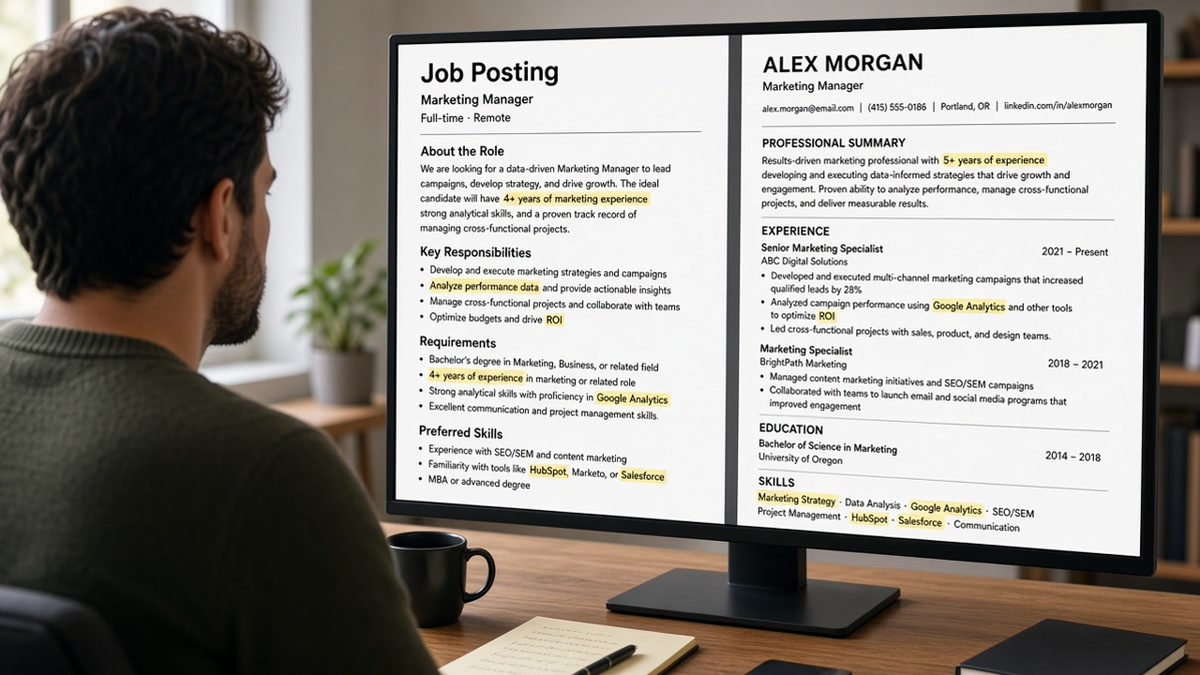
What does the system actually compare? That's the question behind most late-night tailoring sessions, and the honest answer is less mysterious than the advice online makes it sound.
You've probably been told to paste every keyword from the posting somewhere on the page. It's tiring, and it doesn't work the way people hope. You're not failing a hidden test of word counts.
Check your resume for free against a real posting while you read. Each section below answers one question people ask about matching, so skip to the one you're stuck on.
Quick Wins
- Circle six must-have terms in the posting.
- Move the top two into the first bullets under your latest job.
- Leave the skills list short and true.
How ATS matches resume to job description, in plain terms
Three things happen, and only one of them is a score. First, the system parses your file into fields: titles, employers, dates, education, skills. Second, recruiters search and filter those fields and the text around them. Third, some systems add a ranking or fit indicator. Others don't.
Vendors don't publish their formulas, and they change them. So this page describes what you can observe from a recruiter's seat, not a secret weighting table. What stays steady is where information lands: the top of the profile and the top of each job get seen first.
That's why a resume can contain every keyword and still feel like a miss. The terms exist, but they're buried where nobody and nothing looks first.
Where does the weight sit on the page?
Recent title and first bullets beat the skills footer. Your latest job shows up in the profile summary and in search results. The first two bullets under it are what a recruiter reads before deciding to open the rest.
- Headline or summary line: names the target role in plain words.
- Most recent title: closest honest match to the posting's title.
- First two bullets under it: your strongest proof of the top requirements.
- Older roles: matter, but less, unless the posting asks for a specific past domain.
- Skills list: a quick reference, not the place where the match is won.
Before: Skills: SQL, Tableau, Power BI, data visualization, dashboards, reporting, analytics, BI, business intelligence
After: Business Analyst, regional health system. Built weekly SQL reports and Tableau dashboards that cut manual spreadsheet pulls for three regional teams.
The second version puts SQL and Tableau next to what you did with them. A recruiter reads proof. A search finds the terms in a job where they belong.
What should I change first?
Edit the top third, in this order. Four moves, about twenty minutes per posting.
- Read the posting and underline six terms: the title, two core tools, one credential or domain, and two outcomes.
- Rewrite your headline line to name the target role, if it honestly fits.
- Open the first bullet under your latest job and get the top requirement into its first eight words.
- Use the second bullet for the next requirement. Trim the skills list to what you could discuss on a call.
Copy-paste bullet skeleton:
[Required tool or skill] [action verb] [what you built or ran] for [who], which [result you can defend].
Before: Responsible for customer reporting and various analytics tasks.
After: Tableau dashboards for the customer success team, tracking renewal risk weekly and flagging accounts for outreach.
I've watched candidates rewrite an entire resume when only the first two bullets of the current job needed work. The rest of the file was already fine. The top was vague.
What if my job title doesn't match the posting?
Internal titles are often creative. Customer Happiness Partner and Support Specialist can be the same job. You can't change what your employer called you, but you can help the reader connect the dots.
Keep the official title and add the standard equivalent only if it's accurate: Customer Happiness Partner (Customer Support Specialist). If the roles really differ, don't stretch. Lead with bullets that show the overlap and let the title stay as it is.
A matching title doesn't replace proof. It makes the proof easier to find.
Which edits don't help?
Synonym footers. Listing five names for one skill adds length and no evidence. Pick the version the posting uses.
Hidden text. White-on-white keyword blocks are visible to anyone who selects all, and recruiters do. It reads as a trick and can end the application.
Pasting the whole posting. It makes the resume sound like the employer's own ad. See how recruiters spot AI resumes for what that looks like from the other side.
Claiming tools you haven't used. A match that collapses in the first interview helps nobody. If the gap is real, say so in your letter and show the closest thing you've done.
None of this rescues an application for a role far outside your experience. It stops a fit candidate from looking like a weak match.
Score it before you apply
Paste the posting and your resume into Score your job match to see which required terms are missing from the top of your file.
If the missing piece is a story, not a keyword, generate a cover letter that names the closest experience and explains it in three sentences.
Do this now: Underline six terms, rewrite two bullets, and run the checker once more before you submit.
One page, one top third
Matching feels like a guessing game because nobody shows you the rules. You can ignore the rules and still do well by putting proof where it gets read first.
- Title and first bullets carry the posting's top terms.
- Skills stay short and true.
- Official titles stay, with an honest equivalent when needed.
- One quick scan before every submit.
Headings matter too. See ATS headings that recruiters actually recognize so the sections you tailor are read as sections.
Read more
Frequently asked questions
No. Some systems show a ranking or fit indicator, and others only store your profile so recruiters can search and filter. You usually can't see which one an employer uses, so write for both: clear fields, plus the posting's key terms near the top.
Only when it honestly describes what you did. If your official title differs, keep it and add the closest standard title in parentheses. Never claim a title you didn't hold, because verification checks will catch it.
Pick the six or so that define the job: title, core tools, a required credential, and the main outcome. Put them where you used them, in your recent role. Stacking dozens in a footer adds clutter, not proof.
You need a different top third. Keep one master file, then rewrite the headline line and the first bullets under your latest job for each posting. Everything below that can stay the same unless the role changes direction.