By Peter Miller · Published March 24, 2026 · Last updated: September 14, 2026
12 min read
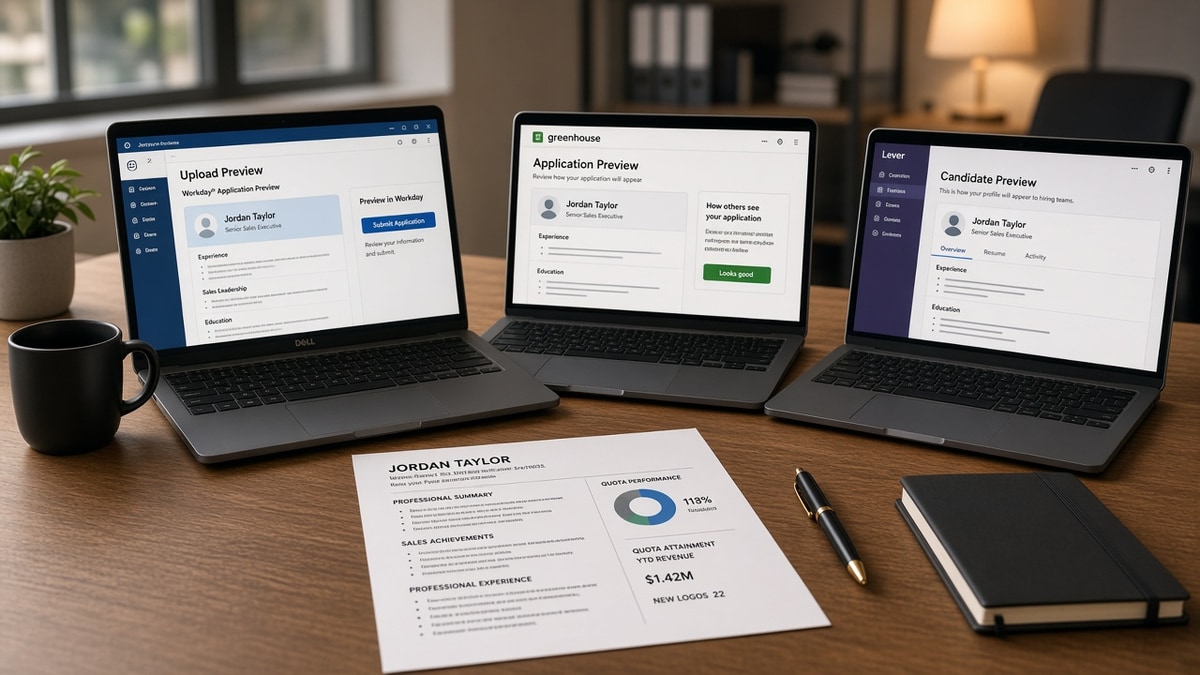
You're not losing screens because you picked the wrong ATS. You're losing them because each platform reads the same PDF differently. Mid-level sales files carry quota tables, pipeline jargon, and CRM names in places parsers skip.
If you're applying tonight, check your resume for free on the file you'll upload. A quota chart that looks sharp in Preview often flattens to garbage in Workday before a recruiter opens it.
This page isn't a feature shootout between vendors. It's what changes on your file so attainment, territory size, and tool names still land after upload. You won't need a Workday copy, a Greenhouse copy, and a Lever copy if the master is boring on purpose.
Copy the After shapes below. Swap in your numbers. Keep every metric in plain text under a dated job block.
Do these three things first
- Move quota attainment out of tables and charts into one plain bullet per role with Month Year dates.
- Rename creative headers to Experience, Skills, and Education before you upload to Greenhouse.
- Put Salesforce, HubSpot, and pipeline terms on dated bullets, not only in a Skills footer for Lever.
Workday vs Greenhouse vs Lever: three parsers, three failure modes
The standard these pairs are judged against is what a sales hiring manager can verify in thirty seconds: title, dates, quota proof, and tool names on the right job. Not a designed deck. Not a keyword cloud.
Workday punishes layout. Greenhouse punishes weird headers. Lever punishes keywords without dates.
I've screened mid-level sales files in Workday where the quota chart looked perfect in PDF and the parser dumped the numbers into a sidebar field no recruiter opens.
Workday is common at large employers and enterprise SaaS shops. Its parser likes linear text. It often misreads tables, text boxes, and two-column layouts. Sales candidates love side-by-side quota summaries. Workday flattens them out of order or drops the numbers entirely. Contact info in headers and footers is another repeat miss.
Greenhouse shows up at tech-forward companies and many high-growth sales orgs. It is more forgiving on simple PDFs but maps sections by header labels. Deal Wins, Revenue Highlights, or The Hunt may not land in Experience. The text might still exist somewhere in the extract, but the recruiter view sorts by standard fields. Chronological order with normal labels wins.
Lever integrates tightly with outbound sales stacks. Its parser tends to weight keywords that appear on dated employer lines. CRM names floating in Skills without a job block read as tags. The same word on a bullet under Account Executive, January 2023 to present, ties to that role. Pipeline, MEDDPICC, and forecast language follow the same rule.
And the fix is not three files. It's one master with inline Month Year dates, standard headers, and metrics in bullets. Strip tables for Workday. Keep headers boring for Greenhouse. Anchor keywords on jobs for Lever. Same content, no redesign per portal.
For column and font rules that survive Workday uploads, start with a Workday-safe single-column format . Two-column templates still send quota numbers into the wrong column.
This won't get you past a role you're not qualified for. It stops a qualified seller from looking under-quota because the parser never read the chart.
Five mid-level sales shapes on Workday, Greenhouse, and Lever
Each pair is a composite. Copy the After structure, not the company names. Numbers inside bullets are illustrations of good shape, not industry averages.
Enterprise AE with a quota table
Before: Two-column table: 2024 quota $1.2M / attainment 118% | 2023 quota $950K / attainment 104%. Title and dates in a text box on the right.
After: Account Executive, SaaS Co., March 2022 to present. Hit 118% of $1.2M annual quota in 2024; 104% of $950K in 2023. Managed 42 enterprise accounts; avg deal size $85K.
Workday often shreds the table and leaves attainment blank. Greenhouse may keep the numbers but mis-associate them with the title in the text box. Lever won't weight quota language unless it sits on the dated job line. One bullet with plain numbers fixes all three.
SMB rep with creative section titles
Before: Section headers: The Hunt · Deal Wins · Tools I Live In. Bullets under Deal Wins with no dates on the section.
After: Experience header. Business Development Rep, Retail Tech, June 2021 to August 2024. Closed 38 new logos; avg cycle 34 days. Skills: outbound prospecting, discovery, demo-to-close.
Greenhouse maps Deal Wins to an unknown bucket. Recruiters scanning Experience see a gap. Standard headers with dates on each role keep the same stories visible in every ATS view.
SDR with CRM keywords only in Skills
Before: Skills: Salesforce, Outreach, Salesloft, cold calling, pipeline generation, objection handling.
After: Sales Development Rep, FinTech, January 2023 to present. Booked 62 qualified meetings per quarter in Salesforce; sequences in Outreach across three verticals. Pipeline generated: $4.1M in 2024.
Lever tags Salesforce in Skills but may not tie it to the SDR role without a dated bullet. Workday and Greenhouse do the same. Move each tool name to the job where you used it with Month Year dates on the block.
Channel manager with logo wall graphics
Before: Image row of partner logos plus line: "Managed top partners."
After: Channel Sales Manager, Hardware Co., September 2020 to May 2025. Grew partner-sourced revenue 27% in 2024 across 14 VAR accounts. Named partners: CDW, Insight, SHI in contract renewals.
Logo walls are invisible to parsers. Workday drops them entirely. Spell partner names in text if the posting cares about channel background. Keep logos off the file you upload.
Sales ops hybrid with metrics in a sidebar
Before: Left column: job duties. Right sidebar: "Forecast accuracy 94% · CRM hygiene score 98% · QBR decks weekly."
After: Sales Operations Analyst, Logistics SaaS, April 2022 to present. Maintained 94% forecast accuracy across 8 reps in HubSpot. Built weekly QBR decks; cut stale pipeline records 31% in Q1 2025.
Sidebars read as a second column. Workday merges columns out of order. Greenhouse may attach sidebar metrics to the wrong employer. Pull every metric into the main bullet stack under the correct title.
Copy-paste master sales file block (edit every bracket)
Copy-paste this into a notes doc, then onto your file. Fill brackets from one posting, not from a portal word bank.
[Your Name] · [City, ST] · [phone] · [email] · [LinkedIn URL]

SUMMARY (optional, 2 lines max):
Mid-level [segment] seller with [years] years in [industry]. [One quota or revenue outcome with a year.]

EXPERIENCE

[Job Title], [Company], [Month Year] to [Month Year or present]
- [Quota or revenue metric in plain text]; [second metric with timeframe]
- [CRM or sales tool] for [object]; [scope: accounts, territory, team size]
- [Pipeline or cycle metric]; [methodology term from posting if true]

[Prior Job Title], [Company], [Month Year] to [Month Year]
- Repeat only metrics and tools you used in that role

SKILLS (posting matches only, each name also on a bullet above):
[CRM] · [methodology] · [industry vertical] · [forecasting or negotiation]

EDUCATION
[Degree], [School], [Year]
If a quota number is not on a dated bullet, it does not belong in a chart or sidebar.
Edge case: The employer used a custom CRM with no public name. Mirror the posting category in the bullet: CRM, ticketing, forecasting. Do not invent a vendor.
Edge case: You hit president's club once, five years ago. Put it on that older job with dates. Do not float the award in a header graphic without a year.
Pair quota bullets with resume bullets that define the metric so attainment has a label the desk can repeat on a call.
Where quota proof goes missing after upload
Weak sales files share one habit. They show attainment where humans look and hide dates where parsers look. The recruiter sees a pretty layout. The extract shows empty Experience rows.
If deleting every employer bullet leaves your quota story unchanged, the file is still a brochure.
Maintaining three resume versions sounds thorough. It drifts. The Workday copy gets a new table. The Lever copy keeps old keywords. The Greenhouse copy still says Deal Wins. One master updated weekly beats three stale files.
Abbreviation-only quota lines are another parse miss. 118% Att. and YoY without spelled-out quota year force string matching to guess. Write 118% of $1.2M annual quota in 2024 once per role.
But duty bullets without numbers waste the line where proof should live. Responsible for territory growth tells Workday nothing measurable. Grew territory ARR from $2.1M to $3.4M between 2022 and 2024 gives a scope and a timeframe. See why weak bullet points get ignored for the same pattern outside sales.
Headers and footers for contact info still break on Workday-heavy employers. Phone and email belong in the body text at the top. Icons and buttons do not parse.
Fancy fonts and color blocks for quota tiers look fine in Canva exports and often garble in parsers. Eleven-point Calibri or Arial, black text, single column. Upload the same PDF you previewed as plain text if the portal offers a text view.
Keyword stuffing the Skills row with every methodology you ever trained on dilutes Lever matches. Keep six to ten posting terms, each duplicated on a dated bullet. Cut the rest unless the job description names them.
Applying with a deck instead of a resume is a different failure mode. Slides are not structured hire data. Recruiters may read them, but parsers will not populate Workday fields from a pitch deck. Send the master file the form asks for.
Parse once, then tailor the letter
A rewritten After bullet still fails if the checker shows quota numbers outside Experience. Upload the exact PDF or DOCX you'll send and run a free ATS check against tonight's posting. Confirm attainment and CRM names appear inside extracted job text with dates, not only in Skills or a sidebar.
Fix the bullets first. A third keyword row cannot invent dated quota proof.
If the portal asks for a letter, name the same quota outcome and two tools from your bullets. Generate a cover letter that repeats one attainment figure and one CRM with dates that match the resume. Checker, then letter, then submit.
For a sixty-second sanity check before upload, use the steps in how to tell if your resume is ATS-friendly in 60 seconds . Same file, same portal, no surprises after you hit Apply.
Ship one master file tonight
That is the file a sales desk can screen. Workday vs Greenhouse vs Lever is not a branding choice for you. It's three parsers reading one upload differently.
Open your current PDF. Kill the quota table. Rename Deal Wins to Experience. Move Salesforce from Skills onto the job where you used it. Add Month Year dates on every block.
Job searching is already hard. You don't need three resumes. You need one boring, dated, plaintext quota story that survives upload. When the bullets are tight, check your resume for free against the same posting before you send it.
Frequently asked questions
No. One master file with standard headers, Month Year dates, and quota metrics in plain-text bullets survives all three. Workday needs tables removed. Greenhouse needs normal section names. Lever needs keywords on dated lines. Tweaking layout beats maintaining three files.
Workday often misreads tables, charts, and two-column quota summaries. Numbers inside a graphic or a side-by-side layout may land in the wrong field or vanish. Put attainment as a plain bullet under the job title with the date range on the same block.
Yes, if the title is not a standard label. Deal Wins or Revenue Story may not map to Experience. Use Experience, Skills, and Education. Keep the creative wording inside bullets where parsers still capture the text.
On dated employer bullets, not only in a Skills footer. Lever tends to weight terms tied to a job block with Month Year dates. Salesforce in a skills row is a tag. Salesforce on a bullet under Account Executive, March 2023 to present, reads as tool use in that role.
Upload the format the portal accepts, then run a parse check on that exact file. A clean single-column PDF in 11-point Calibri usually survives Workday. If the site only takes DOCX, export DOCX from the same master and avoid text boxes. The file you test is the file you send.