12 min read
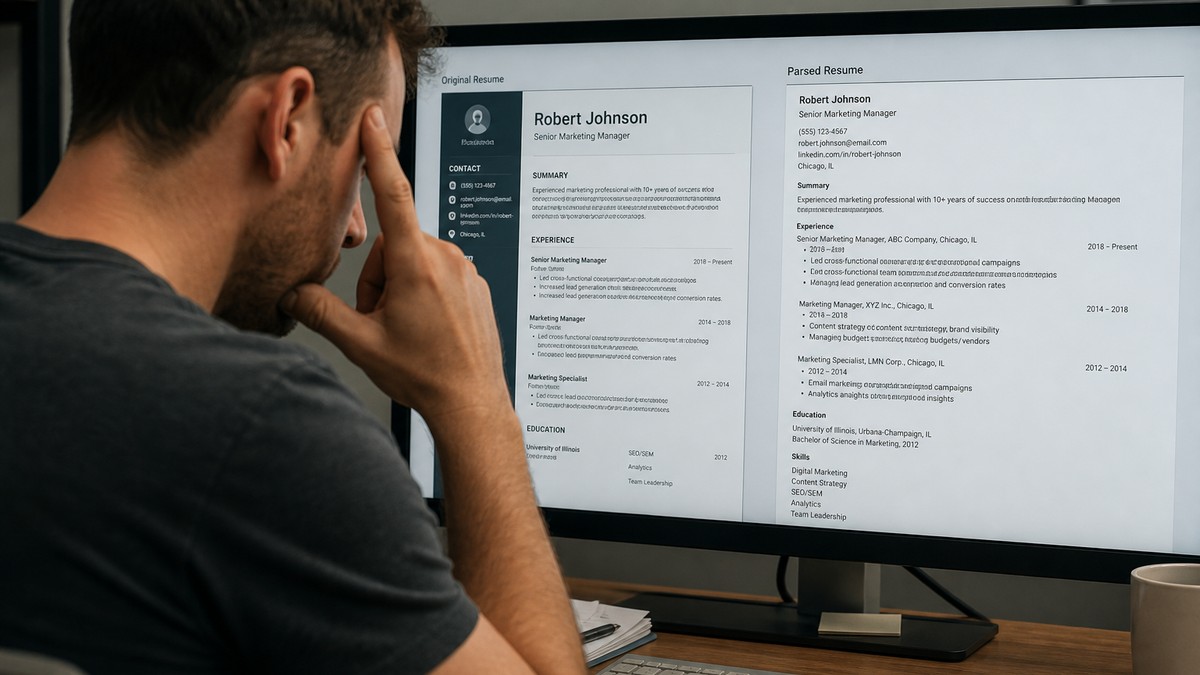
You uploaded a polished resume. The Workday preview looked like a ransom note. No, the recruiter is not punishing you. The system stripped your layout on purpose.
Why Workday removes formatting has a boring technical answer and a practical one. Technically, parsers need plain text in predictable order. Practically, if your keywords lived in a sidebar infographic, they may not exist in the profile recruiters search.
Before you blame the ATS, check your resume for free and paste the PDF into Notepad. I've seen US candidates with ten years of Salesforce experience show zero Salesforce in parsed view because skills sat inside icons.
You cannot turn off formatting removal. You can build a file that still makes sense when every font and color disappears. That's what we'll do next.
Quick Wins
- Paste your PDF into Notepad. That plain view is close to what Workday stores for search.
- Move every must-have skill from icons or sidebars into dated experience bullets.
- Run the free checker with a Workday posting before you upload again.
Why Workday removes formatting in US hiring (what is actually happening)
Workday removes formatting because its applicant tracking module converts resumes into structured data: name, work history objects, education rows, skills tags, and application answers. Visual design does not map cleanly to those fields. Bold headings become noise. Tables become unpredictable cell order. Icons become blank space.
The US explanation candidates need is simpler than the engineering spec: Workday cares more about searchable text than your brand colors. Recruiters filter thousands of applications by title, employer, years of experience, and keyword strings. That workflow runs on parsed data, not on whether your section dividers used teal lines.
Formatting removal is not the same as rejection. Many successful hires never see their resume render beautifully inside the portal. Failure happens when removal exposes bad structure: titles separated from dates, jobs listed newest to oldest incorrectly, or skills missing entirely.
Corporate US employers on Workday include retail, healthcare, finance, and public sector agencies. All share the same constraint. Your competitive edge is a resume that reads correctly with zero styling.
Understanding this helps you stop fighting the preview pane. You are optimizing for two audiences: the parser that strips design, and the human who may download your original PDF later.
Workday tenants differ slightly in configuration, but the strip-and-parse pattern is consistent. Custom portals still sit on the same engine. Layout rules in this guide transfer across industries.
When optional AI ranking layers sit on top of parsed text, garbled imports hurt twice. Fix structure before you chase keyword percentage scores.
If a recruiter downloads your original PDF after search, they still want clean typography. Plain does not mean ugly. It means readable fonts, consistent spacing, and bullets that scan in ten seconds. The stripped view and the PDF should tell the same story with the same metrics.
US Workday truth: recruiters search parsed text first. If formatting removal hides your skills, the original PDF may never get opened.
Step-by-step: what to do when Workday removes your formatting
Step 1: Separate the stored file from the parsed profile
Think of two copies after upload. Copy A is your PDF on disk. Copy B is what Workday extracted into database fields.
Recruiters may open Copy A for final review. Filters and keyword search run on Copy B. Your job is to make Copy B accurate.
Check: After upload, open any preview or profile review the portal offers. Do titles, employers, and dates appear in the right slots?
If not: The parser guessed wrong because layout misled it, not because Workday hates you.
This is why why Workday removes formatting stops being academic. Removal reveals whether your content survives without design crutches.
Step 2: See the resume the way the parser does
Paste all text into Notepad. Read it like a stranger.
Before (visual PDF): Skills column with 24 icons plus a narrow experience column.
After (paste): Skills lines interrupt mid-job. Dates float pages away from titles.
Fix: Merge into one column. Put each skill you need for filters inside a dated bullet under the role where you used it.
Example bullet after fix: Administered Salesforce Service Cloud for 40 agents, cutting case backlog 22% in Q3.
The plain version should tell a coherent career story. If it does not, formatting removal will expose the same gaps to recruiters.
Step 3: Learn which elements Workday strips or breaks first
These elements commonly disappear or scramble during US Workday parsing:
- Multi-column layouts and sidebars
- Tables used for alignment
- Text boxes and shapes
- Headers and footers with contact info
- Embedded charts, images, and skill meters
- Custom bullets copied from the web
Before: Proficiency shown as five-dot graphics for Python.
After: Built Python ETL scripts ingesting 2M rows nightly into Snowflake (2023 to 2024).
Workday is not grading aesthetics. It is trying to turn your file into rows. Rows need words, dates, and labels parsers recognize.
Finance and healthcare candidates: compliance keywords in shaded table cells often vanish. Move HIPAA, SOX, or FDA terms into plain bullets under the regulated employer.
Sales candidates: quota tables in PowerPoint-style layouts rarely import. Write quota attainment as a bullet with percent and period instead.
Step 4: Write bullets that survive plain text export
Strong Workday bullets stand alone without bold, color, or tables.
Weak: Improved outcomes across initiatives.
Strong: Cut month-end close from 6 days to 3 by automating reconciliations in Excel and NetSuite for a 50-person finance team.
Weak: Led cross-functional projects.
Strong: Led seven-person product squad shipping HIPAA-compliant patient intake on iOS, raising completion rate 19%.
Lead with role-relevant nouns recruiters search: Salesforce, NetSuite, HIPAA, iOS. Metrics are optional but help humans when they open the PDF.
Avoid line breaks mid-bullet created by narrow columns. In plain text they read as random fragments.
Step 5: Align headings with Workday field names
Custom branding breaks mapping.
Use: Experience, Education, Skills, Certifications, Projects
Avoid: Career Highlights, Technical Arsenal, Where I Thrive
When you rename Experience to Career Highlights, parsers may not attach jobs to work history objects. Recruiters filtering "current title contains Manager" miss you.
Edge case: Academic CVs with Publications and Research are fine when those headings are standard in your field and listed after Experience. Keep dates on every entry.
Federal contractors sometimes need clearance lines. Put one honest clearance note in the header when required. Do not bury it inside a text box.
Step 6: Test, upload, and keep a Workday master file
Run HireFlow's free ATS resume checker with the posting text. Fix parsing warnings before keyword tweaks.
Save a dedicated Workday_master.pdf with no columns, no icons, and standard headings. Tailor top bullets per req, but do not maintain separate fancy and plain versions that drift apart.
Read resume parsing explained for field mapping basics.
Use cover letter generator when letters are optional. Repeat title and stack terms consistently.
After each upload, spot-check parsed fields. One employer's Workday config may surface a preview others hide. The paste test still predicts outcomes.
Step 7: Coach yourself with a two-file comparison ritual
Before you accept that Workday ruined your resume, compare three artifacts side by side: your designed export, your Notepad paste, and the checker parse report.
Designed export: what you wish recruiters saw.
Notepad paste: what automation likely indexed.
Checker report: which sections failed and which keywords are missing.
Mark differences in yellow. Every gap becomes a fix list: move a skill into a bullet, rename a heading, delete a table.
Weekly habit: update one bullet with a new metric, re-run paste test, re-save Workday_master.pdf. Fifteen minutes of maintenance prevents a panicked rebuild when you find a dream req on Friday afternoon.
Share the plain master with a friend recruiter if you have one. Ask them to search two terms from the posting in your paste file. If they cannot find them quickly, neither will Workday.
Edge case: creative portfolios and marketing resumes
Designers and marketers face pressure to show visual work. Keep the Workday upload plain. Link portfolio pieces in the header URL.
Resume bullet: Art-directed 12 campaign launches for national retail brand, lifting CTR 0.4 points across paid social.
Let the portfolio show layout skill. Let the Workday file show outcomes and tools in searchable text.
If you must include one image, know it may strip. Never put keywords inside images alone.
Copy-paste plain-text block that survives Workday stripping
Experience
Senior Data Analyst | Horizon Insurance | Mar 2021 to Present
Built SQL models in Snowflake feeding actuarial dashboards, reducing manual reporting 15 hours per week.
Partnered with compliance to document SOX controls for premium data pipelines.
Skills: SQL, Snowflake, Tableau, Excel, SOX, Agile
Paste into Notepad. If it reads cleanly, Workday removal will hurt less.
Run free ATS check before your next insurance or finance Workday batch.
Edge case: internal transfers and already-employed applicants
Current employees applying internally still upload external-style resumes in many Workday tenants. The same formatting rules apply.
Before: Assume HR already knows your history so you upload a sparse file.
After: Full dated bullets with internal project metrics parsers can index.
Reference internal systems honestly: Workday HCM, ServiceNow, internal data warehouse names. Recruiters searching internal pipelines use the same keyword filters as external reqs.
Keep manager-facing metrics in bullets even when your employee profile exists elsewhere. Hiring managers often read the uploaded PDF first.
Common mistakes
Assuming stripped preview means rejection. Judge whether titles, dates, and skills imported correctly.
Keeping skills only in graphics. Icons do not become searchable tags after parsing.
Fighting the parser with more design. More columns and tables worsen reading order.
Ignoring the downloadable original. Humans may still open your PDF. Keep it clean, not flashy.
Using one fancy template for every portal. Maintain a parser-safe master for Workday specifically.
Keyword stuffing hidden text. Risky and unnecessary. Use honest terms in dated bullets instead.
Check what Workday can read before you upload
Paste your text export into HireFlow's free ATS resume checker alongside the job description. You will see whether must-have terms land in experience rows or vanish with formatting.
The checker cannot change Workday's engine. It shows whether your file survives the same strip-and-parse story US employers run.
Pair applications with cover letter generator drafts when optional. Consistent job titles across files reduce recruiter confusion.
Read BambooHR vs Workday parsing when you split applications across multiple ATS platforms in one search week.
Why Workday removes formatting and what you should do
Why Workday removes formatting comes down to structured hiring data. US applicants win by making the plain-text version of their resume accurate, dated, and keyword-rich.
- Remember recruiters search parsed rows, not your color palette.
- Paste-test and move skills into dated experience bullets.
- Keep a single-column Workday master and verify each upload.
Before your next US corporate apply, run the free resume check, paste your PDF into Notepad, and fix the first line where order breaks. That is how you turn why Workday removes formatting from a surprise into a solved problem.
Read more
Frequently asked questions
No. The system stores your upload and often lets recruiters download the original PDF. Workday also creates a parsed text profile used for search, filters, and autofill fields.
Not necessarily. Stripping visuals is normal. Failure happens when parsing scrambles titles, dates, or skills so recruiters cannot search or read your history.
Simple single-column files parse cleanly. Tables, columns, and graphics force the engine to guess reading order. Guessing produces scrambled rows.
They usually see both parsed fields and a downloadable original. Many recruiters search parsed data first. If keywords never imported, you look underqualified even with a strong PDF.
No. You adapt. Use parser-safe layout so the stripped version still tells your story in the right order with searchable terms in dated bullets.