7 min read
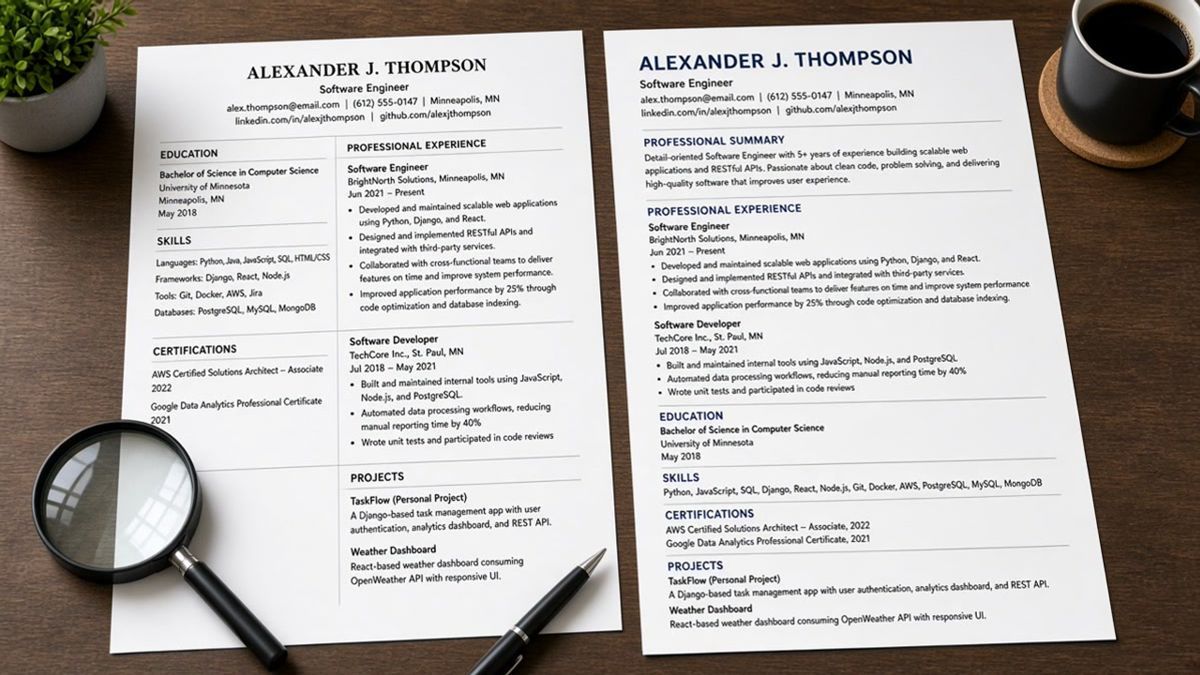
Your resume looks tidy in Word. Two neat columns for skills, a grid for employers, phone tucked beside your name. The portal still says upload complete. Then silence, and you're left wondering if anyone opened the file.
That's the table trap. You're not underqualified. The parser read cells in the wrong order and built a profile that doesn't match the PDF you designed, even when you've got the right years on paper.
Before you rebuild from scratch, check your resume for free on the posting you care about. If keywords look fine but employer order is wrong in preview, layout is the leak.
Below you'll see why tables break ATS parsing in one pass, what to use instead tonight, mistakes that survive a redesign, and a short FAQ when you're deciding whether to keep one small grid.
Quick wins
- Paste all resume text into Notepad and read employers top to bottom.
- Put Month Year dates on the same line as company and title.
- Replace skills grids with a short list plus proof in bullet one.
Why tables break ATS parsing in one read
Parsers don't see your layout. They see cells. Row one left, row one right, row two left, row two right. A contact table that puts phone beside your name can import as digits before your name string. Recruiters search for your current title and find a phone fragment instead of a job line.
Experience tables split company, title, and dates into columns. Flattened text can read Acme Corp Analyst March 2022 without clear pairing. Sidebars built with invisible tables behave the same way. Skills on the left splice into employment on the right, so a keyword match lights up on the wrong employer row.
Merged cells are worse. Project timelines that use start and end dates in separate columns can paste as one long string with no labels. Humans guess which date belongs to which project. Parsers don't guess. They attach the first date they see to the nearest text blob.
The fix is boring: one column, labels in the line, no merged cells. Workday, Greenhouse, Lever, Taleo, and iCIMS imports all get safer when the Notepad dump reads like a script you'd leave on voicemail.
For file-type quirks after tables are gone, read how resume file type impacts screening before you blame keywords alone.
What to use instead of tables tonight
You don't need a designer. You need the same facts in stacked lines. Open the DOCX, select each table, copy text into a blank document, and insert line breaks where columns used to sit.
Before: Two-column contact table with name left, phone and email right.
After: Full Name on line one, phone on line two, email on line three, city on line four.
Before: Skills table with tool names and proficiency in separate cells.
After: Skills: SQL, Tableau, Salesforce CRM. Bullet one under current job names the top tool with scope: Built Tableau dashboards for finance ops; automated 12 weekly reports and cut manual prep from 6 hours to 90 minutes per cycle in Q1 2025.
Before: Three-column employer grid with company, title, and dates in separate cells per row.
After: Acme Logistics · Senior Analyst · March 2022 to Present, then bullets directly below with no wrapper.
Copy-paste employer skeleton
[Company] · [Title] · [Month Year] to [Month Year or Present]
- [Posting tool] + [scope] + [outcome with number you can defend]
- [Second must-have from posting in bullet two]
Save single-column PDF from Word, not from a design export. Select all, copy, paste into Notepad. If Skills sit between two bullets from the same job, keep editing until the dump is linear.
Set 11-point Calibri or Arial, one-inch margins, and kill floating shapes. Borders can stay invisible in Word, but the table object still exists until you convert the block to plain paragraphs. That's the step most people skip because the page already looks fine on screen.
Table traps that survive a quick redesign
I've screened stacks of these in Workday and Greenhouse, and the file that wins is a plain DOCX where bullet one names the posting tool before any icon or star rating appears.
- Header tables: names in Word headers sometimes never import into the profile.
- Nested tables: project timelines inside cells drop rows when cells merge.
- Text boxes: they look like tables to parsers and often paste empty.
- Icon bullets: decorative glyphs strip to blank space while text survives.
See why fancy resume layouts fail when you've removed tables but imports still look thin.
Check layout before keywords
Run the export you will attach. Parse check first, keyword tune second. A perfect word list on a scrambled employer order still ranks like a generic profile.
Paste into the free ATS resume checker after each table you flatten. Missing employers belong in tonight's edit, not in a follow-up apology email.
If you're rebuilding from a template pack, start in the free resume builder single-column shell instead of re-importing the same grid.
Upload the stacked version
Tables break ATS parsing when row order beats your design. Stacked lines, inline dates, and a Notepad paste test stop qualified files from dying before a human reads bullet one. Keep a versioned filename so you know which export passed the paste test on the req you're chasing tonight.
If a template vendor swears their grid is ATS-safe, still run the paste test. Vendors optimize for screenshots, not for how Lever or Workday flatten cells on upload.
This won't fix applying to roles you're not qualified for. It stops a strong background from importing like a blank page.
When the posting asks for a letter, use the cover letter generator after bullet one matches the req so the letter cites proof instead of repeating skills.
Read more
Frequently asked questions
Treat contact grids as unsafe. Name in one cell and phone in the next often imports as phone before name. Stack full name, phone, email, and city on separate lines. Run a paste test after export. If digits appear before your name, flatten the block before you apply.
No. PDFs preserve how the page looks, not how the parser reads. Table markup still flattens row by row. Export single-column PDF from Word after you remove grids. If paste into Notepad scrambles employers, fix the source DOCX first.
Use one comma list or short lines: Skills: SQL, Python, Salesforce. Prove the top three in bullet one under your current job with scope and a number you can defend. Parsers attach skills to jobs when the words sit in experience bullets, not in a side column.
Select all text in your export, copy, paste into Notepad. Read top to bottom. Employers should stay grouped with their bullets and Month Year dates. Then run the same file through a free parse check against the posting. Fix layout before you tune keywords.