11 min read
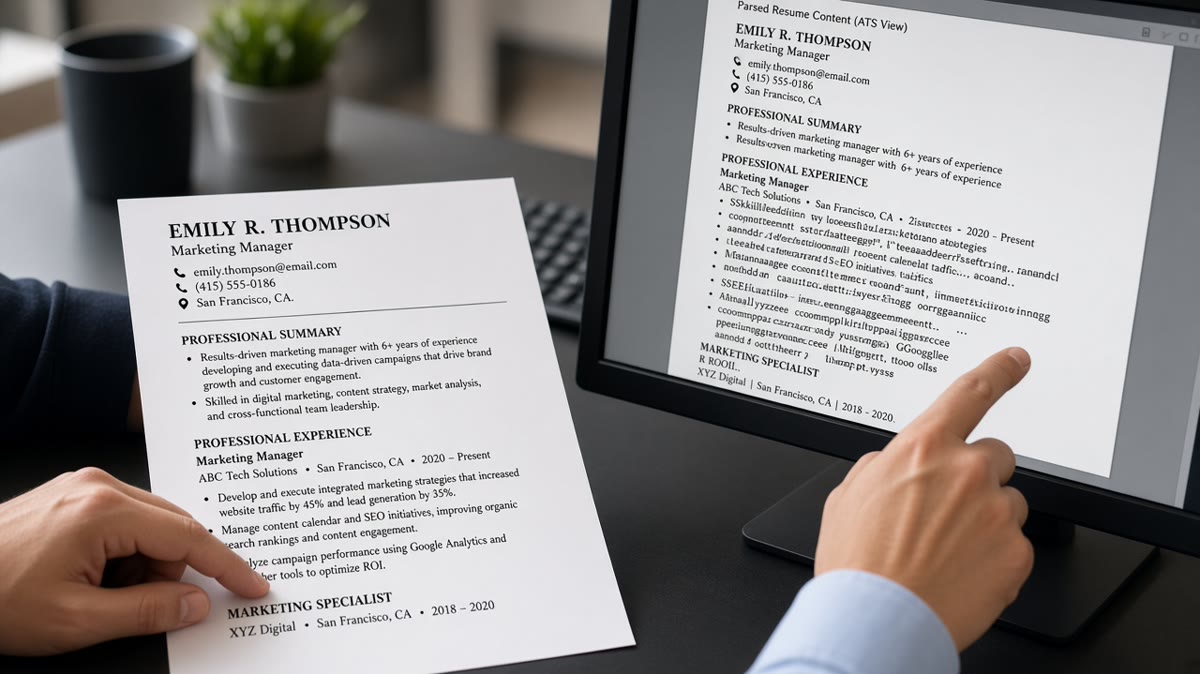
Your bullets look perfect in Word. The Workday preview reads like someone shook the page. That's not bad luck. Parsers strip formatting first, then read whatever plain text survives. Fancy symbols, nested indents, and table cells reorder lines before keyword matching ever runs.
You don't need a design degree to fix it. You need a two-minute paste test and five rebuild steps. Start by checking your resume for free on the file you'll attach, then walk the steps below in order. If Notepad shows one long paragraph where bullets should be, the ATS saw the same mess.
Job searching's already slow. You shouldn't lose a week wondering if they ghosted you when the upload never parsed your strongest bullet. I've watched qualified files score low because an arrow glyph never exported as text.
Pair this cleanup with a tailored cover letter so your top bullet language repeats cleanly. Generate a cover letter using the same tool names you fixed in Experience, and you won't contradict yourself on upload.
Quick Wins
- PDF select-all, paste to Notepad. One bullet equals one line.
- Replace arrow and checkmark bullets with standard dots or hyphens.
- Move bullets out of tables, text boxes, and right columns.
- One achievement per bullet. Split nested lists into flat lines.
What the parser pulls from bullets
Applicant tracking systems do not admire your layout. They ingest a text stream. Bullets are just line breaks and leading characters in that stream. When the export garbles those characters, keywords inside the bullet never reach the matcher.
Fancy glyphs are the fastest failure. Arrows, checkmarks, stars, and custom icons often save as images or private-use Unicode. The PDF looks crisp. Plain-text paste shows an empty line or a random symbol with no verb attached.
Nested bullets flatten next. A parent line about budget ownership and a child line about vendor selection merge into one sentence with no space. The parser loses which idea was which. Recruiters still read the PDF. The score runs on the broken stream.
Table and text-box bullets fail quietly. Designers love two-column Experience with dates in the margin. Extractors read left column first, dump dates mid-paragraph, and attach skills to the wrong employer. Your Salesforce bullet under Client A lands under Client B in the preview.
Why ATS misreads bullet points is rarely about word choice first. It's about export order. Fix the stream, then tune language. For file-type failures that eat bullets even on clean lists, read how resume file type impacts screening .
Edge case: resumes built in LaTeX or academic CV templates. They can export fine, but hyphen bullets sometimes become en dashes that paste as mid-line joins. Run the Notepad test on every template change, not just the first export.
Edge case: emoji in bullets for culture-fit flair. Parsers treat emoji as noise or drop the line. Save personality for the cover letter. Keep Experience bullets plain text.
Long bullets that wrap to four lines in Word often paste as two lines with a hard break mid-sentence. The parser may treat the second line as a new orphan record with no verb. Trim to two lines max. Move detail to a second bullet if the outcome deserves its own line.
Right-aligned date columns beside left-aligned bullets confuse extractors even when the PDF looks balanced. Dates should sit on the employer line or immediately after the title, not in a margin column that imports before your verbs.
Five fixes in order
Work top to bottom. Don't rewrite achievements until the paste test shows one line per bullet.
Step 1: Run the Notepad paste test
Open your PDF. Select all. Paste into Notepad or TextEdit plain mode. Each bullet should appear as its own line with words intact. If lines merge or symbols vanish, stop and rebuild layout before you touch wording.
Before: Paste shows Managed team with no line break before the next sentence about budgets.
After: Paste shows two lines: Managed four analysts on monthly close. Owned $2.1M vendor budget with APAC suppliers.
Step 2: Swap fancy bullets for standard lists
In Word or Google Docs, highlight Experience bullets and apply the default round bullet style. Avoid custom icon sets from design marketplaces. If you must use ASCII, a leading hyphen plus space parses safely on most US portals.
Before: ➔ Reduced ticket backlog 22% in Q3 using Zendesk macros.
After: Reduced ticket backlog 22% in Q3 using Zendesk macros.
Step 3: Flatten tables and text boxes
Cut bullets out of cells. Put employer name and Month Year dates on plain lines above the list. One column only. Skills grids beside Experience belong below the dated roles or inside bullets, not in a sidebar table.
Before: Two-column table with job title left, bullets trapped in a narrow right cell.
After: Northline Corp, Chicago IL. Analyst | January 2021 to March 2024. Four plain bullets listed below on separate lines.
Step 4: Split nested bullets into flat lines
Convert sub-bullets into sibling bullets with their own verbs. Parent context moves into the first three words of each line. You lose visual hierarchy. You gain parser-readable records.
Before: Led CRM migration with nested sub-bullets for data cleanup and training under one parent dot.
After: Led Salesforce CRM migration across sales and service teams. Cleaned 140,000 legacy records before go-live. Trained twelve reps on new opportunity stages in two weeks.
Step 5: Export, paste again, upload once
Save DOCX when the portal allows it. Export PDF from Word, not from a screenshot tool. Paste to Notepad again. Upload when lines read cleanly. Read the portal preview before Submit.
For weak wording after layout is fixed, see why weak bullet points get ignored . Parser-safe bullets still need verbs and outcomes humans want to read.
Copy-paste block: ATS-safe bullet lines
Employer Name, City ST
Job Title | Month Year to Month Year

- Built Looker dashboards for ops leadership, cutting weekly reporting prep from 6 hours to 90 minutes.
- Owned Zendesk workflow rules that reduced backlog tickets 22% in Q3.
- Partnered with APAC vendors on $2.1M annual spend, renegotiating three contracts in H1.

Use one leading hyphen or standard Word bullets. One idea per line.
Step 5 detail: filename matters less than content, but use Firstname-Lastname-Resume.pdf with no spaces. Some portals truncate weird filenames and attach the wrong version to your profile. One clean file per application cycle beats three variants with version2 in the name.
If you use Google Docs, download as DOCX before PDF when the portal accepts Word. Docs PDF exports sometimes embed fonts that paste with odd line breaks on older Workday builds. DOCX from Docs is often cleaner for the first upload attempt.
Edge case: academic CVs with publication sub-bullets under one heading. Split each publication into its own flat line with title and year, or move publications to a separate section with plain lines. Do not nest journal names under a parent bullet if you're applying through US corporate Workday.
Where bullet cleanup still fails
Plain bullets won't save a scanned PDF or a photo export. These mistakes survive step five if you skip the paste test.
Image PDFs from Canva or InDesign. Bullets are pictures. Text-select returns nothing. Rebuild in Docs or Word, export real text, paste test again.
Mixing bullet styles on one page. Round dots on recent roles and hyphens on older roles sometimes reorder on export. Pick one style for the whole Experience section.
Cramming two achievements into one bullet. Long lines wrap oddly in plain text and hide the second keyword. Split them. Two lines beat one paragraph masquerading as a bullet.
Headers that aren't standard. My Impact or Career Highlights instead of Experience can drop everything below from the Experience bucket in some parsers. Use Experience or Professional Experience as the heading above your bullets.
Why ATS misreads bullet points after you've flattened layout often points to file type, not wording. When paste looks clean but preview still scrambles, switch DOCX and read why your resume looks different after Workday upload .
Edge case: creative roles that require portfolio links. Keep URLs on their own plain line under the employer block, not inside icon bullets. The link text should be the domain, not click here.
Before: Portfolio link embedded inside a star-bullet icon that pastes as an empty line.
After: Portfolio: jordanlee.design on its own line below the employer block, no icon, no hyperlink styling required.
Numbered lists instead of bullets can parse fine when exported from Word, but mixed numbered and bulleted sections on one page sometimes reorder on Greenhouse imports. Pick bullets for all Experience lines and numbers only if the posting template demands it.
All-caps bullets shout on the PDF and break keyword matching when the posting uses title case. Write Salesforce, not SALESFORCE, unless the posting itself is all caps. Matchers are case-sensitive on some builds.
Pronouns at the start of bullets (I, we) waste the first eight words where tools should sit. Lead with the skill or outcome. Recruiters know the file is yours. Parsers want nouns early.
This won't fix applying without the skills the posting requires. It stops strong bullets from disappearing because a glyph never exported as text.
Parse-test before upload
Upload the rebuilt file to HireFlow's free ATS resume checker . Confirm each Experience bullet imported as its own line with keywords still attached to the right employer.
When you're tailoring bullets to a specific req, score your job match on the same export. Fix layout first, then tune language. A clean stream with the posting's must-have in bullet one beats a pretty PDF the parser never read.
Do this now: Paste test, swap glyphs, flatten tables, split nested lines, retest, upload once.
Ship one clean file
Why ATS misreads bullet points comes down to export order, not your achievements. Standard glyphs, flat lists, and plain lines under dated employers fix most previews. Run the paste test twice, upload once, and move on to the next req.
- Paste test every export before apply.
- One idea per bullet on plain lines.
- No tables, text boxes, or icon glyphs.
- Retest in a checker with the target posting.
- Stop when Notepad and preview agree.
When preview still scrambles after a clean paste, switch file type and reread the Workday upload guide linked above. Run a free ATS check on the DOCX before you spend another hour rewriting bullets the parser never saw.
Save the fixed file as your master for this job family. You should touch bullet wording per posting, not layout per night. Layout fixes are one-time when the paste test passes twice in a row.
Read more
Frequently asked questions
Simple round bullets from Word or Google Docs usually export as plain lines with a hyphen or dot. Fancy icons, arrows, and checkmarks do not. When in doubt, run the Notepad paste test on your PDF. If bullet lines arrive as one run-on paragraph, rebuild with standard list formatting or manual hyphens on plain lines.
Rarely on US corporate uploads. Nested indents flatten into one block in many parsers, jumbling parent and child points. Split nested ideas into separate top-level bullets with clear verbs. If you must show hierarchy, use one line per idea instead of indent levels.
Keep bullets for Experience. Recruiters scan faster and parsers treat one line per bullet as one record. Paragraphs bury keywords mid-block. The fix is not removing bullets. It is removing the layout that breaks them on export.
Only if the export passes the text-select test. Many Canva PDFs save bullets as graphics. The human sees a list. The parser sees blank space. Rebuild the same content in Word or Google Docs with standard lists, export DOCX or plain PDF, and retest before you upload again.