12 min read
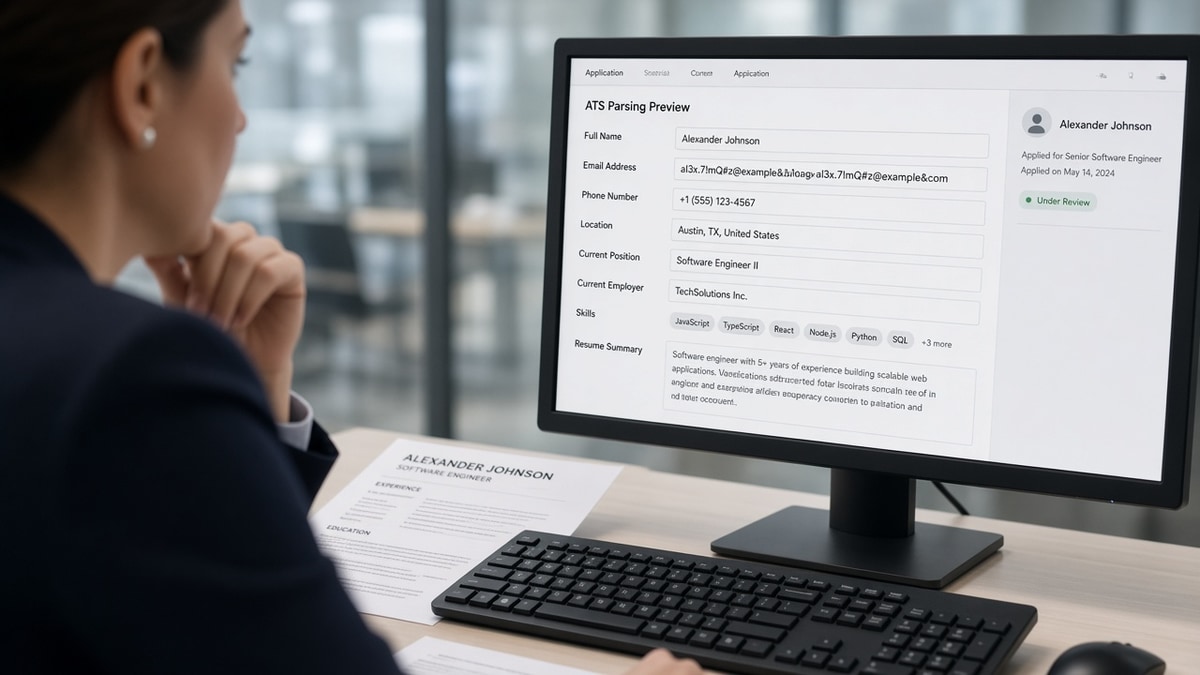
When the Workday preview shows your name and phone but leaves email blank, the parser usually dropped a mailto link, an icon font, or text trapped in a header zone it never reads. Plain typed email on line one of a single-column body fixes most US imports. That's the fix before you chase keyword tweaks.
You're not failing a secret test. You're watching a qualified file arrive without a reachable address because the contact block looked fine in Word. Before you re-export, check your resume for free with the target posting pasted in. You're confirming whether email imported, not guessing from the PDF view.
Job searching while you're still employed is stressful enough. Missing email shouldn't be why a recruiter can't schedule a screen. I've screened stacks where the preview had phone and city but no address, and the candidate never knew until weeks passed.
Below you'll see the symptom recruiters react to, three causes that drive it, how to tell which one is yours, and the fix for each. When the posting asks for a cover letter, generate a cover letter that repeats the same plain email string as line one on your resume so nothing contradicts on upload.
Quick Wins
- Type email as plain text on line one. No mailto link.
- Remove envelope icons and Font Awesome glyphs from the header.
- Single column contact block: name, email, phone, city.
- Run a plain-text paste test before every export.
The symptom: blank email in the Workday preview
Recruiters open the candidate preview before they read bullet one. The symptom is consistent: name parses, phone parses, city sometimes parses, and the email field stays empty or shows garbled characters where an icon used to sit.
The PDF lied to you. Word and Canva render mailto links and icon fonts as normal contact lines. The importer reads the file as structured text. Hyperlinks often export as field codes without visible characters. Icon fonts export as empty boxes or punctuation the parser throws away.
Humans can still find you if they open the attachment. Many workflows never get that far. Scheduling links, knockout forms, and auto-acknowledgments pull from parsed fields. No email in the record means no message reaches you even when a recruiter wanted to move forward.
Why ATS can't read your email on upload is rarely about the address itself. Invalid domains get caught later. The failure you see immediately is formatting: linked text, symbols, or contact data sitting where the parser does not look.
For the full contact-field map, read how ATS reads contact info and common mistakes . Email is one row in that map, and it is the row that breaks most often on mailto headers.
Candidates often discover the gap only after silence. They assume spam filters ate the reply. Recruiters assume the applicant used a disposable address or opted out of mail. Neither side catches the parser miss without opening the preview side by side with the PDF.
The fix is mechanical, not creative. You are not rewriting bullets. You are moving one string of characters where the importer expects plain text. That is why this problem feels insulting when it happens on an otherwise strong file.
Why ATS can't read your email after a clean-looking upload
Cause 1: mailto hyperlinks instead of typed characters
How to tell: Ctrl-click the address in Word and it opens a compose window. Plain-text paste shows nothing on the email line, or shows the word Email without the address.
Before: Header block with Name in 18pt, then a blue underlined mailto link reading [email protected].
After: Alex Morgan on line one. [email protected] on line two as unlinked black text. (555) 555-0198 on line three. Chicago, IL on line four.
The fix: select the address, remove hyperlink, retype it character by character if needed. Greenhouse and Workday both map plain strings into the email input reliably when they sit at the top of the body.
Cause 2: icon fonts, envelopes, and emoji in the contact row
How to tell: the resume looks polished with tiny glyphs beside each field. Plain-text paste shows squares, question marks, or stray pipes before the address.
Before: One line with envelope icon, phone icon, and location pin from a Canva template, email buried between symbols.
After: Four plain lines. Name. Email address alone. Phone with digits and parentheses. City and state spelled out.
The fix: delete every icon from the contact zone. Templates that pair symbols with fields belong in the design trash for ATS uploads. Keep the same information as words only.
Cause 3: email trapped in headers, footers, or table cells
How to tell: double-click the top margin and the address appears in the Word header. Or contact sits in a two-column table with name left and email right in a narrow cell.
Before: Two-column resume template. Email in the right column header row beside a photo placeholder.
After: Single column. Name centered or left-aligned. Email on the first content line below the name block, above Professional Summary.
The fix: move contact into the document body. Close header and footer editing. Flatten tables until plain-text paste lists name, then email, then phone in reading order.
Copy-paste block: ATS-safe contact header
Alex Morgan
[email protected]
(555) 555-0198
Chicago, IL

Professional Summary
Two lines max. Plain text only.
Run the paste test after every edit. Copy the whole document into Notepad or TextEdit plain mode. If email is missing there, the ATS will miss it too.
Edge case: academic CVs that put email in a letterhead PDF layer need a separate one-column Word export for corporate portals. The fancy letterhead can stay for faculty inquiries.
Edge case: plus-address aliases like [email protected] are fine when typed plainly. Do not wrap them in mailto links just because the plus sign looks fragile.
When the preview scrambles the whole header, not just email, read Workday: why your resume looks different after upload . Fix layout first, then re-check the email field alone.
How to tell which cause is yours in under two minutes: run the paste test first. Missing email in Notepad means mailto or header trap. Garbled symbols mean icons. Email present in Notepad but missing in preview means portal-specific field mapping, and you should re-upload a DOCX export before trying PDF.
Do not add a second mailto link in the cover letter body to compensate. Many portals parse the resume attachment only for contact data. The letter helps humans, not the email field you need filled for scheduling automation.
Edge cases where plain email still vanishes
Plain text on line one solves most imports. These exceptions explain why a corrected file can still show an empty email field after upload.
Line breaks inside the address. Word sometimes wraps long emails with a hidden break mid-domain. Paste test shows two fragments on separate lines. Retype on one continuous line.
Smart punctuation. Curly apostrophes in uncommon domains or special hyphens in the local part can split parsing. Retype with straight keyboard characters.
Multiple emails on one line. Personal and university addresses separated by a pipe confuse field mappers. Pick one primary line for applications. Move the secondary address to a cover letter if needed.
Scanned PDF exports. A scan of a printed resume has no selectable email even when you see it visually. Export DOCX or a text-based PDF from the source file instead.
Password-protected or portfolio-linked contact. Some designers hide email behind a button shape. Shapes do not export as text. Type the address visibly.
Exception: government SF-144 forms that cap contact fields may strip custom headers entirely. Match the form fields manually even when your master resume keeps line-one email for corporate uploads.
This will not fix applying with an unprofessional address you should retire. It stops a valid address from disappearing because the parser never received plain characters.
Before: Marketing coordinator header with Canva icons, mailto link, and email in the document footer on page two.
After: Same candidate, operations title target, four plain lines at top of page one, no footer contact, no links.
Recruiters rarely hunt through footers when the preview already shows phone. They assume email is missing on purpose or the file is incomplete. You will not get a courtesy call to ask for it.
And if you changed email providers mid-search, update line one on every version you upload. Old mailto links pointing at a closed inbox are worse than a blank field because acknowledgments bounce silently.
Keep phone and email on separate lines even when space feels tight. Combined contact strings like phone pipe email sometimes map entirely into the phone field in SAP builds.
For SAP-specific layout rules after contact is clean, see SAP ATS parsing: US resume formatting that works . Email and employer blocks follow different parsers in the same upload.
But do not wait for a perfect template before you fix email. A boring Calibri header with four plain lines beats a designed header that drops your address every time. Recruiters forgive plain. They cannot reply to a blank field.
If you use a professional domain, type the full address including subdomain. Some parsers truncate at the first space when a wrap character hides between domain segments. Zoom to 200 percent in Word and confirm the string is continuous.
Verify contact fields before the next application
Upload your flattened file and the posting to HireFlow's free ATS resume checker . Confirm the email field populated and matches line one character for character.
When you're rebuilding from a template-heavy file, build your resume with a plain contact block baked in so you do not reintroduce mailto links on the next edit.
Do this now: Remove hyperlinks from email, delete header icons, paste into Notepad to confirm line one, upload once, read the preview email field before Submit.
What to do now
Why ATS can't read your email usually comes down to mailto links, icon fonts, or contact text sitting in a zone parsers skip. Type the address plainly on line one, flatten to a single column, and trust the preview over the PDF.
- Strip mailto links and retype email as plain text.
- Remove envelope icons and template glyphs from the header.
- Move contact out of Word headers and table cells.
- Run a plain-text paste test before export.
- Confirm the preview email field before Submit.
Open the req you are targeting. Run a free ATS check , fix any blank contact fields, and submit one clean upload.
Read more
Frequently asked questions
No. Type the address as plain characters on its own line: [email protected]. Mailto hyperlinks look clickable in Word but many Workday and Greenhouse imports strip the href and drop the visible text. Plain typing survives plain-text paste tests and fills the email field in the preview.
Line one of the body, left-aligned, single column, above the summary or first job title. Put name on the line above or the same block with phone on the next line. Do not bury email in a footer, sidebar, or table cell. Parsers read top-down; contact blocks below Experience often never attach to your candidate record.
Often yes. Font Awesome envelopes, Wingdings bullets, and emoji mail icons export as glyphs or empty boxes. The parser reads a symbol, not characters. Remove icons from the contact block entirely. Type Email: only if your template already uses plain labels everywhere; otherwise skip the label and show the address alone.
Phone numbers use digits parsers recognize even inside tables. Email needs contiguous letters, numbers, @, and dots. Check for a mailto link, a line break inside the address, or email sitting in the document header. Flatten to one column, retype the address without linking, and upload again before you assume the file is fine.
Footers and second pages import inconsistently. Some Taleo builds read page-one contact only. Treat line-one plain text as the primary record. A footer repeat is optional redundancy, not a fix for a missing header email. If line one parses, the footer rarely matters.