11 min read
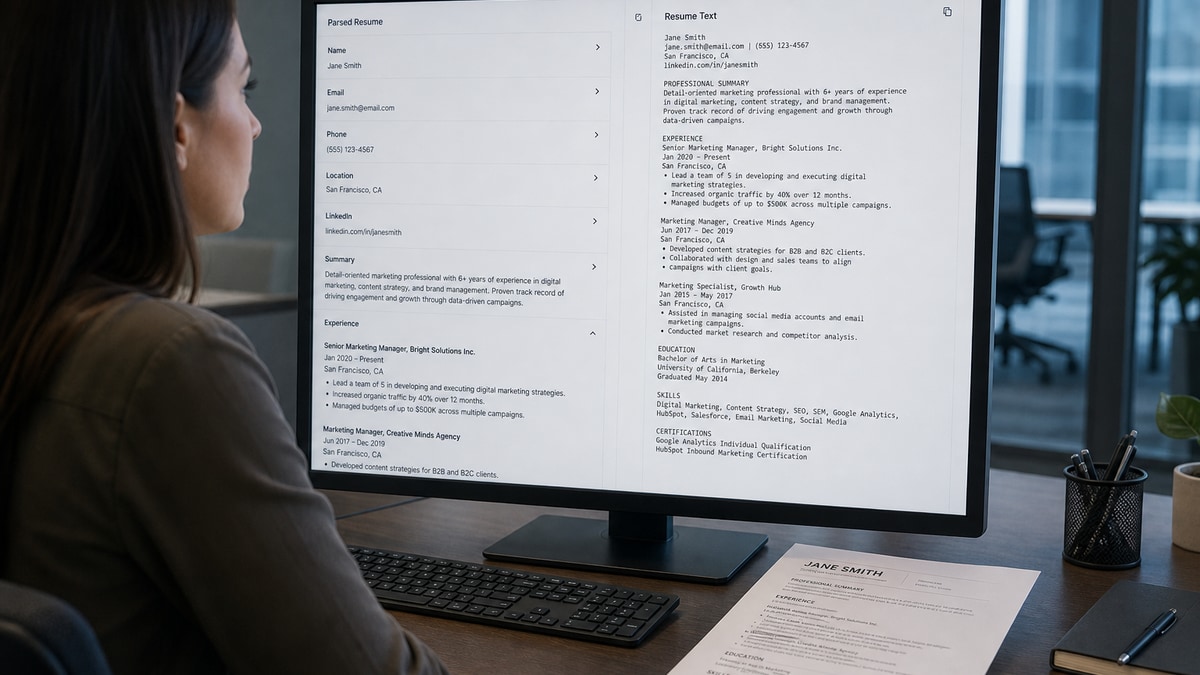
An ATS parser is the step that turns your PDF or Word file into structured fields: name, email, employers, titles, dates, education, and skills. Keyword matching and recruiter search only work on what the parser extracted cleanly. When people say a resume isn't ATS-friendly, they usually mean the parser couldn't read the layout, not that some hidden AI rejected their experience. It doesn't grade your career. It won't fix scrambled columns for you either.
The parser reads top to bottom looking for contact text and standard section headers first. Two-column Canva templates, tables, and header/footer contact blocks scramble that order before matching ever runs. Your strongest bullet can sit in the file while Workday stores your skills under the wrong employer. That's a layout failure, not a talent failure.
Check your resume for free with the posting pasted in. You'll see which must-haves appear in parsed Experience text versus which ones never left a mangled Skills block. The fix usually isn't more keywords. It's a single-column export where Month Year dates and plain-text contact info copy cleanly.
Below you'll see what parsers are scored against, six before/after parsing pairs across common layout failures, what broken files share, and a copy-paste formatting block before you upload again. Job searching's draining. You're not lazy if uploads keep mangling. This page is about what the machine reads first, not motivational slogans.
If you've been tweaking keywords while your Notepad paste still scrambles employers, stop. Fix the parser layer tonight, then tune bullets. That's the order that actually moves files forward in Greenhouse and Workday.
Quick Wins
- Copy-paste your PDF into Notepad and read the order aloud.
- Move phone and email out of headers into the body as plain text.
- Switch to single-column layout with standard Experience and Skills headers.
- Format dates as January 2022 to Present, not Jan '22.
What an ATS parser extracts before matching runs
Think of the parser as a data importer, not a judge. It pulls text out of your file, guesses which chunk is Experience versus Education, and maps employer names and dates into database columns recruiters search later. Workday, Greenhouse, Lever, iCIMS, and Taleo all run some version of this pipeline. The details differ. The dependency is the same: garbage layout in means garbage fields out.
The read order most parsers follow: contact text near the top, recognizable section headers, employer and title lines inside Experience, Month Year date ranges, degree lines inside Education, then undated skill tokens. Keyword tagging scans the extracted plain text after those fields exist. If your email sat in a footer graphic, recruiters searching by contact may never find you even when your bullets are strong.
Step one is raw text extraction. PDFs and DOCX store characters differently. Multi-column layouts often interleave left and right columns so half a job description appears before your Skills header. Step two is section detection. Nonstandard headers like My Journey or What I Bring may not register as Experience. Step three is field parsing inside each section. Weird date separators merge titles and companies. Step four is skill and keyword tagging against the cleaned text.
When step one fails, every later step inherits the error. That is why formatting advice is really parser advice. Readable is the bar. Most files miss it because the template looked fine in a PDF viewer while the plain-text export scrambled employers.
Read how ATS matches resumes to job descriptions after your layout parses cleanly. Matching only matters once the parser stored the right text in the right fields.
Six resume parsing examples: before and after
Each pair shows what a parser likely sees when you copy-paste the export into plain text. Swap employer names for yours. Minimal prose between pairs on purpose. That is the point of archetype C.
Pair 1: Two-column template scrambles employer order
Two-column templates are the failure I see most in Workday imports. The sidebar Skills column injects keywords between employer lines when the parser reads left-to-right across the page.
Before: Skills: Python SQL Tableau · Product Manager Acme Corp 2022-2024 · Built dashboards · Senior Analyst Beta Inc 2020-2022 · Java stakeholder management · Led roadmap
After: Experience · Product Manager, Acme Corp, January 2022 to Present · Built self-serve reporting in SQL and Tableau; cut manual status requests 18% · Senior Analyst, Beta Inc, March 2020 to December 2021 · Automated weekly KPI pack for 6 business units · Skills: Python, SQL, Tableau
Pair 2: Contact info trapped in a header graphic
Before: JANE DOE · Experience · Software Engineer, Northwind Labs · (phone and email missing entirely from pasted text)
After: Jane Doe · [email protected] · (555) 234-8890 · Chicago, IL · Experience · Software Engineer, Northwind Labs, June 2021 to Present
Pair 3: Table-based layout drops bullet content
Before: Experience · Marketing Manager · 2019-2023 · (blank lines where table cells did not export)
After: Experience · Marketing Manager, Lumen Health, May 2019 to August 2023 · Launched patient portal email nurture; lifted appointment bookings 12% · Owned paid search tests across 4 service lines with $420K annual budget
Pair 4: Nonstandard section headers skip Experience
I've screened uploads where the human resume showed four roles but the parsed profile only captured Education because Where I've Worked never mapped to Experience in Greenhouse.
Before: Where I've Worked · Nurse, City Hospital · BSN University of Michigan · Skills: Epic, patient education
After: Experience · Registered Nurse, City Hospital, July 2020 to Present · Precepted 4 orientees on a 32-bed med-surg unit · Education · BSN, University of Michigan, 2020 · Skills: Epic, patient education
Pair 5: Date formats merge title and company
Before: Data Analyst Jan '22 - present MegaCorp · Built models
After: Data Analyst, MegaCorp, January 2022 to Present · Built forecasting models in Python; cut manual spreadsheet prep 9 hours per week for finance partners
Pair 6: Scanned image PDF with no selectable text
Before: (empty file or gibberish characters when you select all)
After: Operations Coordinator, Fleet Services Co, September 2023 to Present · Routed 180 daily service tickets in Zendesk; held first-response SLA at 94% across Q1 2026
Copy-paste parser-safe header block
Copy-paste this block at the top of a single-column DOCX or Google Doc, then fill your details: "Full Name · [email protected] · (555) 123-4567 · City, ST · Experience · Job Title, Company Name, Month Year to Month Year or Present · Bullet with scope and outcome · Education · Degree, School Name, Year · Skills: comma-separated tools echoed from bullets"
Example fill: "Alex Kim · [email protected] · (555) 801-4422 · Austin, TX"
Edge case: creative portfolio PDF exported from design software
Some tools export text as vector outlines. The PDF looks crisp while parsers read nothing. Rebuild the same content in Word or Google Docs with standard fonts, then export a text-based PDF. Keep the portfolio link as a plain URL in the header.
Before: Gorgeous layout, zero selectable text in Acrobat.
After: Plain single-column resume file plus https://portfolio.example.com as a typed link recruiters can click after parsing succeeds.
Edge case: federal-style multi-page with dense tables
Long government-style resumes still need parser-safe structure. Move the strongest recent role to page one with standard headers. Break tables into bullet lines. Parsers do not reward complexity; they reward field clarity.
See Workday resume format for 2026 when the employer portal is Workday-specific. Parsing rules still start with plain-text order before vendor quirks matter.
What broken parser exports share
Weak files look polished in Preview and fall apart in Notepad. These patterns show up across roles and industries. The ATS parser does not care how expensive the template was. It cares whether text exports in reading order with recognizable headers.
A composite mid-level analyst whose PDF looks sharp but pastes with Skills wedged between two jobs will lose keyword credit on both roles. The recruiter never sees a clean timeline. The system stores a jumbled profile. Fixing that is a layout job, not a thesaurus job.
Contact info not in the body. Headers, footers, and icon rows look professional and extract empty. Recruiters ctrl-f email inside Workday and get zero hits.
Columns and tables. Sidebars push Skills between employer lines. Table cells drop bullets entirely in some parsers.
Cute section names. My Path or Core Strengths do not map to Experience or Skills in most systems. Standard headers are boring on purpose.
Compressed dates and merged lines. Jan '22-present glued to a title string becomes one unreadable field. Month Year with commas or to separators parses cleaner.
Keyword stuffing after layout already failed. Adding forty skills does not help if the parser attached them to the wrong employer. Fix order first, then tune keywords.
Verify parsing before you apply
Run the copy-paste test, then confirm must-haves from the posting appear inside parsed Experience text on your screen. You are checking field extraction, not keyword density alone.
When contact info still vanishes, rebuild the header in the document body. When employers scramble, collapse to one column. When dates merge, put each role on its own line with Month Year ranges.
Run a free ATS check with the description pasted, then score your job match after the plain-text export reads in the right order.
Fix parsing before you chase more keywords
An ATS parser is not mystical. It extracts text, maps fields, then hands those fields to search and matching. When your export scrambles employers or drops contact info, keyword tweaks cannot rescue the upload.
Copy-paste into Notepad tonight. Rebuild single-column with standard headers. Move contact lines into the body. Export a text-based PDF and check your resume for free before the next application. When the portal wants a letter, generate a cover letter that repeats the same title and metric from bullet one.
This won't fix applying to senior roles when your scope was junior. It does stop qualified candidates from losing to a two-column template while their best role never landed under Experience in Workday.
And if you're applying through Workday this week, read the Workday-specific format notes after your plain-text export is clean. Parsing order comes first. Vendor quirks come second.
Read more
Frequently asked questions
Most parsers try contact blocks and section headers before they score keywords. Name, email, phone, and city usually map first when they appear as plain text in the body. Then Experience, Education, and Skills headers trigger field extraction for employers, titles, dates, and degrees. If step one scrambles because of columns or tables, every field after inherits the wrong order. Fix layout before you tweak keyword density.
Both can work when the file stores real text characters, not scanned images. Text-based PDFs from Word or Google Docs generally parse cleanly in modern systems like Greenhouse and Workday. If a posting requests .docx, follow that instruction because some employer configs still prefer Word extraction. The failure mode is usually layout, not file type alone.
No. Parsing quality varies between Workday, Greenhouse, iCIMS, Taleo, Lever, and even between configs at different companies. You cannot tune for one secret algorithm. Simple single-column structure with standard headers is the safest bet across vendors because it survives the widest range of parsers.
Copy-paste your exported PDF into Notepad or TextEdit. If employer names land out of order, contact info vanishes, or Skills text appears inside an Experience block, a parser will likely see the same mess. Run a free ATS check with the posting pasted to see which must-haves never appear in parsed Experience text.
No. Parsing only gets your content into structured fields recruiters can search. Matching and human review still decide who moves forward. This work stops a qualified file from dying because the system never extracted your current title or phone number. It does not fix applying to roles you're not qualified for.