11 min read
Your CV looks fine in Canva. Greenhouse reads it like a single column scraped left to right, so dates parked in a side rail attach to the wrong employer. That's the failure mode you're hitting on UK mid-level marketing uploads: strong campaign bullets, scrambled timeline, HubSpot sitting in Skills with no job block behind it. You don't need a new career story. You need a file the importer reads in the order you wrote it.
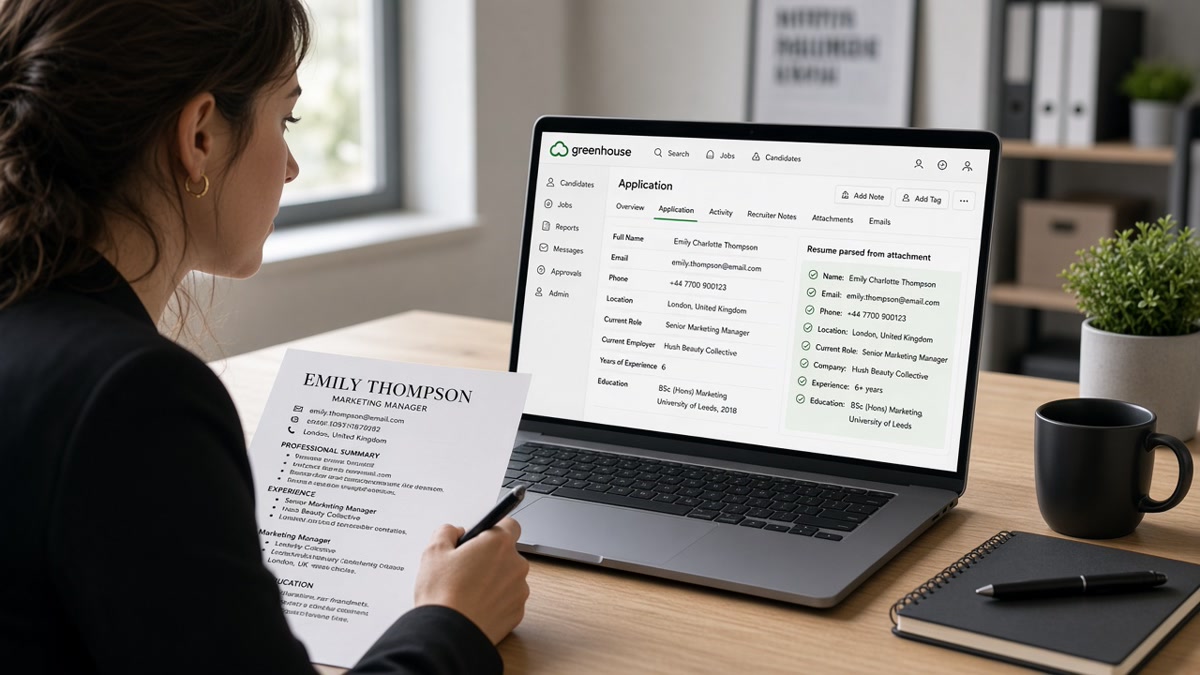
Check your resume for free on the exact PDF you'd upload. Paste the same file into Notepad right after. If Month Year dates show up after bullets from another role, Greenhouse's already misfiled you. Troubleshooting parsing issues in Greenhouse ATS for UK mid-level marketing CVs starts with that paste test, not with more keywords in a sidebar.
Below: five steps with before and after pairs, two edge cases, where layout breaks, tools, and a copy-paste employer line you can drop in tonight. Job searching in UK marketing is draining enough without your 2024 performance numbers landing under a 2019 internship. Fix the column order first. Tailor bullets second. When the posting asks for a letter, use the cover letter generator only after the CV parses clean so both files tell one timeline. You won't fix a scrambled import by rewriting bullet copy alone.
Open your latest Canva or Word export. Don't touch the wording yet. Run the plain-text test in step one. When the read order matches what you see on screen, you've solved most Greenhouse parsing pain for UK marketing CVs in one pass.
Quick Wins
- Paste export to Notepad; read employer order before you edit copy.
- Flatten Canva two-column layouts to one main column.
- Put Month Year dates on the same line as title and company.
- Rename creative headings to Experience, Education, Skills.
- Ctrl-f your current employer, title, and end date after re-export.
Why two-column Canva CVs scramble Greenhouse imports
Greenhouse does not see your design. It sees a text stream. Two-column templates read the left stack first, then the right stack. Dates in that right rail often parse after every bullet in the left column. Your current Digital Marketing Manager role can look like it ended in 2019 because the end date was the last token the importer touched.
The pattern on mid-level UK marketing CVs: left column holds profile text and campaign bullets. Right column holds Month Year ranges, phone, LinkedIn URL, and a skills cloud. Visually correct. Structurally backwards for any ATS that reads linearly.
I've screened stacks of these in Greenhouse after import, and the timeline error is almost always layout, not content. The candidate had owned paid social last quarter. The system showed three years of content-only work because dates detached from titles.
UK marketing candidates often use CV labels recruiters expect: Personal Profile, Key Skills, Career History. Greenhouse maps more reliably to Experience and Skills. A heading the parser skips turns ten strong bullets into one anonymous paragraph.
Troubleshooting parsing issues in Greenhouse ATS for UK mid-level marketing CVs in five steps
Work in this order. Copy changes before layout fixes waste time because you'll re-export twice. Each step ends with a before and after you can compare on your own file.
Step 1: Run a plain-text paste test on your current export
Save the PDF or DOCX you'd upload. Open Notepad, TextEdit, or any plain editor. Paste the full document. Read top to bottom without scrolling back. Mark where your current employer first appears and where its end date lands. If the date shows up after bullets from an older role, stop. Layout is broken.
Before: Trusted the Canva preview because headings looked aligned on screen.
After: Pasted to Notepad, saw March 2022 to Present under a 2018 internship block, flagged the CV before another Greenhouse upload.
Step 2: Flatten two-column layout to a single main column
Open the source in Canva, Word, or Google Docs. Delete the sidebar column. Move phone, email, city, and LinkedIn URL to three lines under your name in the main column. Remove skill clouds rendered as separate shapes. Type skills as a simple list under a Skills heading later.
Before: Two-column Canva template with teal sidebar for dates and icons for each platform.
After: Single column, 11-point Calibri, contact block under name, no text boxes, no tables splitting employer from bullets.
Step 3: Put Month Year dates on the same line as employer and title
Format each role on one line in the main stream: Job Title, Company, Month Year to Month Year. British recruiters still ask for day-level detail in forms sometimes. On the CV file itself, Month Year is enough when it stays glued to the title Greenhouse must match.
Before: Digital Marketing Manager on line one, Brightwave SaaS on line two, dates in a right margin column across from bullets.
After: Digital Marketing Manager, Brightwave SaaS, March 2022 to Present on one line, then bullets indented or prefixed with a simple dash.
Step 4: Rename sections to headings Greenhouse recognises
Replace creative labels with Experience, Education, and Skills. Move Personal Profile content into three lines at the top or into bullet one under your latest role. Do not leave profile prose inside a colored band the exporter treats as an image.
Before: Career Highlights, Brand Toolkit, Academic Background as H2-style text in colored blocks.
After: Experience with standard bullets, Education with institution and qualification on one line each, Skills as a comma list or three short lines.
Step 5: Tie marketing tools to dated bullets, then re-export
Lead bullet one under each employer with the channel you owned and the platform name. Paid social belongs with Meta Ads Manager or LinkedIn Campaign Manager in the line where you spent budget last quarter. SEO content belongs with GA4 or Search Console when that was the measurement stack.
Before: HubSpot, Salesforce, GA4, Semrush listed in a sidebar cloud with no dates.
After: Bullet one: Owned HubSpot lifecycle flows and GA4 reporting for UK SMB trial funnel, lifted MQL to SQL rate from 11% to 16% in H2 2024. Skills line echoes HubSpot, GA4, Salesforce after proof.
Save PDF with selectable text. Paste to Notepad again. Ctrl-f current employer, title, and Present or your end month. Run an ATS check on the same file. Upload to Greenhouse only when all three sit together above bullet one.
Copy-paste employer line and bullet skeleton
Digital Marketing Manager, Brightwave SaaS, March 2022 to Present
- Owned paid social and email in HubSpot for UK SMB trial funnel; cut CPA from GBP 42 to GBP 31 in Q3 2024 while holding lead volume flat.
- Built GA4 dashboards for content and paid paths; flagged landing-page drop that drove 18% lift in demo bookings after copy refresh.
- Partnered with sales on Salesforce campaign membership rules; reduced manual list uploads from weekly to one monthly sync.
Marketing Executive, Northline Retail, June 2019 to February 2022
- Ran Meta and Google paid campaigns for seasonal footwear lines; delivered ROAS 3.8 on GBP 120k Q4 2021 spend.
- Drafted email journeys in Klaviyo for loyalty members; lifted repeat purchase rate from 14% to 19% over two quarters.
Before and after: in-house SaaS marketer
Before: Canva two-column CV. Dates in teal sidebar. Profile calls you a growth generalist. HubSpot in icon row only.
After: Single column. Digital Marketing Manager, Brightwave SaaS, March 2022 to Present on one line. Bullet one names HubSpot and GA4 with UK funnel scope and a dated metric from 2024.
Before and after: agency account manager
Before: Client logos in a grid. Campaign Highlights heading with no dates. Tools listed under Brand Toolkit.
After: Account Manager, Cedar Agency, January 2021 to August 2024 on one line. Bullet one names B2B client vertical, LinkedIn Campaign Manager, and pipeline influenced with a quarter label you can defend on a call.
Edge case: hybrid UK remote role with EU campaigns
State UK base in the contact block. Put EU market scope inside bullet text, not a separate country column. Greenhouse often drops narrow side columns used for market tags. One bullet can read: Ran German and French LinkedIn campaigns from UK hub; held CPL under EUR 38 across Q1 2025 tests.
Edge case: career break or contract gaps
Do not use a table to align dates when you return from parental leave or a sabbatical. List the prior role with an honest end month, leave a single blank line, then start the next employer with its true start month. A one-line Contract or Freelance block with Month Year range is fine when NDA allows client industry naming without logo grids.
Where UK marketing CVs lose the Greenhouse import
Trusting Canva PDF because it looks polished. Design tools hide parse order. Plain-text paste is the truth test. Run it every time.
Stuffing tools in Skills before Experience proves them. Greenhouse may index the word HubSpot. Recruiters still ctrl-f under your latest employer. Empty pairing reads junior.
Using tables to line up dates. Tables look tidy in Word. Exporters often strip cell order. Inline employer lines beat grid alignment.
Headers and footers with contact details. Some imports drop repeating header text entirely. Keep phone and email in the body under your name.
Keyword blocks without campaign scope. Performance marketing, CRM, and SEO in a list do not replace one bullet with budget, audience, and outcome. Mid-level screens fail on scope, not synonym count.
Read why your resume looks different after upload for the same linear-read problem on another major ATS. Different brand, same habit: flatten before you tailor.
Parse check before Greenhouse upload
Run the finished PDF through the free ATS checker after the plain-text paste passes. You're confirming headings survived and employer blocks stayed grouped, not chasing a perfect score on the first pass.
When the posting lists must-have channels, score your job match after bullet one names the primary platform under your current role. Fix layout first if dates still jump employers. Match tools cannot repair a timeline the parser already split.
Export once, verify twice
Troubleshooting parsing issues in Greenhouse ATS for UK mid-level marketing CVs comes down to read order, not prettier design. Flatten Canva columns. Inline Month Year dates with title and company. Rename sections to Experience, Education, Skills. Tie HubSpot, GA4, and Salesforce to bullet one under the job where you used them last. Paste to Notepad before every upload.
This will not fix applying to senior brand roles without the years the posting marks required. It stops qualified mid-level marketers from losing screens because 2024 paid social metrics imported under a 2019 university placement. Save one parse-clean base file and re-run the paste test after any template change.
Read more
Frequently asked questions
Greenhouse reads the file top to bottom in one stream. Two-column Canva or Word layouts often put Month Year dates in a right margin column. The importer finishes the left column first, so your latest campaign bullet can attach to an older employer block. Flatten to one column and put dates on the same line as company and title before you upload again.
Upload a single-column PDF with selectable text when the form allows PDF. If the employer asks for Word, export DOCX from Google Docs or Word after you flatten columns. Avoid Canva PDF exports with text boxes for employer lines. Run a plain-text paste test after every export. If dates vanish in Notepad, Greenhouse will struggle the same way.
Yes. Use Experience, Education, and Skills as plain headings. Creative labels like Brand Journey or Campaign Highlights often land as body text with no section boundary. Greenhouse then dumps bullets into one block. Rename once, re-export, and confirm the heading survives a plain-text paste on its own line.
Put the primary stack in bullet one under the employer where you used it last, with Month Year dates on that same employer line. List secondary tools in Skills only after bullet one proves recent use. Tools floating in a sidebar column often parse without any employer tie, which makes mid-level scope look thinner than it is.
Paste the exported file into a plain-text editor and read top to bottom. Ctrl-f your current employer, job title, and end date. They should appear together before the first bullet. Then run a free ATS check on the same PDF. Fix layout if headings merge or dates jump employers before you tweak keywords.