By Peter Miller · Published March 24, 2026 · Last updated: September 16, 2026
11 min read
You've tailored bullets for a backend role in Berlin. Greenhouse still shows Kubernetes as your job title and buries Nordic Fintech GmbH under Education. That's not a keyword problem. European mid-level IT CVs break in Greenhouse when US-style single-page templates use tables for sprint metrics or park skills in a sidebar the parser doesn't read last. The file looks hireable on screen. The import tells a different story. You're not imagining it, and you're not alone.
Greenhouse parsing issues on European mid-level IT CVs usually start with layout, not keywords. Before you rewrite another bullet, check your resume for free and paste your PDF into Notepad. If tools appear above your current employer, fix the skeleton first. Mid-level IT candidates often lose screens on structure alone.
Job searching when every upload goes quiet is exhausting. You're not failing because your sprints lacked impact. You're often submitting a CV built for human skim patterns that Greenhouse reads column by column. Recruiters often see tech stack tools imported as job titles while the agency role sat under Education. This page maps what recruiters see on import to the layout choice that caused it.
When the posting asks for a cover letter after you fix the skeleton, generate a cover letter that names the same employer lines your paste test confirmed. You'll spend five minutes and save another week of silence.
Quick Wins
- Paste CV into Notepad; if tools appear before your employer, rebuild single column.
- Rename non-standard section labels to Experience before Greenhouse upload.
- Move project tables into dated bullets under the real employer line.
- Export DOCX from Word when the portal accepts it; re-check preview once.
What the recruiter sees on import
The failure isn't always a blank upload. Greenhouse often keeps your name and email, then scrambles everything else. Skills import twice. A 2022 internship attaches to your 2024 agency role. Sprint metrics float between sections with no employer header. You still get the confirmation email. The hiring manager opens a profile that doesn't match the PDF you spent Sunday night polishing.
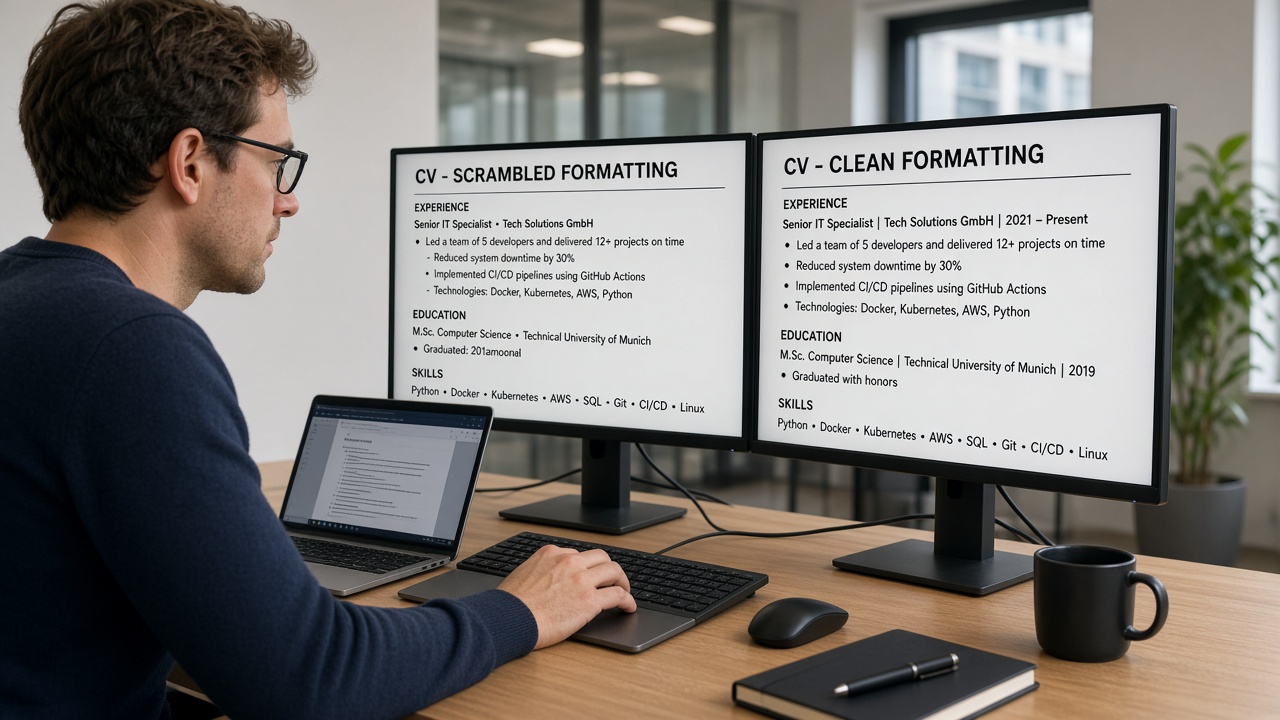
Humans read top to bottom across the page. Many parsers read one column fully, then the next. A European mid-level engineer using a US Canva template with a left rail for Docker, Python, and Kubernetes looks balanced in preview. On import, that rail can become the first block of body text, pushing Manager, Nordic Fintech GmbH below your degree.
A composite mid-level backend developer whose two-page CV read cleanly to a human still failed screens because Greenhouse listed Google Analytics 4 as the current title and merged Q4 Kubernetes clusters bullets into a freelance block from 2019. Same achievements. Wrong skeleton.
UK candidates sometimes assume two pages cause the problem. Length is rarely the parser trigger. Layout inside those two pages is. A dense second page of sprint write-ups in plain bullets parses fine. A one-page US template with invisible tables does not.
Greenhouse imports sometimes need only a sidebar strip and a re-export. Keyword edits on the broken layout would not have moved the needle.
Parsing issues Greenhouse ATS European mid-level IT CVs: three layout causes
Most silent rejections on European IT applications trace to one of three layout choices. Run the tell test after each block. Only rebuild what your paste test proves broke.
Cause 1: Two-column CV with a tech stack sidebar read first
EU CV templates often park certifications and tools in a left column while roles sit on the right, which mimics US sidebar resumes parsers read column-first. Greenhouse and Lever often ingest the full left column before the first job line. Your tech stack stack becomes the opening paragraph. Experience imports out of order or duplicates when the parser retries partial reads.
How to tell: Paste your PDF into Notepad. If Kubernetes, Salesforce, or Python appear as a block before Marketing Manager or any employer name, you've got sidebar-first scramble.
Before: Left rail with tool icons and certification badges; right column with three agency roles and a photo header.
After: Single column: contact three lines, Experience with title-employer-dates per role, Education, Skills as one comma line echoing tools already proven in bullets.
I've screened Greenhouse imports where Docker and Kubernetes landed as the current job title while the actual employer sat under Education, and I passed on the file until the engineer rebuilt a single-column CV.
Cause 2: Sprint metric tables and invisible alignment grids
IT CVs love neat tables: channel, spend, latency, uptime by quarter. Word and Canva hide the grid lines. Parsers read cell by cell, left to right, top to bottom. Q3 Meta figures attach to the wrong employer. Date ranges split from job titles. A table row for Sprint | 42% faster deploys | £12k revenue imports as three orphan lines with no role header.
How to tell: Notepad paste shows metrics on lines without employer names nearby, or job titles separated from dates by blank lines and stray numbers.
Before: Three-column table under each role listing channel, budget, and outcome per quarter.
After: One bullet per win: Ran always-on Meta and LinkedIn with £180k annual spend, held blended uptime under £14 while scaling lead volume 22% year on year.
Cause 3: Header contact blocks and EU CV section labels in text boxes
EU CVs often repeat phone and LinkedIn in a page header on page two. Text boxes hold profile summaries styled as coloured bands. Parsers treat headers and boxes as separate streams. Contact imports once from the footer and drops from the body. Profile prose lands after Education. Section labels like Selected Sprints inside a shaded box import as body text without hierarchy.
How to tell: Phone appears only at the bottom of the Notepad paste. Summary paragraph sits after your degree. Section headings lost ALL CAPS and read as mid-sentence fragments.
Before: Name and phone in page header; profile summary in a grey text box; Key Sprints as a styled sidebar on page two.
After: Contact block in body on page one only. Profile as three plain lines under contact, no box. Sprint wins as standard bullets under the employer that ran them.
Fix walkthrough: platform engineer with sidebar scramble
Before: Canva two-column CV. Left rail: Terraform, PostgreSQL, React, GitLab. Right rail: Content Marketing Manager at Cloudline Systems plus two prior roles. Notepad lists every tool before Cloudline Systems.
After: Word single column. Bullet one under Northwind: Owned SEO content calendar in React and PostgreSQL, grew organic sessions 31% in nine months. Skills line at bottom: React, PostgreSQL, Terraform, GitLab.
Fix walkthrough: performance engineer with metric table merge
Before: Invisible table aligns Q1 to Q4 uptime by channel under Performance Marketing Executive, Nordic Fintech GmbH. Parser attaches Q2 Google figures to a 2021 internship.
After: Performance Marketing Executive, Nordic Fintech GmbH, Jan 2023 to Present on one block. Bullet: Managed Google and Meta with £240k quarterly spend, cut blended uptime from £19 to £14 over two quarters. Paste shows one employer header with dates intact.
Copy-paste block: European IT CV skeleton that parses in Greenhouse
[Full Name]
[City, EU] · [phone] · [email] · [LinkedIn URL plain text]

PROFESSIONAL EXPERIENCE

[Job Title]
[Employer], [City, EU]                                    [Mon Year] – [Mon Year]
• [Sprint tool and outcome in first eight words, e.g. Ran Kubernetes clusters in AWS, cut uptime 18% in two quarters]
• [Second bullet with channel scope]

[Prior Title]
[Prior Employer], [City, EU]                              [Mon Year] – [Mon Year]
• [Bullet]

EDUCATION
[Degree], [University], [City, EU]                        [Year]

SKILLS
[Tool], [Tool], [Tool] (comma separated, no icons)
How to tell which cause is yours
Run this four-step diagnostic before you touch bullet wording. Ten minutes now beats another week of silent applications.
- Export the same PDF or DOCX you upload to Greenhouse. Paste into Notepad on Windows or TextEdit in plain text mode on Mac.
- Read top to bottom without glancing back at the formatted CV. If tools or certifications appear before your current job title, Cause 1 is yours.
- Count employer names. Three roles but five employer strings means duplication from columns or tables. Stray numbers between jobs point to Cause 2.
- Ctrl+F your phone number. Missing from the first screenful signals Cause 3 header or text-box contact loss.
Sidebar scramble fixes with single column. Table failures fix by moving metrics into bullets with tab stops for dates, not grids. Header and text-box failures fix by moving contact and summary into the body stream only.
Mixing fixes wastes an evening when you haven't diagnosed yet. One composite brand manager fixed only keywords for three weeks while Kubernetes still imported as her title. A single-column rebuild took forty minutes.
For EU versus US document norms before you strip layout, read US vs UK CV formats . Two pages is fine for EU mid-level IT roles when page one opens with parseable Experience.
Edge case: portfolio-heavy engineering roles
Send a plain parseable CV through Greenhouse and link GitHub or a repo readme in contact. Don't embed sprint screenshot grids in the upload PDF. Hiring managers who need visuals will click. Parsers won't read your carousel layout.
Edge case: contract and freelance blocks on EU IT CVs
Multiple short freelance clients tempt engineers into a table of clients and dates. List each substantial contract as its own employer block with Month Year dates, or group under Freelance Software Consultant with client names inside bullets. Tables of client logos import as garbage strings in Greenhouse.
CV traps European IT candidates miss after the first fix
Assuming EU recruiters want US one-page length. Mid-level IT CVs at two pages parse when layout is single column. Shrinking into a US sidebar template to hit one page often recreates the same import scramble you were trying to fix.
Keeping icon skill bars for tech stack stacks. Five-star graphics for Kubernetes strip to empty squares. Replace with comma-separated plain text after bullets prove each tool.
Stuffing keywords in a white footer. Some templates hide a keyword block in tiny text. Parsers may read it. Recruiters who open the PDF see spam. Don't.
Re-exporting from Canva without re-pasting. Every edit can re-break column order. Paste test after each export, not only the first rebuild.
Keyword edits on a broken layout. Tailoring bullet one for the posting won't help when Python still imports as your job title. Skeleton first, wording second.
Uploading image-only PDFs from design exports. If you can't select text in the PDF, Greenhouse can't read it either. Re-export as text-based PDF or DOCX.
This won't fix applying to brand roles when your background is pure pure support work. It stops qualified European IT candidates from losing when the parser thought Skills was their current employer.
For template-level failures that span every ATS, see resume template mistakes that break ATS . Greenhouse is picky, but column scramble is platform-agnostic.
Re-test before the next batch
After you rebuild in single column, run the same file against the req on your screen. You're confirming employer order, date attachment, and keyword placement in parsed body text, not in a sidebar the import skipped.
Upload your stripped export to HireFlow's free ATS resume checker . If job three still imports before job one, the CV skeleton isn't fixed yet.
When you're rebuilding from scratch, build your resume in a single-column layout with standard section headers so you don't reintroduce sidebars on the next edit.
For file-type choices after layout is clean, read how resume file type impacts screening . A plain DOCX sometimes beats a design-tool PDF even after you drop tables.
Do this now: Paste your CV into Notepad. If tech stack tools appear before your current employer, switch to single column before you tailor another bullet.
Rebuild order, then resubmit
Parsing issues Greenhouse ATS European mid-level IT CVs usually trace to sidebar skills, project tables, or contact trapped in headers. Fix read order first. Tailor bullets second. A two-page single-column CV with plain metrics in bullets beats a one-page US template that imports Kubernetes as your title.
Paste your export into Notepad tonight. If tools run before employers, rebuild in one column before you touch wording. Then run a free ATS check with the posting attached and confirm each agency name appears once, newest first.
- Drop sidebars that push tech stack ahead of Experience on import.
- Move sprint metrics from tables into dated role bullets.
- Put phone and email in the body contact block, not the page header.
- Re-paste after every export, not only the first fix.
- Match file type to what survived the paste test.
And if a template claims ATS friendly on the marketplace page, run Notepad on the sample PDF before you buy it. You're choosing a parse path, not a thumbnail.
Read more
Frequently asked questions
Greenhouse reads the file you upload, not the country on the posting. UK candidates can keep two-page CV length when content is dense and relevant. The parser still chokes on US-style sidebars, sprint metric tables, and header contact blocks regardless of CV versus resume labelling. Single-column body text with standard section headers parses more reliably than a polished Canva layout built for US one-page norms.
Sidebar Skills blocks often import before Experience when parsers read the left column fully, then the right. Your tools line lands where a job title should sit. Move skills below dated roles in one column, echo each tool in a bullet under the employer that used it, and paste-test before re-uploading.
Remove invisible alignment tables and rebuild metrics inside bullets. Parsers read table cells out of order and attach Q3 latency figures to the wrong employer. One bullet per win: Managed Kubernetes clusters in AWS, cut cost-per-lead 18% over two quarters. Tables belong in portfolio decks, not the CV you upload to Greenhouse.
DOCX from Word or Google Docs often survives contact blocks and date lines better than design-tool PDFs. Export the same file type you plan to upload, paste into Notepad, and compare. If PDF paste scrambles section order while DOCX paste reads clean top to bottom, submit DOCX when the form allows it.
Paste your export into Notepad. Your phone number and email should appear in the first ten lines. Employer names should list once each in reverse chronological order. Sprint tools should sit inside bullets, not as a block above your current title. Then run a free parse check with the posting attached and confirm must-have keywords match parsed body text.