6 min read · Default to dated hybrid
Functional templates promise to spotlight skills and quiet messy timelines. That pitch made sense when a human read every printout. It falls apart when the first reader is a parser hunting employer and date fields, and you'll see empty Experience rows in preview if dates aren't tied to jobs.
Check your resume for free after you flatten to one column with visible dates. If Experience blocks stay empty in preview, a functional layout won't rescue the upload, and recruiters won't wait for a second guess.
You're not stuck with a decade of unrelated bullets. You're choosing a format that still shows when and where you worked while you aim the top third at the next role. Gaps belong in an honest sentence, not a hidden header.
Quick Wins
- List every role with Month Year start and end in one Experience section.
- Move skill headers into bullets under the job where you used them.
- Add a three-line summary that names your target title honestly.
What a functional resume tries to do
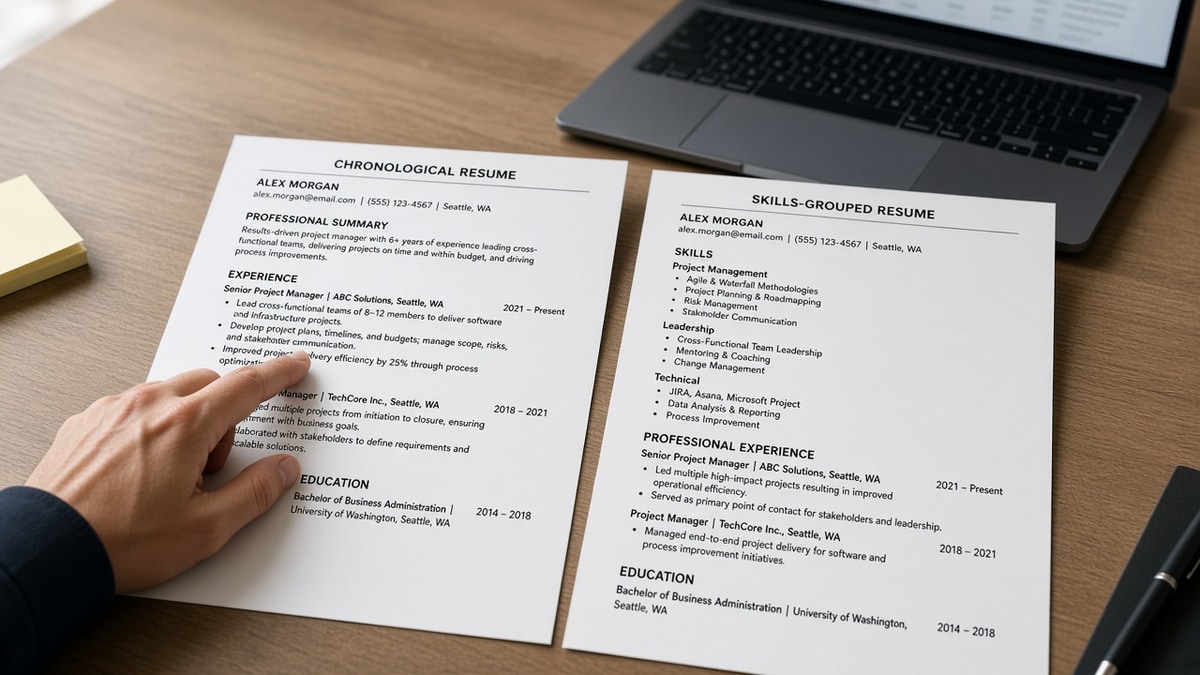
A functional resume groups accomplishments under skill headings like Project Management or Client Relations instead of leading with Company A, 2019 to 2022. The goal is to steer attention away from job hopping, gaps, or unrelated titles.
Parser expectation. Corporate ATS builds profiles from chronological Experience: employer name, title, start, end. When those anchors are missing, fields stay blank or attach bullets to the wrong slot.
Recruiter read. Screeners look for progression and tenure patterns in seconds. A skills cloud without dates feels like you're dodging a question they were about to ask.
I've opened Workday records where a functional upload left the latest title field empty even though the PDF listed strong bullets under Leadership. The queue sort treated the candidate as junior because the parser never saw a current role line.
Compare formats in chronological vs functional resume in 2026 when you're deciding how much timeline to show.
Should you use a functional resume in 2026? Decision paths
Use this fork before you rebuild the whole file. Most readers land on hybrid, not functional.
Online apply with ATS portal
Answer: No functional layout. Use reverse-chronological or hybrid with dates on every role.
Before: Sections titled Core Competencies and Achievements with no employer lines.
After: Experience header with Company, Title, City, Jan 2021 to Mar 2024, then bullets that name the same competencies inside dated work.
Career change with transferable skills
Answer: Hybrid, not functional. Summary states the target role; bullets under past jobs show the tools the new field uses.
Before: Functional layout hiding retail management dates while seeking product ops.
After: Same jobs listed with dates; first bullet under each role mentions inventory systems, vendor SLAs, or roadmap rituals that map to product work.
Copy-paste hybrid header block
Copy-paste hybrid skeleton
Summary (3 lines): Target title + years in adjacent field + one metric
Skills (one line): 8 tools from posting, comma-separated
Experience:
Company | Title | City | Mon YYYY – Mon YYYY
• Bullet with tool inside sentence + outcome
Repeat for each role, most recent first
For parser-friendly structure detail, see how to use a hybrid resume and still pass ATS before you submit another skills-only draft.
Functional format mistakes that still show up
Dropping company names to save space. Parsers match employer strings to verify tenure. Anonymous bullets read like fiction.
Using functional to hide a six-month gap. A visible six-month break with a one-line explanation beats a format swap recruiters associate with concealment.
Skills section replacing Experience. Nouns without dates do not answer how many years you practiced the skill.
Applying functional files to enterprise reqs. Large employers route almost everything through Workday, iCIMS, or Taleo. Expect automated filters to misread the file.
Rebuild in a format parsers can read
Run your dated export through the free ATS resume checker after you collapse skill sections into Experience. You're checking that employer and title fields populate, not whether the template looked creative.
If you're starting from scratch, build your resume in a single-column chronological layout, then tailor bullets per posting instead of switching to functional whenever history feels messy.
What to do tonight
Should you use a functional resume in 2026? Default to no for ATS portals. Keep dates, employers, and titles visible. Rewrite bullets and summary toward the role you want, and let the cover letter carry honest context about gaps or pivots.
- Convert skill-grouped sections back into dated Experience blocks.
- Mirror must-have tools inside bullets tied to real jobs.
- Retest portal preview before you apply again.
When the timeline is visible again, run a free resume check on the export you'll upload. That's the file parsers and recruiters will actually rank. If you need one line about a gap, use the cover letter generator after the resume matches the story.
Read more
Frequently asked questions
No. Omitting dates or burying jobs under skill headers makes parsers and recruiters hunt for what you removed. A short gap with month and year on the resume plus one honest line in the cover letter reads cleaner than a format built to obscure time.
Often poorly. Applicant tracking systems expect Experience blocks with employer, title, and dates. Skill-grouped sections without a clear timeline leave those fields empty or mislabeled, so filters cannot match years of experience to the posting.
Use a hybrid layout: reverse-chronological jobs with dates, a targeted summary that names your new direction, and bullets rewritten to highlight transferable tools. You show continuity and relevance without dropping the timeline.
Only when you know the reader never uses an online portal: a direct email to a hiring manager who asked for a narrative CV, some academic bios, or a portfolio-first creative pitch. For standard Workday or Greenhouse apply links, treat functional as off the table.