9 min read
Your PDF looks perfect in Preview. Workday might store a profile with no phone number, your 2022 role listed as current, and Skills merged into Education. That gap's invisible until you run a parsing test yourself.
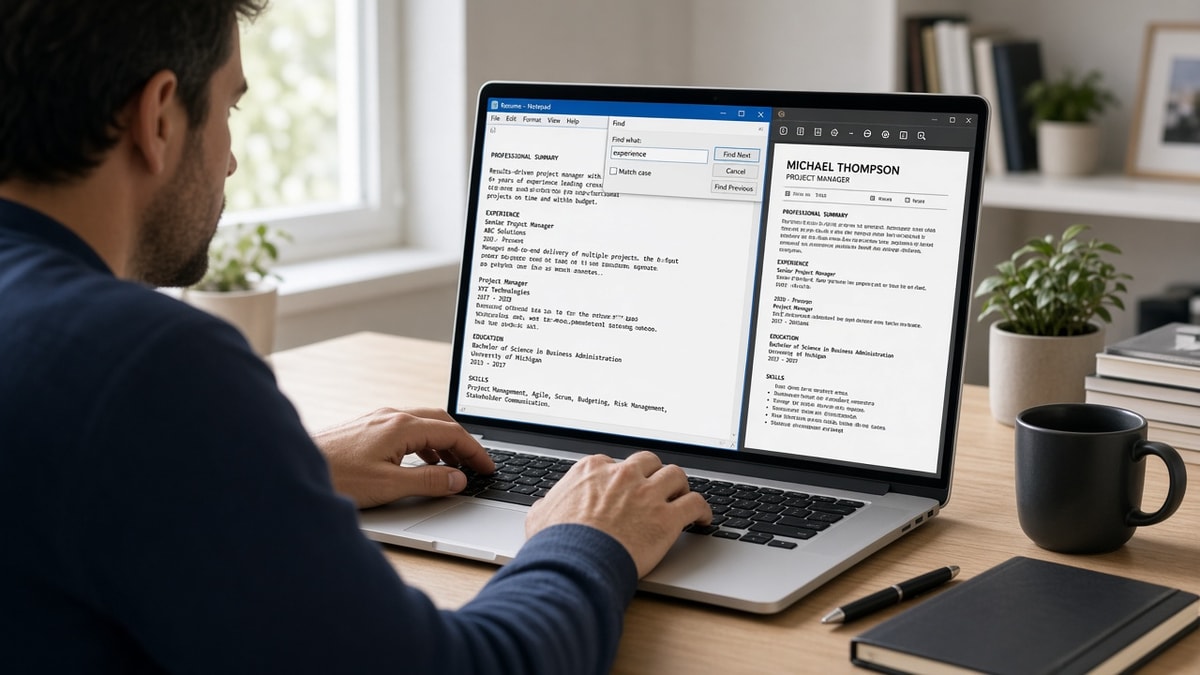
You don't need special software tonight. Copy-paste into Notepad plus Ctrl+F for three strings tells you whether the ATS read your file or guessed. Most qualified applicants never check. They'll keyword-tune a layout the parser never parsed, and that's the failure you're fixing here.
Check your resume for free after the paste test passes. Parsing and keyword match are two different problems. Fix the file structure first so every later edit lands in the right row. You'll know it's working when Ctrl+F finds all three strings.
Below: what breaks when parsers read PDFs, five steps with H3s, before/after layout fixes, edge cases for Mac and mobile exports, and a copy-paste checklist you can run in ten minutes before your next application.
Quick Wins
- Paste your PDF into Notepad before every new application batch.
- Ctrl+F your phone number. No match means the ATS lost contact info.
- Confirm current job title appears above older roles in plain text order.
- Re-export from Word after you collapse tables and text boxes to one column.
What a resume parsing test actually shows you
An ATS does not see your margins, fonts, or colour blocks. It extracts text strings and maps them to fields: name, phone, email, employer, title, dates, skills. When extraction fails, the recruiter sees an empty phone field or a job history that reads backwards.
The resume parsing test is a mirror of that extraction. Plain-text paste strips design away. What survives in Notepad is what most parsers store. If your number is not searchable there, do not assume Workday captured it from a header graphic.
Symptom: You applied to twenty roles and heard nothing. Likely cause: Parser stored wrong title on your current employer row. Fix: Run the paste test, then rebuild as single column before the next batch.
Most resumes never reach a human when the stored profile is incomplete. The parser reads the file first. A file it cannot read does not get scored against the posting keywords you spent an hour adding.
For deeper error patterns, read common resume parsing errors and how to fix them . This page is the ten-minute test you run before you upload.
Five steps to run a resume parsing test on your PDF
Work through these in order on the exact file you plan to attach. Do not test a Google Docs tab if you will upload a PDF export with different encoding.
Step 1: Open your final export file
Locate the PDF or DOCX saved from Word, Google Docs, or LibreOffice. Avoid testing a Canva download or a phone photo of a printout. If you only have a scan, run OCR first or retype into a blank DOCX before you test.
Before: Testing a browser print preview that differs from the uploaded PDF.
After: Testing the same bytes you will attach in Workday or Greenhouse tonight.
Step 2: Select all and paste into plain text
Press Ctrl+A (Windows) or Cmd+A (Mac), copy, and paste into Notepad or TextEdit set to plain text. On Mac, open TextEdit, choose Format, then Make Plain Text before you paste.
Empty paste or a single garbled line means image PDF. The ATS treats it as blank. Rebuild in Word as single-column DOCX before you apply anywhere.
Step 3: Ctrl+F your phone number, title, and employer
I've screened thousands of uploads in Workday and Greenhouse, and the file that passes is boring: phone in the body, title on its own line, dates in Month Year format. When Ctrl+F misses your number, the recruiter's call list already skipped you.
Search three strings in order: your phone number (digits only if formatted oddly), your current job title, and your most recent employer name. Any failed search marks a field the parser likely dropped.
Before: Phone number visible in PDF header graphic only.
After: Phone number on line two of plain text, searchable with Ctrl+F.
Step 4: Read section order and dates top to bottom
Contact info should lead. Experience should list current role first. Each role should show title, employer, and Month Year dates on consecutive lines. If Skills text appears between two jobs, a column or table merged sections on import.
Before: 2019 internship listed above 2024 current role in plain text.
After: Current role first, reverse chronological, with January 2022 to Present on the same block as the title.
Step 5: Fix structure, re-export, and re-test
Move contact out of headers and footers. Delete tables and text boxes. Stack sections vertically. Standardize Month Year on every role. Save DOCX, export text-based PDF if required, and run steps two through four again.
Copy-paste block: parsing test checklist
RESUME PARSING TEST (run on final PDF/DOCX)

1. Open export file (not preview tab)
2. Select all → paste into Notepad / plain TextEdit
3. Ctrl+F searches (must all find a match):
   - Phone: [your number]
   - Title: [current job title]
   - Employer: [current company name]
4. Scan order: contact → summary → experience (newest first) → education → skills
5. Dates: every role shows Month Year (e.g. March 2021 to Present)
6. If any step fails → single-column rebuild in Word → re-export → re-test
7. Upload only after step 3 passes on the new export
When the portal shows a preview screen after upload, compare it to your Notepad output. Mismatches mean the hosted parser applied extra rules. Favour the preview over your local paste when they disagree.
Edge case: Mac TextEdit and rich paste
TextEdit defaults to rich text mode. Hidden formatting tags can make your paste look fine while still carrying invisible characters parsers choke on. Switch to plain text before you paste, or use Notepad on Windows for the cleanest read.
Before: Pasting into TextEdit with formatting toolbar active.
After: Format → Make Plain Text, then paste and run Ctrl+F searches on the stripped output.
Edge case: Mobile PDF exports and cloud saves
Resumes edited on a phone and exported through a cloud app often flatten layers differently than desktop Word. Always run the test on the desktop export you will attach. If mobile is your only option, email the file to yourself, open on a laptop, and paste from there before you trust the upload.
Before: Uploading a phone-exported PDF without a desktop paste check.
After: Same file opened on desktop, pasted to Notepad, phone number and title confirmed searchable.
What to log when something fails
Note which search failed: phone, title, or employer. Note whether sections merged or dates disappeared. That tells you whether to fix contact placement, collapse columns, or standardize Month Year formatting. One failure mode per rebuild pass beats guessing which template setting broke the file.
See how to preview your resume like an ATS when you want a second pass after the Notepad test passes.
Layout traps that survive a visual PDF check
Two-column Canva or Word templates. Side-by-side Skills and Experience columns merge into one stream on paste. Your current title lands under an old employer name. Single column is the fix that survives most corporate ATS flows.
Contact info in headers and footers. PDF headers look professional. Parsers often skip them entirely. Put name, phone, email, and city on line one through four of the body.
Title and company on one line with a pipe character. Senior Analyst | Acme Corp reads as one field. Put title on its own line. Company on the next. Dates on the line below in Month Year format.
Icons and text boxes for social links. LinkedIn URLs inside shapes do not paste. Type the URL as plain text or omit it when the application form has a separate LinkedIn field.
Skipping the test because the PDF looks fine. Visual polish does not prove extraction. The paste test takes two minutes. Silence after twenty applications costs more.
Custom section headers parsers do not map. Labels like My Journey or Core Competencies may not map to Experience or Skills in Workday. Use standard headers: Experience, Education, Skills. Parsers route text into fields based on header names they recognise from millions of prior uploads.
Hyphen-heavy date ranges without spaces. Jan2021-Present can paste as one token. Write January 2021 to Present with spaces so the date line splits cleanly on import.
This won't fix applying to roles you're not qualified for. It stops a qualified file from dying in the parser before keyword scoring starts.
Parser-check before you upload
After Notepad passes, upload the same file to a checker with the job description pasted in. You're confirming whether required skills land in Experience rows the parser stored, not only in a Skills cloud.
Use HireFlow's free ATS resume checker against the posting you are targeting. Fix layout gaps before you chase keyword density on a file the machine never read correctly.
If the role also asks for a letter, generate a cover letter from the same posting so titles and dates match what the parser stored on your CV upload.
Run the test before you click apply
A resume parsing test is copy-paste into Notepad plus Ctrl+F for your phone number. If search fails, the ATS already lost your contact block. Fix structure first. Keyword work comes after the file reads cleanly.
Open your export tonight. Run the checklist. Rebuild single column if anything fails. Then run a free ATS check against the posting before you upload to Workday or Greenhouse again.
Job searching is already draining. Ten minutes of parsing prep beats three weeks of silence because a header graphic ate your phone number.
Read more
Frequently asked questions
A resume parsing test shows what an ATS reads from your file before a recruiter opens it. Open your PDF or DOCX, select all text, and paste into Notepad or TextEdit. Then search for your phone number, current job title, and most recent employer name. If any search fails, the parser stored a broken profile. The paste output is what Workday, Greenhouse, Lever, and iCIMS see when they import your upload.
Contact blocks in PDF headers and footers often drop on import. If your phone number does not appear in the plain-text paste, the ATS profile may have no phone field even though the PDF looks fine on screen. Recruiters who call from the ATS record will not reach you. The same failure hits email addresses tucked inside text boxes or icon rows beside social links.
Test whichever file you plan to upload. Build and edit in DOCX, then export PDF only if the posting requires it. Run the paste test on both exports when the portal accepts either format. Image PDFs from Canva or scanned printouts paste as blank or scrambled lines. Text-based exports from Word or Google Docs should paste in the same order you wrote the sections.
The portal may re-parse on upload with different rules than your local paste. Upload to a free checker that simulates parser output, or apply to a similar posting on the same ATS and review the preview screen before final submit. Two-column layouts and table cells are the usual cause when local paste looks fine but the hosted preview reorders Experience rows.