12 min read
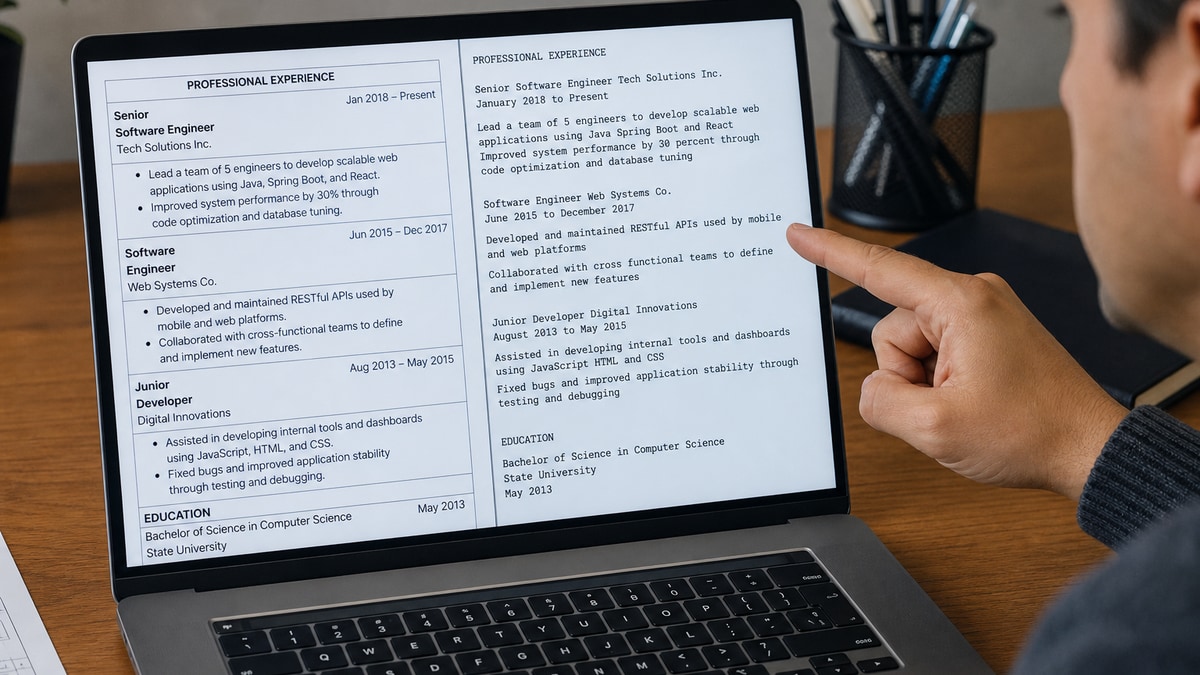
Short answer: US ATS parsers don't read your resume like a human scanning a grid. They flatten the file into a single text stream, usually left to right and top to bottom through each table row. Your contact block, job title, and best bullet can land in the wrong order even when the PDF looks polished.
That's why tables break US ATS parsing on most corporate uploads. The visual layout you designed isn't the read order the import uses. Skills in a left column can splice into the middle of an employer block. A date cell can detach from the title beside it. You'll lose matches you earned because the parser never attached keywords to the right job line.
Check your resume for free after you paste the posting in. If the checker shows green on keywords but a Notepad paste scrambles employer order, you'll know layout is the leak. Below: how the read order works, the rare exceptions, stacked-text replacements you can paste tonight, and what to upload instead.
Job searching is already draining when you've sent twenty files and heard nothing back. This isn't a lecture on pretty templates. It's which structures to rip out so Workday, Greenhouse, Lever, Taleo, and iCIMS imports stop eating your dates and titles. Don't upload another grid layout until you've run the plain-text paste test once.
Quick Wins
- Copy resume text into Notepad and read employer order top to bottom.
- Replace contact grids with stacked name, phone, email, and city lines.
- Put Month Year dates inline on each employer line, not in a side column.
- Export single-column PDF from Word before the next Workday upload.
How parsers read tables versus how you designed them
You built a clean grid: name and phone on row one, email and LinkedIn on row two, experience in the wide cell below. On screen it reads like a business card plus a timeline. The import does not see a timeline. It sees cells.
Most US corporate parsers walk table rows in document order. Row one left cell, row one right cell, row two left cell, row two right cell. They do not know your right cell was meant to stay beside your left cell visually. When the export flattens, phone can land before your name, or your city can interrupt bullet two.
The pattern recruiters see: a PDF that looks fine in Adobe Reader imports with your latest employer missing dates, or with Skills injected between two bullets from the same job. The human assumes you are underqualified. The file was scrambled.
Nested tables make it worse. A table inside a table for project timelines can drop entire rows when a cell is merged. Icons and proficiency bars inside cells often strip to blank space. Parsers keep text; they discard decoration.
Word DOCX and PDF exported from Word still carry table markup even when borders are invisible. Canva and design-tool PDFs frequently store text inside vector boxes the parser never enters. The file looks sharp. The extracted profile is half empty.
Read how resume file type impacts screening when you've already removed tables but imports still look thin. Format and file type stack on top of layout.
Why tables break US ATS parsing when the PDF still looks perfect
A composite operations analyst used a two-column skills table: tools on the left, years on the right. I've seen Greenhouse attach four years to Tableau while the analyst employer line imported without dates because the date sat in a merged header cell above the table. Keyword match lit up. Job tenure did not parse.
Contact grids are the sneakiest failure. Name in column one, phone and email in column two is a layout choice humans parse instantly. Imports often read name, then phone, then jump to the next row before they reach email and city. Recruiters search your file for your current title and find a string of digits.
Sidebar templates behave like tables even without grid lines. Skills pinned left, Experience right, Education below the fold on screen. Many imports read across the page width first. Your AWS line can land under a college name while bullet one still says supported cloud operations with no service named.
Before: Two-column contact table with name left, phone and email right; skills grid with tool and level columns; experience in a third table below.
After: Stacked lines: Full Name on line one, phone on line two, email on line three, city and state on line four; Experience with Month Year dates inline on the employer line; Skills as a short comma list after Experience.
Project tables cause a different miss. Start and end dates in separate columns look organized. Flattened text can read Project Alpha January 2024 February 2025 Project Beta without clear which date belongs to which project. Recruiters cannot tell if you led one six-month effort or two overlapping gigs.
Header and footer tables are easy to miss. Putting your name in a Word header so it repeats on page two sounds professional. Some parsers skip headers entirely. Page two then opens mid-bullet with no name attached to the file in the database.
When a table might survive (and why it is still a bad bet)
A single-row, single-column table used only as spacing sometimes imports like plain text. A one-by-two contact strip with no merged cells occasionally survives in one ATS and fails in the next portal you hit Thursday. Exceptions are not a strategy. They are luck you cannot see from the outside.
Simple lists formatted with table borders off in Word can parse if every cell holds one line and rows stack vertically in one column only. Once you add a second column for dates, proficiency stars, or icons, you are back in scramble territory.
Edge case: you are handing a PDF directly to a hiring manager at a career fair with no upload step. A light table might be fine for that human-only path. Most US corporate roles still route through an ATS first, so keep a stacked-text master for uploads and treat the designed PDF as optional.
Edge case: academic CVs with publication tables are a different culture. This post is about US corporate resumes in Workday-style pipelines. If a school career center insists on a grid CV, fork a plain version for industry applications.
Edge case: federal resume builders that force table-like fields are portal-native. You still control bullets inside each employment block. Write stacked sentences there instead of mini-grids for duty lists.
If you are unsure, paste test beats theory. A five-minute Notepad check saves another week of silence.
Stacked-text alternatives to replace every table type
You do not need a designer to fix this. You need the same information in a single column, top to bottom, with labels in the line instead of a second column.
Contact block: kill the grid
Before: Table with name and title left, phone and email right.
After:
Jordan Ellis
Operations Analyst
(312) 555-0142 · [email protected] · Chicago, IL
linkedin.com/in/jordanellis
Skills: one line per tool, not a rating column
Before: Two-column skills table with Expert, Proficient, and Familiar in the right cells.
After: Skills: SQL, Python, Tableau, Looker, Salesforce CRM. Then prove the top three in bullet one under your current employer with scope and a metric you can defend.
Pair for a registered nurse file: Before: Table listing BLS, ACLS, and Epic with checkmarks in column two.
After: Certifications: BLS (2025), ACLS (2024). Bullet one: Managed Epic charting for a 28-bed med-surg unit; precepted 4 orientees on admission workflows and cut incomplete documentation flags 19% in Q2 2025.
Experience: employer line carries dates inline
Before: Three-column table with company, title, and dates in separate cells per row.
After: Acme Logistics · Senior Analyst · March 2022 to Present, then bullets directly below with no grid wrapper.
Pair for a project manager file: Before: Project table with name, start, and end columns.
After: Bullet: Led CRM migration (Jan 2024 to Jun 2024) for 320 users; held scope to $1.1M and delivered UAT sign-off 2 weeks early. Bullet: Ran website revamp (Jul 2024 to Dec 2024) across 6 vendors with zero launch-night P1 defects.
Copy-paste stacked employer skeleton
Copy-paste this block and fill honestly:
[Company Name] · [Job Title] · [Month Year] to [Month Year or Present]
- [Tool or duty from posting] + [scope] + [outcome with number you can defend]
- [Second bullet with a different must-have from the posting]
- [Third bullet optional; stop at three if space is tight]
Example fill: Built Tableau dashboards in SQL for finance leadership; automated 12 recurring reports and cut manual prep from 6 hours to 90 minutes per cycle in Q1 2025.
Rebuild workflow in ten minutes
Open the DOCX. Select each table, copy the text into a blank document, and insert line breaks where columns used to sit. Reapply bold only to employer lines. Remove text boxes and floating shapes. Set 11-point Calibri or Arial, one-inch margins, single column. Save As PDF from Word, not from a design export.
Select All, copy, paste into Notepad. Read top to bottom. If you hear phone digits before your name, or Skills between two bullets from the same job, keep editing. When the dump reads like a script you'd leave on voicemail, you are close.
See how to make the Skills section readable for ATS and humans after tables are gone and you are deciding what belongs in Skills versus bullets.
Table traps that still kill imports after one fix pass
Invisible borders do not mean invisible to the parser. Gridlines off still leaves table markup in the file. Strip the table structure, not just the lines.
Merged cells for section headers. EXPERIENCE spanning two columns often imports as a lone word floating above unrelated text. Use a plain bold line instead.
Columns for job location and title. City in column one and Senior Analyst in column two can detach on import. Put city on the employer line or in bullet scope.
Proficiency icons and star ratings. Graphics inside cells vanish. Write plain words or years of use in the line.
Uploading the pretty PDF while keeping the table DOCX as master. Every edit reintroduces risk. Make the stacked version your master for applications.
Assuming a human will fix the import. Some recruiters retype contact info when a file is bad. Most will not hunt for your dates inside a garbled dump when fifty cleaner files are waiting.
Parse check before the next upload
After you rebuild, paste the job description into Run a free ATS check on the exported PDF. You are confirming employer order and keyword attachment, not chasing a perfect score on a broken layout.
If you are rebuilding from a Canva or template file, Build your resume in a single-column flow, then paste bullets from your old PDF one block at a time. Faster than fighting hidden tables for a third night in a row.
When the portal also asks for a letter, generate a cover letter only after the stacked PDF parses cleanly. The letter should name the same tools and employer lines the Notepad dump shows in order.
Keep a screenshot of the Notepad dump beside the checker results when you apply to similar roles. When one portal scrambles contact order, you will spot it before you burn another req on the same file.
Upload the stacked version tonight
Why tables break US ATS parsing comes down to read order, not aesthetics. Parsers walk cells. You designed for eyes. When those diverge, dates detach, Skills splices into Experience, and contact lines land backwards.
Strip grids from contact, skills, and job history. Put Month Year dates on the employer line. Paste into Notepad and read the dump once. Run a free check with the posting attached. Submit the boring single-column PDF.
This will not fix applying to roles where you lack core requirements. It stops qualified files from dying because Tableau lived in a left column while bullet one still said improved reporting workflows.
And if you are debating whether one small contact table is fine: spend five minutes on the paste test. The answer is in the text dump, not the template thumbnail.
Read more
Frequently asked questions
Treat them as unsafe by default. A one-row contact strip or a skills grid inside a Word template can import cleanly on one portal and scramble on the next. If you must keep a table, paste the exported file into Notepad and confirm name, phone, employer, and bullet order still read top to bottom. When text jumps columns, rebuild as stacked lines before you apply.
Yes, for parsing purposes. Many Canva and Google Docs templates use invisible tables or text boxes to pin a sidebar. Workday and Greenhouse imports often read across the row, so Skills from the left rail lands between employer names from the right. Single-column DOCX or a plain PDF exported from Word is the safer default for US corporate portals.
Stack each skill on its own line with a colon or dash, not a second column. Write Python: 4 years production ETL, not a two-column grid with Expert in the right cell. Put the strongest tools in bullet one under your current role with scope, then echo a short comma list in Skills after Experience.
Plain is the point for parsers. You can still use bold employer lines, consistent 11-point Calibri or Arial, and one-line spacing between sections. Recruiters skim a single column faster than they decode a grid. Save the designed version for networking PDFs if you want; upload the stacked-text version to the ATS.
Export or save as PDF, copy all text into Notepad or TextEdit, and read the dump aloud. If your latest job title appears after your college name, or Skills interrupts a bullet, tables or columns are the likely cause. Then run the same file through a checker with the posting attached so you are not guessing which field moved.