12 min read
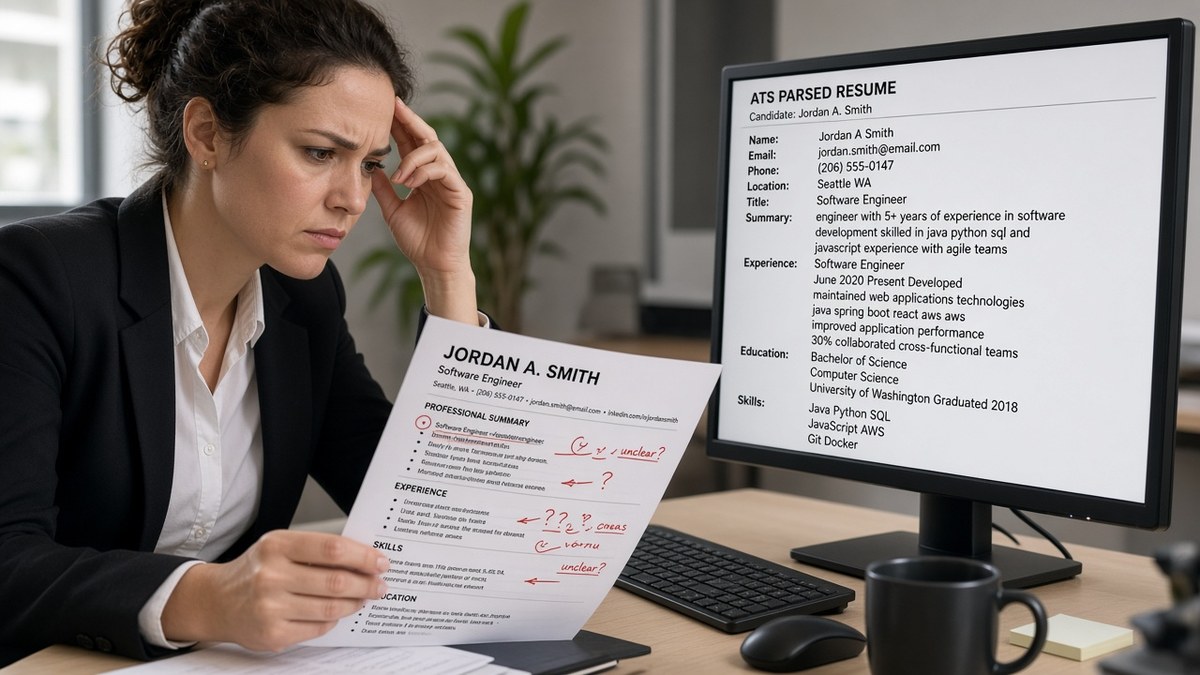
Your resume didn't disappear because you lacked skills. It broke in the parser. Workday, Greenhouse, Lever, and iCIMS read your file before a recruiter opens it. When common resume parsing errors scramble your dates or drop your phone number, the profile stored in the ATS isn't the resume you designed.
You can't keyword your way out of a file the machine never read correctly. That's why this page is organized by cause, not by a generic checklist. Each section starts with a symptom you can spot in thirty seconds, then the fix that stops that specific failure.
Before you reformat anything, check your resume for free against the posting you're targeting. Parsing and match are two different problems. Fix the file first so every later edit lands in the right row.
Job searching's already draining. You don't need silence because a two-column Canva template merged your Skills block into your 2019 internship. The sections below walk through four causes I see weekly, how to tell which one hit your file, and copy-paste structure you can drop into Word tonight.
Quick Wins
- Paste test: select all, paste to Notepad. Scrambled text means the ATS sees the same.
- Single column, 11-point Calibri or Arial, no text boxes or tables.
- Contact block in the body, not the header or footer.
- Month Year dates on every role: March 2021 to Present, not 2021 to Now.
What a broken parse looks like in US ATS portals
Parsing is the step where your upload becomes rows: name, phone, employer, title, start date, end date, degree. Recruiters search those rows. Hiring managers skim the reconstructed profile, not your original PDF layout.
The symptom is mismatch between what you uploaded and what the preview shows. Experience entries stack in reverse. Your current title attaches to the wrong company. Skills repeat as job titles. Contact fields stay empty even though you can see your email on page one.
A mid-level analyst whose top bullet still reads Responsible for weekly reports can also suffer parsing failure. The content problem and the format problem stack. Fix format first so your rewritten bullets land under the correct employer row.
Edge case: the portal accepts your file but stores a blank Experience section. That usually means an image PDF or a design export with text outlined as shapes. Edge case: only the first page parsed. Headers and footers sometimes carry page-two content in Word that never reaches the body stream.
Read how to test your resume on Workday before applying when your target employer runs that stack. The preview step catches most of these before submit.
The thirty-second paste test
Open your file. Select all. Paste into plain text. Read top to bottom once. If the order feels wrong to you, it is wrong to the parser.
Before: Pasted text shows Skills JavaScript React beside Experience Acme Corp 2020 with no line break.
After: Pasted text lists Experience, then Acme Corp, then title, then dates, then bullets in order.
Keep the Notepad output beside you while you read the cause sections below. You're matching symptoms to fixes, not guessing from a generic template.
Common resume parsing errors by cause (and the fix for each)
Four causes cover most US corporate uploads I've screened. Find your symptom, apply that fix only, then rerun the paste test before you touch keywords.
Cause 1: Multi-column layout and tables
Symptom: Skills appear under Education. Dates float between unrelated jobs. Canva, Word templates with sidebars, and Excel-style tables in Word are frequent offenders.
The parser reads left to right, top to bottom, one stream. Two columns become alternating fragments. A table cell with your title may parse after the cell with bullets from another role.
Before: Two-column design with Skills in a left rail and Experience on the right.
After: Single column: Contact, Summary if used, Experience with each role stacked, Education, Skills last.
Fix: rebuild in Word or Google Docs with one column. Delete text boxes. Convert table rows to plain lines with hyphen bullets. Re-export PDF from that source, not from the design tool.
Cause 2: Contact info trapped in headers or footers
Symptom: Workday application profile shows blank phone and email. Greenhouse candidate record has name only. You swear the header looked perfect in Word.
Many parsers skip header and footer regions entirely. Icons and emoji phone symbols make it worse because they become empty tokens.
Before: Phone and email in the Word header on every page.
After: First lines of the body read Name, City ST, phone, email, one link if needed.
Fix: cut contact lines from the header. Paste at the top of the document body in plain text. Remove emoji and graphic icons. Use a standard phone format with digits and hyphens only.
Cause 3: Inconsistent dates and merged title lines
Symptom: Tenure shows zero months. Current job marked ended. Job title stored as Employer Name at Acme Corp.
Mixed date styles confuse timeline logic. Piping title and company on one line without a clear separator merges fields.
Before: Senior Analyst | Acme Corp | 2020 to Present with pipes and year-only dates.
After: Senior Analyst on line one, Acme Corp on line two, March 2020 to Present on line three.
Fix: pick Month Year everywhere. Spell Present for current roles. Never mix 01/2020 with Jan 2020 on the same file. Keep company and title on separate lines.
Cause 4: Wrong file type or image-based PDF
Symptom: Upload succeeds but preview is empty or one block of gibberish. Scanner apps and phone photo exports do this often.
The ATS cannot OCR every upload reliably. A pretty PDF that is really a flat image stores nothing searchable.
Before: PDF exported from a design app with outlined text and embedded graphics.
After: DOCX from Word, or PDF saved as PDF from that DOCX with selectable text in the paste test.
Fix: rebuild in Word, confirm paste test shows selectable text, then export. If the posting allows DOCX, upload DOCX. If it requires PDF, export from Word's Save as PDF, not Print to PDF from a browser.
How to tell which cause is yours
Scrambled section order points to Cause 1. Missing contact points to Cause 2. Wrong titles or timelines point to Cause 3. Blank preview with a pretty file points to Cause 4. More than one can apply. Fix layout and contact before dates, then re-export before you reapply.
Copy-paste skeleton after you flatten to single column:
Jordan Lee
Austin TX · 512-555-0142 · [email protected]
Experience
Operations Analyst
Northwind Logistics
June 2021 to Present
- Built weekly SLA dashboards in Looker, cutting reactive tickets 11% in Q3
- Owned vendor scorecard reviews across twelve regional carriers
Business Analyst
Harbor Retail Group
January 2019 to May 2021
- Standardized Month Year reporting for forty store rollouts
Education
BBA Finance · Texas State University · 2015 to 2019
Skills
SQL, Looker, Excel, stakeholder reporting
Edge case: federal resumes with long duty blocks still need linear text. Edge case: academic CVs with publications can stay multi-page but should not use side-by-side columns for core Experience.
Cause 5: Section labels the parser does not map
Symptom: Skills section empty in preview while Core Competencies looks full on your PDF. Recruiter keyword search misses terms you thought were obvious.
Workday and iCIMS map a fixed vocabulary: Experience, Education, Skills, Summary. Creative labels fall into uncategorized text blobs.
Before: Section header reads Core Competencies and Career Highlights instead of Skills and Experience.
After: Standard headers with the same bullet content underneath unchanged.
Fix: rename headers only. Keep your bullets. Run search in the preview for one skill you know is on page one. If it does not appear in a Skills or Experience row, the label is still wrong.
When to rebuild versus patch
Patch when one cause matches and the paste test shows mostly correct order. Rebuild when three or more causes hit or the PDF fails paste entirely. Rebuilding from a Word single-column template takes twenty minutes. Reapplying with a broken file costs weeks of silence.
Save two exports: Lastname_Role_2026.docx for portals that want Word, Lastname_Role_2026.pdf from that same file for PDF-only uploads. One source document prevents drift where the PDF is old and the DOCX is new.
Where files still fail after a format fix
Renaming sections to creative titles. My Journey instead of Experience hides roles from search filters. Stick to Experience, Education, Skills.
Decorative bullets and symbols. Checkmarks, arrows, and custom Wingdings characters drop or convert to squares. Use hyphen or dot bullets only.
Keyword blocks in tiny white font or text boxes. Parsers read them. Recruiters flag them faster. Hidden text does not fix a broken layout.
Uploading the wrong version. You fixed the Word file but attached last week's Canva PDF from Downloads. Rename files with date suffixes so you send the repaired export.
Assuming the portal re-parses on every edit. Some systems cache the first upload on a profile. Delete the old attachment or start a fresh application when the preview still shows scrambled rows after a fix.
Fixing parsing but ignoring title match. A clean parse with the wrong job title still loses. Align headline and first role title to the posting after the file reads correctly.
Read why a plain text resume backup matters when a portal strips formatting on paste. Keeping a .txt copy speeds recovery when an upload step fails mid-session.
Hyperlinks that hide the label. Some templates use bare URLs as bullet text. Parsers keep the URL string but drop context. Spell the tool name, then add the link in parentheses if needed.
Multiple font families in one section. Switching fonts mid-bullet can split tokens at search time. One family, 10.5 to 11.5 point size range, consistent throughout.
This will not fix applying to roles you're not qualified for. It stops a qualified file from dying because the machine stored your phone number in a footer it never read.
Test before you upload again
Run the repaired file through the free ATS resume checker with the job description attached. You want confirmation that titles, dates, and skills landed in order before you spend twenty minutes on demographic questions.
If you're rebuilding from scratch, build your resume in a single-column template and export DOCX plus PDF from the same source. One draft beats maintaining a design file and a plain file that drift apart.
Optional cover letter uploads should use the same contact block as the repaired resume. Mismatched phone numbers between files create duplicate candidate rows in some Greenhouse setups. When a posting asks for a letter, generate a cover letter from the same contact header you just repaired so both files merge to one profile.
Re-upload on a test req before you burn a referral. Referrals do not bypass a blank Experience preview. A clean parse still needs correct title strings tied to the posting level.
Tonight's repair order
Common resume parsing errors look scary until you name the cause. Run the paste test. Match scrambled contact, order, dates, or blank preview to one of the four fixes above.
Flatten columns tonight. Move contact into the body. Standardize Month Year dates. Re-export from Word. Upload to one test application and read the preview row by row before you batch apply.
Keywords matter after the profile stores correctly. I've screened stacks of these in Workday and Greenhouse, and the file that wins is boring and specific. Plain layout, readable rows, bullets that prove scope beat any template with icons in the margin.
Keep the paste test output in your job tracker. When silence hits, you'll know whether to fix the file again or shift to a different req level. Parsing first. Match second. Volume third.
Read more
Frequently asked questions
Run the paste test. Open your PDF or DOCX, select all, paste into Notepad or TextEdit. If contact info is missing, jobs appear out of order, or two columns read as one scrambled line, the parser will see the same mess. Workday preview sometimes shows Experience rows stacked wrong before submit. Greenhouse often drops header phone numbers entirely.
Use text-based PDF or DOCX saved from Word or Google Docs export. Avoid Canva PDFs, scanned photos, and password-protected files. When the posting says PDF preferred, export from a single-column Word draft. When it says Word only, send DOCX. Image PDFs parse as blank pages in most US corporate ATS flows.
Not always, but often enough to treat them as guilty until proven innocent. Side-by-side Skills and Experience columns merge into one stream. Table cells reorder so your current title lands under an old employer. Single-column linear text with plain bullets is the fix that survives Workday, Greenhouse, Lever, and iCIMS most consistently.
Title and company probably sit on one line with a pipe or em dash substitute the parser reads as part of the company name. Or a text box holds the title while the date sits outside the Experience block. Put title on its own line, company on the next, dates on the same line or the line below in Month Year format.
Yes for most files. Convert to single column, move contact info out of headers, standardize Month Year dates, and re-export. That fixes the majority of common resume parsing errors I see in US screens. Keyword work comes after the file reads cleanly. A pretty layout that parses wrong still loses to a plain file that stores every row.