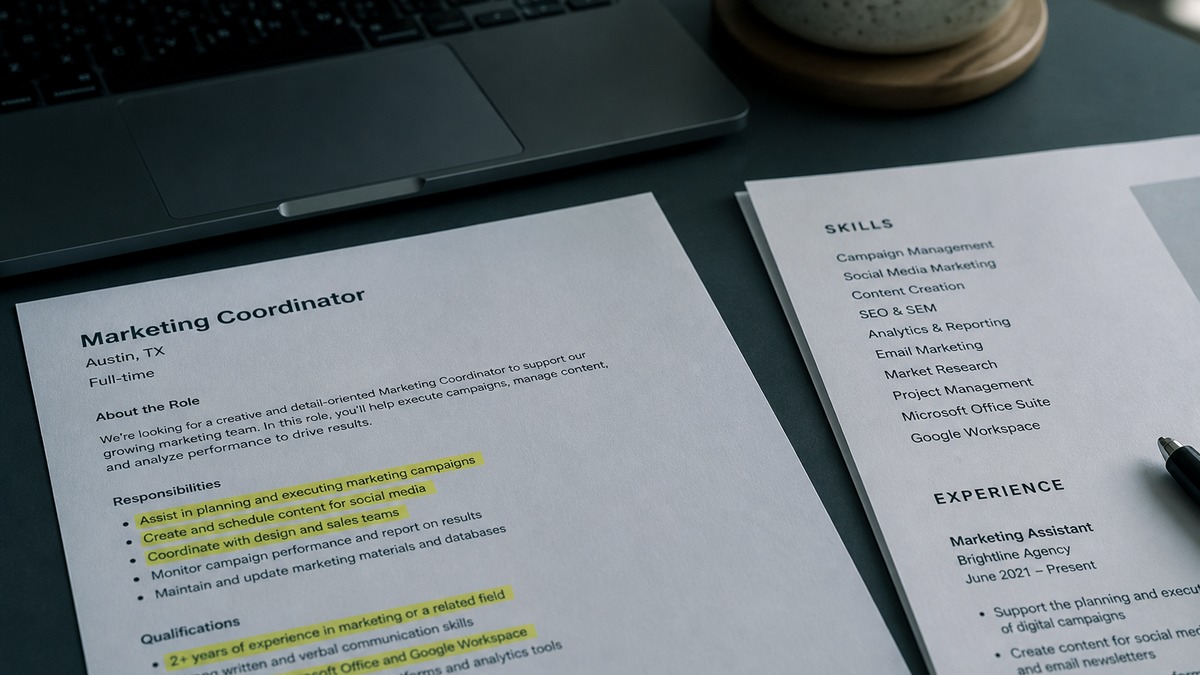
Find resume keywords in the live job description: exact title, hard skills, tools, credentials, methods, regulations, customer types, and deliverables. Rank required and repeated phrases first, keep only claims you can prove, place a compact set in Skills, and use priority terms naturally in dated bullets or projects with action, scope, and outcomes.
Resume keywords are labels for relevant evidence, not secret passwords. They help a recruiter search for a skill and help a reader understand that your experience matches the employer's language. A term earns space only when it accurately describes your background and contributes useful meaning.
This article teaches the manual method: harvest from one posting, classify each phrase, and place it naturally. It is intentionally different from a tool tutorial. Use the ATS keyword category overview for more examples, then compare your finished version with HireFlow Job Match Score.
Key Takeaways
- Use the target posting as your primary vocabulary source.
- Prioritize concrete nouns and full professional phrases.
- Separate required, repeated, preferred, and generic terms.
- Add only terminology supported by real evidence.
- Use Skills for discovery and dated bullets for proof.
- Test extraction and remove repetition before submitting.
What counts as a useful resume keyword
Useful keywords identify a role or capability with enough precision to support search and evaluation. The exact job title is often the first. Hard skills, software, equipment, credentials, regulations, methodologies, product areas, customer segments, and named outputs follow. “Salesforce,” “month-end close,” “registered nurse,” and “incident response” carry more occupational meaning than “motivated” or “excellent.”
Multiword phrases deserve attention because their combined meaning is specific. Financial planning and analysis is not simply planning plus analysis. Identity and access management is not generic management. Product-led growth identifies a business model and operating approach. Preserve the phrase when it accurately describes your work.
Verbs matter in bullet writing, but nouns tend to be stable search anchors. A posting may say build, develop, create, or produce while consistently naming the deliverable as a forecast, dashboard, campaign, care plan, or API. Extract both, then emphasize the standard noun and choose a direct verb that reflects your actual role.
Soft skills are rarely strong standalone search terms. “Communication” adds little by itself. A bullet showing that you presented a risk analysis to executive leaders demonstrates audience, content, and communication. If the posting repeatedly names stakeholder communication, use that phrase once and support it with an example.
Search behavior varies across Workday, Greenhouse, Lever, and Taleo because employers configure workflows, fields, and recruiter practices. Clear terminology helps across systems, but no public list reproduces every employer's setup. Use the job description rather than a generic keyword cloud.
Key Takeaway: Prioritize labels a qualified peer would use for the role: title, hard skill, product, credential, method, domain, customer, and deliverable.
How to harvest keywords from a job description
Save the complete live posting before it changes or closes. Include title, team description, responsibilities, minimum qualifications, preferred qualifications, location, schedule, and application questions. Paste it into a working document without editing the source. You need context to distinguish requirements from passing mentions.
First, box the exact title and close variants used in the posting. Second, highlight hard skills, products, platforms, equipment, credentials, standards, regulations, methods, customer types, and deliverables. Third, underline phrases tied to ownership or cadence: own the monthly forecast, lead weekly incident review, manage enterprise accounts, or maintain clinical documentation.
Separate the posting into signal and boilerplate. Benefits, company values, equal-opportunity language, and broad promotional claims matter for evaluating an employer, but most do not become resume keywords. “Dynamic culture” does not mean your summary needs “dynamic.” Keep the vocabulary connected to the work and requirements.
Mark frequency and position. A phrase in the title, first responsibility, and minimum qualifications likely deserves priority. A tool listed once under preferences may deserve space if you used it, but it should not displace a repeated required skill. Frequency is evidence of emphasis, not a mechanical score.
| Posting language | Keyword type | Resume decision |
|---|---|---|
| Customer Success Manager | Exact title | Use in target summary if accurate |
| Salesforce and Gainsight | Named tools | List beside real use |
| Renewal forecasting | Method and deliverable | Prove cadence and audience |
| Enterprise customers | Customer segment | State only if portfolio fits |
| Fast-paced rockstar | Promotional adjective | Skip and show operating context |
Compare two or three similar postings only after completing the target extraction. That comparison can reveal a standard industry label you omitted from your master resume. It should not override the live role. The target employer's language remains the main source for this version.
Key Takeaway: Harvest in context. Title, section, frequency, requirement level, and surrounding sentence all help determine whether a phrase belongs.
Classify keywords before adding them to your resume
Every candidate keyword belongs in one of five buckets. Proven means you did the work and can identify when, where, and how. Equivalent means your current wording names the same concept differently. Adjacent means your experience is related but not identical. Unsupported means you cannot honestly claim it. Irrelevant means the word came from boilerplate or another context.
Proven omissions are straightforward. If you used Tableau for weekly retention reporting but wrote only “dashboard,” add Tableau to that dated bullet and perhaps Skills. Equivalent language requires professional judgment. “Supplier oversight” may be vendor management, but only if scope fits the standard meaning. Ask whether a manager in that function would accept the label.
Adjacent experience needs an explicit bridge. HubSpot is not Salesforce. You can write “HubSpot CRM administration” and describe comparable workflows, but you cannot state Salesforce experience. Coursework is not professional ownership. A sandbox project can support a Projects section when labeled as a project, not a job.
Unsupported phrases remain out even if they appear repeatedly. Do not claim an earned certification when it is in progress, a security clearance you do not hold, or management responsibility when you coordinated peers. A keyword match can attract a question you cannot answer and damage trust beyond that single term.
Maintain a fact ledger for recurring searches. Record the standard term, role and dates where you used it, tools, scope, one evidence bullet, and any limits. This becomes a reliable tailoring source. It is not a block to paste wholesale into every application.
Responsible hiring should apply job-related criteria consistently. Applicant information is available from the U.S. Equal Employment Opportunity Commission, and recruiting practice resources are available from the Society for Human Resource Management. Keyword matching alone cannot evaluate a complete hiring process.
Key Takeaway: Add proven terms, normalize true equivalents, explain adjacent skills accurately, and reject unsupported or irrelevant language.
Where to place resume keywords naturally
Placement gives a word meaning. A target title in a short Summary establishes direction. A hard skill in Skills supports rapid discovery. The same term in a dated Experience bullet establishes recency and use. A credential in Certifications communicates issuer and status. A tool in Projects can prove applied learning when professional experience is limited.
Keep Skills compact and categorized when useful: Data, Platforms, Methods, Languages, or Clinical Systems. Eight to fourteen relevant entries often create a readable section, but the right count depends on the role. Do not fill space with basic tools that the posting does not value or skills you cannot defend.
Put the highest-priority terms in recent, relevant bullets. Connect each with an action, output, scope, audience, cadence, or verified result. The bullet should remain understandable without knowing the job description. Never paste the employer's sentence and replace one verb.
Use recognized paired forms once when helpful: Amazon Web Services (AWS), customer relationship management (CRM), or financial planning and analysis (FP&A). Do not list every synonym. Standard terminology plus specific context is easier to search and easier to read.
Ensure the file can expose the words. A keyword inside an icon, chart, header, footer, or broken two-column export may disappear during extraction. Use a Workday-safe single-column format even when applying through Greenhouse, Lever, or Taleo because the same structural discipline benefits each workflow.
Read for density after tailoring. If the same phrase appears in the summary, headline, skills, and three consecutive bullets, remove uses that add no new proof. A recruiter should notice fit without feeling that the posting has been echoed back.
Key Takeaway: Use top sections to signal relevance and dated sections to prove it. Placement should answer where, when, and how each priority term applies.
Before-and-after keyword examples with natural context
These patterns show how to add recognized language without stuffing. Replace every tool, scope detail, and outcome with your own verified facts.
Before: Created reports for the sales team.
After: Built weekly pipeline forecasts in Excel and Salesforce, reporting stage movement and risk to sales and finance leaders.
Before: Helped new customers get started.
After: Managed B2B SaaS customer onboarding from kickoff through data import, administrator training, and the first adoption review.
Before: Worked on security access requests.
After: Processed identity and access management requests in Okta, documented approvals, and completed quarterly access-review evidence.
Before: Did marketing analysis and tests.
After: Analyzed acquisition and activation by campaign cohort, then reported landing-page experiment results to growth and product partners.
The revised bullets include a keyword, but the keyword is not the whole improvement. Each sentence states a deliverable or workflow and identifies a tool, audience, stage, or cadence. This context lets a reader judge depth. A system can find “Okta”; a security manager can see that the work involved approvals and review evidence.
Numbers are optional and must be real. Use verified revenue, time, quality, volume, size, or rate changes when records support them. If a precise metric is unavailable, state frequency, portfolio type, stakeholders, technical environment, or responsibility boundaries. Never adopt numbers from sample resumes.
Avoid inflated ownership. “Contributed analysis to quarterly planning” is different from “owned corporate strategy.” “Supported SOC 2 evidence collection” is different from “ensured compliance.” Exact role boundaries improve credibility and prepare you for detailed follow-up questions.
Key Takeaway: Natural keyword use adds professional labels to specific evidence. The sentence should become more informative, not merely more searchable.
Numbered keyword workflow for every application
- Save the full live posting with title, responsibilities, qualifications, preferences, location, and application questions.
- Separate work-related content from benefits, brand copy, values language, and equal-opportunity text.
- Highlight exact title, hard skills, tools, equipment, credentials, methods, regulations, customer types, and deliverables.
- Mark each phrase required, repeated priority, useful preference, or low-value generic wording.
- Classify your relationship to each priority term as proven, equivalent, adjacent, unsupported, or irrelevant.
- Add a compact selection to Summary or Skills, then place major terms in the dated role or project that proves them.
- Rewrite supporting bullets with action, output, scope, cadence, audience, and verified result where available.
- Export the final file and paste it into plain text to confirm all keywords remain visible in the correct order.
- Compare the exact resume with the posting, inspect every remaining gap, and stop when gaps reflect experience you lack.
- Read the resume as a recruiter, remove awkward repetition, verify every claim, and save the submitted version.
Compare your evidence with the role
Find accurate missing terms and see where your resume needs clearer proof before you submit.
Check your job match scoreThe manual classification step is the quality control. A scanner may correctly report that “Kubernetes” is missing, but only you know whether it belongs. The absence may be an omission, a true qualification gap, or an irrelevant mention in the posting. Review context before editing.
For recurring applications, reuse the workflow rather than the final keyword list. Two employers hiring the same title may emphasize different products, markets, credentials, or outputs. Preserve your history while selecting the evidence most relevant to each role.
Key Takeaway: Harvest, rank, verify, place, test, and edit. The verification decision between ranking and placement prevents deceptive optimization.
Keyword mistakes that reduce trust and readability
The clearest mistake is unsupported matching. Adding a required product, credential, language, or method solely because the posting names it creates a false signal. Hiring teams can probe the claim through application questions, work samples, technical screens, interviews, references, or credential checks.
Hidden text is also a poor strategy. White words, tiny type, metadata lists, and copied descriptions provide no readable evidence and may violate expectations. Keep every term visible and useful. If a phrase makes no sense to a recruiter in context, it does not belong.
Another mistake is treating all repetition equally. A benefit repeated in several blocks is not a qualification. A word appearing inside the company name may be irrelevant. A preference is not a requirement. Read the sentence and section around every term before assigning priority.
Avoid synonym flooding. “Customer support, customer service, client support, client service, customer care” is not stronger than the standard phrase used by the employer plus a clear support workflow. Add a common abbreviation once when it helps, then let evidence carry the concept.
Do not put every keyword in Skills. Recruiters need to know where and how you used important capabilities. Move core evidence to Experience or Projects. Conversely, do not bury all tools in dense paragraphs. A compact Skills section can support fast discovery when paired with proof.
Finally, do not chase a perfect score. Public tools estimate alignment and cannot see the full pool, employer settings, referrals, assessments, or internal priorities. Review good ATS score guidance and stop editing when remaining differences are honest.
Key Takeaway: A keyword should improve truth and clarity at the same time. If it only increases overlap, reconsider the edit.
Turn the posting's language into your evidence
Start with the employer's vocabulary, but finish with your own factual story. Extract precise terms, rank their importance, verify each match, and write natural context around the strongest ones. Keep unsupported requirements visible as gaps rather than disguising them.
Compare the tailored file with HireFlow Job Match Score, then run a broader review in the ATS resume checker. Use the output to ask better questions, not to replace judgment.
Key Takeaway: Resume keywords work when employer language and candidate evidence meet honestly. Find the label, prove the fact, and keep the sentence human.
Frequently asked questions
Resume keywords are recognizable words and phrases that identify a target role, hard skills, tools, credentials, methods, regulations, customers, and deliverables. They help systems and recruiters locate relevant evidence, but the surrounding context determines whether a match is credible.
Use the complete live job description as the primary source. Extract the exact title, repeated requirements, software, certifications, methods, domain nouns, and named outputs. Compare several similar postings only to learn standard language, not to add terms absent from the target role.
Put a compact selection in Summary or Skills for discovery, then place the most important terms in Experience or Projects where dates, actions, scope, and outputs prove them. Credentials belong in a Certifications section with accurate status and issuer.
There is no universal frequency. A priority tool might appear once in Skills and once or twice in relevant bullets. Repeat only when each use adds distinct evidence. Natural clarity is more useful than a target density.
Use an exact phrase when it is a standard label for work you truly performed, such as financial planning and analysis or identity and access management. Do not copy full sentences, employer claims, or qualifications you lack.
Some searches and tools may normalize common variants, while others may rely on exact recruiter queries. Include a standard paired form when accurate, such as Amazon Web Services (AWS). Avoid long synonym lists that make the resume unnatural.
Keyword stuffing is excessive or deceptive repetition, often through long unsupported lists, copied job-description text, hidden words, or awkward phrasing. It weakens readability and credibility. Every listed term should connect to evidence you can explain.
No. Keywords can improve findability and clarify fit, but they cannot replace required qualifications or control recruiter judgment, application answers, assessments, competition, referrals, or hiring priorities. Use them to label truthful evidence clearly.