12 min read
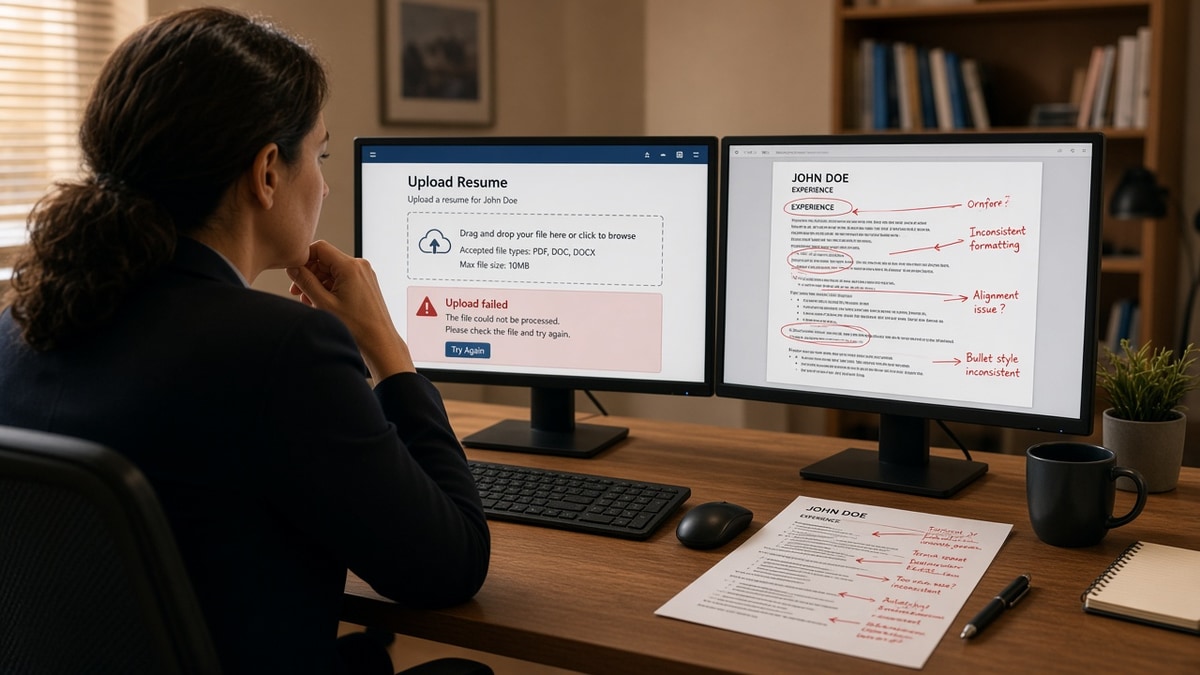
You hit apply on a JazzHR career page. The spinner runs, then either the upload fails outright or the form fills with someone else's career story. Your phone number sits under Education. Your current title landed in Skills. You're not imagining it. The file uploaded. The parser read it wrong.
Most candidates blame keywords first. That's usually second. Check your resume for free against the posting only after you confirm the portal can extract plain text from your file. If JazzHR can't read your layout, no amount of tailoring fixes a blank work history on the recruiter side.
This diagnostic walks through JazzHR resume upload issues by symptom, not by generic ATS advice. You'll learn which US ATS formatting choice caused the break, how to tell upload failure from parse scramble, and what to change before you submit again. Job searching is already draining. You shouldn't have to guess whether the system ate page one.
Quick Wins
- Copy resume text into Notepad. If order is wrong there, JazzHR sees the same mess.
- Retry upload as DOCX exported from Word or Google Docs before fighting with PDF.
- Move contact info out of headers, footers, and side columns into the body.
- Rename the file FirstName_LastName_Resume.docx so support can find it if upload stalls.
Two JazzHR resume upload issues recruiters see behind the screen
JazzHR sits on many small and mid-size US employer career sites. Candidates experience two distinct problems. Hard upload failure stops you at the file picker with an error or endless spinner. Silent parse scramble lets you submit, then stores garbled employers, dates, and skills in the recruiter view.
Hard failure points to file type, file size, or a corrupted export. The fix is mechanical: new DOCX, smaller file, no password, no image PDF. Silent scramble points to layout: two columns, tables, text boxes, icons, or contact details trapped in a header band the parser skips.
I've opened JazzHR candidate records where the work history was empty because the resume used a Canva two-column template. The person had eight years of experience. The ATS profile looked like a new grad. That is a formatting failure, not a fit failure.
Cause 1: File type the portal cannot read
JazzHR career pages commonly accept DOC, DOCX, and PDF. Image PDFs from scanners, design exports, or "print to PDF" from a browser often fail upload or pass upload with zero extractable text. DOC files from pre-2007 Word sometimes trigger errors on modern browsers.
How to tell this is yours: upload error message, file greyed out, or Notepad paste shows blank or a single garbage line after you thought you uploaded a PDF.
Cause 2: Layout that reads out of order
Parsers read left to right, top to bottom. A sidebar skills column may import before your current job. Tables that pair dates in one cell and titles in another split fields across database columns. Skill bars and star ratings become nonsense strings.
How to tell this is yours: preview fields show wrong section order, merged lines, or skills where employer names should sit. Notepad paste jumps from phone number to 2019 job before your name appears.
Cause 3: Contact and dates in non-body zones
Email and phone in a Word header, LinkedIn URL in a footer, or dates inside a text box often never map to JazzHR contact fields. Recruiters then see an application with no way to reach you even when upload succeeded.
How to tell this is yours: you submitted fine but the auto-filled form left phone or email blank. Recruiter inbox shows a name with no contact path.
Edge case: you already applied with a broken file and the req is still open. Export a fixed DOCX, rename it clearly, and reapply only if the portal allows duplicate submissions. Some employers lock the first parse until a recruiter resets the profile.
Edge case: the posting asks for cover letter plus resume in one PDF. Merge in Word with a page break between documents, not in a design tool. Combined files that parse cleanly as one text stream beat zip uploads JazzHR may not accept.
Read how resume file type impacts screening when you are torn between PDF and Word for US employers on JazzHR.
How to tell which cause is yours in five minutes
Open the file you last submitted. Select all text. Paste into Notepad on Windows or TextEdit plain text on Mac. Read top to bottom without scrolling back.
If paste is blank or one short line, you have a file type problem. Re-export as DOCX from the original Word or Google Doc. Do not resubmit the same PDF hoping the portal changes its mind.
If paste shows your skills block before your name, or dates floating between unrelated bullets, you have a layout problem. Flatten to one column before you touch keywords.
If paste looks fine but JazzHR auto-fill skipped phone or email, you have a header-footer problem. Move contact lines into the body under your name and upload again.
Only after all three checks pass should you spend time tailoring bullets to the posting. Parsing and keywords are separate layers. Most JazzHR frustration comes from fixing the wrong layer first.
JazzHR resume upload issues: fix by cause
Match your symptom to the block below. Each pair is a composite role recruiters see weekly. Swap your employer names and metrics. Keep the structure flat and single-column.
Fix file type failures
Open the source in Word or Google Docs. Save As DOCX. If the posting requires PDF, export from Word using Save as PDF, not a screenshot or Canva download. Stay under common size limits by removing embedded photos and flattening icons to text.
Before: marketing coordinator uploads a Canva PDF. JazzHR spinner fails or accepts a file whose Notepad paste is three lines of junk.
After: same content rebuilt in Google Docs, exported as DOCX, upload completes and Notepad shows full work history in order.
Fix column and table scramble
Delete sidebars. Replace tables with employer line, date line, bullet list. Put skills after experience in plain comma or line format, not a graphic grid.
Before: operations analyst resume uses a two-column template: skills rail on the left, jobs on the right. JazzHR stores SQL and Looker under Education.
After: single column: Summary, Experience with SQL and Looker inside bullets, Skills line at bottom. Parser maps employer and title fields correctly.
Fix missing contact and date fields
Type phone, email, city, and LinkedIn URL as plain lines under your name in the document body. Use Month Year to Month Year on the same line as the job title or directly below it. Avoid text boxes for dates.
Before: registered nurse places credentials in a header and dates in a table column. Recruiter view shows name only.
After: RN license on line two under name, Epic and unit size in first bullet, dates inline: Staff Nurse | Mercy General | March 2022 to Present.
Fix keyword visibility after parse works
Once Notepad order looks right, tailor must-have terms from the posting into the first two bullets under your current role. JazzHR search and recruiter skim still depend on readable text in Experience, not a keyword footer the parser dropped.
Before: software engineer lists Kubernetes twelve times in a sidebar skill cloud with no cluster work in bullets.
After: one Skills line plus bullet: Migrated payment service to Kubernetes on AWS EKS, cutting deploy time from 45 minutes to 12 across six microservices.
Copy-paste JazzHR-safe header and job block
Copy-paste block. Edit brackets. Delete lines that are not true.
[Full Name]
[City, ST] | [phone] | [email] | linkedin.com/in/[handle]

PROFESSIONAL SUMMARY
[Two lines max. Role + years + core tools from the posting in plain text.]

PROFESSIONAL EXPERIENCE

[Job Title] | [Employer] | [City, ST]
[Month Year] to [Month Year or Present]
• [Bullet with tool name and metric from posting]
• [Bullet with scope: team size, budget, volume]
• [Bullet with outcome a recruiter can verify]

[Prior Job Title] | [Employer]
[Month Year] to [Month Year]
• [Bullet]
• [Bullet]

SKILLS
[Tool], [Tool], [Tool], [method the posting repeats]

EDUCATION
[Degree], [School], [Year]
Read resume formatting errors that break ATS parsing when Notepad still scrambles after you flatten columns.
When upload succeeds but the recruiter view stays empty
Some JazzHR setups attach your original PDF for download while the parsed profile stays blank. Recruiters who rely on the parsed view never see your bullets. Others always open the attachment. You cannot control which habit they have, so fix both: readable parse plus clean attachment.
Screenshot the parsed preview when the employer shows it. Email yourself the image. That proof helps if you need to ask recruiting ops whether your first upload locked a bad parse. Polite note with a fixed DOCX beats applying five more times with the same Canva file.
For career changers, keep one honest title line and put transferable tools inside bullets. JazzHR boolean search still runs on extracted text. A sidebar label like Core Competencies without dated proof parses like noise even when the layout is flat.
What breaks JazzHR parsing most often
Design-template PDFs. They look sharp to you and empty to the parser. Rebuild in Word before you blame JazzHR.
Skill icons and progress bars. Stars, charts, and flags strip to random characters or vanish. Replace with text proficiency only when the posting asks.
Multiple columns on page one. Contact in a left rail imports before your summary. Recruiters see city and phone where job title should be.
Headers and footers for contact info. JazzHR and many parsers ignore repeated page bands. Body text only for email and phone.
Mixed date formats. 03/2021 beside March 2021 beside Present with no pattern confuses timeline fields. Pick Month Year and stick to it.
Uploading the wrong attachment. Cover letter PDF selected in the resume field, or an old two-page version with tables you forgot you still had. File name your tailored export so you do not grab the wrong one from Downloads.
Keyword stuffing in a sidebar. After layout breaks, stuffing makes the profile look spammy without fixing empty Experience. Parse first, tailor second.
When upload works but search still ignores you, read why ATS prefers text-based resumes for the plain-text standard US portals expect.
Special characters in filenames. Resume_final(2).pdf or spaces and ampersands in the name sometimes trip older upload handlers. Use FirstName_LastName_Resume.docx with letters, numbers, and underscores only.
Font embedding. Custom fonts look fine locally and strip to boxes on export. Calibri, Arial, Georgia, and Times New Roman survive most JazzHR parses. If Notepad shows empty squares, switch fonts and re-export.
Hyperlinks as contact. Clickable email links are fine for humans. Some parsers want the literal address typed. Include both if space allows: mailto link plus plain email on the next line during testing, then drop duplicate once parse holds.
Verify parsing before you hit submit again
Run the Notepad test first. Then upload the same file to HireFlow's free ATS resume checker and confirm experience text still extracts in order. If the preview drops your current employer, fix layout before you tailor keywords.
Once parsing looks clean, run Score your job match against the JazzHR posting to see which required terms still sit outside your experience section.
If the gap is a short explanation rather than resume text, draft two lines with the cover letter generator instead of adding another skills column that will break on the next upload.
Submit the readable version, not the pretty one
JazzHR resume upload issues split cleanly: the file never made it in, or it came in unreadable. US ATS formatting is the bridge between those outcomes. A single-column DOCX with contact in the body and dates beside titles is boring. Boring parses.
Tonight, open your last JazzHR export. Paste into Notepad. If you cannot read your own career in plain text, neither can the recruiter dashboard. Flatten layout, re-export, run the checker, then tailor three posting terms into bullet one.
You already did the hard part building the experience. This guide is about making sure JazzHR stores it where a human can find it on the first open.
Keep a master resume in DOCX with every role in single-column format. Save a tailored copy per apply where three posting terms moved into the top two bullets. You do not need a new template for each company. You need one parser-safe base file and small keyword edits on top.
If a JazzHR page offers optional fields after upload, type the same employer names and dates you used in the file. Mismatched manual entry and attachment confuse recruiters who compare both views. Consistency beats clever formatting every time on US ATS portals.
When silence continues after a clean parse and honest fit, the req may be closed, paused, or flooded. Formatting fixes remove one variable you control. They do not promise interviews. They stop your qualified file from looking empty on a recruiter's first click.
- DOCX from Word or Google Docs unless the posting demands PDF.
- Notepad test passes before keyword work.
- Contact and dates in the body, not headers or tables.
Read more
Frequently asked questions
Upload rejection usually means file type, size, or corruption. JazzHR career pages typically accept DOC, DOCX, and PDF under common size caps. Image-only PDFs exported from Canva or a phone scan, password-protected files, and oversized uploads fail before parsing starts. Save a fresh DOCX from Word or Google Docs, or export a text-based PDF, then retry.
Start with DOCX when the portal allows it. Word files parse more predictably when you built the resume in Word or Google Docs. Use PDF only when the posting requires it or when your DOCX already parses cleanly and you want locked layout. Never upload a design-tool PDF or a scanned image file expecting ATS to read it.
Some JazzHR applications show a parsed preview or auto-filled profile fields. If employers, dates, or skills land in wrong boxes, the parser lost structure. Copy your file text into Notepad: jumbled order, missing phone number, or skills merged into one line means the same scramble happened on the employer side even when upload succeeded.
No. Format fixes stop a qualified file from dying in the parser. They do not override knockout questions on sponsorship, location, or years of experience. Fix layout first so recruiters see your real history, then tailor keywords to the posting. Applying to roles you cannot take still ends in silence.