9 min read
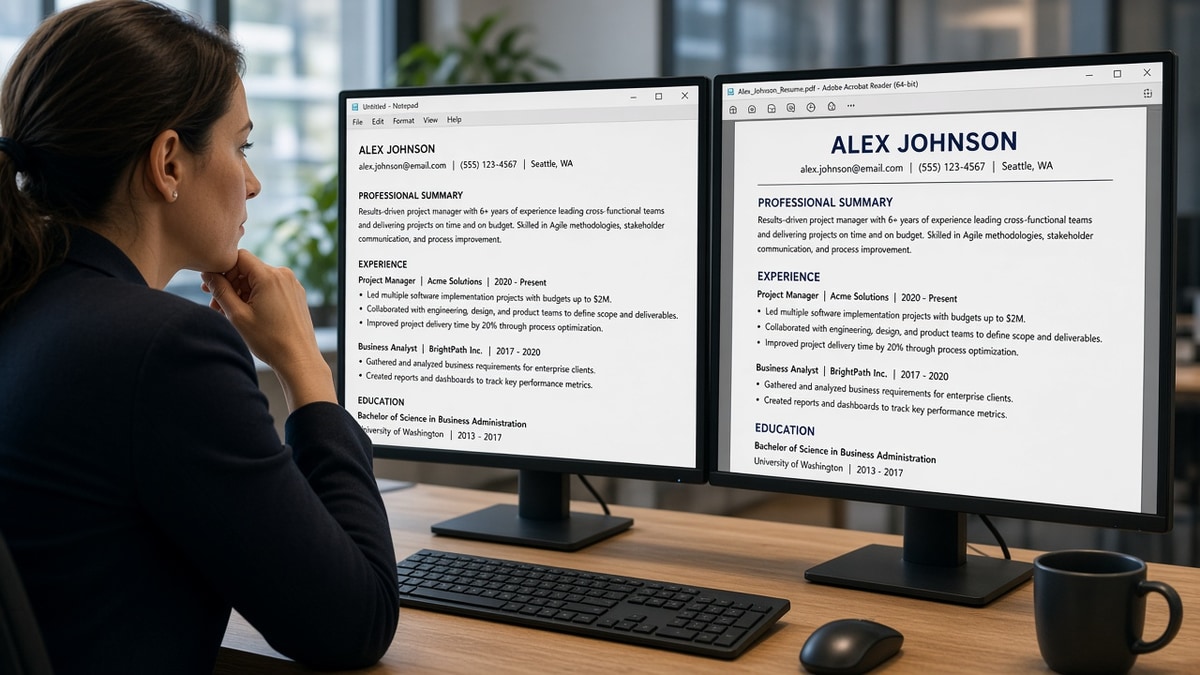
Your PDF looks sharp. Paste it into Notepad and the employer line vanishes. That's why ATS prefers text-based resumes: parsers score searchable character layers, not the layout your eye catches in preview. If extraction fails, the req keywords in bullet three never attach to a job row.
Run a free resume check on the file you'll upload, then run the Notepad paste test below. Human recruiters may open the pretty PDF later. The parser reads first.
Below: the symptom, three causes, how to tell which one is yours, fixes for each, before/after pairs, and a copy-paste block. Organized by failure mode, not by generic steps.
You're not failing because you lack skills. You're failing extract when the text layer isn't there. That's fixable in one export cycle if you'll test paste order before decorate.
And don't assume Word always wins. A badly built DOCX with text boxes fails the same way. The test is always the same: copy, paste, read order.
Quick Wins
- Paste upload PDF into Notepad. Reading order intact?
- Single column. No sidebar Skills pushing Experience down in extract.
- Name and phone typed as text, not logo images.
- Export from Word or Google Docs, not slide-design tools.
The symptom: pretty file, empty fields
You upload. The portal preview shows blank employer rows or jumbled titles. You hear nothing. The resume looked fine when you emailed it to yourself. The parser never got searchable text in the right fields.
What text-based means here: characters the system can copy in order, not pixels that look like letters. US corporate stacks in Workday, Greenhouse, Lever, and SuccessFactors all depend on that layer before keyword match runs.
Read resume formatting errors that break ATS parsing for layout mistakes beyond image-heavy PDFs.
Recruiters sometimes receive the original PDF attachment while the ATS profile holds garbled extract. You get silence because the profile row is empty even when someone liked the attachment in email. Text-based structure aligns both views.
Keyword tools can't score what isn't attached to a job field. That's why bullet three duty words disappear when employer lines merge during extract. Fix text first, then tune keywords.
Hybrid and remote corporate roles use the same extract rules as on-site reqs. A text-based file helps when recruiters pull candidates from multiple regions into one queue. Design PDFs that parse empty won't rank in any timezone.
Students and early-career candidates often download free designed templates. Swap to a plain single-column master before corporate apply season. Campus career centers may praise the design while corporate parsers reject the extract.
Why ATS prefers text based resumes: three causes
Cause 1: Text saved as images or shapes
Canva exports, InDesign PDFs, and scanned photos look crisp. Extractors read zero searchable lines.
How to tell: Notepad paste returns blank or random symbols.
Before: Name and title inside a banner graphic on PDF page one.
After: Typed name and headline in 11pt Calibri or Arial. Export Save As PDF from Word.
Fix: Rebuild in DOCX with real text, then export once.
Designers and marketers hit cause 1 most often because portfolio habits favor visual headers. Convert one header element at a time and repaste until name and title extract. You keep brand color in PDF if text remains selectable after export.
Cause 2: Columns and tables reorder extract
Two-column Skills beside Experience reads Skills words before employer names in plain paste.
After: Single column top to bottom: contact, headline, Experience, Skills, Education.
Fix: Delete sidebar. Move Skills below Experience. Repaste until job blocks read first.
Cause 3: Text boxes and headers outside body flow
Word text boxes and PDF form fields often drop on upload. Contact info disappears first.
How to tell: Phone on PDF page one but empty phone field in portal after upload.
Before: Email and phone in a footer text box.
After: Contact lines in main document body under your name. Retype into portal fields anyway.
Before/after: marketing designer resume
Before: Portfolio-style PDF with icon skill row. Notepad paste empty.
After: Plain DOCX. Bullet one: Ran HubSpot lifecycle email for 3 product lines; lifted MQLs 22% in H1 2025. Paste shows full block.
Before/after: accountant resume
Before: Table grid for jobs. Extract merges two employers.
After: Each employer as line breaks: company, title, Month Year dates, bullets. Table removed.
Before/after: data analyst with chart header
Before: Bar chart image summarizing KPIs where bullet one should be. Notepad shows nothing from chart.
After: Bullet one: Built weekly revenue dashboards in Tableau from SQL extracts; flagged $1.2M forecast variance for finance leads. Chart removed from resume body.
Before/after: project manager with logo band
Before: Company logos for each employer instead of typed names. Extract shows blank employer fields.
After: Typed employer names in bold text lines. Logos removed. Paste shows ACME Corp before bullets.
How to tell which cause is yours
Blank Notepad paste points to cause 1. Skills words before employers point to cause 2. Missing phone in portal after upload points to cause 3. Run the test once and pick the fix branch. Don't rebuild everything blindly.
Copy-paste text-layer test
Copy-paste before every corporate apply:
1. Open upload PDF. Select all. Copy into Notepad
2. Name, phone, email appear as typed text?
3. Employers in reverse chronological order in paste?
4. No gibberish symbols or blank paste
5. Skills after Experience, not interrupting job blocks
6. If fail, rebuild single-column DOCX and re-export
7. Scan final file with posting text
8. Retype contact into portal fields after upload
9. Bold only employer lines; avoid text inside shapes
10. If still failing, rebuild from plain DOCX master without templates
Pair with DOCX export settings that improve US ATS parsing when Word exports still scramble on save.
Cause 1 fixes often take ten minutes in Word. Cause 2 needs a full column delete. Cause 3 needs contact lines moved into body flow plus portal retype. Fix the cause you confirmed, not all three at once unless paste fails every check.
If you work in a visual field, keep a portfolio link in one typed line and let the resume stay boring. Boring here means searchable. Recruiters who want visuals will click through when extract already proved your job titles and dates.
After text passes, compare bullet one to the posting again. Extract fixes reveal keywords that were always in the PDF but attached to the wrong field. Rescan once mapping is clean.
Design habits that block searchable text
Assuming if humans can read it, ATS can. False when text is rasterized.
Using PDF as design final without paste test. Always test extract.
Icon replacements for bullet markers. Some portals strip non-standard bullets.
Embedding charts for metrics. Type the number in the bullet instead.
Edge case: creative roles where portfolio links matter. Keep resume body text-based. Put visuals on a separate portfolio URL in one typed line.
Edge case: federal or academic CV with long publication lists. Text-based still applies. Use line breaks, not multi-column journal tables.
Using headers and footers for contact data. Many parsers ignore page header/footer regions.
Saving PDF from browser print of a web resume. Often rasterizes text. Export from the editor instead.
Light gray body text. Humans read it; some extractors drop low-contrast characters. Use black text.
Nested tables for alignment. Tables split employer from dates in extract. Use line breaks instead.
Edge case: password-protected PDF. Remove protection before upload. Portal can't extract locked files.
Edge case: resume built in LaTeX or academic templates with dense macros. Export a plain PDF from a simplified source or paste a plain-text version into the portal when allowed. Macros often hide contact lines from extractors even when the PDF renders perfectly.
This won't make a weak fit strong. It stops a qualified text resume from dying because the parser read a picture of your job title.
Test extract and match on the same export
After Notepad passes, scan the upload against the posting. Fix missing duty terms only after text layer is clean.
Starting fresh? Build a text-first resume in single column before you add any visual theme.
Text-based doesn't mean ugly. It means every line a recruiter needs is selectable text in reading order. Add subtle bold on employer lines after paste passes. Skip photo headers and icon bullets until extract is stable across three test pastes.
Plain text first, polish second
Why ATS prefers text-based resumes comes down to extraction order. Parsers attach keywords to fields they can read. Image headers, column sidebars, and shape text fail that test while humans still admire the PDF.
Keep a plain master file and a decorated optional version for networking email if you must. Upload the plain one to corporate portals every time. You'll spend less time wondering why silence followed a beautiful attachment.
I've screened uploads where the designed file looked executive and the Notepad paste was empty. Same candidate, plain DOCX five minutes later, mapped clean in Workday. Run the copy-paste test before you decorate.
When a posting wants a letter, generate a cover letter in plain text too. Designed letter PDFs fail the same extract step.
Share the plain export with a friend for a five-second Notepad test if you're tired. Fresh eyes spot scrambled order faster than you will after staring at the same template all day.
Run the text-layer test again after any template change, even a small font swap. Minor edits sometimes reintroduce text boxes or column splits you removed last week.
Text-based resumes still use bold employer lines and clean spacing. You are trading layout tricks for extract reliability, not sending ugly files. Recruiters read plain layouts daily in US corporate queues.
If you already paid for a design template, paste-test it once before buying variants. Many template packs reuse the same image header across colors. One Notepad failure on the blue version predicts failure on the navy version too.
Save the plain DOCX as resume-plain.docx and the optional design as resume-network.pdf so you never upload the wrong one at midnight. Naming beats memory when you're applying to multiple reqs in one sitting tonight.
Read more
Frequently asked questions
Not always for human view, but often for field extraction. If paste into Notepad returns scrambled order or missing employer lines, the parser sees the same mess. Text-based exports with a searchable layer pass when blocks stay in reading order. Design that survives is plain single column, not icons or image headers.
DOCX usually exposes text in order when exported simply. PDF depends on how it was built. Save As PDF from Word with standard fonts often works. Designed PDFs from Canva or InDesign frequently flatten text into shapes. Run the Notepad paste test on the exact file you will upload, regardless of format.
Visual PDF render hides missing text layer. Headers built as images, charts, or text boxes do not extract. Contact info in icon bands drops. The ATS scores searchable characters, not what your eyes see on screen.
Color alone rarely breaks parse. Layout breaks parse: columns, tables, text boxes, image logos replacing typed name lines. Switch to text-based structure first. Color is optional after paste order passes.
Copy the upload PDF into Notepad on Windows or TextEdit plain mode on Mac. If name, employers, titles, dates, and bullets appear in reading order without gibberish, you likely have a searchable layer. If lines merge or vanish, rebuild as single-column DOCX and export again.