10 min read
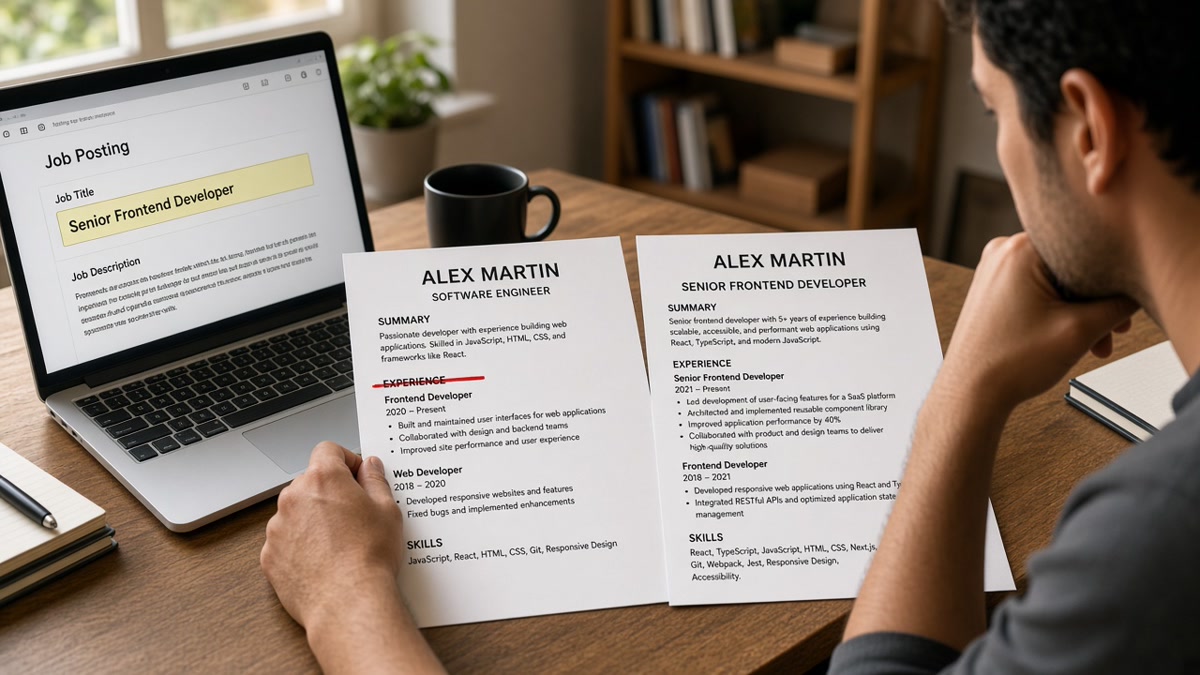
Your bullets are strong. You're still invisible. The line recruiters filter on first is the job title above your company name, and most parsers treat it as its own field. If that field says something your target req never searches for, the rest of the file doesn't get opened. That's not a formatting quirk. It's how title fields work in most ATS dashboards you'll apply through this month.
Check your resume for free and confirm title lines parse on their own row before you rename anything. A scrambled title block means fix layout first, then wording. You don't need a new template. You need a searchable title line on a file that already parses.
When the posting asks for a cover letter, don't repeat a vague headline there either. Generate a cover letter that names the same market title you put in Experience so the note and resume agree in the recruiter's inbox.
Below you'll see how title fields work in Workday and Greenhouse, four before/after pairs you can paste tonight, a copy-paste title rewrite block, and traps that still hide qualified files after you fix the words. Job searching is slow enough without losing screens to a title nobody types into search. If you've been tweaking bullets while the title line still says Specialist III, that's the lever you haven't pulled yet.
We're not talking about keyword games. We're talking about the field recruiters sort on before they read sentence one. Get that line right and the same experience finally shows up where hiring teams are already looking.
Quick Wins
- Put each job title on its own line directly above the employer name.
- Replace creative internal titles with searchable industry names plus parentheses.
- Match seniority words from the posting when duties truly align.
- Keep title format consistent across every role on the page.
How role naming impacts visibility before anyone reads bullet one
Recruiters run title searches inside ATS dashboards before they open PDFs. A req for Senior Product Manager pulls every profile where the title field contains those words. Bullets about roadmap ownership do not matter if the title field says Product Lead or blank because the parser merged lines.
Title is a filter, not a decoration. Keyword stuffing in Skills does not replace a missing Senior marker when the req filters on seniority. The title line is the fastest signal for level and function.
I've screened stacks in Greenhouse where the candidate's top bullet named the exact product, but the title field said Specialist III and the req searched Manager. The file never left the maybe pile because the title mismatch looked like a level gap.
This is not permission to lie. It is permission to translate employer branding into language hiring teams already type into search boxes. When payroll title and market title differ, parentheses keep you honest and searchable.
Read how ATS matches resumes to job descriptions when bullets match but title search still returns zero. The gap is usually field placement, not missing keywords in paragraph three.
How role naming impacts visibility: four before/after pairs
Swap employer names and dates. Keep the structure: title line, company line, Month Year dates inline. Each pair shows what recruiters type versus what parsers store.
Pair 1: Creative internal branding
Before: Title line: Code Ninja · Company: BrightStack Apps
After: Title line: Senior Frontend Developer (internal title: Code Ninja) · Company: BrightStack Apps
Recruiters filtering Frontend Developer never see Ninja. Parentheses preserve truth for background checks while the searchable field carries market language.
Pair 2: Vague analyst line
Before: Title line: Analyst · Company: Harbor Health
After: Title line: Healthcare Data Analyst · Company: Harbor Health
Analyst alone competes with finance, ops, and clinical roles. Specialization in the title field narrows you into the correct req family without rewriting every bullet.
Pair 3: Inconsistent seniority formatting
Before: Developer (2019-2021), Sr. Developer (2021-2023), Senior Dev (2023-2025)
After: Developer (2019-2021), Senior Developer (2021-2023), Senior Developer (2023-2025)
Abbreviations split one career into three unrelated titles in search results. Full words keep progression visible when recruiters sort by title history.
Pair 4: Title buried inside a bullet
Before: Bullet one: Served as project lead for enterprise clients at Northline Consulting with no title line above the company.
After: Title line: Senior Project Manager · Company: Northline Consulting · Bullet one opens with client count and delivery scope.
Parsers do not promote bullet text into the title field reliably. If lead work was your role, the title line must say it.
Copy-paste block: title rewrite worksheet
Copy-paste (fill brackets, one role at a time)
Employer payroll title: [what HR called you]
Market title recruiters search: [2-4 words from postings you want]
Seniority marker: [Junior | (none) | Senior | Lead | Manager]
Final title line: [Seniority] [Market title] (internal: [payroll title])

Posting title to mirror tonight: [paste from req]
Match? Y/N. If Y, use posting phrase in headline or summary too.
Run the worksheet on your current role first. Only then walk backward through older jobs. Promotions should show as separate title lines with dates, not one title stretched across five years.
Edge case: contract roles through an agency. List the function title you performed, then note the agency in the company line or a short bullet. Recruiters search for Data Engineer, not Temp Worker IV.
Edge case: dual titles such as Player Coach. Pick the title that matches the req you want next. Put coaching scope in bullet two, not in a hyphen pile that parsers truncate.
Career changers: your old title may not match your target field. That's fine. Translate the function, not the industry jargon. A teacher moving into corporate training lists Training Specialist, not Fourth Grade Lead, when the posting says facilitator or L&D coordinator.
Military and government roles need the same translation. MOS or grade codes belong in a bullet or parenthetical, not as the only title line on a corporate application. Recruiters in Greenhouse search Program Manager, not E-7 or GS-11, even when that's how payroll knew you.
After you fix titles, skim the posting one more time. If paragraph one names a title variant you honestly held under a different label, add that phrase to your summary line. You're not stuffing keywords. You're aligning fields humans and parsers already compare side by side.
Title fixes that still hide your file
Renaming without fixing field placement. A perfect title inside a table cell still vanishes in Workday. Move it to a plain line above the employer.
Inflating level. Manager on the resume when payroll said Coordinator breaks trust in the first reference check. Translate, do not upgrade.
Matching posting titles you never performed. If you were an individual contributor, do not list Director because the req says it. Mirror language in the summary instead.
Before: Ten title variants across ten applications with the same employer dates.
After: One honest employer title line, headline tweaked per posting family.
Ignoring headline vs experience title. Headline says Product Manager while every experience line says Project Coordinator. Pick one story. Align headline with the most recent searchable title.
Stacking every promotion into one title string. Senior Developer, Team Lead, Architect on one line reads like keyword stuffing. List each promotion with dates so progression stays visible without breaking parser limits on title length.
Parse check after you rename titles
After renames, export DOCX or PDF and run the free ATS checker. Confirm each title appears as its own parsed row with the employer directly beneath it.
Then score your job match on a live posting. Title alignment shows up in match gaps before you spend an evening rewriting bullets that were never the first filter.
Rewrite your title lines tonight
Open your master file. List payroll titles in the worksheet. Write market titles recruiters already search. Move every title to its own line above the company. Export once and parse-check before you apply again.
How role naming impacts visibility is blunt: filters run on title fields first. Fix the name, keep the proof in bullets, and the same work finally shows up in the searches you care about.
Need a clean single-column base layout before you rename rows? Build your resume in a parser-friendly template, then paste your new title lines in.
Read more
Frequently asked questions
Mirror the posting when your actual duties match and the employer title was internal jargon. Keep the employer title in parentheses if payroll records differ. Do not invent a title you never held. Recruiters search title fields before they read bullets, so alignment helps filters without replacing honest scope.
Yes when you translate to industry-standard language that describes the same work. Growth Associate who ran paid campaigns can list Marketing Coordinator with the internal name in parentheses. Ninja, guru, and rockstar titles should become searchable equivalents recruiters already filter on.
On its own line above the company name in the Experience section, not buried inside a bullet. Workday and Greenhouse store title as a separate field. When title sits in a bullet or table cell, parsers often drop it or merge it with employer text, which breaks recruiter title searches.
Adjust only when your role genuinely spans two families, such as product analyst versus operations analyst. Keep one honest base title per employer and tweak the headline or summary for each posting. Renaming every title per click looks inconsistent in background checks.