6 min read
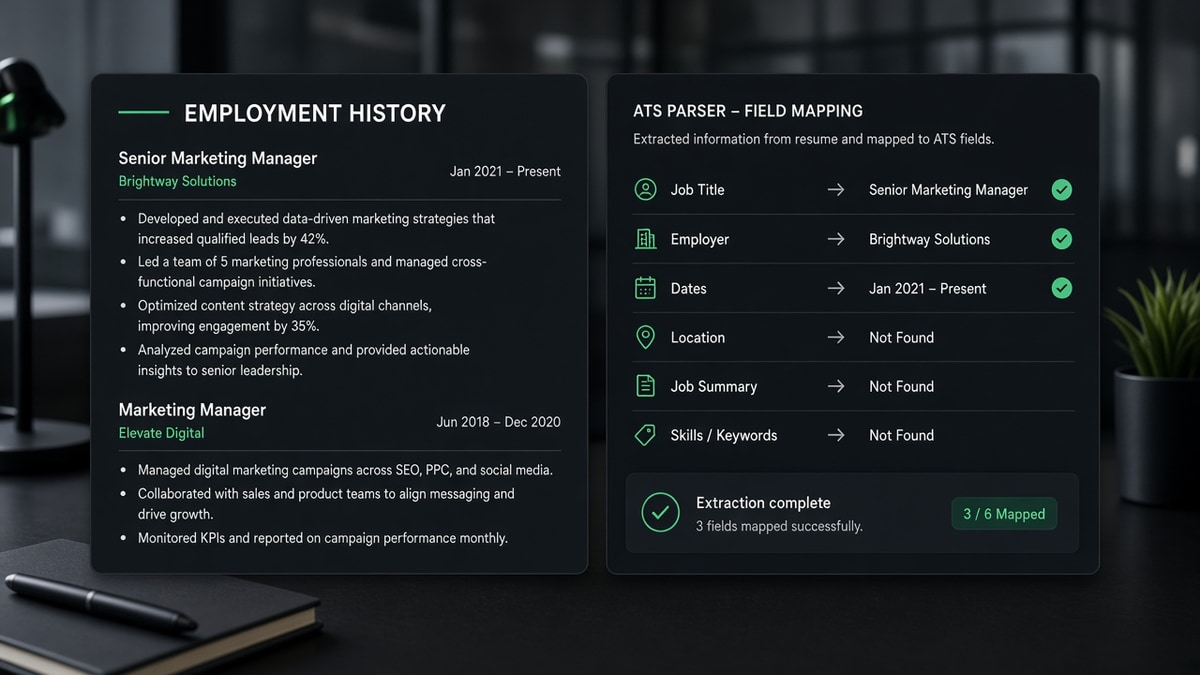
You're not fighting a mystery algorithm tonight. You're fixing the order your work history appears when the file gets stripped to text. If the parser can't tag your last title, recruiters won't find you in a title search even when your PDF looks perfect.
Run a quick extraction check first. Check your resume for free and confirm employer names and end dates show up in sequence. When they're out of order in plain text, the ATS profile will mirror that mess.
The sections below answer the parsing questions I hear most about titles, dates, employers, and gaps. You don't need a new resume story. You need the same jobs formatted so a machine can count them.
Quick wins
- Stack jobs reverse chronological with Month Year on every role.
- Put employer on its own line above title, never inside a table cell.
- Paste into Notepad and read jobs aloud in parser order before upload.
How ATS reads employment history: parser questions
How does a parser tag job titles?
The parser looks for title-like tokens near employer names and date strings. Creative labels without a standard title word often land in a notes field recruiters never search. If you held an internal nickname, keep the official title on line two and add context in bullets instead.
Before: Growth Ninja at BrightPath Apps with no standard title word on the line.
After: BrightPath Apps, Marketing Manager (Growth), March 2022 to Present. The parser tags Marketing Manager; bullets carry the growth work.
How do date ranges get extracted?
Parsers hunt Month Year patterns and Present. Year-only ranges force the system to assume January or December. Slash dates like 03/21 can split across tokens. One format everywhere beats a mix of styles.
Before: 2020 to 2023 on one line, Jan 2024 to Present on the next role.
After: March 2020 to June 2023, then July 2024 to Present on every job. Tenure math stays consistent in the profile view.
How are employer names captured?
Company names should sit on their own line in plain text, not inside a logo, icon row, or right-aligned table column. Abbreviations only work when they're obvious on a verification call. Write Meta Platforms if that's what payroll used, not a stock ticker alone.
What happens to employment gaps?
Gaps appear when end and start dates don't touch. Parsers don't write cover letters for you; they show blank months. A short consulting line or coursework block with dates often reads cleaner than a mystery hole, but don't invent employers to hide time off.
How to format dates on a resume for ATS walks through Month Year patterns that import cleanly across Greenhouse and Workday too.
Format each job block the parser can count
- Open a blank DOCX. Paste contact info in the body, not a header band.
- Add an Experience heading in plain text. No icons or shaded bars.
- For each role: employer line, title line, Month Year range, then bullets.
- Repeat employer and dates on every promotion at the same company.
- Keep locations as City, State on the employer line when space allows.
- Paste the file into Notepad and confirm jobs read top to bottom in order.
Copy-paste job block:
Harbor Retail Group, Boston, MA
Senior Operations Analyst
January 2021 to August 2024
• Built weekly inventory dashboards in Excel, cutting stockouts on the Northeast lane 9%
• Led cycle-count process across 14 stores with the warehouse team
I've screened profiles where a strong candidate's current title never imported because dates sat in a right column table. Recruiters filtered on Senior Analyst and never saw the name. The resume PDF was fine. The parsed record wasn't.
Contract roles deserve the same block structure as full-time jobs. One line per client keeps tenure visible and stops the parser from merging unrelated projects into a single mystery employer.
Layout traps that scramble employment history
- Two-column templates: skills sidebar pulls text before experience in parser order.
- Date columns in tables: end dates attach to the employer row below yours.
- Combined employer stacks: three titles under one company with one date range.
- Graphic logos instead of typed names: company field imports blank.
- Overlapping dates: concurrent jobs need clear labels, not identical ranges.
Before: All roles at one company listed as bullet promotions with a single 2018 to Present line.
After: Three separate blocks with employer repeated, each with its own title and Month Year range.
How to write resume experience ATS understands shows more before and after blocks for multi-company histories.
Verify parsed fields before you submit
After you rebuild the experience section, scroll the application preview if the portal offers one. Check current employer, current title, and the end date on your prior role. Those three fields drive most recruiter filters.
Run the ATS check on your employment block and compare extracted employers against what you typed. Fix one layer at a time instead of redesigning the whole resume.
Generate a cover letter when you need to explain a gap the resume dates already show. Keep dates consistent across both documents.
Make the timeline machine-readable
How ATS reads employment history comes down to tagged lines: employer, title, dates, bullets. When those land in order, recruiters can search your last title and count your years in the field. When they don't, the same career story disappears inside a garbled profile.
Save a master DOCX with the fixed experience block and duplicate it per application. Tweak bullets for the posting, not the date structure. You'll spend less time guessing why silence happened and more time on roles that match the work you already did.
Read more
Frequently asked questions
Most parsers record start and end dates per role and leave gap math to recruiters. A blank month range or overlapping dates cause more trouble than a visible six-month gap. List roles in reverse chronological order with Month Year on every line so the timeline is readable.
Use the title you actually held, spelled the way HR would list it on a verification call. You can add a posting-aligned label in parentheses when your internal title was nonstandard, but don't rename a role you never held. Recruiters search on title tokens the parser extracted, not on creative synonyms.
Treat each client or engagement as its own employer line with dates and a clear title. A single block labeled Freelance with no dates forces the parser to guess tenure. Separate lines also keep contract work from looking like one long job at a mystery company.
If you stack promotions under one company name without repeating dates on each title line, some parsers attach all bullets to the latest title only. Repeat employer, title, and date range for every role change, even when the company name stays the same.