10 min read
You're three years into demand gen or lifecycle marketing, your campaigns have real numbers, and Greenhouse still shows a blank Skills block after upload. That's usually not a keyword gap. It's a layout gap.
You don't need another keyword list. You need the parser to read your current title, your last employer, and the bullet with paid social ROAS in the order you wrote them. Before you tailor another posting, check your resume for free and compare what Greenhouse would extract to what you think you uploaded.
Mid-level US marketing roles in Greenhouse often sit behind fifty to two hundred applicants. Recruiters aren't scrolling your Canva layout. They're scanning a parsed profile where your best metric might never have landed. Below: what a readable file looks like, six before-and-after pairs you can paste from, the habits weak versions share, and a copy-paste block for your top role.
Quick Wins
- Move HubSpot, GA4, or Marketo from a sidebar into the first bullet under your current title.
- Put job title and company on separate lines with Month Year dates on their own line.
- Export a single-column .docx and re-upload to the checker until contact info parses clean.
What Greenhouse does to a mid-level marketing resume
Greenhouse reads your file top to bottom in one column. It tries to slot text into contact fields, job history, education, and skills. It does not admire your color palette. It does not follow your Canva arrows.
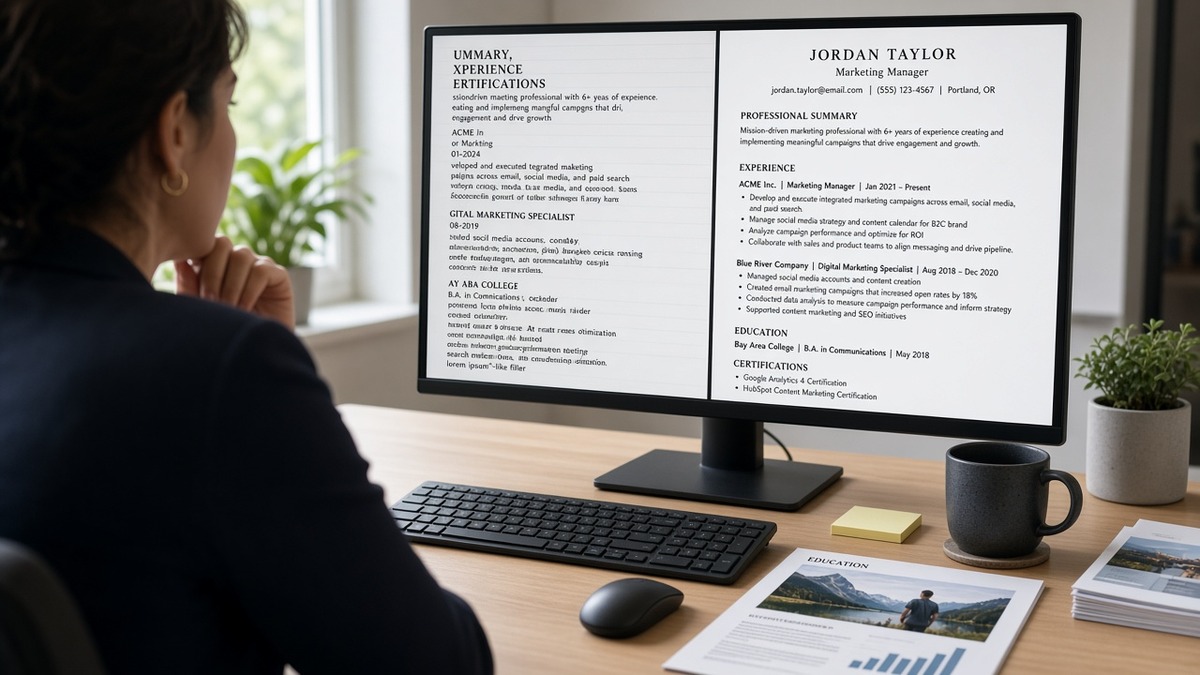
The contrast most candidates miss: two resumes can both list "email marketing" and "HubSpot." The one with tools inside Experience bullets survives parsing. The one with skills trapped in a right-hand table often shows up in the recruiter view with an empty current job.
Mid-level US marketing roles sit in a narrow band. You are past intern tasks but not yet running a full org chart. Hiring managers want channel proof, budget scope, and cross-functional work with product or sales. Greenhouse needs plain headings so that proof lands in the right field: Professional Experience, not "My Marketing Journey."
File type matters at upload. A text-based .docx with 11-point Calibri and standard round bullets parses more predictably than a designed PDF exported from a template site. When the posting allows either format, test both if you are unsure.
Contact info belongs in the body, not a header bar. Name, phone, email, city, and LinkedIn URL on separate plain lines at the top. Greenhouse maps those fields first. If your phone sits inside a text box, recruiters may see a blank phone row even when the number is visible on your PDF preview.
Dates need one format across roles. March 2022 to Present beats mixing 03/22, Mar '22, and 2022 alone on the same page. Parsers attach dates to the nearest job title line. When titles and employers share one table row, end dates sometimes stick to the wrong company.
Certifications like Google Ads or HubSpot Inbound belong in a labeled Certifications section or inside a bullet where relevant. A badge image without alt text parses as nothing. Spell out the credential and year in plain text.
This won't fix applying to roles where you lack the core channel experience. It stops a qualified mid-level marketer from disappearing because the parser never saw the campaign metrics.
Greenhouse ATS resume optimization US marketing: judged examples
Each pair below is a composite from mid-level marketing screens. Numbers inside bullets are illustrations, not market claims. Swap in your honest metrics.
Pair 1: Demand gen manager (B2B SaaS)
Before: Two-column layout. Skills column lists Marketo, Salesforce, Google Ads. Experience column says "Managed campaigns and grew pipeline."
After: Single column. Job title on line one, company on line two, March 2021 to Present on line three. First bullet: "Built Marketo nurture tracks that sourced $2.1M pipeline in FY24; synced MQL rules with Salesforce stages."
Why it works: the parser reads job one as a block. Tools sit next to outcomes in the same line Greenhouse stores as Experience text. Recruiters ctrl+F "Marketo" and land on proof, not a orphaned Skills row.
Pair 2: Lifecycle email marketer (e-commerce)
Before: Logo strip of ESP icons in a header image. Dates written as '20 to '24. No employer name on its own line.
After: Plain contact block. Title: Email Marketing Manager. Company: [Retailer name]. January 2020 to June 2024. Bullet: "Owned Klaviyo flows for cart and win-back; lifted repeat purchase rate 9% in six months."
Header images look on-brand for lifecycle roles. Greenhouse treats them as dead space. Move ESP names into bullets where you built flows, not into icons.
Pair 3: Content marketing lead (healthcare tech)
Before: Section titled "Where I've Made Impact." Bullets start with "Responsible for blog strategy."
After: Section titled Professional Experience. Bullet: "Published 14 HIPAA-aware clinical guides in 2023; organic demo requests from content rose 22% quarter over quarter."
Creative headings feel personal. Parsers expect Work Experience or Professional Experience. Rename the section, keep the stories.
Pair 4: Paid social specialist (consumer app)
Before: Metrics inside a text box shape in Word. Skills section repeats Meta Ads Manager twelve times.
After: One bullet under Paid Social Specialist: "Ran Meta and TikTok tests with $180K quarterly spend; cut CPI from $4.10 to $2.85 while holding day-seven retention flat."
Text boxes break the linear read order. The CPI line belongs in a normal bullet under a normal title line, not floating beside a chart screenshot.
Pair 5: Product marketing manager (fintech)
Before: Summary paragraph fills half a page with adjectives. Launch work buried on page two.
After: Two-line summary with one metric, then current role first. Bullet: "Launched SMB payments feature with sales enablement kit; 41% of new ARR in Q2 tied to launch campaigns."
Product marketing managers often bury launch metrics on page two because the summary ate half a page. Cut the adjectives. Lead with the launch bullet under the current title.
Pair 6: Marketing ops analyst (enterprise software)
Before: Table for each role with merged cells. LinkedIn URL in footer only.
After: linkedin.com/in/yourname under email in the header. Bullet: "Cleaned Marketo duplicate records and rebuilt lead scoring; MQL-to-opportunity conversion improved 13% in two quarters."
Marketing ops resumes look like spreadsheets. Tables with merged cells scramble which dates belong to which employer. Flatten each role into title, company, dates, bullets. Repeat for every job.
Copy-paste block for your current role
Edit every bracket. Keep one column. Paste under your real title and dates.
[Job Title]
[Company Name], [City, ST or Remote]
[Month Year] to Present

• Owned [channel] for [audience]; [metric illustration, e.g., cut CPA 18% on $120K monthly spend across Google and LinkedIn].
• Built [tool] reports for [team]; [metric illustration, e.g., shortened weekly pipeline review prep from 4 hours to 45 minutes].
• Partnered with [sales/product] on [launch/campaign]; [metric illustration, e.g., 26% of trial signups traced to coordinated email and paid social].
• Managed [budget scope or vendor count]; [metric illustration, e.g., renegotiated agency SOW and saved $34K while holding lead volume steady].
Edge case: you support multiple brands inside one employer. List the parent company once, then use bullets to name each product line. Do not create fake job entries unless titles actually changed.
Edge case: contract or agency stints back-to-back. Put the agency name as employer and the client inside the bullet if NDAs allow. Otherwise write "Fortune 500 fintech client" without inventing logos.
Edge case: career pivot from sales or CS into marketing. Keep one employer block honest. Add a two-line summary that names the pivot, then write bullets that show marketing tasks you already own, not tasks you hope to own.
I've screened mid-level marketing files in Greenhouse where the designed PDF hid every ROAS number. The plain .docx version of the same candidate got a phone screen the same week.
Open your latest export. Read only the first eight words of each bullet. If they start with "Responsible for" or "Helped with," rewrite the top three before you apply again.
Tailoring for a posting still means plain text edits. Highlight three required tools from the job description. Mirror those tool names in bullet one under your current role. Do not add a keyword footer in eight-point gray text. Recruiters notice, and parsers sometimes read footers as contact info.
What to do in the next ten minutes
Save a copy of your file with today's date. Strip columns. Fix dates on your top two roles. Paste the copy block. Swap one metric. Upload to the checker. If your current title parses blank, stop and fix layout before you touch keywords.
What weak Greenhouse marketing files share
Creative section labels. "Growth Story" and "Brand Wins" do not map to Experience. The parser dumps them or skips them.
Tool lists without work. Fifteen platforms in Skills and no production use in bullets reads like keyword stuffing to a human even when parsing succeeds.
Headers and footers. Page numbers and repeated name lines sometimes overwrite email fields on import.
Graphics for channel proof. Ad screenshots and badge icons rarely parse. Describe the work in text.
Mixed date styles. One role with years only and the next with full months breaks timeline order in some views.
Keyword footers. Gray eight-point skill clouds at the bottom parse poorly and look like stuffing in the human view after Greenhouse strips formatting.
Multiple font families. Switching fonts between sections suggests merged documents. Stick to one body font at 10 to 12 point.
Volunteer work without labels. If you include pro bono campaign work, label the section Volunteer Experience. Otherwise dates may attach to paid roles incorrectly.
And when every bullet on page one starts with "Managed" or "Led," the human skim feels flat even if parsing succeeds. Vary the verb, keep the structure boring.
Read formatting mistakes that kill your resume with AI screening when your file passes Greenhouse but still stalls later in the funnel.
Read why resumes get rejected by ATS if parsing looks fine but you never hear back after submit.
Check the file, then match the cover letter
Greenhouse stores the resume recruiters search inside the profile. Your cover letter should repeat the same channel and metric language, not introduce a new story.
Run the free ATS resume check on the .docx you plan to upload. Fix title lines and dates until extracted fields match your master. Then generate a cover letter from the posting text and paste in the same top bullet metric you fixed in step one.
Do not upload a new design template until the checker shows your current employer and end date in the right order. Pretty files that parse wrong waste a strong posting match.
Save one master file named with the date you last tested parsing. Tailor keywords in bullets, not in text boxes. Re-run the checker when you change layout, not only when you change words.
Cover letters in Greenhouse upload separately. Keep paragraph breaks simple. Left-align plain text. Match the posting title string in sentence one. Pull one metric from the same bullet you fixed in the resume so the recruiter sees one story across both files.
If the posting asks for salary expectations or work authorization, answer in the application fields. Do not tuck answers into resume headers where parsers treat them as name lines.
Fix one Experience block tonight
Open your current role. Kill the table. Put title, company, and dates on separate lines. Rewrite the first bullet so the tool and the metric show up in the first eight words.
Greenhouse ATS resume optimization US marketing work is mostly boring formatting. That is the point. Recruiters cannot interview metrics they never see.
Test the .docx. Submit with the same language in your cover letter. Move on to the next posting instead of redesigning the header for the third time.
If you are between roles, keep the same plain structure for contract work. Gap explanations belong in one short line in the cover letter, not in a sidebar infographic.
Your next ten minutes: export single column, paste the copy block, swap in one honest metric, run the checker, apply once.
Job searching is slow right now in many marketing lanes. A parser fix will not overnight your pipeline. It does stop you from losing screens you already earned on paper.
Keep the designed portfolio for interviews. Keep the boring file for Greenhouse. That split saves hours of silence after submit.
Read more
Frequently asked questions
Use a .docx with selectable text unless the posting asks for PDF. Many mid-level marketing resumes look fine as PDFs on screen but Greenhouse extracts job titles and dates more reliably from Word. If you only have PDF, export from Word or Google Docs with a single column and standard headings, then test the parse before you submit.
Name them inside Experience bullets where you used them, not only in a Skills sidebar. Greenhouse often reads Skills last or skips it when the layout uses columns. One bullet that says you built weekly Looker dashboards from GA4 data beats a long tool list with no context.
Optional. If you keep one, cap it at two lines and label it Summary or Professional Summary. A long paragraph at the top can push your current job title below the first screen in the recruiter view. Many strong files skip the summary and let the top role speak first.
You can, but Greenhouse may not read it. Icons, columns, and text boxes often drop campaign metrics and dates. Keep a plain master file for applications and save the designed version for networking or a portfolio link in plain text under contact info.
Upload the same file to a checker that shows extracted fields. Confirm your name, email, current title, employer, and end date for your latest role all appear in order. If Skills is empty but Experience bullets mention HubSpot, the layout is the problem, not keyword count.