By Peter Miller · Published September 1, 2026 · Last updated: September 19, 2026
9 min read
You didn't get rejected for lacking skills tonight. You're staring at a profile where your current title landed under an old internship and your phone number never imported.
That's what formatting mistakes that kill your resume with AI look like in the wild. They're not taste calls. Each one scrambles the order a parser reads, and the system won't send you a warning when it guesses wrong.
Before you upload again, check your resume for free and read what the checker extracts. If a job's missing dates or skills sit under the wrong employer, one of the five tests below will name the culprit.
You're not rebuilding the whole document from scratch. You're running five quick checks, fixing the one that failed, and saving a plain file you can trust.
Do these three checks first
- Select all, paste into a plain text editor, and read whether jobs stay in order.
- Search the PDF for your phone number. No hit means the text is not real.
- Turn on table gridlines in Word and look for invisible grids around dates.
What the parser actually receives after upload
Before any matching or ranking runs, something has to turn your document into fields: employer, title, start date, end date, degree, skills. That step is parsing, and it is much dumber than the AI language around it suggests.
The parser reads in one direction and commits to whatever order it finds.
A two-column template forces a guess. Read across and your job title collides with a sidebar skill. Read down and your entire skills column arrives before any experience, so the first thing Workday learns about you is a software list with no context.
The failure is worse than a rejection. A file that parses badly does not bounce back. It becomes a profile with two jobs missing and a graduation date where a start date should be, and that broken record is what gets scored.
You are never told this happened. That is why qualified people send the same scrambled file to dozens of employers and wonder why silence follows.
Job searching is hard enough without a layout trick hiding your contact line. None of this means your experience is weak. It means the file never arrived intact.
Five tests that name the formatting mistake tonight
Run these in order. Most people fail two or three. The test that breaks is the one you fix before the next upload.
Did columns scramble your job history?
Select all text, paste into Notepad or TextEdit, and read top to bottom. If your sidebar skills appear between job bullets, that is the order the ATS received.
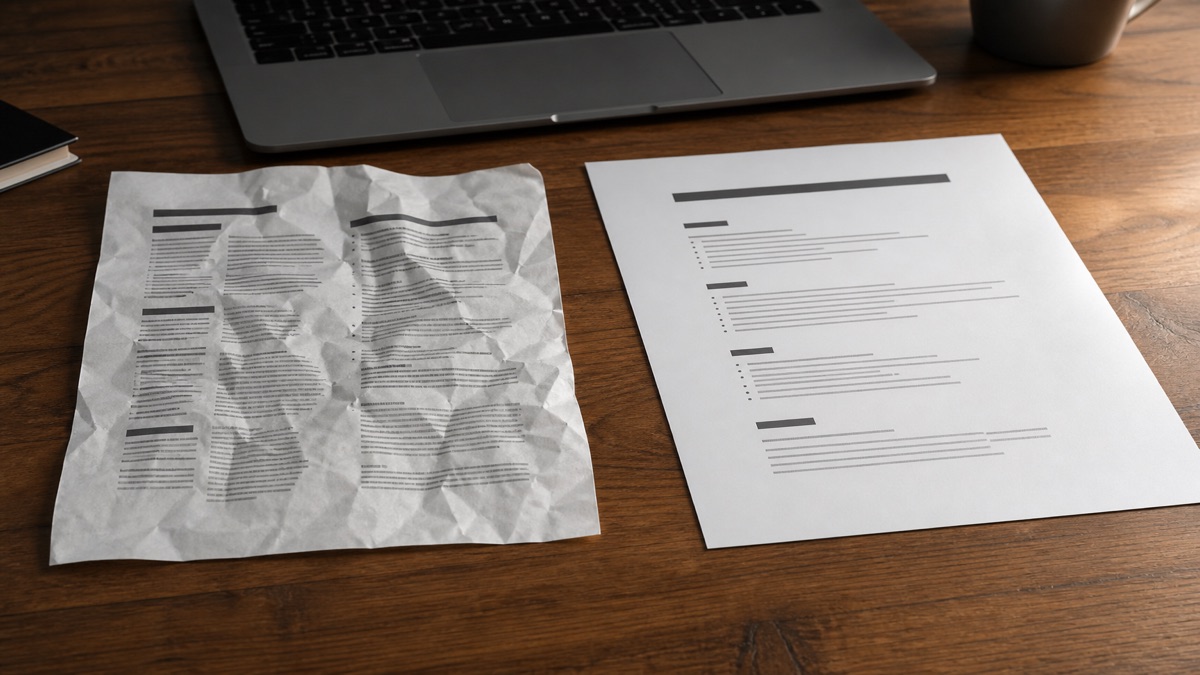
Before: Skills column on the left, experience on the right, contact strip across the top in a colored band.
After: One column only. Contact block, summary, experience, education, skills. Plain 11-point Calibri. No sidebars.
Are hidden tables eating your dates?
Open the file in Word, show table gridlines, and click into a date cell. A small cross-shaped handle means a borderless table is driving the layout even though you only see clean spacing.
Before: Senior Analyst | Acme Ltd | [right-aligned cell] Mar 2022 to Present
After: Senior Analyst, Acme Ltd, March 2022 to Present on one left-aligned line with no table behind it.
Is your contact info trapped in a header?
Double-click the very top of the page. If the region becomes separately editable and the body greys out, your name and email live in a header zone some parsers skip entirely.
Copy-paste this contact block at the top of page one as normal body text. Delete lines you do not use.
Copy-paste contact block
[Full name]
[City, ST] · [phone] · [email] · [linkedin.com/in/handle]
[One-line target title matching the posting]
Can you search for your own phone number in the PDF?
Open the PDF and press Ctrl+F or Cmd+F. Type your phone number. If nothing is found, the file is a picture, not text, no matter how sharp it looks on screen.
Export from Word or Google Docs instead of Canva or a scan app. Replace icon labels with words. Skill bars and star ratings do not parse; write "Python (4 years, production)" instead.
Would a form field recognize your section headings?
Read each heading aloud. Experience, Education, Skills, Certifications, Summary. If you wrote "My Journey" or "The Toolkit," a parser hunting for Experience may never map what sits below.
Rename headings to the boring words portals expect. Pair this with Workday resume format that parses cleanly when the employer names Workday on the careers page.
Formatting mistakes that kill your resume with AI, mapped to symptoms
Each layout choice produces a predictable symptom in the imported profile. Match the symptom to the fix.
I've screened stacks of these in Workday and Greenhouse, and the file that wins is boring, single-column, and specific about dates.
Two columns: skills attached to the wrong job
Symptom: Python and SQL show up under a retail job from 2019. Fix: rebuild as one column. Skills go last, not beside experience.
Hidden tables: jobs with no dates
Symptom: a role appears but years-of-experience filters fail because start and end dates never imported. Fix: stack title, company, and Month Year dates on plain lines.
Header-only contact: blank name field
Symptom: the application form shows an empty name or email even though the PDF looks complete. Fix: repeat contact lines in the body. No icons where a word belongs.
Image PDF: empty extraction
Symptom: the checker returns almost nothing. Fix: re-export as a text-based PDF or DOCX from a word processor.
Creative headings: experience section missing
Symptom: education imported but work history did not. Fix: rename the section to Experience and use market-standard job titles. Internal titles like Analyst III need the market label beside them: Data Analyst (internally Analyst III).
This will not fix applying to roles you are not qualified for. It stops a qualified file from dying in the parser because the layout looked clever on a phone screen.
Confirm the fix before you hit Apply
The five tests tell you what broke. A full extraction check shows what the employer actually received.
Upload the file to the free ATS resume checker and compare the output line by line against your document. Missing jobs, missing dates, and misplaced skills are the three flags to fix.
If the template itself is the problem, starting from a clean base with the free resume builder is usually faster than patching a design file. Save a plain DOCX backup even when the portal asks for PDF.
Run the copy-paste test tonight
You do not need a new career story. You need to know which formatting mistake scrambled tonight's upload.
Paste into plain text. Search your phone number in the PDF. Show gridlines in Word. Move contact info into the body. Rename clever headings. Save a boring single-column file.
Then upload to the checker and read the extraction, not just the score. When the imported profile matches your document, you are finally competing on experience instead of layout.
If silence continues after the file parses cleanly, read why you are not hearing back after job applications to sort timing and fit from format.
Once the resume parses, draft a short letter with the cover letter generator so the packet reads consistent to a human reviewer.
Frequently asked questions
A two-column layout. Parsers read a page in a linear order, and columns force them to guess where that order runs. When the guess is wrong, skills from a sidebar get attached to the wrong job and your work history arrives interleaved and unreadable.
Open the file in Word and turn on table gridlines, or click inside a date and look for the small move handle in the corner. Many templates use borderless tables for alignment, so the structure is invisible on screen but very much present in the file.
No. Some systems do not scan header and footer regions at all, which means your name, email, and phone number can be missing from the imported profile even though they are clearly visible on the page. Always repeat them in the body text.
Either works if the text is genuinely selectable. A clean DOCX is the safer default for older enterprise systems, and a text-based PDF is fine almost everywhere. What fails is an exported image, a scan, or a design file flattened into a picture.