11 min read
Short answer: test your Workday file with a plain-text paste, a Ctrl+F phone search in the PDF, the Apply with Resume preview rows, and a free checker on the same export. Workday's importer maps your upload into structured fields before a recruiter opens the attachment. When preview rows are blank or out of order, most failures show up before Submit if you run those four checks.
You're not crazy when a polished PDF lands in Workday and your dates vanish. US corporate reqs on Workday often show parsed fields right after upload. That preview is the closest thing you'll get to a dress rehearsal. Job searching's already slow. Don't click through a broken import and wonder why silence hits a role you clearly fit.
Check your resume for free on the export you'll attach tonight. Below: why Workday previews matter, the exceptions when they don't appear, four hands-on tests with before/after pairs, and a copy-paste row checklist for preview fields.
Quick Wins
- Paste the export into Notepad and read contact before Skills.
- Ctrl+F your phone number inside the PDF before upload.
- Stop on Workday preview if dates or title rows are blank.
- Run a free checker on the identical file you will attach.
Why Workday's preview row beats guessing
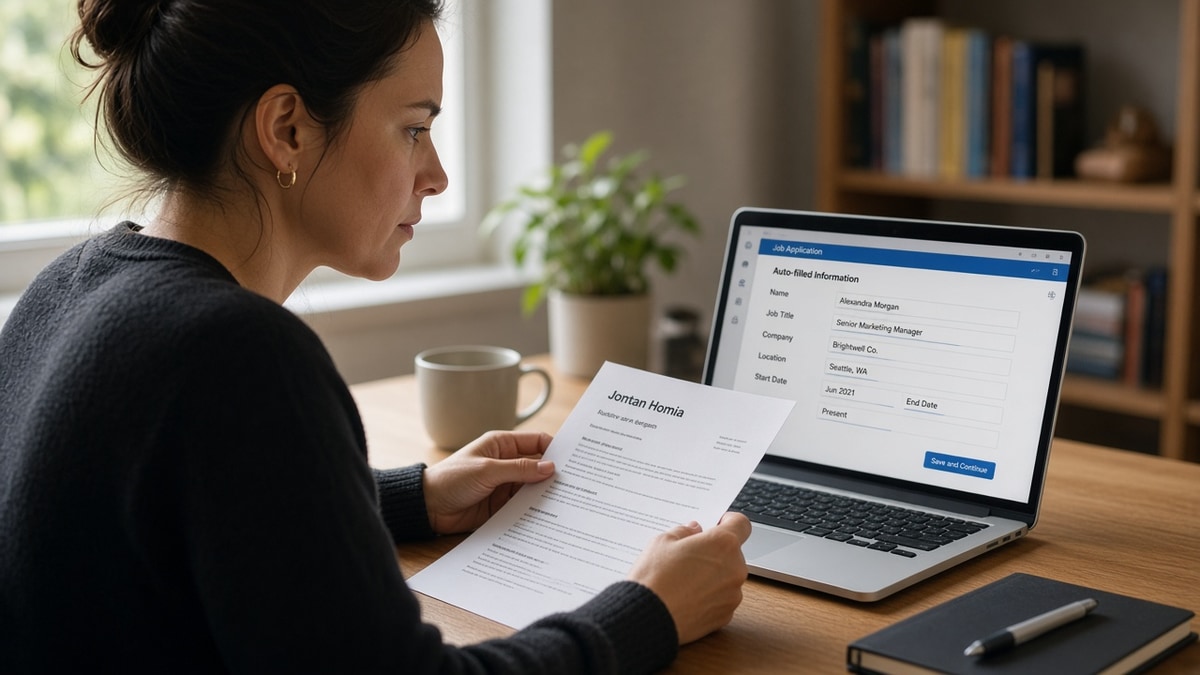
Workday doesn't just store your PDF. On many US employer career sites, Apply with Resume runs your file through a candidate-profile importer that tries to fill structured fields: name, phone, employer, title, start date, end date, degree, skills. Recruiters often see that imported block before they download your attachment.
The pattern most people miss: a file that looks perfect on your screen can still produce blank phone rows or swap job title with company name in the preview. That's not a mystery rejection later. That's the importer telling you the layout failed while you still have time to fix it.
I've screened stacks of Workday imports where a composite operations analyst lost six months because dates sat in a right column the importer read last. Plain-text paste showed the same scramble. Preview row check would have caught it before Submit.
Exception: some Workday instances skip a visible preview or cache an older import from a prior application tied to your email. Always scroll every auto-filled page even when preview looks thin. Duplicate profile data from an old upload can mask a fresh parse failure.
Exception: referral links or employee referrals sometimes pre-populate fields that disagree with your resume. Match them manually or fix the resume so both sources align. Mismatched title strings look like carelessness in review.
Exception: header and footer contact layers. Some Workday configs ignore those regions entirely. If preview shows name only, move phone and email into the body under your name before you retest.
Exception: multi-page application flows that re-ask for work history after a clean preview. Treat the resume upload as step one, not the whole form. Scroll back to Experience rows on later pages even when page one looked fine.
Edge case: you're applying from a phone. Upload from a laptop when possible so you can run Ctrl+F and read preview rows without squinting at a five-inch screen. Mobile uploads still parse the same file skeleton you tested on desktop.
Read PDF vs DOCX for ATS when the portal lets you choose a format and paste test results differ between exports.
How to test your resume on Workday before applying US: four checks
Run these in order on the exact DOCX or PDF you'll attach. Don't swap files after test three because you tweaked a font at midnight. That undo happens more than candidates admit.
Check 1: plain-text paste test
Open Notepad, a blank Google Doc, or any editor without formatting. Select all text in your resume export and paste. Read top to bottom once, out loud if you need to slow down.
Your name and contact should appear first. Latest employer and job title should appear before a long Skills comma chain. If Education jumps above Experience, or Skills lands on line four, you've found a layout bug worth fixing before Workday sees the file.
Before: Two-column template with teal sidebar holding Skills and LinkedIn. Plain-text paste drops the sidebar below Education.
After: Single column. Contact under name. Experience block with Month Year dates before Skills as a plain comma list at the bottom.
Check 2: Ctrl+F phone and title in the PDF
Open the PDF you plan to upload. Press Ctrl+F on Windows or Cmd+F on Mac. Search your phone number digit by digit, then your latest job title string exactly as written on the page.
If search finds nothing, the text may be flattened as an image or trapped in a text box parsers skip. Re-export from Word or Google Docs as text-based PDF, or upload DOCX when the portal allows it.
Before: Phone number inside a header band with a phone icon and no digits in the body layer. Ctrl+F finds zero matches.
After: Jane Doe · (555) 234-8890 · [email protected] · Denver, CO on one body line under the name. Search hits on first try.
Check 3: Workday preview field row audit
Start the application on the live req without submitting if you can stop before the final page. Upload your tested file on Apply with Resume. When preview rows appear, verify each field against your source document.
Minimum row audit: full name, phone, email, current employer, current title, start date, end date or Present, prior employer block if applicable. If any row is blank while the PDF shows the data, assume the importer failed that field mapping.
Do not click forward hoping a human will fix it. Fix layout, re-export, re-upload, and re-read preview rows. Some flows cache the first import. Delete the upload and attach again if rows don't refresh.
Pair for a finance analyst file: Before: Preview shows employer Acme Corp but title blank and dates missing while PDF lists Senior Analyst, Jan 2022 to Present.
After: Title and dates moved inline on one line under employer in DOCX. Preview rows populate all three fields on second upload.
Check 4: free ATS checker on the same export
Upload the identical file to a free checker after paste and preview pass. You're confirming category warnings about columns, unreadable blocks, and missing employer lines, not chasing a magic score.
Warnings about tables or text boxes mean plain text will fail too. Green layout with weak Experience usually means bullet rewrites still pending, not parser luck on Workday.
Edge case: the req also asks for a cover letter on the same form. Draft after resume checks pass. Use the cover letter generator so letter bullet one matches resume bullet one. Contradictory proof lines survive parse and still lose the screen.
Copy-paste Workday preview row checklist
Copy this beside the req before you upload:
PASTE ORDER: name → contact → latest job title before Skills
CTRL+F: phone found · latest job title found in PDF
PREVIEW ROWS: phone · email · current employer · current title · start · end/Present
PRIOR ROLE: second employer block populated if resume lists two+ jobs
SAME FILE: checker upload = Workday attachment · no last-minute layout edits
See how to tell if ATS is the problem or your resume content when preview looks clean but screens still stall. Parse gets you seen. Bullet one still has to prove the posting duty.
What still fails after a clean-looking PDF
Trusting eyeball review instead of paste order. Pretty PDFs still paste with Skills above Experience. Always run plain text, not zoom at 125% on your laptop.
Skipping preview because you tested on Greenhouse last week. Workday's importer is stricter about structured field mapping. A file that survived another portal can still drop dates here.
Uploading a different file than you tested. You validated resume_v2.docx but attached resume_v2_tailored.pdf with a new text box. Start the four checks again on the new export.
Clicking through blank preview rows. Blank phone in preview usually means blank phone in the recruiter profile pane. Fix contact placement before you burn the application slot.
Hidden tables around dates. Toggle gridlines in Word. Invisible-border tables around date columns are a common reason preview shows title without months.
Assuming resubmit fixes parse without re-upload. Some Workday flows cache the first import. Replace the file and confirm preview rows actually changed before you finish the form.
Checker pass on the same file you'll attach
Workday preview is employer-side. HireFlow's checker stands in for the layout warnings paste test can't quantify: column risk, header/footer contact, unreadable sections.
Run a free ATS check on the export that passed Ctrl+F and plain text. Fix employer block order first when warnings flag Experience. Skills footer second.
If preview still scares you after a green checker pass, rebuild from a single-column base with the free resume builder rather than patching a broken template one margin tweak at a time. Ten minutes of structure beats three blind Workday uploads on the same broken layout.
Run the four checks, then apply once on Workday
How to test your resume on Workday before applying US comes down to paste order, searchable contact in the PDF, preview row truth, and a checker pass on the same attachment. Workday gives you a rare second look through Apply with Resume. Use it when it appears. Simulate it with plain text when preview is thin.
Export single column tonight. Paste into a blank doc. Ctrl+F your phone. Upload on the live req and read every preview row before forward. This won't fix applying to roles where you lack a license or clearance gate. It stops qualified files from dying because the importer read your footer before your current title.
And if preview rows look perfect but you're still hesitant, read bullet one out loud under your latest employer. If you can't hear a must-have duty from the posting in that line, fix the bullet before you finish the Workday form. Preview gets you into the stack. Bullet one gets you remembered.
Read more
Frequently asked questions
Many US corporate Workday flows include an Apply with Resume step that displays auto-filled fields after upload. You can often review name, contact info, job titles, and dates before you finish the application. If those preview rows are blank or scrambled, fix the file before you click forward. Not every employer enables the same preview depth, but when it appears, treat it as your live parse test.
Paste your export into a plain text editor and read top to bottom. Then open the PDF and use Ctrl+F or Cmd+F to search for your phone number and latest job title. If either fails, the importer will likely miss them too. Upload only after both checks pass on the exact file you plan to attach.
Either works when the file is single-column text with Month Year dates inline with employers. Older enterprise Workday portals often handle DOCX more reliably. Modern career sites accept clean text-based PDFs. Run the paste test on both exports when the posting allows a choice. Pick whichever keeps employer blocks in reading order.
Phone, email, current job title, employer name, and start/end dates on your latest role. Missing phone usually means contact sat in a header layer parsers skip. Wrong dates often trace to table cells or right-aligned date columns. Blank Experience with a full Skills row means layout pushed work history below what the importer mapped.
Retest when you move Skills above Experience, add columns, shrink margins to fit page two, or drop text into boxes. Keyword swaps inside existing bullets rarely change parse order. Run plain text again only when the skeleton moved, not when you replaced three verbs.