12 min read
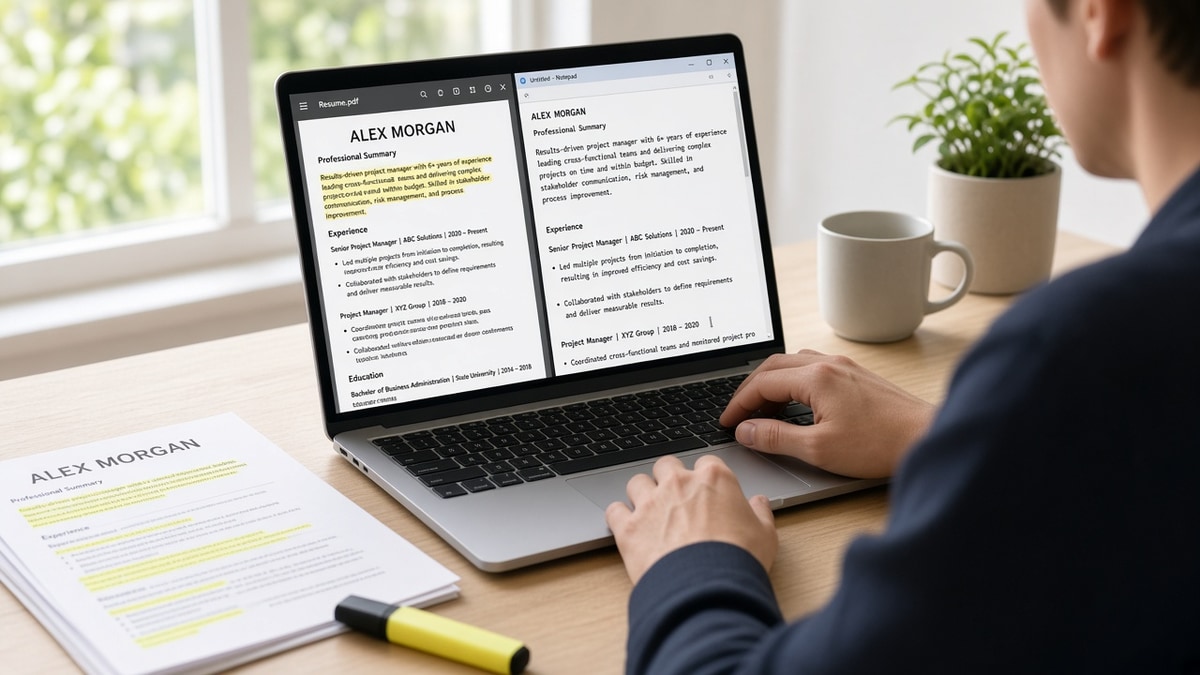
Your PDF looks perfect. Workday's preview shows your internship above your director title. That's not bad luck. The parser read your file out of order before any recruiter opened it. An ATS resume test for US applications catches that failure in ten minutes on your kitchen table. You don't need a paid scanner. You need Notepad, ctrl-f, and the posting on your screen.
Before you upload again, check your resume for free with the same file you'll attach. US corporate portals on Workday, Greenhouse, Lever, and iCIMS all ingest text first. If plain paste scrambles your Experience block, keyword tweaks won't save the screen.
Job searching while you're still employed is brutal enough. You shouldn't lose a week wondering if they ghosted you when the upload never parsed. This page walks through five ordered steps, before/after fixes, and a copy-paste checklist you can run tonight.
When the portal asks for a letter, generate a cover letter that repeats the same current title and employer pairing your plain-text test confirmed. Letter and resume should agree after parsing.
Quick Wins
- Paste export into Notepad. Blank paste means image PDF. Rebuild in Word.
- Current role must appear first in plain text, not in the PDF layout alone.
- Ctrl-f three posting must-haves inside dated Experience bullets.
- Test the exact PDF or DOCX you'll attach, not an older draft.
What the plain-text test catches that PDF preview hides
I've opened Workday candidate profiles where the attachment looked sharp and the parsed timeline showed a 2019 internship above a 2024 manager role. The recruiter search ran on scrambled order. Your best bullet sat under the wrong employer. The screen ended before a human ever scrolled.
A useful home test reads your file as text, not as design. US employers on Workday, Greenhouse, Lever, and Taleo map plain strings into profile fields. Two-column layouts read right column before left. Table cells dump dates before titles. Headers repeat your name into every section break. The home test surfaces that before you hit submit.
You're not testing whether you're qualified. You're testing whether a qualified file survives ingestion. Most failures show up in three places: plain-text paste order, ctrl-f hits inside Experience instead of Skills, and contact lines trapped in headers the parser skips.
Edge case: the portal shows a parsed preview after upload. Run the Notepad test anyway on the export you attached. Preview sometimes renders the PDF visually while the stored parse order differs. Edge case: you already applied with a broken file. Fix the export, save a new filename, and reapply only when the employer allows a second submission. Do not assume the first parse corrected itself.
For single-column layout rules, read resume formatting rules recruiters wish more people followed . This page applies those rules as a pass/fail test sequence before US upload.
Five-step ATS resume test for US job portals
Work in order. Each step ends with a pass or fail check. Stop and rebuild the file when you fail step one or two. Keyword work comes after parse order is clean.
Step 1: Run the plain-text paste test
Open your PDF or DOCX in a desktop reader. Press ctrl-a or cmd-a to select all. Paste into Notepad on Windows or TextEdit in plain text mode on Mac. Read top to bottom without scrolling back to the PDF.
Before: Paste shows an empty box, random symbols, or one giant block with no line breaks. The file is image-based or the export stripped text. Workday will see the same blank field.
After: Paste shows your name, phone, email, then Work Experience with employer names, titles, and Month Year dates in reading order. Parser has raw text to map.
Fail here? Rebuild in Word or Google Docs. Export DOCX first. If you need PDF, export from that DOCX, not from Canva, not from a phone scan. A composite marketing manager whose paste showed only a logo in the top-left corner had been exporting from a slide deck. One hour in Word fixed every downstream step.
Step 2: Confirm parse order and section labels
In the Notepad window, locate your current employer. It should appear before older roles. Section headers should read Work Experience, Education, and Skills in standard spelling. Creative labels like My Journey or Career Highlights sometimes map to blank fields in Greenhouse.
Before: Skills keywords appear before your first job title. Education dates sit between two employers. A sidebar dumped certifications into the middle of Experience.
After: Newest role is first under Work Experience. Each role block shows title, employer, city or Remote, Month Year to Month Year or Present, then bullets directly underneath.
Flatten two-column templates before you retest. Move dates onto the same line as employer or directly under title. Never isolate dates in a right table column. US recruiters expect linear Experience, not magazine layout.
Step 3: Ctrl-f three must-haves from the posting
Open the job description beside your Notepad paste. Highlight three non-negotiable tools, methods, or scope terms. Ctrl-f each term in the plain-text window. Every hit should land inside a dated Experience bullet under the employer where you used it.
Before: Salesforce appears twelve times in Skills and zero times under the account executive role where you ran pipeline.
After: Bullet one under that employer opens with Salesforce pipeline management and names quota scope in the first eight words.
Synonyms count only when the posting uses them. If the req says Greenhouse, ctrl-f Greenhouse, not only ATS. If it says SQL, PostgreSQL alone may not match a literal search. Mirror the posting language in the bullet where you did the work.
Edge case: acronym-heavy postings. Spell out the long form once in a bullet before you rely on the acronym alone. Edge case: remote-only reqs. Ctrl-f Remote in your location line so parsers don't file you as on-site when the ad expects US time zones.
A composite operations analyst whose ctrl-f found SOC 2 only in a certification footer moved it into bullet two under the employer where they led audit prep. Same word count, different screen outcome.
Step 4: Audit contact lines and hidden headers
Search the plain-text paste for your email address and phone number. Both should appear in the first ten lines of body text. If your name repeats on every page break, Word running headers are injecting into the parse stream.
Before: Email sits in a footer the parser skips. LinkedIn URL imported as a separate paragraph above your name. City and state duplicated under every job because a template repeated the header row.
After: Line one is name. Line two is city, state, or Remote. Line three is phone and email as plain text, no hyperlink codes. Section headers are typed bold in the body, not text boxes.
Turn off running headers except page one. Remove headshots and chart graphics. They rarely help US corporate screens and often push file size over portal caps. A plain file that parses beats a designed file that doesn't.
Before: Phone number imported as (555) 123-4567 x891 with extension codes split onto a new line. Recruiters searching the last four digits miss the match.
After: One phone line in standard US format with no extension codes buried in special characters. Email as plain text, not a mailto link that pastes as a URL string.
Step 5: Match export format and save the upload version
Run steps one through four on the exact file type you'll submit. When the portal accepts PDF and DOCX, test both. If PDF paste scrambles columns but DOCX from the same Word source reads clean, upload DOCX. When PDF is required, rebuild from single-column Word and export PDF from that file only.
Save as Firstname-Lastname-Resume.docx or .pdf with no spaces. Label the folder with the employer name so you don't attach last week's tailored draft. One master parse-friendly file per tailoring session beats three retries with the same image PDF.
Edge case: password-protected PDF. Remove protection before upload. Edge case: mobile upload from cloud preview. Download the file to device storage first. Streaming previews sometimes send a link wrapper instead of document bytes.
Copy-paste block: pre-upload checklist
ATS RESUME TEST - US APPLICATION (10 min)

□ Plain-text paste shows readable employers, titles, dates
□ Current role appears first in Notepad order
□ Section labels: Work Experience, Education, Skills (standard spelling)
□ Ctrl-f must-have #1 found in dated Experience bullet
□ Ctrl-f must-have #2 found in dated Experience bullet
□ Ctrl-f must-have #3 found in dated Experience bullet
□ Email and phone in body text, not header/footer only
□ Same file type tested as upload (PDF or DOCX)
□ Filename: Firstname-Lastname-Resume.ext
For deeper keyword placement after layout passes, read how to tailor your resume to a job description before you rewrite bullet one for the third time without fixing column order.
Where US uploads fail even after a clean paste
Skipping the test because the PDF looks fine. Visual layout hides parse order. Always paste before apply. Recruiters live in parsed profiles, not your attachment layout.
Ctrl-f only in Skills. A Skills cloud with Greenhouse, Lever, and Workday tells me you know the ecosystem exists. It doesn't prove you ran reqs in Greenhouse last quarter. Move tools into bullets under the job where you used them.
Testing an old draft. You fixed columns in Word but uploaded yesterday's PDF from Downloads. Rename the final export and run the checklist on that file only.
Keyword stuffing after a failed paste. Adding a hidden white-text block or a seventy-line Skills footer won't fix scrambled Experience. Flatten layout first. Then tailor bullet one.
Mixing US and international date styles. 03/2024 and March 2024 in the same file confuse sort logic. Pick Month Year everywhere: March 2021 to Present. Slashes and dots read as separate fields in some parsers.
Uploading the cover letter in the resume field. Double-check which button you clicked. A one-page letter missing Experience parses as blank work history. When both fields exist, test the resume file separately.
Canva and design-tool PDFs. They look sharp and paste as images. Rebuild in a word processor. US corporate reqs rarely reward graphic resumes in the parser.
Assuming one passed test covers every portal. You fixed DOCX for Greenhouse last week, then uploaded the same PDF to a Workday req that rasterized the export. Retest when format or template changes.
This won't fix applying when you lack must-have years on the posting. It stops qualified US candidates from losing screens because Experience imported with internships above director titles and Skills ate the keyword proof.
Score the file against the posting after the home test
Plain-text order and ctrl-f hits are the floor. Once both pass, upload the same export and the full job description to HireFlow's free ATS resume checker . Low continuity scores usually mean date or column fixes, not more keywords in Skills.
When you're deciding between two similar reqs this week, paste each posting into score your job match with your cleaned file. Fix parse order once. Tailor bullet one per ad instead of rebuilding layout from scratch.
Do this now: Paste into Notepad, ctrl-f three must-haves in Experience, then run a free check on the file you'll attach. Parsing first, keywords second.
Run the test before you apply again
An ATS resume test for US applications is paste, order, ctrl-f, contact audit, then upload the file that passed. Design preview lies. Notepad doesn't. Fix parse order before you chase keyword density in Skills.
Open the export on your screen tonight. If paste is blank, rebuild in Word before you touch the posting again. If current role sits below an internship in plain text, flatten columns and retest. When order is clean, ctrl-f three must-haves in Experience and run a free ATS check on the same file you'll attach.
- Paste into Notepad before every US corporate upload.
- Confirm newest employer appears first in plain text.
- Ctrl-f posting terms inside dated bullets, not Skills alone.
- Save one labeled upload file per employer.
- Retest when you change template or export format.
And if a friend asks why Workday ate their resume, send them step one. Most US upload failures end before step three once the PDF is actually text and Experience reads in order.
Read more
Frequently asked questions
Open your export, select all text, paste into Notepad or TextEdit plain mode. If employer names, titles, and Month Year dates appear in reading order with no blank gaps, the parser has text to work with. Then ctrl-f three must-haves from the posting inside dated Experience lines. That two-pass check takes under ten minutes and catches most upload failures before Workday or Greenhouse sees the file.
Test the exact file type you plan to submit. Run the plain-text paste on both when the portal allows either format. If PDF paste shows scrambled columns but DOCX from the same Word source reads clean, upload DOCX. If the employer requires PDF, rebuild from a single-column Word file and export PDF from that source, not from Canva or a scanned print.
Parsers and recruiters weight keywords inside dated Experience bullets higher than a Skills footer. Ctrl-f should find must-haves under the employer where you used them. A keyword that appears only in Skills without a bullet proof line often fails the screen even when the word is on the page. Move the term into bullet one under the relevant role after the plain-text test passes.
Run the full sequence whenever you tailor for a new posting, swap templates, or change export format. A new two-column design, a PDF compression tool, or a bullet rewrite can break parsing you fixed last week. One pass before submit on each req is enough if the file and posting stayed identical.
No. Online scores assume the file parsed correctly. If your current title imported under Education, keyword density on a scrambled file does not restore employer pairing. Plain-text order first, ctrl-f in Experience second, then run a checker or job match score against the posting.