11 min read
Direct answer: when a qualified remote tech candidate fails Workday, the cause is usually a broken PDF text layer or a table layout that scrambles employer order. It is not a missing Kubernetes keyword. Workday reads file structure before it scores content. If your export flattened text into graphics or trapped dates in table cells, your strongest Python or AWS bullet may never reach the recruiter's screen even though the PDF looks perfect on your monitor.
Check your resume for free with the remote tech posting pasted in. You'll likely see stack terms flagged as matched while employer names import in the wrong order or disappear entirely. That's a layout problem, not a keyword problem, and it's fixable tonight without rewriting every bullet.
You're not hunting for ten more tools to paste into Skills. You're exporting a single-column file with selectable text, confirming employer order in Notepad, and matching each Workday parse symptom to a specific fix. Remote job searching is draining enough without blaming your stack when the parser never read it.
Quick Wins
- Paste your PDF into Notepad and confirm employer names read top to bottom in correct order.
- Ctrl+F your phone number inside the PDF. If it is not findable, Workday cannot read it either.
- Rebuild as a single column in Word with Month Year dates inline after each job title.
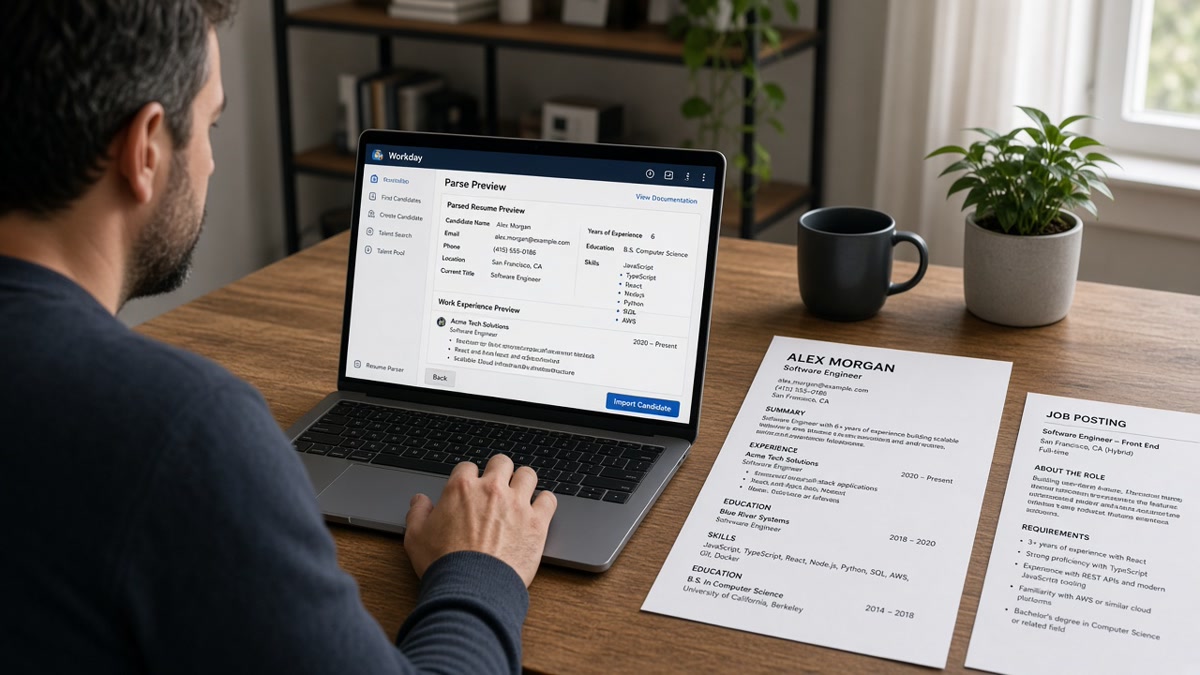
- Open Workday's parse preview before you hit Submit on the remote tech application.
Why ATS resume optimization for Workday US remote tech starts with file structure
Remote tech candidates often assume rejection means missing Docker or Terraform in Skills. Workday does keyword matching, but only on text it successfully extracts. Image-only PDFs from Canva, portfolio builders, or LaTeX exports look sharp on screen while carrying zero selectable text. Two-column templates push your GitHub projects into a sidebar that imports after Education. Table grids trap Month Year dates in cells Workday reads left to right, attaching 2024 to the wrong employer.
The pattern I see on remote tech screens: the candidate has the stack. The file fails the import. The recruiter opens a profile where bullet three from your current role landed under a bootcamp certificate. They move on before they ever ctrl-f for Kubernetes because the timeline already looks broken.
A composite remote backend engineer whose PDF exports from a design template loses to a plain Word file that opens with the same AWS and Python proof in bullet one. Same qualifications. Different text layer. One imports. One does not.
Read why your resume looks different after Workday upload for the baseline import behavior. This page stays on remote tech symptoms and the fixes that clear them on the next attempt.
Fix each common Workday error for US remote tech applications
Error 1: Blank or empty Workday preview after upload
The portal stored your file as an attachment but extracted no text. That means an image-only PDF, a scan, or a heavily designed export where text is flattened into graphics. Remote tech candidates hit this after exporting from portfolio sites or design tools that prioritize visual layout over a live text layer.
Before: Upload a Canva or portfolio-site PDF that looks polished but fails the Notepad paste test entirely.
After: Rebuild in Word or Google Docs as a single column, export a text-selectable PDF, paste into Notepad to confirm employer names appear, then re-upload before Submit.
Error 2: Employer names and dates in wrong order
Dates trapped in table cells or text boxes often land in the wrong field or attach to the wrong company. Workday reads table rows left to right, so a date in the right column can pair with the employer above it instead of beside it. Tech resume templates with a left sidebar for skills and a right column for experience scramble on import.
Before: Two-column template with skills in a left sidebar and experience in a right table grid with dates in separate cells.
After: Single column with job title, employer, and Month Year on one line, bullets below, no tables. Confirm order in Notepad before upload.
Error 3: Contact info missing from imported profile
Some Workday instances skip header and footer regions during import. Remote tech candidates often put email, phone, and LinkedIn in a styled header bar that looks clean on screen but never reaches the parser. If Ctrl+F cannot find your phone number inside the PDF text layer, Workday probably cannot either.
I've screened remote tech files where every stack keyword parsed but the recruiter could not find a phone number because it lived in a footer region Workday skipped. Fix the contact block before you worry about adding Terraform to Skills.
Before: Name, email, phone, and GitHub URL in a decorative header bar at the top of a designed PDF.
After: Name, city, phone, email, and LinkedIn on the first three lines of body text in 11-point Calibri or Arial, no header region dependency.
Error 4: Stack keywords present but Experience section empty
Skills imported. Experience did not. This happens when bullets sit inside text boxes, floating shapes, or multi-column sections that Workday treats as graphics. Your Kubernetes and Python terms may appear in a Skills sidebar while dated proof never reaches Experience. Recruiters see a keyword cloud with no timeline.
Before: Tech stack listed in a styled sidebar; experience bullets inside bordered text boxes that fail paste test.
After: Standard Experience heading with employer lines and plain bullets on the main document flow. Skills echoes below dated roles only.
Error 5: Garbled characters from LaTeX or special fonts
LaTeX resumes and custom icon fonts look professional to engineers but break on parsers that expect standard Unicode. Bullets become question marks. Em dashes become boxes. Remote tech candidates who export from Overleaf or academic templates hit this on every Workday upload.
Before: LaTeX PDF with custom bullet glyphs, small caps section headers, and narrow margins optimized for print.
After: Plain Word export with standard round bullets, Arial or Calibri 11-point, and one-inch margins. Content stays identical. Layout becomes parser-safe.
Error 6: File too large or upload spinner never finishes
Remote tech resumes with embedded project screenshots, certificate images, or high-res headshots blow past size limits on some Workday portals. Stay under two megabytes when you can. Drop embedded photos. Compress remaining images. Switch to current Chrome or Firefox if the spinner hangs.
Before: Five-page PDF with project screenshots, cert badges, and a photo on every page, totaling 4.8 MB.
After: Two-page single-column PDF under 1.5 MB with project links in plain text instead of embedded images.
Before/after pair: remote full-stack developer
Before: Portfolio-site PDF with React and Node.js in a colored sidebar; experience bullets in a table with dates in the right column; Notepad paste shows bootcamp before current employer.
After: Word single-column file: Full Stack Developer | Remote | Acme SaaS | Mar 2021 to Present, then bullet one with React and Node.js proof. Notepad paste matches visual order. Workday preview populates all fields.
Before/after pair: remote DevOps engineer
Before: LaTeX export with Kubernetes and Terraform in Skills section that imports; CI/CD bullets inside a text box that Workday skips entirely.
After: Plain PDF with DevOps Engineer title, Month Year dates inline, and Terraform and Kubernetes in bullet one under the dated role. Parse preview shows CI/CD proof in Experience where recruiters expect it.
Copy-paste Workday remote tech resume layout checklist
"Single column · Contact in body text lines 1-3 · Month Year dates inline with job titles · Standard round bullets · No tables, text boxes, or sidebars · Text-selectable PDF under 2 MB · Notepad paste order matches visual order · Parse preview checked before Submit."
Run this checklist on every remote tech Workday application. Keyword tailoring comes after the file imports correctly. A perfect Kubernetes match in a broken layout still loses to a plain file with the same proof in bullet one.
When keywords actually matter on Workday remote tech reqs
After the layout passes, mirror posting language in dated Experience bullets. Remote tech reqs search Python, AWS, Kubernetes, CI/CD, and Agile in Experience, not only Skills. Put the posting's top term in bullet one with scope and a delivery metric. But do this only after Notepad confirms your employer order is correct. Layout first. Keywords second.
Read how to create an ATS resume for frontend developers when your remote role blends UI delivery with strict parser formatting rules.
Remote tech traps that break Workday before keywords matter
Adding Kubernetes to Skills instead of fixing the text layer. The most common mistake I see from remote engineers. They paste ten more tools into Skills while the PDF still fails Notepad. Workday never scores what it cannot read.
Trusting the portfolio PDF. Your personal site export looks great in a browser. Workday does not render HTML. It extracts text from the uploaded file. Export from Word, not from a screenshot of your portfolio.
Using the same designed template for every remote application. One template may parse on Greenhouse and fail on Workday because each employer configures import rules differently. Test the parse preview on each portal, not once on a generic checker.
Skipping the parse preview because upload said successful. Upload successful means the file attached. It does not mean Experience imported correctly. Open the preview fields every time before Submit on a remote tech role you care about.
Putting GitHub stats in a graphic badge. Star counts and contribution graphs in image form do not parse. Write contributed to 14 open-source repos including [name] with 2.3k stars in plain text if the posting values OSS proof.
See resume upload mistakes that instantly disqualify you when the failure happens before Workday even opens the file.
Verify your remote tech resume before the Workday upload
After you rebuild as a single column, run the same PDF against the remote tech req on your screen. You're checking whether employer names, dates, and stack terms appear inside parsed Experience text, not only in Skills. Must-haves from the posting should match what Workday's preview shows before you finalize.
When Kubernetes still misses after a clean import, add it to the bullet where you ran cluster work, not as a twelfth Skills comma. When the posting names CI/CD, put the term in the bullet that carries pipeline scope and deployment frequency.
Run a free ATS check with the description pasted, then build a parser-safe resume in a single-column template before you upload to Workday tonight.
Fix the text layer, then apply
Remote tech Workday failures trace to PDF text layers and table layouts, not missing Kubernetes keywords. Rebuild as a single column with selectable text, confirm employer order in Notepad, and check the parse preview before Submit. Your stack proof only matters after Workday can read it.
Open your current PDF tonight. Paste it into Notepad. If the order is wrong or the paste is blank, rebuild in Word before you add another keyword. Export under two megabytes. Run a free ATS check. When the portal wants a letter, generate a cover letter that repeats the same delivery metric from bullet one.
This won't fix applying to staff engineer roles when your scope was mid-level. It does stop qualified remote tech candidates from losing to a designed PDF while a plain Word file with the same AWS proof would have imported cleanly.
Read more
Frequently asked questions
Because Workday reads file structure before it scores content. Image-only PDFs, two-column templates, and table grids scramble employer order even when Kubernetes and Python appear on screen. Remote tech candidates often export from Canva, LaTeX, or portfolio builders that flatten text into graphics. Open the Workday parse preview. If employer names and dates did not populate, the parser never reached your stack keywords.
Read the upload tooltip on that posting. Many US Workday portals accept both. Default to a text-selectable PDF exported from Word or Google Docs when both are listed. Choose DOCX when the site says Word only or when your PDF fails the Notepad paste test. Avoid .pages, scans, and portfolio-site PDF exports that look sharp but carry no live text layer.
Only if the posting lists Kubernetes as required and your Experience section never mentions it. Most remote tech rejections I see are layout failures, not keyword gaps. A file with perfect stack terms in a sidebar column often imports with your strongest bullet under Education. Fix the text layer and single-column order first. Then mirror posting language in dated bullets.
Paste the full file into Notepad and read employer order top to bottom. Search the PDF for your phone number and most recent job title with Ctrl+F. Toggle Word gridlines to expose hidden tables. Run a free ATS check for layout flags, then open Workday's parse preview if the portal offers one before you finalize the application.
No. Portfolio links help humans after the file imports. They do not repair a garbled candidate profile. If Workday scrambled your Experience section, the recruiter's first view is still the broken import. Fix the resume file, confirm the preview fields, then add your GitHub or portfolio URL in the application form where the portal asks for it.